# Best AI-Powered Developer Tools in 2026: Build and Deploy With AI
> Discover the best AI-powered developer tools in 2026 for coding and one-click deployment. Learn how developers ship faster using AI tools.
- **Author**: jaikishan-singh-rajawat
- **Published**: 2026-01-28
- **Modified**: 2026-03-23
- **Category**: AI & DevOps
- **URL**: https://kuberns.com/blogs/ai-powered-developer-tools/
---
## TL;DR
AI-powered developer tools use artificial intelligence to automate coding, testing, deployment, and maintenance, dramatically improving developer productivity.
Top AI Tools by Category:
Deployment & Infrastructure:
* Kuberns - One-click AI deployment, automatic scaling, zero DevOps
Code Editors:
* [Cursor](https://cursor.com) - AI-first editor with codebase understanding
* [GitHub Copilot](https://github.com/features/copilot) - AI assistant for any editor
App Builders:
* v0 by Vercel - Generate UI components from text
* Replit AI - Browser-based AI development
Impact: Developers using AI tools build applications 50-70% faster by automating repetitive tasks while focusing on creative problem-solving.
Quick Answer: Use [Kuberns ](https://kuberns.com/)for deployment, Cursor or Copilot for coding, v0 for UI generation. This stack covers the complete development lifecycle with AI automation.
## Understanding AI-Powered Developer Tools
AI-powered developer tools use machine learning models to assist or automate software development tasks. Unlike traditional tools that require manual configuration and execution, AI tools understand intent and generate solutions automatically.
**Traditional development:** Write every line manually, configure servers, debug for hours, deploy through complex pipelines.
**AI-powered development:** Describe what you want, AI generates code, one-click deployment, automatic scaling and monitoring.
The shift is profound. AI handles tedious work (boilerplate, configuration, deployment) while developers focus on architecture, user experience, and unique features.
 ## How AI Automation is Changing Web Development
AI automation transforms web development from manual coding to describing intentions and reviewing AI-generated implementations.
**Code Generation:** Describe "create a user authentication system with email verification" and AI generates the complete implementation - forms, validation, database models, email templates, and security measures.
**Instant Deployment:** Push code to Git, AI detects your framework, provisions infrastructure, configures SSL, and deploys to production. What took days now takes minutes.
**Continuous Optimization:** AI monitors performance, suggests improvements, and automatically scales resources based on traffic patterns.
**Result:** Web applications that previously required weeks to build and deploy now launch in days, with ongoing maintenance largely automated.
## Essential AI-Powered Tools for Developers
### Deployment and Infrastructure
#### Kuberns
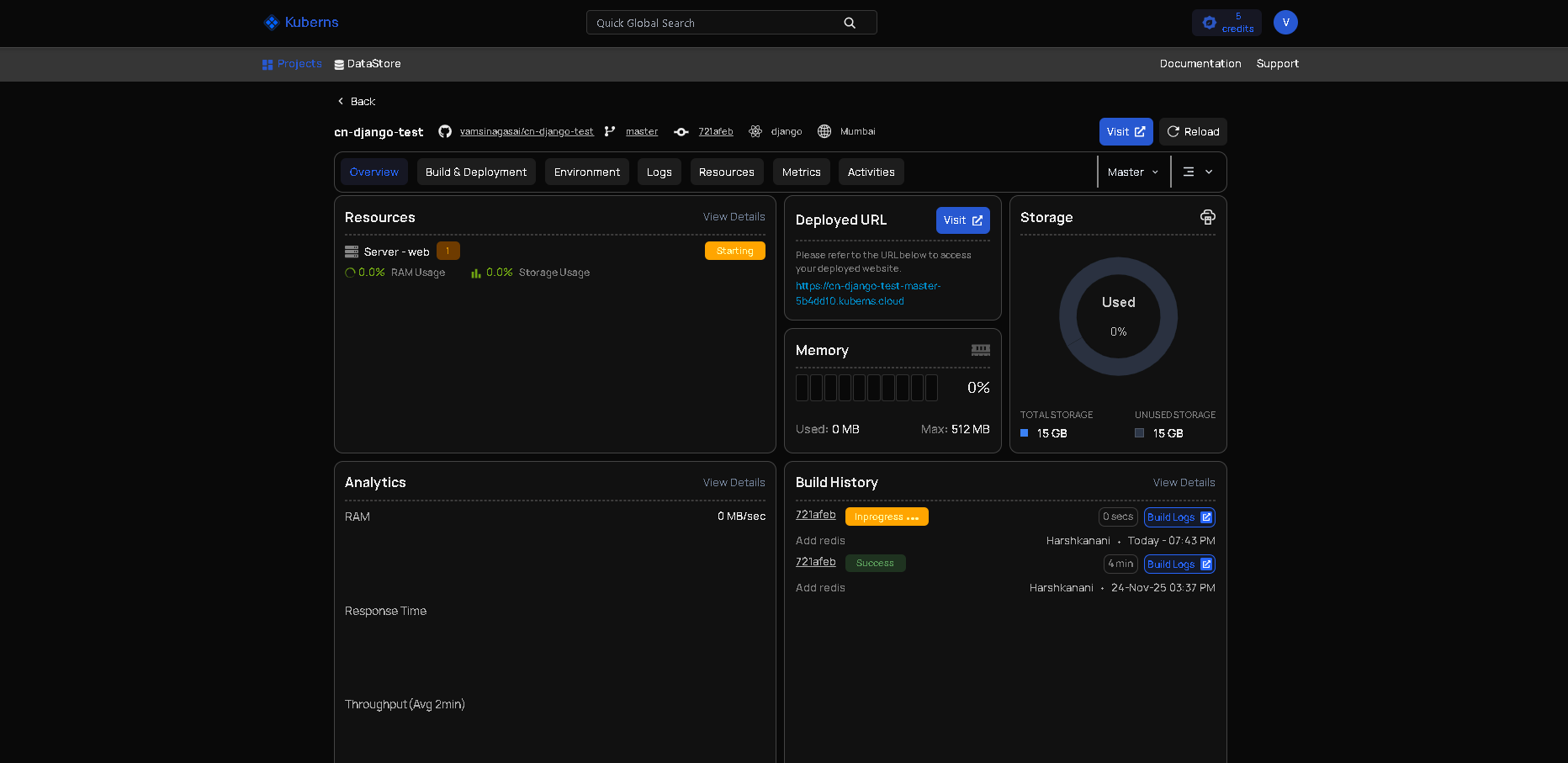
[Kuberns](https://kuberns.com/) eliminates deployment complexity through AI automation. Connect your Git repository, and the AI automatically:
* Detects your stack: Recognizes React, Next.js, Node.js, Python, Django, Flask, or any framework
* Provisions infrastructure: Sets up servers, databases, and resources on enterprise AWS infrastructure
* Configures production: Environment variables, SSL certificates, custom domains, load balancing
* Manages operations: Automatic scaling based on traffic, health monitoring, log aggregation
* Handles updates: Push to Git, automatic redeployment with zero downtime
Why it's essential: Traditional deployment requires hours of server configuration, CI/CD pipeline setup, and ongoing maintenance. [Kuberns](https://kuberns.com/) reduces this to one click, letting you deploy as fast as you code.
Pricing: Usage-based. Pay only for infrastructure resources your application consumes. No minimum fees or per-project charges.
Best for any developer who wants deployment to match their development speed.
### Code Editors and Assistants
#### Cursor

AI-first code editor that understands your entire project architecture. Built on VS Code but redesigned for AI integration.
Key capabilities:
* Codebase analysis: Understands relationships between files, components, and modules
* Natural language editing: "Convert this class to use async/await" works across multiple files
* Context-aware completions: Suggestions based on your full project, not just current file
* AI chat: Ask questions about your code and get answers grounded in your actual codebase
Pricing: Free tier with limited requests, Pro at $20/month for unlimited usage.
Best for complex projects where AI needs to understand architectural context.
#### GitHub Copilot

The most widely adopted AI coding assistant. Works as an extension in VS Code, JetBrains IDEs, Neovim, and other popular editors.
Key capabilities:
* Line-by-line suggestions: Predicts what you're writing as you type
* Function generation: Write a comment describing what you need, get the implementation
* Multi-language support: Excellent performance across JavaScript, Python, TypeScript, Go, Ruby, and more
* Copilot Chat: Conversational interface for debugging and code explanations
Pricing: $10/month for individuals, $19/month for businesses. Free for students and open-source maintainers.
Best for developers who want powerful AI without changing their editor.
#### Codeium

Free AI coding assistant with unlimited usage for individuals. Comparable performance to paid alternatives.
Key capabilities:
* 70+ languages: Broad support across programming languages
* 40+ editors: Works in VS Code, JetBrains, Vim, Neovim, Emacs, and more
* Privacy-focused: Doesn't train on your private code
* Fast completions: Minimal latency for responsive suggestions
Pricing: Free forever for individuals. Team and enterprise plans available.
Best for budget-conscious developers who want quality AI assistance.
### Application Builders
#### v0 by Vercel

AI-powered tool that generates complete React UI components from natural language descriptions. Built by the team behind Next.js.
Key capabilities:
* Text-to-UI: Describe interfaces, get production-ready React components
* Framework integration: Generates code using shadcn/ui components and Tailwind CSS
* Iterative refinement: Chat interface lets you modify and improve generated components
* Export options: Copy code directly into your project or deploy to Vercel
Example: "Create a pricing page with three tiers, toggle for monthly/annual billing, feature comparison table, and highlight the middle tier" generates a complete, styled component in seconds.
Pricing: Free tier available, paid plans for extended usage.
Best for front-end developers and rapid UI prototyping.
#### Replit AI

Browser-based development environment with integrated AI. Zero setup required - open browser, start coding.
Key capabilities:
* Instant environment: No installation, automatically installs dependencies
* AI code generation: Describe applications, AI builds the structure
* Live deployment: Apps are instantly live with shareable URLs
* Collaborative: Real-time collaboration with teammates
Pricing: Free tier available, paid plans for more resources.
Best for quick experiments, learning, and sharing code examples.
## AI Tools for Developer Productivity
AI automation eliminates time-consuming tasks:
Code generation: AI writes functions, classes, and components from descriptions. Generate authentication systems, API endpoints, or database schemas in seconds instead of hours.
Intelligent debugging: Paste error messages, get instant explanations and fixes. AI identifies root causes by analyzing code context and suggests multiple solutions.
Automated testing: AI generates comprehensive test suites including edge cases you might miss. Better coverage with minimal manual test writing.
Instant deployment:[Kuberns](https://kuberns.com/) turns deployment from hours of configuration to one click. Push code, production deployment happens automatically with proper infrastructure.
Documentation maintenance: AI writes and updates docstrings, comments, and README files as code evolves, keeping documentation synchronized automatically.
## How AI Automation is Changing Web Development
AI automation transforms web development from manual coding to describing intentions and reviewing AI-generated implementations.
**Code Generation:** Describe "create a user authentication system with email verification" and AI generates the complete implementation - forms, validation, database models, email templates, and security measures.
**Instant Deployment:** Push code to Git, AI detects your framework, provisions infrastructure, configures SSL, and deploys to production. What took days now takes minutes.
**Continuous Optimization:** AI monitors performance, suggests improvements, and automatically scales resources based on traffic patterns.
**Result:** Web applications that previously required weeks to build and deploy now launch in days, with ongoing maintenance largely automated.
## Essential AI-Powered Tools for Developers
### Deployment and Infrastructure
#### Kuberns

[Kuberns](https://kuberns.com/) eliminates deployment complexity through AI automation. Connect your Git repository, and the AI automatically:
* Detects your stack: Recognizes React, Next.js, Node.js, Python, Django, Flask, or any framework
* Provisions infrastructure: Sets up servers, databases, and resources on enterprise AWS infrastructure
* Configures production: Environment variables, SSL certificates, custom domains, load balancing
* Manages operations: Automatic scaling based on traffic, health monitoring, log aggregation
* Handles updates: Push to Git, automatic redeployment with zero downtime
Why it's essential: Traditional deployment requires hours of server configuration, CI/CD pipeline setup, and ongoing maintenance. [Kuberns](https://kuberns.com/) reduces this to one click, letting you deploy as fast as you code.
Pricing: Usage-based. Pay only for infrastructure resources your application consumes. No minimum fees or per-project charges.
Best for any developer who wants deployment to match their development speed.
### Code Editors and Assistants
#### Cursor

AI-first code editor that understands your entire project architecture. Built on VS Code but redesigned for AI integration.
Key capabilities:
* Codebase analysis: Understands relationships between files, components, and modules
* Natural language editing: "Convert this class to use async/await" works across multiple files
* Context-aware completions: Suggestions based on your full project, not just current file
* AI chat: Ask questions about your code and get answers grounded in your actual codebase
Pricing: Free tier with limited requests, Pro at $20/month for unlimited usage.
Best for complex projects where AI needs to understand architectural context.
#### GitHub Copilot

The most widely adopted AI coding assistant. Works as an extension in VS Code, JetBrains IDEs, Neovim, and other popular editors.
Key capabilities:
* Line-by-line suggestions: Predicts what you're writing as you type
* Function generation: Write a comment describing what you need, get the implementation
* Multi-language support: Excellent performance across JavaScript, Python, TypeScript, Go, Ruby, and more
* Copilot Chat: Conversational interface for debugging and code explanations
Pricing: $10/month for individuals, $19/month for businesses. Free for students and open-source maintainers.
Best for developers who want powerful AI without changing their editor.
#### Codeium

Free AI coding assistant with unlimited usage for individuals. Comparable performance to paid alternatives.
Key capabilities:
* 70+ languages: Broad support across programming languages
* 40+ editors: Works in VS Code, JetBrains, Vim, Neovim, Emacs, and more
* Privacy-focused: Doesn't train on your private code
* Fast completions: Minimal latency for responsive suggestions
Pricing: Free forever for individuals. Team and enterprise plans available.
Best for budget-conscious developers who want quality AI assistance.
### Application Builders
#### v0 by Vercel

AI-powered tool that generates complete React UI components from natural language descriptions. Built by the team behind Next.js.
Key capabilities:
* Text-to-UI: Describe interfaces, get production-ready React components
* Framework integration: Generates code using shadcn/ui components and Tailwind CSS
* Iterative refinement: Chat interface lets you modify and improve generated components
* Export options: Copy code directly into your project or deploy to Vercel
Example: "Create a pricing page with three tiers, toggle for monthly/annual billing, feature comparison table, and highlight the middle tier" generates a complete, styled component in seconds.
Pricing: Free tier available, paid plans for extended usage.
Best for front-end developers and rapid UI prototyping.
#### Replit AI

Browser-based development environment with integrated AI. Zero setup required - open browser, start coding.
Key capabilities:
* Instant environment: No installation, automatically installs dependencies
* AI code generation: Describe applications, AI builds the structure
* Live deployment: Apps are instantly live with shareable URLs
* Collaborative: Real-time collaboration with teammates
Pricing: Free tier available, paid plans for more resources.
Best for quick experiments, learning, and sharing code examples.
## AI Tools for Developer Productivity
AI automation eliminates time-consuming tasks:
Code generation: AI writes functions, classes, and components from descriptions. Generate authentication systems, API endpoints, or database schemas in seconds instead of hours.
Intelligent debugging: Paste error messages, get instant explanations and fixes. AI identifies root causes by analyzing code context and suggests multiple solutions.
Automated testing: AI generates comprehensive test suites including edge cases you might miss. Better coverage with minimal manual test writing.
Instant deployment:[Kuberns](https://kuberns.com/) turns deployment from hours of configuration to one click. Push code, production deployment happens automatically with proper infrastructure.
Documentation maintenance: AI writes and updates docstrings, comments, and README files as code evolves, keeping documentation synchronized automatically.
 ## How to Choose Tools for Full-Stack AI Development
Selecting AI tools depends on your development stack and priorities:
For Full-Stack Web Development:
* Coding: Cursor or GitHub Copilot for backend and frontend
* UI: v0 for interface components
* Deployment: [Kuberns](https://kuberns.com/) for automatic infrastructure
* Result: Complete stack with AI at every stage
For Rapid Prototyping:
* Coding: Replit AI for quick iterations
* Deployment: [Kuberns](https://kuberns.com/) for instant production access
* Result: Idea to live application in hours
For Enterprise Applications:
* Coding: Cursor for complex codebase management
* Testing: AI-generated comprehensive test suites
* Deployment: [Kuberns](https://kuberns.com/) with enterprise-grade infrastructure
* Result: Professional development with AI acceleration
For Budget-Conscious Development:
* Coding: Codeium (free) for code assistance
* Deployment: [Kuberns](https://kuberns.com/) with usage-based pricing
* Result: Complete AI workflow without subscription costs
## AI-Native App Building vs Traditional Development
Traditional Enterprise Development:
* Manual coding of every feature
* Complex CI/CD pipeline configuration
* Dedicated DevOps team for infrastructure
* Weeks or months from idea to deployment
* High costs for development and operations
AI-Native App Building:
* AI generates implementations from descriptions
* One-click deployment with [Kuberns](https://kuberns.com/)
* No DevOps team needed
* Days from idea to production
* Lower costs through automation
The transition: AI-native platforms don't replace programming knowledge. They automate tedious tasks so developers focus on valuable work: architecture, user experience, and business logic.
## Best Practices for AI-Powered Development
Review all AI output: AI makes mistakes. Test generated code thoroughly and understand logic before deploying to production.
Use AI for boilerplate: Let AI handle repetitive patterns like CRUD operations, form validation, and API endpoints. Focus your creativity on unique features.
Automate deployment from day one: Set up [Kuberns](https://kuberns.com/) at project start. Fast deployment enables rapid iteration throughout development.
Combine tools strategically: Use Cursor or Copilot for coding, v0 for UI, [Kuberns](https://kuberns.com/) for deployment. Each tool excels at specific stages.
## Common Concerns Addressed
Security and privacy: Reputable AI tools have strong security practices. Review privacy policies carefully. Use enterprise versions for sensitive projects. Never commit secrets or API keys to code.
Code reliability: AI generates good code but requires review. Treat it like code from a capable junior developer - useful but needs verification and testing.
Cost justification: Many AI tools offer free tiers. Paid tools cost $10-30/month. [Kuberns](https://kuberns.com/) uses usage-based pricing. Time savings typically justify costs within weeks.
## Conclusion
AI-powered developer tools transform how software is built. They automate tedious tasks, accelerate development, and make sophisticated applications accessible to more people.
The optimal approach combines specialized tools: AI coding assistants for writing code, AI app builders for interfaces, and platforms like [Kuberns](https://kuberns.com/) for deployment and infrastructure.
Start building with AI tools today. Use AI to code faster, and use [Kuberns](https://kuberns.com/) to deploy instantly. The combination creates a modern workflow where ideas become production applications in hours instead of weeks.
**Code with AI. Deploy with [Kuberns](https://kuberns.com/). Ship faster than ever.**
[Start Your AI-Powered Development Journey with Kuberns](https://kuberns.com/)
## How to Choose Tools for Full-Stack AI Development
Selecting AI tools depends on your development stack and priorities:
For Full-Stack Web Development:
* Coding: Cursor or GitHub Copilot for backend and frontend
* UI: v0 for interface components
* Deployment: [Kuberns](https://kuberns.com/) for automatic infrastructure
* Result: Complete stack with AI at every stage
For Rapid Prototyping:
* Coding: Replit AI for quick iterations
* Deployment: [Kuberns](https://kuberns.com/) for instant production access
* Result: Idea to live application in hours
For Enterprise Applications:
* Coding: Cursor for complex codebase management
* Testing: AI-generated comprehensive test suites
* Deployment: [Kuberns](https://kuberns.com/) with enterprise-grade infrastructure
* Result: Professional development with AI acceleration
For Budget-Conscious Development:
* Coding: Codeium (free) for code assistance
* Deployment: [Kuberns](https://kuberns.com/) with usage-based pricing
* Result: Complete AI workflow without subscription costs
## AI-Native App Building vs Traditional Development
Traditional Enterprise Development:
* Manual coding of every feature
* Complex CI/CD pipeline configuration
* Dedicated DevOps team for infrastructure
* Weeks or months from idea to deployment
* High costs for development and operations
AI-Native App Building:
* AI generates implementations from descriptions
* One-click deployment with [Kuberns](https://kuberns.com/)
* No DevOps team needed
* Days from idea to production
* Lower costs through automation
The transition: AI-native platforms don't replace programming knowledge. They automate tedious tasks so developers focus on valuable work: architecture, user experience, and business logic.
## Best Practices for AI-Powered Development
Review all AI output: AI makes mistakes. Test generated code thoroughly and understand logic before deploying to production.
Use AI for boilerplate: Let AI handle repetitive patterns like CRUD operations, form validation, and API endpoints. Focus your creativity on unique features.
Automate deployment from day one: Set up [Kuberns](https://kuberns.com/) at project start. Fast deployment enables rapid iteration throughout development.
Combine tools strategically: Use Cursor or Copilot for coding, v0 for UI, [Kuberns](https://kuberns.com/) for deployment. Each tool excels at specific stages.
## Common Concerns Addressed
Security and privacy: Reputable AI tools have strong security practices. Review privacy policies carefully. Use enterprise versions for sensitive projects. Never commit secrets or API keys to code.
Code reliability: AI generates good code but requires review. Treat it like code from a capable junior developer - useful but needs verification and testing.
Cost justification: Many AI tools offer free tiers. Paid tools cost $10-30/month. [Kuberns](https://kuberns.com/) uses usage-based pricing. Time savings typically justify costs within weeks.
## Conclusion
AI-powered developer tools transform how software is built. They automate tedious tasks, accelerate development, and make sophisticated applications accessible to more people.
The optimal approach combines specialized tools: AI coding assistants for writing code, AI app builders for interfaces, and platforms like [Kuberns](https://kuberns.com/) for deployment and infrastructure.
Start building with AI tools today. Use AI to code faster, and use [Kuberns](https://kuberns.com/) to deploy instantly. The combination creates a modern workflow where ideas become production applications in hours instead of weeks.
**Code with AI. Deploy with [Kuberns](https://kuberns.com/). Ship faster than ever.**
[Start Your AI-Powered Development Journey with Kuberns](https://kuberns.com/)
 ## Frequently Asked Questions
### What is the best AI for application development?
It depends on your needs. Cursor for comprehensive code editing, GitHub Copilot for broad compatibility, v0 for UI building, and Kuberns for deployment. Most developers use multiple tools for different stages.
### How do AI automation tools improve productivity?
They automate repetitive tasks like writing boilerplate, generating tests, and configuring deployment. Developers spend time on creative work instead of tedious implementation details. Studies show 50-70% faster development with AI tools.
### Can beginners use AI-powered tools?
Yes. AI tools make development more accessible by handling complex syntax and patterns. However, understanding programming fundamentals remains important for reviewing and understanding AI-generated code.
### How much do AI developer tools cost?
Many offer free tiers. Paid coding tools range from $10-30/month for individuals. Kuberns uses usage-based pricing, so you pay only for infrastructure resources consumed. Time savings typically justify costs quickly.
### Do I need DevOps knowledge to deploy applications?
Not with Kuberns. The AI handles all infrastructure configuration, SSL setup, and scaling automatically. No DevOps expertise required.
### How do I start using AI tools in my workflow?
Begin with one coding assistant like Cursor or Copilot. Build a small project with AI help. Then add Kuberns for one-click deployment. Gradually incorporate more AI tools as you become comfortable with AI-assisted development.
---
- [More AI & DevOps articles](https://kuberns.com/blogs/category/ai-devops/1/)
- [All articles](https://kuberns.com/blogs/)
## Frequently Asked Questions
### What is the best AI for application development?
It depends on your needs. Cursor for comprehensive code editing, GitHub Copilot for broad compatibility, v0 for UI building, and Kuberns for deployment. Most developers use multiple tools for different stages.
### How do AI automation tools improve productivity?
They automate repetitive tasks like writing boilerplate, generating tests, and configuring deployment. Developers spend time on creative work instead of tedious implementation details. Studies show 50-70% faster development with AI tools.
### Can beginners use AI-powered tools?
Yes. AI tools make development more accessible by handling complex syntax and patterns. However, understanding programming fundamentals remains important for reviewing and understanding AI-generated code.
### How much do AI developer tools cost?
Many offer free tiers. Paid coding tools range from $10-30/month for individuals. Kuberns uses usage-based pricing, so you pay only for infrastructure resources consumed. Time savings typically justify costs quickly.
### Do I need DevOps knowledge to deploy applications?
Not with Kuberns. The AI handles all infrastructure configuration, SSL setup, and scaling automatically. No DevOps expertise required.
### How do I start using AI tools in my workflow?
Begin with one coding assistant like Cursor or Copilot. Build a small project with AI help. Then add Kuberns for one-click deployment. Gradually incorporate more AI tools as you become comfortable with AI-assisted development.
---
- [More AI & DevOps articles](https://kuberns.com/blogs/category/ai-devops/1/)
- [All articles](https://kuberns.com/blogs/)