# 11 Best DigitalOcean Alternatives for Cloud Hosting in 2026
> Compare 11 best DigitalOcean alternatives for VPS, Droplets, App Platform, managed databases, pricing, deployment workflows and pick the best for your project.
- **Author**: charan-achari
- **Published**: 2025-07-25
- **Modified**: 2026-08-26
- **Category**: Alternatives
- **URL**: https://kuberns.com/blogs/digitalocean-alternatives/
---
The best DigitalOcean alternative depends on what you are replacing. If you want to stop managing servers and deploy full-stack applications from a repository, **Kuberns** is the best managed deployment alternative. If you want a direct Droplet or VPS replacement, **Vultr**, **Hetzner Cloud**, **Akamai Cloud (Linode)**, and **AWS** are closer matches. If you are replacing DigitalOcean App Platform, **Render**, **Railway**, **Fly.io**, **Qovery**, and **Vercel** are the main managed-platform options. If the gap is DigitalOcean Managed Databases, **Selfhost.dev** is built around managed PostgreSQL, MySQL, Redis, and ClickHouse with predictable hourly billing.
DigitalOcean serves several different needs through Droplets, App Platform, Managed Kubernetes, Managed Databases, storage, and networking. The right alternative therefore depends on what you are replacing. A team leaving Droplets may prioritize compute price, regions, support, and infrastructure control. A team replacing App Platform may care more about repository deployment, background workers, managed databases, autoscaling, and the amount of configuration required after launch. Our [IaaS vs PaaS vs SaaS guide](https://kuberns.com/blogs/iaas-vs-paas-vs-saas/) explains the difference between infrastructure and managed-platform alternatives.
This guide compares eleven DigitalOcean alternatives across the main replacement paths: full-stack deployment, App Platform hosting, managed databases, Kubernetes workflows, and direct cloud or VPS infrastructure. Each review explains what DigitalOcean service it replaces, how deployment works, what pricing model to expect, and how much operational responsibility remains with your team.
## TL;DR: What You Need to Know
* **Best managed deployment alternative:** Kuberns is the best fit for teams that want to deploy supported full-stack applications from GitHub with minimal manual deployment configuration.
* **Best DigitalOcean App Platform alternatives:** Render, Railway, Fly.io, Qovery, and Vercel are stronger matches when you want Git-based deployment, workers, previews, scaling, or framework-specific hosting.
* **Best Droplet and VPS alternatives:** Vultr, Hetzner Cloud, AWS, and Akamai Cloud are closer matches when you want to replace virtual servers, networking, Kubernetes, or broader infrastructure.
* **Best managed database alternative:** Selfhost.dev is useful for teams replacing DigitalOcean Managed Databases with PostgreSQL, MySQL, Redis, and ClickHouse on AWS or in their own AWS account through BYOC.
* **Best Kubernetes replacement path:** Qovery, AWS EKS, Vultr Kubernetes Engine, and Akamai's Linode Kubernetes Engine are relevant if your current DigitalOcean setup depends on DOKS.
* **Best way to compare costs:** do not compare only one entry-level server. Include app compute, workers, databases, storage, network transfer, backups, monitoring, support, and engineering time.
## Comparison of the Best DigitalOcean Alternatives (2026)
Before diving into the full reviews, here's a quick snapshot of how the top platforms compare.
| Platform | Best for | DigitalOcean service replaced | Setup effort | Databases and data | Scaling workflow | Support model | Main tradeoff |
| --- | --- | --- | --- | --- | --- | --- | --- |
| **Kuberns** | Managed full-stack deployment | Droplets plus deployment tooling, or App Platform | Low: connect GitHub and add environment variables | Application data services depend on the project architecture | Platform-managed application scaling | Platform support | Less direct infrastructure control |
| **Render** | Web services, workers, and managed data | App Platform | Low | Managed PostgreSQL and Key Value | Manual or policy-based autoscaling by service and plan | Documentation and plan-based support | Costs accumulate across services, data, and workspace features |
| **Railway** | Fast project and service deployment | App Platform | Low | Database templates and persistent volumes | Resource configuration and usage-based scaling | Documentation, community, and plan-based support | Usage costs require active monitoring |
| **Fly.io** | Regionally distributed applications | Droplets or App Platform for global workloads | Moderate | Managed Postgres and persistent volumes | Developers choose regions, Machines, and scaling settings | Documentation, community, and paid support options | More infrastructure decisions than a conventional PaaS |
| **Qovery** | Kubernetes-based developer platforms | DigitalOcean Kubernetes | Moderate | Databases and services deployed through cloud integrations | Kubernetes-based policies and environment controls | Documentation and commercial support | Platform fees plus underlying cloud costs |
| **Vercel** | Next.js and frontend-led full-stack apps | App Platform or static hosting | Low | Storage and marketplace integrations | Functions and platform-managed web scaling | Documentation and plan-based support | Not a general-purpose VM or container host |
| **Selfhost.dev** | Managed databases and single-tenant app servers with predictable hourly billing | Managed Databases, plus Droplets or App Platform for apps | Low: pick an engine and region, or connect GitHub for an app | Managed PostgreSQL, MySQL, Redis, and ClickHouse on AWS, with BYOC into your own AWS account | Resize on demand, hourly billing, stopped resources cost $0 | Email support from the team | Smaller platform than the hyperscalers, no edge network or CDN |
| **AWS** | Broad cloud infrastructure and enterprise workloads | Droplets, DOKS, databases, storage, and networking | Moderate to high | Extensive managed database portfolio | Service-specific autoscaling across EC2, containers, and managed platforms | Tiered AWS Support | Breadth and billing complexity |
| **Hetzner Cloud** | Cost-conscious VPS and European infrastructure | Droplets | Moderate | Managed database options are more limited than hyperscalers | Server and load-balancer capacity is configured by the team | Documentation and ticket support | Smaller managed-service portfolio and regional footprint |
| **Vultr** | Global VPS, Kubernetes, and GPU workloads | Droplets and DOKS | Moderate | Managed databases plus block and object storage | Instance, Kubernetes, and load-balancer configuration | Documentation and ticket support | More infrastructure ownership than a managed app platform |
| **Akamai Cloud (Linode)** | Developer-focused compute and distributed infrastructure | Droplets and DOKS | Moderate | Managed databases, object storage, and block storage | Compute, Kubernetes, and distributed-region configuration | Documentation and support plans | Application deployment workflows require more assembly |
*Product capabilities and pricing models were reviewed against official vendor documentation in August 2026. Verify region-specific availability and current plan limits before migrating production workloads.*
## These are the Top DigitalOcean Alternatives in 2026
When evaluating DigitalOcean alternatives, first identify whether you are replacing a managed application workflow or the underlying cloud infrastructure. The eleven options below cover both needs.
### 1. [Kuberns](https://kuberns.com/)

Best for: Teams that want an Agentic AI platform for deployment that removes infrastructure and DevOps work
#### What Makes Kuberns Different
Most deployment platforms are tools. They give you a better interface for doing the same underlying work, configuring pipelines, setting scaling rules, managing environments, and watching dashboards. The operational thinking still belongs to your team.
Kuberns is built on a different model entirely. Kuberns is an Agentic AI platform for deployment built for developers who want to deploy and scale applications without managing infrastructure.
Instead of asking developers to define every deployment setting, Kuberns uses its agent to analyse a connected GitHub repository, identify the technology stack, and prepare the build and deployment workflow. Developers add required environment variables before deploying. Learn more in [What is Kuberns?](https://kuberns.com/blogs/what-is-kuberns-the-simplest-way-to-build-deploy-and-scale-full-stack-apps/).
From that point forward, the platform continues to manage scaling, monitoring, and cloud operations automatically. The entire process, from connecting a repository to a live app, is covered in the [Kuberns Getting Started guide](https://docs.kuberns.com/docs/getStarted).
The result is a deployment experience where developers focus on writing code while the agentic AI system handles the operational side of running applications.
#### Key Capabilities of Kuberns Agentic AI
**Repository deployment from GitHub:** Connect a supported repository, add required environment variables, and let Kuberns detect the stack and prepare the deployment.
**Smart stack detection across major frameworks:** Supports Node.js, Python (Django and Flask), Go, Ruby, Java, and more. No manual runtime selection, no Dockerfile maintenance, no dependency management overhead. Check the full list of [supported templates and frameworks](https://kuberns.com/services).
**Integrated deployment workflow:** repository updates can trigger the platform's build and deployment process without requiring a separate deployment pipeline for supported projects.
**Full observability, real-time monitoring and alerts:** Logs, performance metrics, uptime monitoring, and alerting are built in. No third-party integrations to wire up, no dashboards to build from scratch.
**Usage-oriented pricing:** pricing is based on application resources rather than a separate fee for every collaborator.
**Managed deployment features:** SSL, logs, deployment history, and application monitoring reduce the number of separate tools teams need to configure. Production readiness still depends on application testing, data architecture, security, and recovery planning.
### 2. Render

Best for: Full-stack developers seeking a Heroku-style platform with more flexibility and better scaling for production workloads
Overview: Render is a modern Platform as a Service (PaaS) built to simplify app hosting without locking you into infrastructure details. It supports a wide variety of application types, including web services, static sites, APIs, background workers, and cron jobs, making it suitable for both MVPs and production environments. Developers can deploy directly from Git with minimal setup, and the platform handles SSL, autoscaling, domain management, and continuous deploys.
It aims to offer a middle ground between the simplicity of Heroku and the power of self-managed infrastructure, while still keeping the developer experience front and centre.
**Key strengths:**
* Git-based continuous deployment: Automatic deploys triggered by Git pushes with support for private and public repos
* Autoscaling: Services can scale based on load, making Render suitable for both early-stage projects and growing apps
* Preview environments: Automatically spins up preview deployments for each pull request to streamline testing and reviews
* Support for jobs and databases: Offers background workers, cron jobs, PostgreSQL, Key Value, and persistent disks
* Custom domains and SSL included: All services include HTTPS out of the box with zero configuration
**Limitations:**
* Multi-service configuration: Render Blueprints can define infrastructure in `render.yaml`, but this is optional for many dashboard-created services and adds complexity for larger environments
* Scaling costs: As usage grows, particularly with bandwidth-heavy apps or high-traffic APIs, costs can increase rapidly and become less predictable.
* Limited control for advanced scenarios: While great for most use cases, Render may not offer the fine-tuned customization required for large enterprise infrastructure.
Render is a solid option for developers who want a Git-driven deployment experience, workers, scheduled jobs, and managed data without operating Droplets. Pricing combines workspace features with compute and data-service usage. See [Render pricing](https://render.com/pricing) and our [Render alternatives comparison](https://kuberns.com/blogs/best-render-alternatives/).
### 3. Railway

Best for: Quick MVPs, solo developers, and small-scale applications that need instant deploys without setup
Overview: Railway is a lightweight cloud development platform designed to help developers launch apps with minimal friction. It offers a zero-config experience with automatic detection of your tech stack and seamless GitHub integration. You can deploy web apps, APIs, and services within seconds, making it ideal for testing ideas, building MVPs, or powering personal tools.
Railway abstracts much of the deployment setup and supports production applications as well as prototypes. Teams with strict compliance, private-cloud, or advanced networking requirements may still need deeper infrastructure controls.
**Key strengths:**
* Zero-config Git-based deploys: Just connect your GitHub repo, and Railway builds and deploys your project automatically
* Beginner-friendly UI: Clean interface that makes it easy to manage services, view logs, and set environment variables
* Built-in integrations: Offers simple plugins for PostgreSQL, MySQL, Redis, storage, and other services without needing manual setup
* Instant previews: Live previews for every change help speed up development and collaboration
* Free, Hobby, Pro, and Enterprise options: Plans combine included usage or subscriptions with metered resources
**Limitations:**
* Basic monitoring and metrics: Lacks deep observability tools or integrated APMs that larger apps may require
* Limited infrastructure control: Not ideal if you need to fine-tune resource allocation or configure custom networking
* Deployment workflows: Git pushes can trigger builds and deployments, while complex test, approval, and release-governance workflows may still use external CI tooling
* Pricing concerns for production use: Costs can scale quickly with bandwidth usage or high-performance requirements, making it less cost-effective for growing apps
Railway works well when fast setup and a clear project-level service model matter. Teams should monitor resource consumption and network usage as workloads grow. Review [Railway pricing](https://railway.com/pricing) and our [Railway alternatives guide](https://kuberns.com/blogs/best-railway-alternatives/).
### 4. Fly.io

Best for: Developers building globally distributed applications, latency-critical services, or apps that benefit from edge computing
Overview: Fly.io is a powerful platform designed to run applications closer to end users by deploying them on a network of edge locations around the world. It's especially useful for teams building real-time services, multiplayer games, or international applications that demand fast response times and low latency. Fly.io supports Docker-based deployments and gives developers deep control over how and where their apps run.
With Fly.io, developers choose the regions and Machine configuration for an application, while Fly Proxy routes traffic to available instances. Multi-region deployment is available but is not created automatically for every application. Developers can also configure persistent storage, secrets, and horizontal scaling.
**Key strengths:**
* Global edge hosting: Run your apps in multiple geographic locations to serve users faster and reduce latency
* Latency-first architecture: Ideal for APIs, streaming services, collaborative tools, and edge-native workloads
* Docker-native support: Bring your own Dockerfile or use the built-in builder to deploy containerized applications
* Persistent storage: Use volumes for apps that require data storage, like databases or file systems
* Full control over clusters: Advanced developers can configure deployments with regional fallbacks, service mesh, and multi-instance scaling
* Custom regions and scaling policies: Fine-tune your infrastructure to meet specific user distribution and performance needs
**Limitations:**
* Not beginner-friendly: Requires CLI-based setup, Docker familiarity, and some infrastructure knowledge
* Manual configuration: Compared to no-code or low-code platforms, Fly.io involves more setup steps and less visual tooling
* Less abstracted experience: You're responsible for managing deployments, containers, and scaling logic, which might be too complex for solo devs or small teams without DevOps background
Fly.io provides a limited trial rather than a permanent free compute tier. Ongoing costs depend on Machines, storage, network usage, and regions. Check [Fly.io pricing](https://fly.io/docs/about/pricing/) and our [Fly.io alternatives guide](https://kuberns.com/blogs/fly-io-alternatives-2025/).
### 5. Qovery

Best for: Teams that want the power of Kubernetes with a streamlined developer experience and GitOps-style deployment
Overview: Qovery is a managed deployment platform built on top of Kubernetes. It bridges the gap between infrastructure complexity and developer productivity by providing a clean interface and automated workflows, while still leveraging the full capabilities of Kubernetes under the hood. Qovery is particularly attractive for teams adopting microservices, containerized workflows, or transitioning to Kubernetes but lacking the time or expertise to configure it manually.
It supports Git-based deployments, preview environments, and environment isolation, making it suitable for fast-paced dev teams and growing SaaS startups. Qovery provides built-in integrations with databases, storage, monitoring tools, and supports staging, production, and ephemeral environments out of the box.
**Key strengths:**
* Kubernetes-level control with a simplified experience: Teams can deploy and scale services with Kubernetes-grade resilience without writing Helm charts or YAML
* GitOps-native workflows: Automatically builds and deploys apps on code pushes, with real-time status updates and logs
* Preview environments per pull request: Test features in isolation before merging, ideal for collaborative teams and CI testing
* Support for multi-service architecture: Easily manage services, databases, and background jobs across environments
* Built-in DevOps tooling: Offers integrated observability, scaling, secrets management, and network configuration
* Runs on your own cloud: Supports AWS, Azure, and GCP, giving teams flexibility and compliance control
**Limitations:**
* Slower onboarding curve: While simpler than pure Kubernetes, Qovery still requires some ramp-up time to understand its model and environment setup
* Partial abstraction: For advanced use cases, teams may still need to understand Kubernetes concepts like namespaces, pods, and ingress rules
* Best suited for mid-sized or technical teams: Solo developers or small non-DevOps teams might find platforms like Render or Kuberns faster to adopt
* Pricing varies based on cloud provider and workload: Teams deploying on their own AWS or GCP account must also monitor usage and infra costs separately
Qovery offers a middle ground between direct Kubernetes administration and a Heroku-style platform. Its cost includes the Qovery plan plus infrastructure consumed in the connected cloud account, so teams should estimate both layers using [Qovery pricing](https://www.qovery.com/pricing/).
### 6. Vercel
Best for: Frontend teams building with React, Next.js, or static site generators who prioritize speed, simplicity, and collaboration
Overview: Vercel is a cloud platform optimized for frontend development. Originally built by the creators of Next.js, it has evolved into a go-to solution for modern frontend teams looking to deliver fast, performant user experiences with minimal configuration. Vercel offers zero-config deployments, global CDN distribution, and real-time collaboration features, making it a great fit for teams working on marketing sites, frontend UIs, eCommerce storefronts, and JAMstack-based projects.
It provides automatic previews for every Git pull request, allowing teams to review changes in real time. Built-in analytics, image optimization, and edge functions further enhance performance and user experience at scale.
**Key strengths:**
* Global CDN with edge caching: Delivers assets and dynamic pages from servers closest to the user, improving load times and reducing latency
* Seamless Next.js integration: Vercel natively supports advanced features like Incremental Static Regeneration (ISR), Middleware, and Server Components for Next.js apps
* Zero-configuration deployments from GitHub, GitLab, or Bitbucket: Push code to a branch and preview instantly
* Preview deployments for every PR: Share live URLs for collaboration, QA, and stakeholder feedback
* Built-in performance optimization: Automatic image compression, smart routing, and Lighthouse metrics built into the dashboard
* Supports static and dynamic pages: With support for edge functions and serverless functions for API routes
**Limitations:**
* Workload boundaries: Vercel supports full-stack applications through Functions, cron jobs, queues, workflows, and storage integrations, but arbitrary containers and continuously running processes may fit a general-purpose PaaS better
* Pricing for dynamic workloads: Serverless function usage, edge middleware, and bandwidth can lead to unpredictable costs as apps scale
* Infrastructure control: Teams that require portable containers, custom networking, or direct VM access may find Vercel too abstracted
* Limited observability tools: Logs and monitoring exist, but they're minimal compared to platforms focused on backend or full-stack workflows
Vercel works best for frontend-led and Next.js applications that benefit from integrated previews and delivery. Teams evaluating broader backend or container requirements can use our [Vercel alternatives guide](https://kuberns.com/blogs/best-vercel-alternatives/).
### 7. Selfhost.dev

**Best for:** Teams replacing DigitalOcean Managed Databases, or running an app on a dedicated server, who want the bill to stay predictable from one month to the next.
Selfhost.dev is a managed database and application platform built around predictable billing. It runs managed PostgreSQL, MySQL, Redis, and ClickHouse on AWS, either in its own account or inside the customer's AWS account through BYOC. It also offers Projects, single-tenant dedicated servers that deploy an application directly from GitHub.
That makes it relevant for teams replacing DigitalOcean Managed Databases, Droplets, or App Platform for specific workloads. The clearest difference from DigitalOcean is how the meter runs: resources are billed hourly against prepaid credit, with no platform subscription and no per-seat charge. A stopped database or paused server can cost $0, and BYOC can help regulated teams keep data inside their own AWS account and compliance boundary, which DigitalOcean's managed databases do not offer.
**Key strengths:**
* Four managed engines in one place: PostgreSQL, MySQL, Redis, and ClickHouse
* BYOC support for running managed databases inside your own AWS account
* Hourly billing where stopped databases or paused servers can cost $0
* No per-seat or platform subscription fee
* GitHub deployment on Projects, with auto-deploy on push, preview environments, and rollback support
* Free white-glove migration handled by an engineer
* AI-native control: an MCP server exposes over 161 tools across 25 modules, so Claude, Cursor, or another agent can provision and manage databases and deployments directly
**Limitations:**
* No edge network or CDN, so globally distributed frontend delivery is better handled elsewhere
* Smaller platform footprint than hyperscalers such as AWS
* Best suited to database and dedicated-server replacement, not every DigitalOcean product category
**Pricing:** Pricing is hourly and prepaid against credits rather than a fixed monthly plan. A managed PostgreSQL instance starts at about $5 per month, plus public IPv4 charges when assigned. New accounts can use free services for up to 7 days. See [Selfhost.dev](https://selfhost.dev/databases/) for current managed database rates.
**Choose Selfhost.dev if:** your main DigitalOcean replacement need is managed databases, dedicated app servers, BYOC, or predictable hourly billing rather than a broad cloud ecosystem.
### 8. Amazon Web Services (AWS)
**Best for:** Teams that need a broad cloud ecosystem, extensive regional availability, enterprise controls, or specialized infrastructure beyond DigitalOcean's product range.
AWS can replace nearly every DigitalOcean service, but it is a collection of services rather than one direct substitute. Amazon Lightsail is the closest starting point to Droplets, with bundled VPS, container, database, load-balancing, storage, DNS, and snapshot options. Elastic Beanstalk provides a managed application environment, while EC2, ECS, EKS, RDS, S3, and other services support more customized architectures.
**Key strengths:**
* Extensive compute, container, database, storage, networking, serverless, and AI services
* Broad global infrastructure and mature identity, security, compliance, and governance controls
* Multiple deployment paths, from Lightsail bundles to Elastic Beanstalk, App Runner, ECS, EKS, and EC2
* Large integration, partner, and support ecosystem
**Limitations:**
* More services and configuration choices create a steeper learning curve than DigitalOcean
* Billing can span compute, storage, transfer, load balancing, monitoring, backups, and support
* Teams need cloud architecture and cost-management discipline as environments grow
**Pricing:** AWS pricing is service-specific. Lightsail uses bundled monthly plans, Elastic Beanstalk has no separate platform charge but bills the underlying AWS resources, and App Runner charges for provisioned and active container resources. Compare them in the official [AWS Lightsail, Elastic Beanstalk, and EC2 decision guide](https://docs.aws.amazon.com/decision-guides/latest/lightsail-elastic-beanstalk-ec2/lightsail-elastic-beanstalk-ec2.html).
**Choose AWS if:** you need more regions, services, compliance options, or architectural flexibility than DigitalOcean provides and have the expertise to manage the additional complexity. For a narrower developer comparison, see [AWS Lightsail vs DigitalOcean vs Kuberns](https://kuberns.com/blogs/aws-lightsail-vs-digitalocean-vs-kuberns/).
### 9. Hetzner Cloud

**Best for:** Cost-conscious teams that want direct VPS-style infrastructure, particularly for workloads serving European users.
Hetzner Cloud is a close alternative to DigitalOcean Droplets. It offers cloud servers, volumes, networks, firewalls, load balancers, snapshots, backups, and APIs while keeping the operating system and application stack under the customer's control.
**Key strengths:**
* Strong compute price-to-resource ratio for many European workloads
* Straightforward virtual-server, storage, networking, firewall, and load-balancer products
* Hourly billing with monthly price caps for cloud servers
* API and infrastructure-as-code support for repeatable provisioning
**Limitations:**
* Smaller global footprint than AWS, Vultr, or DigitalOcean
* Fewer managed application and database services than broad cloud platforms
* Your team remains responsible for operating systems, deployments, security patches, backups, monitoring, and scaling architecture
**Pricing:** Rates vary by server family, location, storage, traffic, and tax. Use the official [Hetzner Cloud pricing page](https://www.hetzner.com/cloud/) rather than relying on older comparison-table prices.
**Choose Hetzner if:** you want an affordable Droplet replacement, are comfortable managing Linux infrastructure, and its available regions fit your users and compliance requirements. For more options, see our [Hetzner alternatives comparison](https://kuberns.com/blogs/discover-the-best-hetzner-alternative-options-today/).
### 10. Vultr

**Best for:** Developers who want globally distributed cloud compute, multiple VM families, managed Kubernetes, GPU infrastructure, and more location choice.
Vultr is a direct competitor to DigitalOcean across cloud compute, bare metal, Kubernetes, databases, object storage, block storage, load balancers, networking, and GPU workloads. It is a better match for teams that still want infrastructure control than for teams trying to eliminate server operations.
**Key strengths:**
* Broad choice of cloud-compute and dedicated-resource plans
* Global regions for placing workloads closer to users
* Managed Kubernetes, managed databases, storage, networking, and GPU options
* API, CLI, and infrastructure-as-code integrations
**Limitations:**
* VPS workloads still require operating-system maintenance, deployment automation, monitoring, and security management
* Final costs depend on instance family, storage, network transfer, backups, and managed services
* Developer experience is infrastructure-focused rather than repository-to-production by default
**Pricing:** Entry-level and promotional plans are not representative of every production workload. Verify current compute, storage, transfer, and regional rates on [Vultr pricing](https://www.vultr.com/pricing/).
**Choose Vultr if:** you want a Droplet-like workflow with a broad global footprint and a larger selection of compute or GPU options. Our [DigitalOcean vs Vultr comparison](https://kuberns.com/blogs/digitalocean-vs-vultr/) examines the operational differences.
### 11. Akamai Cloud (Linode)

**Best for:** Teams that want developer-focused cloud infrastructure backed by Akamai's network and a familiar VM, Kubernetes, database, storage, and networking portfolio.
Akamai Cloud, formerly known primarily through the Linode brand, is another direct alternative to DigitalOcean infrastructure. It offers shared and dedicated compute, managed Kubernetes, databases, object and block storage, cloud firewalls, load balancers, and distributed compute options.
**Key strengths:**
* Developer-oriented documentation and conventional virtual-machine workflow
* Managed Kubernetes and database services alongside compute and storage
* Integration with Akamai's broader delivery and security portfolio
* Core and distributed compute regions for different latency and location requirements
**Limitations:**
* Application deployment, CI/CD, operating-system updates, and service integration remain the team's responsibility for VM-based architectures
* Product availability and pricing can vary between core and distributed regions
* It offers less application-workflow abstraction than Kuberns, Render, Railway, or Vercel
**Pricing:** Compute pricing varies by shared, dedicated, premium, GPU, and distributed plans. Akamai notes that distributed compute plans have separate specifications and transfer pricing, so verify the selected region in the [Akamai Cloud plan documentation](https://techdocs.akamai.com/cloud-computing/docs/plans-distributed).
**Choose Akamai Cloud if:** you want a developer-focused Droplet replacement with Kubernetes, databases, storage, and access to Akamai's wider edge and security ecosystem. See [Linode vs DigitalOcean](https://kuberns.com/blogs/linode-vs-digitalocean/) for a focused comparison.
## Why Consider Alternatives to DigitalOcean in 2026?
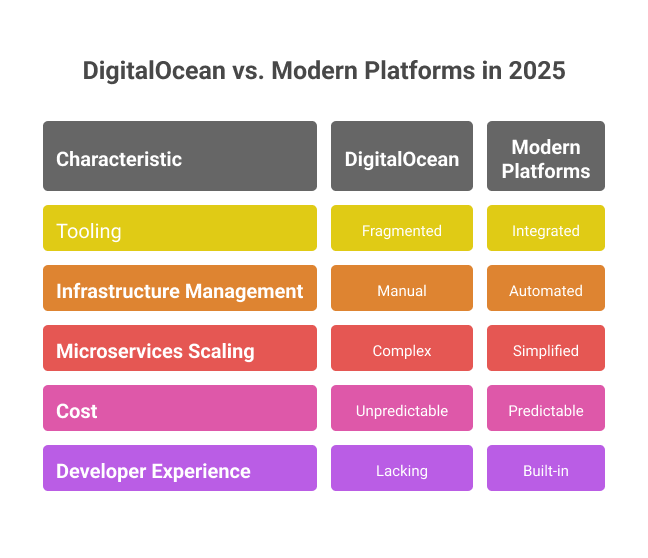 DigitalOcean remains a popular choice for virtual private servers, managed application deployment, Kubernetes, databases, storage, and networking. The reason teams look for alternatives is rarely the same across every workload. Some teams want cheaper VPS capacity, some need more global regions, some want stronger managed databases, and others want to stop managing deployment infrastructure altogether.
The amount of operational work depends on the product. Droplets leave server administration with your team, while App Platform, DigitalOcean Kubernetes, and Managed Databases remove more of the underlying infrastructure work. Before switching, identify whether the real problem is cost, regions, deployment workflow, database management, Kubernetes complexity, or the time spent maintaining servers.
Many teams now face challenges with DigitalOcean, such as:
* **Droplet administration:** Teams using virtual machines manage the operating system, security patches, application runtime, deployment workflow, and incident recovery.
* **Different workflow needs:** App Platform offers managed Git-based deployment, but teams may prefer another platform's service model, framework integration, scaling controls, or developer experience.
* **Regional requirements:** Some applications need cloud locations or data-residency options outside DigitalOcean's available regions.
* **Broader or cheaper infrastructure:** AWS offers a wider service catalog, while Hetzner, Vultr, and Akamai Cloud may fit different compute, support, or price requirements.
* **Total production cost:** Databases, storage, network transfer, backups, load balancing, monitoring, and support can matter more than the price of one entry-level instance.
For app teams, the strongest alternative is usually not another server provider. It is a managed deployment workflow that reduces how much infrastructure work developers have to own after every release.
## Why Teams Choose Kuberns Over DigitalOcean for App Deployment
The difference between Kuberns and DigitalOcean isn't just about features or pricing. It's about where the operational responsibility sits.
With DigitalOcean Droplets, server and deployment responsibility stays with your team. DigitalOcean App Platform and other managed products reduce that responsibility, but the team still chooses service configuration, databases, scaling settings, and the surrounding application architecture.
Kuberns provides a more opinionated workflow. You connect a GitHub repository, add required environment variables, and let its agent detect the stack and configure the deployment. This reduces the infrastructure choices presented to developers, although teams still own application behavior, data migration, security, and production validation.
Here is what that looks like side by side:
On DigitalOcean: create a Droplet, install dependencies, configure Nginx, set up a CI/CD pipeline in a separate tool, define scaling rules, configure monitoring, manage SSL certificates, handle backups, and repeat that workflow for every environment.
On Kuberns: connect your GitHub repository, add required environment variables, and deploy. The agent detects the supported stack and prepares the deployment workflow.
Teams choose Kuberns specifically because:
**Deployment responsibility is removed, not just reduced:** No pipelines to wire up, no YAML files to maintain, no infrastructure tasks sitting in the backlog waiting for someone with DevOps knowledge to action them.
**Unlimited team collaboration with no per-user pricing:** DigitalOcean's model is account-based. Kuberns supports unlimited users on the same project without per-seat charges stacking up as the team grows.
**The workflow stays consistent:** Repository detection and environment-variable setup remain the core deployment steps as the application evolves. Teams should still test scaling, recovery, database, and observability requirements for their workload.
### Who Should Use Kuberns?
* **Early-stage startups** that need production-grade deployment from day one but do not have a dedicated platform engineer.
* **Growing development teams** spending too much time on failed deployments, pipeline maintenance, and scaling incidents instead of building products.
* **Agencies and freelancers** managing multiple client projects simultaneously and needing a consistent deployment workflow across client applications.
* **Teams actively migrating off DigitalOcean** who want to replace fragmented deployment, monitoring, and scaling configuration with a more managed workflow.
* **Developers building supported full-stack applications** who want repository detection and a consistent deployment workflow without configuring individual servers.
## Ready to Make the Switch?
If you're still configuring pipelines, managing Droplets, and wiring together monitoring tools manually, that means you are wasting both time and money on things that can be completely automated.
Kuberns reduces that workflow by detecting supported stacks and preparing deployment configuration from a connected repository. Developers add the required environment variables and validate the application before directing production traffic.
The [DigitalOcean to Kuberns migration guide](https://docs.kuberns.com/docs/migration/digital-ocean) covers repository deployment and environment setup. Applications using DigitalOcean-specific databases, Spaces, networking, volumes, or Kubernetes resources may also need a separate data and service-migration plan.
Review the current [Kuberns pricing page](https://kuberns.com/pricing) to estimate the compute required for your application; runtime varies by workload and traffic.
DigitalOcean remains a popular choice for virtual private servers, managed application deployment, Kubernetes, databases, storage, and networking. The reason teams look for alternatives is rarely the same across every workload. Some teams want cheaper VPS capacity, some need more global regions, some want stronger managed databases, and others want to stop managing deployment infrastructure altogether.
The amount of operational work depends on the product. Droplets leave server administration with your team, while App Platform, DigitalOcean Kubernetes, and Managed Databases remove more of the underlying infrastructure work. Before switching, identify whether the real problem is cost, regions, deployment workflow, database management, Kubernetes complexity, or the time spent maintaining servers.
Many teams now face challenges with DigitalOcean, such as:
* **Droplet administration:** Teams using virtual machines manage the operating system, security patches, application runtime, deployment workflow, and incident recovery.
* **Different workflow needs:** App Platform offers managed Git-based deployment, but teams may prefer another platform's service model, framework integration, scaling controls, or developer experience.
* **Regional requirements:** Some applications need cloud locations or data-residency options outside DigitalOcean's available regions.
* **Broader or cheaper infrastructure:** AWS offers a wider service catalog, while Hetzner, Vultr, and Akamai Cloud may fit different compute, support, or price requirements.
* **Total production cost:** Databases, storage, network transfer, backups, load balancing, monitoring, and support can matter more than the price of one entry-level instance.
For app teams, the strongest alternative is usually not another server provider. It is a managed deployment workflow that reduces how much infrastructure work developers have to own after every release.
## Why Teams Choose Kuberns Over DigitalOcean for App Deployment
The difference between Kuberns and DigitalOcean isn't just about features or pricing. It's about where the operational responsibility sits.
With DigitalOcean Droplets, server and deployment responsibility stays with your team. DigitalOcean App Platform and other managed products reduce that responsibility, but the team still chooses service configuration, databases, scaling settings, and the surrounding application architecture.
Kuberns provides a more opinionated workflow. You connect a GitHub repository, add required environment variables, and let its agent detect the stack and configure the deployment. This reduces the infrastructure choices presented to developers, although teams still own application behavior, data migration, security, and production validation.
Here is what that looks like side by side:
On DigitalOcean: create a Droplet, install dependencies, configure Nginx, set up a CI/CD pipeline in a separate tool, define scaling rules, configure monitoring, manage SSL certificates, handle backups, and repeat that workflow for every environment.
On Kuberns: connect your GitHub repository, add required environment variables, and deploy. The agent detects the supported stack and prepares the deployment workflow.
Teams choose Kuberns specifically because:
**Deployment responsibility is removed, not just reduced:** No pipelines to wire up, no YAML files to maintain, no infrastructure tasks sitting in the backlog waiting for someone with DevOps knowledge to action them.
**Unlimited team collaboration with no per-user pricing:** DigitalOcean's model is account-based. Kuberns supports unlimited users on the same project without per-seat charges stacking up as the team grows.
**The workflow stays consistent:** Repository detection and environment-variable setup remain the core deployment steps as the application evolves. Teams should still test scaling, recovery, database, and observability requirements for their workload.
### Who Should Use Kuberns?
* **Early-stage startups** that need production-grade deployment from day one but do not have a dedicated platform engineer.
* **Growing development teams** spending too much time on failed deployments, pipeline maintenance, and scaling incidents instead of building products.
* **Agencies and freelancers** managing multiple client projects simultaneously and needing a consistent deployment workflow across client applications.
* **Teams actively migrating off DigitalOcean** who want to replace fragmented deployment, monitoring, and scaling configuration with a more managed workflow.
* **Developers building supported full-stack applications** who want repository detection and a consistent deployment workflow without configuring individual servers.
## Ready to Make the Switch?
If you're still configuring pipelines, managing Droplets, and wiring together monitoring tools manually, that means you are wasting both time and money on things that can be completely automated.
Kuberns reduces that workflow by detecting supported stacks and preparing deployment configuration from a connected repository. Developers add the required environment variables and validate the application before directing production traffic.
The [DigitalOcean to Kuberns migration guide](https://docs.kuberns.com/docs/migration/digital-ocean) covers repository deployment and environment setup. Applications using DigitalOcean-specific databases, Spaces, networking, volumes, or Kubernetes resources may also need a separate data and service-migration plan.
Review the current [Kuberns pricing page](https://kuberns.com/pricing) to estimate the compute required for your application; runtime varies by workload and traffic.
 ## Frequently Asked Questions
### What is the best DigitalOcean alternative in 2026?
The best DigitalOcean alternative depends on what you are replacing. Kuberns is the best option for managed full-stack app deployment, Render and Railway are strong DigitalOcean App Platform alternatives, Selfhost.dev fits managed database replacement, and Vultr, Hetzner, AWS, and Akamai Cloud are closer Droplet or VPS alternatives.
### What is the cheapest DigitalOcean alternative?
Hetzner Cloud is often one of the lowest-cost direct Droplet alternatives, particularly for European workloads. Entry-level prices alone are not enough for a production comparison: include storage, backups, load balancers, network transfer, databases, support, and the engineering time required to operate the server. Verify current rates on each provider's official pricing page.
### Which DigitalOcean alternative is best for startups?
Kuberns is a strong choice for startups that want to connect a GitHub repository, add environment variables, and deploy without building a separate infrastructure workflow. Railway is suitable for fast prototypes and small services, while Render is useful when the application needs web services, workers, scheduled jobs, and managed PostgreSQL.
### Can I migrate from DigitalOcean without changing my code?
Applications that use standard runtimes and externalized environment variables may migrate without major code changes. Applications tied to DigitalOcean Spaces, Managed Databases, volumes, private networking, load balancers, or Kubernetes configuration may require data migration and service changes. Use a staging migration and rollback plan before switching production traffic.
### Is Vultr better than DigitalOcean?
Vultr may be better when its regions, compute families, bare-metal options, or GPU products fit the workload. DigitalOcean may be better for teams that prefer its documentation, App Platform, Managed Databases, or existing ecosystem. Compare the required region, server specification, transfer allowance, support, and managed services rather than one entry-level price.
### What is the best DigitalOcean alternative for full-stack app deployment?
Kuberns is the strongest overall recommendation for a supported full-stack repository when the goal is minimal deployment configuration. Render is a strong alternative for web services, workers, scheduled jobs, and managed PostgreSQL. Railway works well for fast multi-service setup, while Vercel is particularly well integrated with Next.js.
### What is the best DigitalOcean App Platform alternative?
Kuberns is the strongest choice when the goal is to replace DigitalOcean App Platform with a managed full-stack deployment workflow and less manual configuration. Render and Railway are also strong App Platform alternatives for Git-based deployments, workers, managed databases, and production web services.
### Does Kuberns replace DigitalOcean Droplets and Kubernetes clusters?
Kuberns can replace the application deployment workflow that currently runs on Droplets or Kubernetes, but it is not a drop-in replacement for every VM or cluster configuration. The application repository and environment variables can move to Kuberns, while databases, persistent data, networking, storage, and DigitalOcean-specific services may need a separate migration plan.
### Why are developers switching away from DigitalOcean in 2026?
Teams evaluate alternatives for different reasons: lower VPS pricing, additional regions, a broader service catalog, more infrastructure control, or a more managed deployment workflow. DigitalOcean remains a capable option; the reason to switch should be tied to a specific workload, operational, support, or cost requirement.
### Which platform includes built-in CI/CD and monitoring tools?
Kuberns integrates repository deployment, logs, and application monitoring for supported projects. Render, Railway, Vercel, Qovery, and DigitalOcean App Platform also support repository-triggered deployments and platform logs, with different levels of configuration and observability. Complex test, approval, and release workflows may still use an external CI system.
### Is Kuberns the same as Kubernetes?
No. Kubernetes is a container-orchestration system used to operate clusters and workloads. Kuberns is a managed application-deployment platform that abstracts the underlying infrastructure from developers. Users connect supported application code rather than administering Kubernetes clusters directly.
### Is there a free DigitalOcean alternative?
Several platforms provide free evaluation options or limited plans, including Kuberns, Railway, Render, and Vercel. Fly.io provides a limited trial rather than a permanent free compute tier. Free plans commonly restrict runtime, usage, collaboration, or commercial use, so verify current terms before selecting one for production.
### What are the best DigitalOcean alternatives for Kubernetes?
Qovery is a strong option for teams that want a developer platform running on Kubernetes in their cloud account. AWS EKS, Vultr Kubernetes Engine, and Akamai's Linode Kubernetes Engine are closer managed-cluster alternatives to DigitalOcean Kubernetes. Kuberns is better suited to teams that want to deploy applications without operating a Kubernetes cluster directly.
### What is the easiest DigitalOcean alternative for beginner developers?
Kuberns, Railway, Render, and Vercel offer low-friction repository deployment. Kuberns is suited to supported full-stack repositories with agent-assisted configuration, Railway to fast project setup, Render to conventional web services and workers, and Vercel to Next.js and frontend-led applications.
### What is the best alternative to DigitalOcean Managed Databases?
Selfhost.dev is a strong alternative to DigitalOcean Managed Databases for teams that want managed PostgreSQL, MySQL, Redis, and ClickHouse on AWS, either in Selfhost.dev's account or in their own AWS account through BYOC. Billing is hourly and prepaid rather than fixed monthly, so stopped databases can cost nothing.
### What is the best alternative to DigitalOcean Droplets?
Hetzner Cloud, Vultr, AWS Lightsail or EC2, and Akamai Cloud are the closest Droplet alternatives in this list. Hetzner emphasizes cost efficiency, Vultr offers broad location and compute choices, AWS provides the largest service ecosystem, and Akamai Cloud combines developer-focused compute with Akamai's network. Kuberns is the better fit when the goal is to stop managing individual servers rather than replace them one for one.
---
- [More Alternatives articles](https://kuberns.com/blogs/category/alternatives/1/)
- [All articles](https://kuberns.com/blogs/)
## Frequently Asked Questions
### What is the best DigitalOcean alternative in 2026?
The best DigitalOcean alternative depends on what you are replacing. Kuberns is the best option for managed full-stack app deployment, Render and Railway are strong DigitalOcean App Platform alternatives, Selfhost.dev fits managed database replacement, and Vultr, Hetzner, AWS, and Akamai Cloud are closer Droplet or VPS alternatives.
### What is the cheapest DigitalOcean alternative?
Hetzner Cloud is often one of the lowest-cost direct Droplet alternatives, particularly for European workloads. Entry-level prices alone are not enough for a production comparison: include storage, backups, load balancers, network transfer, databases, support, and the engineering time required to operate the server. Verify current rates on each provider's official pricing page.
### Which DigitalOcean alternative is best for startups?
Kuberns is a strong choice for startups that want to connect a GitHub repository, add environment variables, and deploy without building a separate infrastructure workflow. Railway is suitable for fast prototypes and small services, while Render is useful when the application needs web services, workers, scheduled jobs, and managed PostgreSQL.
### Can I migrate from DigitalOcean without changing my code?
Applications that use standard runtimes and externalized environment variables may migrate without major code changes. Applications tied to DigitalOcean Spaces, Managed Databases, volumes, private networking, load balancers, or Kubernetes configuration may require data migration and service changes. Use a staging migration and rollback plan before switching production traffic.
### Is Vultr better than DigitalOcean?
Vultr may be better when its regions, compute families, bare-metal options, or GPU products fit the workload. DigitalOcean may be better for teams that prefer its documentation, App Platform, Managed Databases, or existing ecosystem. Compare the required region, server specification, transfer allowance, support, and managed services rather than one entry-level price.
### What is the best DigitalOcean alternative for full-stack app deployment?
Kuberns is the strongest overall recommendation for a supported full-stack repository when the goal is minimal deployment configuration. Render is a strong alternative for web services, workers, scheduled jobs, and managed PostgreSQL. Railway works well for fast multi-service setup, while Vercel is particularly well integrated with Next.js.
### What is the best DigitalOcean App Platform alternative?
Kuberns is the strongest choice when the goal is to replace DigitalOcean App Platform with a managed full-stack deployment workflow and less manual configuration. Render and Railway are also strong App Platform alternatives for Git-based deployments, workers, managed databases, and production web services.
### Does Kuberns replace DigitalOcean Droplets and Kubernetes clusters?
Kuberns can replace the application deployment workflow that currently runs on Droplets or Kubernetes, but it is not a drop-in replacement for every VM or cluster configuration. The application repository and environment variables can move to Kuberns, while databases, persistent data, networking, storage, and DigitalOcean-specific services may need a separate migration plan.
### Why are developers switching away from DigitalOcean in 2026?
Teams evaluate alternatives for different reasons: lower VPS pricing, additional regions, a broader service catalog, more infrastructure control, or a more managed deployment workflow. DigitalOcean remains a capable option; the reason to switch should be tied to a specific workload, operational, support, or cost requirement.
### Which platform includes built-in CI/CD and monitoring tools?
Kuberns integrates repository deployment, logs, and application monitoring for supported projects. Render, Railway, Vercel, Qovery, and DigitalOcean App Platform also support repository-triggered deployments and platform logs, with different levels of configuration and observability. Complex test, approval, and release workflows may still use an external CI system.
### Is Kuberns the same as Kubernetes?
No. Kubernetes is a container-orchestration system used to operate clusters and workloads. Kuberns is a managed application-deployment platform that abstracts the underlying infrastructure from developers. Users connect supported application code rather than administering Kubernetes clusters directly.
### Is there a free DigitalOcean alternative?
Several platforms provide free evaluation options or limited plans, including Kuberns, Railway, Render, and Vercel. Fly.io provides a limited trial rather than a permanent free compute tier. Free plans commonly restrict runtime, usage, collaboration, or commercial use, so verify current terms before selecting one for production.
### What are the best DigitalOcean alternatives for Kubernetes?
Qovery is a strong option for teams that want a developer platform running on Kubernetes in their cloud account. AWS EKS, Vultr Kubernetes Engine, and Akamai's Linode Kubernetes Engine are closer managed-cluster alternatives to DigitalOcean Kubernetes. Kuberns is better suited to teams that want to deploy applications without operating a Kubernetes cluster directly.
### What is the easiest DigitalOcean alternative for beginner developers?
Kuberns, Railway, Render, and Vercel offer low-friction repository deployment. Kuberns is suited to supported full-stack repositories with agent-assisted configuration, Railway to fast project setup, Render to conventional web services and workers, and Vercel to Next.js and frontend-led applications.
### What is the best alternative to DigitalOcean Managed Databases?
Selfhost.dev is a strong alternative to DigitalOcean Managed Databases for teams that want managed PostgreSQL, MySQL, Redis, and ClickHouse on AWS, either in Selfhost.dev's account or in their own AWS account through BYOC. Billing is hourly and prepaid rather than fixed monthly, so stopped databases can cost nothing.
### What is the best alternative to DigitalOcean Droplets?
Hetzner Cloud, Vultr, AWS Lightsail or EC2, and Akamai Cloud are the closest Droplet alternatives in this list. Hetzner emphasizes cost efficiency, Vultr offers broad location and compute choices, AWS provides the largest service ecosystem, and Akamai Cloud combines developer-focused compute with Akamai's network. Kuberns is the better fit when the goal is to stop managing individual servers rather than replace them one for one.
---
- [More Alternatives articles](https://kuberns.com/blogs/category/alternatives/1/)
- [All articles](https://kuberns.com/blogs/)