# Best Git-Based Deployment Platforms in 2026
> Compare the best git-based deployment platforms in 2026. Push-to-deploy, CI/CD, pricing, and which platform actually handles full-stack apps without DevOps overhead.
- **Author**: arjun-mehta
- **Published**: 2026-06-20
- **Modified**: 2026-06-20
- **Category**: Deployment Guides
- **URL**: https://kuberns.com/blogs/best-git-based-deployment-platforms/
---
Git push to deploy is the workflow every modern developer expects. Write code, commit, push, and your app updates automatically. No SSH. No manual builds. No server babysitting. [Kuberns](https://kuberns.com) takes this further: its Agentic AI detects your stack, builds your app, and deploys it to AWS with HTTPS and CI/CD enabled from the very first push, with no configuration required.
The question in 2026 is not whether a platform supports git-based deployment. Most of them do. The real question is how well they handle it across different stacks, how they behave at scale, and what you give up when your app goes beyond a simple static site. Most platforms struggle the moment you move past a basic frontend. Kuberns is built for the full picture: frontend, backend, and containerized services all deployed from a single GitHub push on a persistent server with no cold starts.
This guide covers the best git-based deployment platforms in 2026, where each one falls short, and why Kuberns is the platform serious teams are switching to.
---
## What to Look for in a Git-Based Deployment Platform
Before comparing platforms, it helps to know what actually matters. Not all git-based deployments are equal.
**Stack support.** Some platforms handle Node.js and React well but fall apart the moment you bring in Python, Go, or a full-stack monorepo. A good git-based platform auto-detects your runtime and builds it correctly without manual config.
**Persistent server vs serverless.** This distinction matters more than most documentation admits. Platforms running your app as serverless functions have cold starts, execution time limits, and no support for WebSockets or long-running background jobs. Persistent server platforms run your app like a real server, always on, and without those constraints.
**CI/CD on push.** Every platform claims auto-deploy on git push. The difference is in the pipeline: does it run your tests, install dependencies correctly, and handle monorepos? Or does it just pull the latest commit and hope for the best?
**Rollbacks.** Production breaks. A platform that lets you roll back to a previous deploy in one click is worth significantly more than one that does not.
**Pricing model.** Pay-per-seat, per-project, per-compute, or per-bandwidth. The difference compounds at scale. Know what you are paying for before you hit a surprise bill.
---
## The Best Git-Based Deployment Platforms in 2026
### 1. Kuberns

[Kuberns](https://kuberns.com) is an Agentic AI cloud deployment platform that reads your repository, detects your stack automatically, and deploys your app to AWS with HTTPS, CI/CD, and autoscaling enabled from the first push. No Dockerfiles. No YAML. No DevOps background required.
**What makes Kuberns stand out:**
- Auto-detects Node.js, Python, Go, PHP, and most popular frameworks from your repo
- Deploys frontend, backend, and containerized microservices from a single GitHub push
- Persistent server model: no cold starts, no function timeouts, full WebSocket support
- Agentic AI manages the full deployment lifecycle including scaling decisions and failure recovery
- Every push to your connected branch triggers an automatic redeploy in 60 to 90 seconds
- Built on AWS with enterprise-grade uptime and the option to choose your region
- Save up to 40% on AWS infrastructure costs compared to configuring it yourself
- Free credits worth approximately $14 for 30 days with no credit card required
**Where it fits:** Teams shipping full-stack apps, APIs, and microservices who want git-push deployment without building or maintaining a CI/CD pipeline themselves. Solo founders, small dev teams, and agencies managing multiple projects all benefit from the unified dashboard and zero-DevOps workflow.
**Pricing:** Pay-as-you-go starting from $7 per month for standard compute.
 ---
### 2. Vercel

Vercel is widely used for frontend deployments, but it comes with real limitations the moment your project grows beyond a simple Next.js site.
**Limitations to know before you commit:**
- Backend apps that need a persistent server, WebSockets, or long-running processes hit function execution time limits immediately
- Full-stack apps that are not Next.js require significant manual configuration to work
- Free tier bandwidth runs out quickly and paid plans jump to $20 per user per month
- Python, Go, and PHP are second-class citizens with limited runtime support
- No Agentic AI to detect your stack or manage your deployment lifecycle automatically
- Serverless cold starts slow down every non-cached request when traffic is low
**Pricing:** Pro starts at $20 per user per month.
---
### 3. Render
Render looks simple on the surface, but the gaps become apparent once you move past a basic web service.
**Limitations to know before you commit:**
- Free tier web services spin down after 15 minutes of inactivity, causing cold starts that can take 30 seconds or more on the first request
- Build times are noticeably slow for larger projects compared to competitors
- Autoscaling is available only on paid plans and is far less sophisticated than AWS-native scaling
- No Agentic AI to detect your stack: you manually specify build commands and start commands for every service
- No unified dashboard for managing multiple projects across clients or teams
- Infrastructure is not built on AWS, which means fewer region options and less global reach
**Pricing:** Free tier available with cold start limitations. Paid web services from $7 per month.
---
### 4. Railway
Railway has a clean interface, but teams running production workloads regularly run into billing surprises and reliability concerns.
**Limitations to know before you commit:**
- Usage-based pricing is unpredictable: traffic spikes can produce unexpected bills with no warning
- Free tier execution hour limits are easy to exceed, locking you out mid-month
- Autoscaling is less mature than cloud-native options and does not handle traffic spikes gracefully
- Production reliability issues have been reported by multiple users under sustained load
- No Agentic AI layer to manage deployment decisions, failure recovery, or scaling automatically
- Platform outages have affected multiple users simultaneously due to shared infrastructure limitations
**Pricing:** Pay-as-you-go from approximately $5 per month, but costs are difficult to predict.
---
### 5. Netlify

Netlify works for static sites, but anything beyond that reveals serious constraints that affect real production apps.
**Limitations to know before you commit:**
- Backend logic runs as serverless functions with a hard 10-second timeout on the free plan and 26 seconds on paid plans
- Full-stack apps with SSR, persistent connections, or background jobs hit these limits regularly in production
- Cold starts slow down every SSR route whenever traffic drops and functions go idle
- WebSocket support is completely absent: real-time features are not possible on Netlify
- Paid plans jump to $19 per user per month, which adds up quickly for teams
- No persistent server model: you cannot run a long-running process, cron job, or background worker natively
**Pricing:** Free tier for static sites. Pro starts at $19 per user per month.
---
### 6. Fly.io

Fly.io gives you low-level control, but that control comes at the cost of significant setup work and operational complexity.
**Limitations to know before you commit:**
- Git-based deployment is not native: you have to build and maintain your own GitHub Actions workflow to trigger deploys on push
- Requires a Dockerfile for every app with no automatic stack detection or zero-config deployment
- Steep learning curve for teams that are not already comfortable with container-based workflows
- Billing is complex and hard to predict, with separate charges for compute, bandwidth, and storage
- Platform has experienced infrastructure incidents that caused widespread outages affecting multiple users simultaneously
- No Agentic AI layer: every deployment decision, scaling rule, and configuration change is fully manual
**Pricing:** Pay-as-you-go. Compute from $1.94 per shared CPU per month, but total costs vary significantly with usage.
---
### 7. Cloudflare Pages

Cloudflare Pages sounds appealing for full-stack apps, but the Workers runtime creates fundamental compatibility problems most teams discover too late.
**Limitations to know before you commit:**
- Backend logic runs on the Cloudflare Workers runtime, which is not standard Node.js: many npm packages and Node APIs simply do not work
- Full-stack apps often require significant rewrites to fit within the Workers execution model
- No persistent server support: long-running processes, background jobs, and stateful connections are not possible
- CPU time per request is capped at 10ms on the free plan and 30ms on paid plans, which breaks compute-heavy backend logic
- Debugging is harder because the Workers environment does not behave like a standard server locally
- Paid plans start at $20 per month and add-ons for Workers KV, R2 storage, and Durable Objects push costs higher unpredictably
**Pricing:** Free tier available for static sites. Paid from $20 per month.
---
## Git-Based Deployment Platforms Compared
| Platform | Runtime Model | Stack Support | Auto-Detect | Cold Starts | Starting Price |
|---|---|---|---|---|---|
| Kuberns | Persistent server | Node.js, Python, Go, PHP, containers | Yes, AI-driven | No | $7/month |
| Vercel | Serverless | Node.js, Next.js (best), limited others | Partial | Yes | $20/user/month |
| Render | Persistent (paid) | Node.js, Python, Ruby, Go, Rust | Partial | Yes (free tier) | $7/month |
| Railway | Persistent | Node.js, Python, Go, Docker | Partial | No | ~$5/month |
| Netlify | Serverless | Static, JAMstack, limited SSR | Partial | Yes | $19/user/month |
| Fly.io | Persistent containers | Any (Docker-based) | No | No | $1.94/month |
| Cloudflare Pages | Edge / Workers runtime | Static, Workers-compatible | Partial | No | $20/month |
---
## The Fastest Way to Go from Git to Production: Deploy on Kuberns
If the goal is to push code and have it live in production without managing infrastructure, configuring pipelines, or worrying about cold starts, [Kuberns](https://kuberns.com) is the most direct path.
**Deploy in 4 steps:**
1. Connect your GitHub repo to Kuberns
2. Set your environment variables
3. Click Deploy
4. Your app is live with a HTTPS URL, CI/CD, and autoscaling
Every subsequent push to your branch triggers an automatic redeploy in under 90 seconds.
---
### 2. Vercel

Vercel is widely used for frontend deployments, but it comes with real limitations the moment your project grows beyond a simple Next.js site.
**Limitations to know before you commit:**
- Backend apps that need a persistent server, WebSockets, or long-running processes hit function execution time limits immediately
- Full-stack apps that are not Next.js require significant manual configuration to work
- Free tier bandwidth runs out quickly and paid plans jump to $20 per user per month
- Python, Go, and PHP are second-class citizens with limited runtime support
- No Agentic AI to detect your stack or manage your deployment lifecycle automatically
- Serverless cold starts slow down every non-cached request when traffic is low
**Pricing:** Pro starts at $20 per user per month.
---
### 3. Render

Render looks simple on the surface, but the gaps become apparent once you move past a basic web service.
**Limitations to know before you commit:**
- Free tier web services spin down after 15 minutes of inactivity, causing cold starts that can take 30 seconds or more on the first request
- Build times are noticeably slow for larger projects compared to competitors
- Autoscaling is available only on paid plans and is far less sophisticated than AWS-native scaling
- No Agentic AI to detect your stack: you manually specify build commands and start commands for every service
- No unified dashboard for managing multiple projects across clients or teams
- Infrastructure is not built on AWS, which means fewer region options and less global reach
**Pricing:** Free tier available with cold start limitations. Paid web services from $7 per month.
---
### 4. Railway

Railway has a clean interface, but teams running production workloads regularly run into billing surprises and reliability concerns.
**Limitations to know before you commit:**
- Usage-based pricing is unpredictable: traffic spikes can produce unexpected bills with no warning
- Free tier execution hour limits are easy to exceed, locking you out mid-month
- Autoscaling is less mature than cloud-native options and does not handle traffic spikes gracefully
- Production reliability issues have been reported by multiple users under sustained load
- No Agentic AI layer to manage deployment decisions, failure recovery, or scaling automatically
- Platform outages have affected multiple users simultaneously due to shared infrastructure limitations
**Pricing:** Pay-as-you-go from approximately $5 per month, but costs are difficult to predict.
---
### 5. Netlify

Netlify works for static sites, but anything beyond that reveals serious constraints that affect real production apps.
**Limitations to know before you commit:**
- Backend logic runs as serverless functions with a hard 10-second timeout on the free plan and 26 seconds on paid plans
- Full-stack apps with SSR, persistent connections, or background jobs hit these limits regularly in production
- Cold starts slow down every SSR route whenever traffic drops and functions go idle
- WebSocket support is completely absent: real-time features are not possible on Netlify
- Paid plans jump to $19 per user per month, which adds up quickly for teams
- No persistent server model: you cannot run a long-running process, cron job, or background worker natively
**Pricing:** Free tier for static sites. Pro starts at $19 per user per month.
---
### 6. Fly.io

Fly.io gives you low-level control, but that control comes at the cost of significant setup work and operational complexity.
**Limitations to know before you commit:**
- Git-based deployment is not native: you have to build and maintain your own GitHub Actions workflow to trigger deploys on push
- Requires a Dockerfile for every app with no automatic stack detection or zero-config deployment
- Steep learning curve for teams that are not already comfortable with container-based workflows
- Billing is complex and hard to predict, with separate charges for compute, bandwidth, and storage
- Platform has experienced infrastructure incidents that caused widespread outages affecting multiple users simultaneously
- No Agentic AI layer: every deployment decision, scaling rule, and configuration change is fully manual
**Pricing:** Pay-as-you-go. Compute from $1.94 per shared CPU per month, but total costs vary significantly with usage.
---
### 7. Cloudflare Pages

Cloudflare Pages sounds appealing for full-stack apps, but the Workers runtime creates fundamental compatibility problems most teams discover too late.
**Limitations to know before you commit:**
- Backend logic runs on the Cloudflare Workers runtime, which is not standard Node.js: many npm packages and Node APIs simply do not work
- Full-stack apps often require significant rewrites to fit within the Workers execution model
- No persistent server support: long-running processes, background jobs, and stateful connections are not possible
- CPU time per request is capped at 10ms on the free plan and 30ms on paid plans, which breaks compute-heavy backend logic
- Debugging is harder because the Workers environment does not behave like a standard server locally
- Paid plans start at $20 per month and add-ons for Workers KV, R2 storage, and Durable Objects push costs higher unpredictably
**Pricing:** Free tier available for static sites. Paid from $20 per month.
---
## Git-Based Deployment Platforms Compared
| Platform | Runtime Model | Stack Support | Auto-Detect | Cold Starts | Starting Price |
|---|---|---|---|---|---|
| Kuberns | Persistent server | Node.js, Python, Go, PHP, containers | Yes, AI-driven | No | $7/month |
| Vercel | Serverless | Node.js, Next.js (best), limited others | Partial | Yes | $20/user/month |
| Render | Persistent (paid) | Node.js, Python, Ruby, Go, Rust | Partial | Yes (free tier) | $7/month |
| Railway | Persistent | Node.js, Python, Go, Docker | Partial | No | ~$5/month |
| Netlify | Serverless | Static, JAMstack, limited SSR | Partial | Yes | $19/user/month |
| Fly.io | Persistent containers | Any (Docker-based) | No | No | $1.94/month |
| Cloudflare Pages | Edge / Workers runtime | Static, Workers-compatible | Partial | No | $20/month |
---
## The Fastest Way to Go from Git to Production: Deploy on Kuberns
If the goal is to push code and have it live in production without managing infrastructure, configuring pipelines, or worrying about cold starts, [Kuberns](https://kuberns.com) is the most direct path.
**Deploy in 4 steps:**
1. Connect your GitHub repo to Kuberns
2. Set your environment variables
3. Click Deploy
4. Your app is live with a HTTPS URL, CI/CD, and autoscaling
Every subsequent push to your branch triggers an automatic redeploy in under 90 seconds.
 ---
## How to Deploy Your App on Kuberns From GitHub
### Prerequisites
Before you start, make sure you have:
- A GitHub account with your project pushed to a repository
- Your app's environment variables ready (API keys, database URLs, secrets)
- A working start command in your project (for Node.js: a `start` script in `package.json`; for Python: an entry point file)
No Dockerfile is required. Kuberns auto-detects your stack.
---
### Step 1: Sign Up on Kuberns

Go to [kuberns.com](https://kuberns.com) and click **Deploy with AI**. Sign up with your Google or GitHub account. New accounts get free credits with no credit card required.
---
### Step 2: Connect Your GitHub Repository

On the **Create Service** page, connect your GitHub account and select the repository and branch you want to deploy from.
Kuberns AI scans your project and automatically detects your runtime (Node.js, Python, Go, PHP), framework (Next.js, Express, FastAPI, Django, and more), build command, and start command. There is nothing to fill in manually.
---
### Step 3: Add Your Environment Variables

Go to the **Environment Variables** tab and add your project's secrets and config values: API keys, database connection strings, and any environment-specific settings.
Kuberns encrypts every value at rest and injects them securely at build time and runtime. They never appear in your logs or build output.
---
### Step 4: Click Deploy

Click **Deploy**. The Kuberns Agentic AI takes it from here:
- Pulls your code from GitHub
- Installs all dependencies
- Runs your build command
- Starts your app on AWS as a persistent server
- Provisions an SSL certificate and assigns a live HTTPS URL
- Sets up CI/CD so every future push to your branch deploys automatically
---
### Step 5: Your App is Live

Your app is live in under 5 minutes with a `*.kuberns.app` URL. You can add a custom domain with a single DNS record. Every subsequent push to your branch triggers a redeploy automatically.
Real-time logs, deployment history, and environment variable management are all available in the dashboard for every project you deploy.
---
## Why Teams Switch to Kuberns for Git-Based Deployment
Most developers start with Vercel or Netlify because they are easy to set up. They hit the wall when their app grows beyond a static site or a simple frontend: the serverless model creates function timeouts, cold starts slow down SSR, and full-stack apps require splitting across multiple services with separate configurations.
**Here is what Kuberns offers beyond the alternatives:**
- One-click Agentic AI deployment for frontend, backend, and containerised microservices from a single git push
- Persistent server model with zero cold starts and no function execution limits
- Automated scaling that adjusts resources based on real traffic without any manual configuration
- Unified monitoring, logs, and deployment history across all your projects in one dashboard
- Save up to 40% on cloud infrastructure costs compared to running equivalent setups on AWS directly
- No servers to manage, no DevOps team required, and no YAML to write
- Enterprise-grade uptime and security backed by a global AWS infrastructure
[Start deploying from GitHub with Kuberns for free](https://dashboard.kuberns.com/)
---
## How to Deploy Your App on Kuberns From GitHub
### Prerequisites
Before you start, make sure you have:
- A GitHub account with your project pushed to a repository
- Your app's environment variables ready (API keys, database URLs, secrets)
- A working start command in your project (for Node.js: a `start` script in `package.json`; for Python: an entry point file)
No Dockerfile is required. Kuberns auto-detects your stack.
---
### Step 1: Sign Up on Kuberns

Go to [kuberns.com](https://kuberns.com) and click **Deploy with AI**. Sign up with your Google or GitHub account. New accounts get free credits with no credit card required.
---
### Step 2: Connect Your GitHub Repository

On the **Create Service** page, connect your GitHub account and select the repository and branch you want to deploy from.
Kuberns AI scans your project and automatically detects your runtime (Node.js, Python, Go, PHP), framework (Next.js, Express, FastAPI, Django, and more), build command, and start command. There is nothing to fill in manually.
---
### Step 3: Add Your Environment Variables

Go to the **Environment Variables** tab and add your project's secrets and config values: API keys, database connection strings, and any environment-specific settings.
Kuberns encrypts every value at rest and injects them securely at build time and runtime. They never appear in your logs or build output.
---
### Step 4: Click Deploy

Click **Deploy**. The Kuberns Agentic AI takes it from here:
- Pulls your code from GitHub
- Installs all dependencies
- Runs your build command
- Starts your app on AWS as a persistent server
- Provisions an SSL certificate and assigns a live HTTPS URL
- Sets up CI/CD so every future push to your branch deploys automatically
---
### Step 5: Your App is Live

Your app is live in under 5 minutes with a `*.kuberns.app` URL. You can add a custom domain with a single DNS record. Every subsequent push to your branch triggers a redeploy automatically.
Real-time logs, deployment history, and environment variable management are all available in the dashboard for every project you deploy.
---
## Why Teams Switch to Kuberns for Git-Based Deployment
Most developers start with Vercel or Netlify because they are easy to set up. They hit the wall when their app grows beyond a static site or a simple frontend: the serverless model creates function timeouts, cold starts slow down SSR, and full-stack apps require splitting across multiple services with separate configurations.
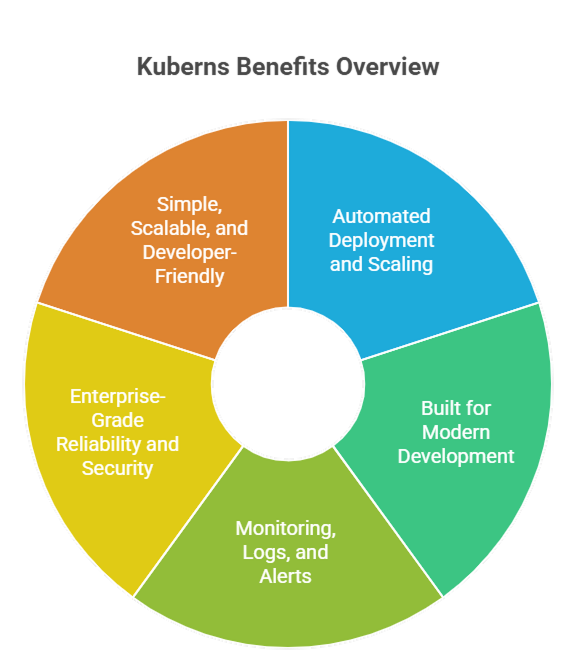
**Here is what Kuberns offers beyond the alternatives:**
- One-click Agentic AI deployment for frontend, backend, and containerised microservices from a single git push
- Persistent server model with zero cold starts and no function execution limits
- Automated scaling that adjusts resources based on real traffic without any manual configuration
- Unified monitoring, logs, and deployment history across all your projects in one dashboard
- Save up to 40% on cloud infrastructure costs compared to running equivalent setups on AWS directly
- No servers to manage, no DevOps team required, and no YAML to write
- Enterprise-grade uptime and security backed by a global AWS infrastructure
[Start deploying from GitHub with Kuberns for free](https://dashboard.kuberns.com/)
 ---
## Common Questions About Git-Based Deployment
### Do I need a Dockerfile to use a git-based deployment platform?
Most modern git-based platforms do not require a Dockerfile. Kuberns auto-detects your stack and builds a container internally. Platforms like Fly.io are Docker-native and require a Dockerfile unless you use buildpacks.
### What happens when a deployment fails?
On Kuberns, the previous version of your app keeps running if a new deployment fails. You get build logs and error output in the dashboard to diagnose the issue. Vercel and Netlify handle this similarly for their supported stacks. On Railway and Render, rollback to a previous deploy is one click.
### Can I use private GitHub repositories?
Yes. All platforms covered in this guide support private repositories. You authorise the platform to access your GitHub account during setup, and it only reads the repos you explicitly grant access to.
### How long does a git-push-triggered deploy take?
On Kuberns, initial deploys take under 5 minutes including dependency installation and container startup. Subsequent deploys on push take 60 to 90 seconds. Vercel and Netlify are fast for static deployments, often under 2 minutes. Railway and Render are comparable for small apps.
---
## Conclusion
Git-based deployment is the baseline expectation for any modern deployment platform in 2026. The platforms that stand out are the ones that go further: auto-detecting your stack, running your app on a persistent server without cold starts, handling autoscaling without configuration, and giving you a single dashboard for every project.
[Kuberns](https://kuberns.com) delivers all of that. Connect your GitHub repo, set your environment variables, and your app is live in under 5 minutes. Every push deploys automatically. You get the git-based workflow you expect and the production-grade infrastructure your app needs, without becoming a DevOps engineer.
For more on setting up automated deployments, check out [how to auto-deploy your apps from GitHub in one click](https://kuberns.com/blogs/how-to-auto-deploy-your-apps-from-github-in-one-click/) and the guide on [managing multiple deployments with an AI agent](https://kuberns.com/blogs/manage-multiple-deployments/).
[Deploy your app from GitHub on Kuberns for free](https://dashboard.kuberns.com/)
---
## Frequently Asked Questions
### What is a git-based deployment platform?
A git-based deployment platform connects to your GitHub, GitLab, or Bitbucket repository and automatically deploys your app every time you push code to a specified branch. You write code, push to git, and the platform handles the build, containerization, and deployment without manual steps.
### Which git-based deployment platform is best for full-stack apps?
[Kuberns](https://kuberns.com) is the best git-based deployment platform for full-stack apps in 2026. It auto-detects your stack, deploys frontend, backend, and containerized services from a single GitHub push, runs on AWS with persistent servers, and handles autoscaling without any DevOps configuration.
### Does Vercel support full-stack git-based deployments?
Vercel is excellent for frontend and Next.js apps with git-based deployment. However, backend services that require persistent connections, long-running processes, or non-Node runtimes like Python or Go run into limitations. For full-stack apps, a platform like Kuberns is a better fit.
### What is the difference between git-based deployment and CI/CD?
Git-based deployment means a push to your repository triggers an automatic deploy. CI/CD is a broader concept that includes running tests and build checks before deployment. Most modern git-based platforms combine both: a push triggers the pipeline, runs checks, and deploys if everything passes.
### Is Heroku still a good option for git-based deployment in 2026?
Heroku pioneered git-based deployment and still works well for simple Node.js and Python apps. However, it is significantly more expensive than modern alternatives and removed its free tier in 2022. Platforms like Kuberns, Railway, and Render offer similar simplicity at a lower cost with better infrastructure.
### Can I use a git-based platform for backend-only deployments?
Yes. All the platforms listed in this guide support backend-only deployments including REST APIs, GraphQL servers, background workers, and microservices. Kuberns supports Node.js, Python, Go, PHP, and containerized services all deployed directly from a GitHub push.
### How do I set up automatic deployment from GitHub?
On Kuberns, connect your GitHub repository, set your environment variables, and click Deploy. Every subsequent push to your selected branch triggers an automatic redeploy with no additional configuration. The process takes under 5 minutes for the initial setup.
### Which git-based deployment platform has the best free tier in 2026?
Kuberns offers approximately $14 in free credits for 30 days with no credit card required. Netlify and Cloudflare Pages have free tiers for static sites. Render offers a free tier but with cold starts and limited runtime. For teams that need persistent servers without paying upfront, Kuberns free credits are the most practical option.
---
- [More Deployment Guides articles](https://kuberns.com/blogs/category/deployment-guides/1/)
- [All articles](https://kuberns.com/blogs/)
---
## Common Questions About Git-Based Deployment
### Do I need a Dockerfile to use a git-based deployment platform?
Most modern git-based platforms do not require a Dockerfile. Kuberns auto-detects your stack and builds a container internally. Platforms like Fly.io are Docker-native and require a Dockerfile unless you use buildpacks.
### What happens when a deployment fails?
On Kuberns, the previous version of your app keeps running if a new deployment fails. You get build logs and error output in the dashboard to diagnose the issue. Vercel and Netlify handle this similarly for their supported stacks. On Railway and Render, rollback to a previous deploy is one click.
### Can I use private GitHub repositories?
Yes. All platforms covered in this guide support private repositories. You authorise the platform to access your GitHub account during setup, and it only reads the repos you explicitly grant access to.
### How long does a git-push-triggered deploy take?
On Kuberns, initial deploys take under 5 minutes including dependency installation and container startup. Subsequent deploys on push take 60 to 90 seconds. Vercel and Netlify are fast for static deployments, often under 2 minutes. Railway and Render are comparable for small apps.
---
## Conclusion
Git-based deployment is the baseline expectation for any modern deployment platform in 2026. The platforms that stand out are the ones that go further: auto-detecting your stack, running your app on a persistent server without cold starts, handling autoscaling without configuration, and giving you a single dashboard for every project.
[Kuberns](https://kuberns.com) delivers all of that. Connect your GitHub repo, set your environment variables, and your app is live in under 5 minutes. Every push deploys automatically. You get the git-based workflow you expect and the production-grade infrastructure your app needs, without becoming a DevOps engineer.
For more on setting up automated deployments, check out [how to auto-deploy your apps from GitHub in one click](https://kuberns.com/blogs/how-to-auto-deploy-your-apps-from-github-in-one-click/) and the guide on [managing multiple deployments with an AI agent](https://kuberns.com/blogs/manage-multiple-deployments/).
[Deploy your app from GitHub on Kuberns for free](https://dashboard.kuberns.com/)
---
## Frequently Asked Questions
### What is a git-based deployment platform?
A git-based deployment platform connects to your GitHub, GitLab, or Bitbucket repository and automatically deploys your app every time you push code to a specified branch. You write code, push to git, and the platform handles the build, containerization, and deployment without manual steps.
### Which git-based deployment platform is best for full-stack apps?
[Kuberns](https://kuberns.com) is the best git-based deployment platform for full-stack apps in 2026. It auto-detects your stack, deploys frontend, backend, and containerized services from a single GitHub push, runs on AWS with persistent servers, and handles autoscaling without any DevOps configuration.
### Does Vercel support full-stack git-based deployments?
Vercel is excellent for frontend and Next.js apps with git-based deployment. However, backend services that require persistent connections, long-running processes, or non-Node runtimes like Python or Go run into limitations. For full-stack apps, a platform like Kuberns is a better fit.
### What is the difference between git-based deployment and CI/CD?
Git-based deployment means a push to your repository triggers an automatic deploy. CI/CD is a broader concept that includes running tests and build checks before deployment. Most modern git-based platforms combine both: a push triggers the pipeline, runs checks, and deploys if everything passes.
### Is Heroku still a good option for git-based deployment in 2026?
Heroku pioneered git-based deployment and still works well for simple Node.js and Python apps. However, it is significantly more expensive than modern alternatives and removed its free tier in 2022. Platforms like Kuberns, Railway, and Render offer similar simplicity at a lower cost with better infrastructure.
### Can I use a git-based platform for backend-only deployments?
Yes. All the platforms listed in this guide support backend-only deployments including REST APIs, GraphQL servers, background workers, and microservices. Kuberns supports Node.js, Python, Go, PHP, and containerized services all deployed directly from a GitHub push.
### How do I set up automatic deployment from GitHub?
On Kuberns, connect your GitHub repository, set your environment variables, and click Deploy. Every subsequent push to your selected branch triggers an automatic redeploy with no additional configuration. The process takes under 5 minutes for the initial setup.
### Which git-based deployment platform has the best free tier in 2026?
Kuberns offers approximately $14 in free credits for 30 days with no credit card required. Netlify and Cloudflare Pages have free tiers for static sites. Render offers a free tier but with cold starts and limited runtime. For teams that need persistent servers without paying upfront, Kuberns free credits are the most practical option.
---
- [More Deployment Guides articles](https://kuberns.com/blogs/category/deployment-guides/1/)
- [All articles](https://kuberns.com/blogs/)