# Cursor Vibe Coding: Build and Deploy Apps in Minutes with One Click
> Discover vibe coding with Cursor and one-click deployment using Kuberns. Ship full-stack apps faster without managing infrastructure.
- **Author**: charan-achari
- **Published**: 2026-01-20
- **Modified**: 2026-03-25
- **Category**: AI & DevOps
- **URL**: https://kuberns.com/blogs/cursor-vibe-coding/
---
## TLDR
What is Cursor Vibe Coding? A flow-based development approach using Cursor's AI to build applications quickly through intuition and rapid iteration, without rigid planning.
The Complete Vibe Coding Stack:
* [Cursor](https://cursor.com) - AI-powered editor for writing code in flow state
* Kuberns - One-click AI deployment that matches Cursor's speed and simplicity
Why This Combination Works: Cursor helps you build applications in minutes with AI assistance. Kuberns deploys those applications to production just as fast with one-click automation. No DevOps knowledge, no server configuration, no deployment friction.
Bottom Line: Build fast with Cursor. Deploy instantly with Kuberns. Ship applications while staying in creative flow.
## What is Cursor Vibe Coding?

Vibe coding represents a fundamental shift in how developers build applications. Instead of detailed specifications and rigid planning, vibe coding embraces spontaneity, experimentation, and creative flow.
With Cursor's AI capabilities, vibe coding becomes incredibly powerful. You describe what you want to build, and Cursor generates working code instantly. Iterate quickly based on what feels right. Trust your instincts. Stay in flow.
The result? Applications built in hours instead of days, prototypes that become products, and development that feels creative rather than tedious.
But there's a problem: deployment.
## The Vibe Coding Deployment Problem
Traditional vibe coding hits a wall at deployment. You've built an amazing application in Cursor in two hours. Now you need to:
* Set up a server or cloud infrastructure
* Configure environment variables
* Install dependencies
* Set up SSL certificates
* Configure networking and domains
* Set up monitoring and logging
* Handle scaling as traffic grows
Suddenly, your two-hour vibe coding session requires eight hours of DevOps work. The creative flow breaks. The momentum stops.
This is where most vibe coding projects die. The gap between "working on my laptop" and "running in production" kills the vibe.
## Enter Kuberns: Vibe Coding for Deployment
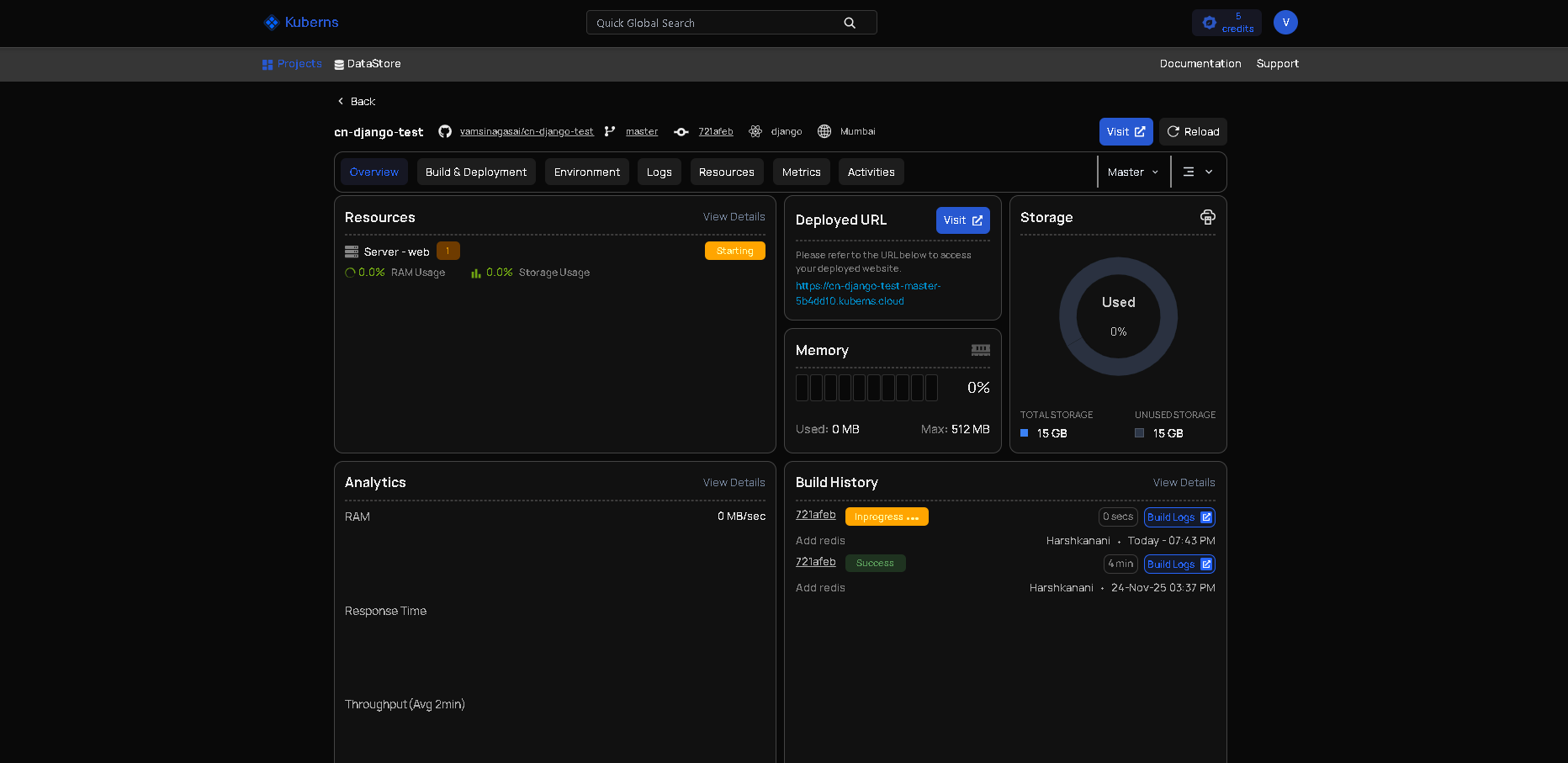
[Kuberns](https://kuberns.com/) solves the deployment problem by bringing the same speed and simplicity of vibe coding to infrastructure.
Just as Cursor lets you build applications without detailed planning, [Kuberns](https://kuberns.com/) lets you deploy applications without infrastructure knowledge. The AI handles everything automatically.
The Kuberns approach is simple:
1. Connect your Git repository
2. Click deploy
3. Your application is live in production
## Why Kuberns is Perfect for Vibe Coding
[Kuberns](https://kuberns.com/) brings the same speed and simplicity to deployment that Cursor brings to coding.
One-click deployment: Connect your Git repository, click deploy, done. The AI detects your app type, configures everything, and provisions infrastructure automatically.
Instant iteration: Change something in Cursor, push to Git, it's live in minutes. The rapid deployment keeps your creative flow going.
AI-powered scaling: Your project goes viral? Kuberns scales up automatically. Traffic drops? It scales down. You stay focused on building, not managing servers.
No configuration files. No server setup. No DevOps complexity. Just like vibe coding, it works based on intuition and automation.
 ## The Complete Cursor to Kuberns Workflow
Here's what modern vibe coding looks like with Cursor and Kuberns working together.
### Step 1: Build in Cursor
Open Cursor and start vibe coding. The AI understands your intentions and generates code as you describe features.
Example vibe coding session:\
"Build a task management app with React. Users can add tasks, mark them complete, and filter by status."
Cursor generates the component structure, state management, and UI. You refine it based on what feels right, iterating quickly.
Within an hour, you have a working application running locally.
### Step 2: Push to Git
Initialize a Git repository and push your code to GitHub, GitLab, or any Git provider.
git init
git add .
git commit -m "Initial vibe coded app"
git push origin main
This takes 30 seconds.
### Step 3: Deploy with Kuberns
Connect your repository to [Kuberns](https://kuberns.com/). Click deploy.
The AI detects your React application, configures a production build, provisions infrastructure, and deploys. Within minutes, your application is live with a URL you can share.
No configuration. No DevOps. Just deployment that matches Cursor's speed.
### Step 4: Iterate and Improve
The vibe continues. Add features in Cursor based on feedback or new ideas. Push to Git. [Kuberns](https://kuberns.com/) automatically deploys updates.
This iteration cycle maintains creative flow. Build, deploy, get feedback, improve, deploy again. All without context-switching to infrastructure concerns.
## The Complete Cursor to Kuberns Workflow
Here's what modern vibe coding looks like with Cursor and Kuberns working together.
### Step 1: Build in Cursor
Open Cursor and start vibe coding. The AI understands your intentions and generates code as you describe features.
Example vibe coding session:\
"Build a task management app with React. Users can add tasks, mark them complete, and filter by status."
Cursor generates the component structure, state management, and UI. You refine it based on what feels right, iterating quickly.
Within an hour, you have a working application running locally.
### Step 2: Push to Git
Initialize a Git repository and push your code to GitHub, GitLab, or any Git provider.
git init
git add .
git commit -m "Initial vibe coded app"
git push origin main
This takes 30 seconds.
### Step 3: Deploy with Kuberns
Connect your repository to [Kuberns](https://kuberns.com/). Click deploy.
The AI detects your React application, configures a production build, provisions infrastructure, and deploys. Within minutes, your application is live with a URL you can share.
No configuration. No DevOps. Just deployment that matches Cursor's speed.
### Step 4: Iterate and Improve
The vibe continues. Add features in Cursor based on feedback or new ideas. Push to Git. [Kuberns](https://kuberns.com/) automatically deploys updates.
This iteration cycle maintains creative flow. Build, deploy, get feedback, improve, deploy again. All without context-switching to infrastructure concerns.
 ## Why Cursor and Kuberns Work Perfectly Together
Cursor and [Kuberns](https://kuberns.com/) share the same philosophy: remove friction, enable creativity, automate the tedious parts.
### Speed Matches Speed
Cursor lets you build features in minutes. [Kuberns](https://kuberns.com/) deploys them in minutes. The entire workflow from idea to production happens quickly enough to maintain flow state.
### AI Understands AI-Generated Code
[Kuberns](https://kuberns.com/) works excellently with code generated by Cursor. The AI deployment platform recognizes modern frameworks and patterns that AI coding tools produce.
### No Context Switching
Stay in creative mode. Cursor handles coding complexity. [Kuberns](https://kuberns.com/) handles infrastructure complexity. You focus on building and iterating.
### Built for Makers, Not Operations Teams
Both tools target developers who want to build and ship, not manage infrastructure. If you're vibe coding in Cursor, you're exactly who [Kuberns](https://kuberns.com/) is built for.
## Real-World Cursor Vibe Coding with Kuberns
Here are practical scenarios where Cursor and Kuberns enable rapid development and deployment.
### Weekend Side Projects
Build an idea over the weekend using Cursor. Deploy it Sunday evening with [Kuberns](https://kuberns.com/). Share it Monday morning.
Traditional deployment would consume most of Sunday with server setup. [Kuberns](https://kuberns.com/) takes minutes, leaving time for building features.
### Startup MVPs Validate startup ideas quickly. Use Cursor to build an MVP in days. Deploy with [Kuberns](https://kuberns.com/) to test with real users immediately.
The faster you deploy, the faster you learn. [Kuberns](https://kuberns.com/) accelerates this learning cycle.
### Client Prototypes
Show clients working prototypes instead of mockups. Build in Cursor during discovery conversations. Deploy with [Kuberns](https://kuberns.com/) before the meeting ends.
Live demonstrations are more convincing than presentations.
### Experimental Features
Try experimental features in production without deployment overhead. Build the experiment in Cursor. Deploy it to a subset of users with [Kuberns](https://kuberns.com/). Iterate based on data.
Fast deployment enables fast experimentation.
## What Kuberns Handles for You
When you deploy from Cursor, [Kuberns](https://kuberns.com/) automatically configures production builds, SSL certificates, custom domains, and static file serving for frontend apps. For full-stack applications, it sets up runtime environments, database connections, and background jobs. Everything includes automatic scaling, monitoring, and logging.
## Best Practices for Cursor Vibe Coding with Kuberns
Maximize productivity by following these practices.
### Build with Deployment in Mind
While vibe coding in Cursor, remember you'll deploy to [Kuberns](https://kuberns.com/). This means:
* Use environment variables for configuration
* Keep sensitive data out of code
* Structure your application for production
Cursor helps with these patterns, and [Kuberns](https://kuberns.com/) handles the deployment details.
### Commit Frequently
Commit working states to Git frequently. This creates natural deployment points with [Kuberns](https://kuberns.com/).
Small, frequent deployments are safer than large, infrequent ones.
### Test Locally First
Before deploying with [Kuberns](https://kuberns.com/), verify your Cursor app works locally. This catches obvious issues before deployment.
### Use Feature Branches
For experimental vibe coding, use Git branches. Deploy branches to [Kuberns](https://kuberns.com/) as separate environments for testing before merging to production.
### Monitor After Deployment
[Kuberns](https://kuberns.com/) provides logging and monitoring. Check these after deploying to ensure everything works as expected.
## The Future of Vibe Coding
Vibe coding represents the future of software development. As AI tools like Cursor become more powerful and deployment platforms like [Kuberns](https://kuberns.com/) become simpler, the gap between idea and production application continues shrinking.\
We're moving toward a world where:
* Ideas become applications in hours, not weeks
* Deployment is as simple as clicking a button
* Infrastructure management is fully automated
* Developers focus entirely on creativity and problem-solving
Cursor and [Kuberns](https://kuberns.com/) are at the forefront of this transformation.
## Why Cursor and Kuberns Work Perfectly Together
Cursor and [Kuberns](https://kuberns.com/) share the same philosophy: remove friction, enable creativity, automate the tedious parts.
### Speed Matches Speed
Cursor lets you build features in minutes. [Kuberns](https://kuberns.com/) deploys them in minutes. The entire workflow from idea to production happens quickly enough to maintain flow state.
### AI Understands AI-Generated Code
[Kuberns](https://kuberns.com/) works excellently with code generated by Cursor. The AI deployment platform recognizes modern frameworks and patterns that AI coding tools produce.
### No Context Switching
Stay in creative mode. Cursor handles coding complexity. [Kuberns](https://kuberns.com/) handles infrastructure complexity. You focus on building and iterating.
### Built for Makers, Not Operations Teams
Both tools target developers who want to build and ship, not manage infrastructure. If you're vibe coding in Cursor, you're exactly who [Kuberns](https://kuberns.com/) is built for.
## Real-World Cursor Vibe Coding with Kuberns
Here are practical scenarios where Cursor and Kuberns enable rapid development and deployment.
### Weekend Side Projects
Build an idea over the weekend using Cursor. Deploy it Sunday evening with [Kuberns](https://kuberns.com/). Share it Monday morning.
Traditional deployment would consume most of Sunday with server setup. [Kuberns](https://kuberns.com/) takes minutes, leaving time for building features.
### Startup MVPs Validate startup ideas quickly. Use Cursor to build an MVP in days. Deploy with [Kuberns](https://kuberns.com/) to test with real users immediately.
The faster you deploy, the faster you learn. [Kuberns](https://kuberns.com/) accelerates this learning cycle.
### Client Prototypes
Show clients working prototypes instead of mockups. Build in Cursor during discovery conversations. Deploy with [Kuberns](https://kuberns.com/) before the meeting ends.
Live demonstrations are more convincing than presentations.
### Experimental Features
Try experimental features in production without deployment overhead. Build the experiment in Cursor. Deploy it to a subset of users with [Kuberns](https://kuberns.com/). Iterate based on data.
Fast deployment enables fast experimentation.
## What Kuberns Handles for You
When you deploy from Cursor, [Kuberns](https://kuberns.com/) automatically configures production builds, SSL certificates, custom domains, and static file serving for frontend apps. For full-stack applications, it sets up runtime environments, database connections, and background jobs. Everything includes automatic scaling, monitoring, and logging.
## Best Practices for Cursor Vibe Coding with Kuberns
Maximize productivity by following these practices.
### Build with Deployment in Mind
While vibe coding in Cursor, remember you'll deploy to [Kuberns](https://kuberns.com/). This means:
* Use environment variables for configuration
* Keep sensitive data out of code
* Structure your application for production
Cursor helps with these patterns, and [Kuberns](https://kuberns.com/) handles the deployment details.
### Commit Frequently
Commit working states to Git frequently. This creates natural deployment points with [Kuberns](https://kuberns.com/).
Small, frequent deployments are safer than large, infrequent ones.
### Test Locally First
Before deploying with [Kuberns](https://kuberns.com/), verify your Cursor app works locally. This catches obvious issues before deployment.
### Use Feature Branches
For experimental vibe coding, use Git branches. Deploy branches to [Kuberns](https://kuberns.com/) as separate environments for testing before merging to production.
### Monitor After Deployment
[Kuberns](https://kuberns.com/) provides logging and monitoring. Check these after deploying to ensure everything works as expected.
## The Future of Vibe Coding
Vibe coding represents the future of software development. As AI tools like Cursor become more powerful and deployment platforms like [Kuberns](https://kuberns.com/) become simpler, the gap between idea and production application continues shrinking.\
We're moving toward a world where:
* Ideas become applications in hours, not weeks
* Deployment is as simple as clicking a button
* Infrastructure management is fully automated
* Developers focus entirely on creativity and problem-solving
Cursor and [Kuberns](https://kuberns.com/) are at the forefront of this transformation.
 ## Conclusion
Vibe coding with Cursor and [Kuberns](https://kuberns.com/) is how development should work: build apps fast with AI, deploy them instantly with one click, and ship while staying in creative flow.
Getting started is simple. Build your app in Cursor, push to Git, connect your repository to [Kuberns](https://kuberns.com/), and click deploy. Your app is live in production in minutes.
No servers. No config. No delays.
You're already building fast in Cursor. Now deploy just as fast with [Kuberns](https://kuberns.com/).
[Deploy Your Cursor Apps with Kuberns](https://kuberns.com/)
## Frequently Asked Questions
### Do I need DevOps knowledge to use Kuberns?
No. [Kuberns](https://kuberns.com/) eliminates the need for DevOps expertise. The AI handles all infrastructure decisions automatically.
### What if my Cursor app needs a database?
[Kuberns](https://kuberns.com/) configures database connections automatically. It detects when your application needs a database and sets up the connection.
### Can I use environment variables?
Yes. Add environment variables through the [Kuberns](https://kuberns.com/) dashboard. The AI injects them into your application automatically.
### How does scaling work?
Automatic. [Kuberns](https://kuberns.com/) monitors your application and scales resources based on traffic. You don't configure scaling rules.
### What about SSL certificates?
Automatic. [Kuberns](https://kuberns.com/) provisions SSL certificates for your domains without manual configuration.
### How much does Kuberns cost?
[Kuberns](https://kuberns.com/) uses usage-based pricing. You pay for actual resources consumed. No minimum fees, no surprise bills.
### Can I deploy multiple Cursor projects?
Yes. Connect multiple repositories and deploy as many applications as you want. Each deploys with the same one-click simplicity.
---
- [More AI & DevOps articles](https://kuberns.com/blogs/category/ai-devops/1/)
- [All articles](https://kuberns.com/blogs/)
## Conclusion
Vibe coding with Cursor and [Kuberns](https://kuberns.com/) is how development should work: build apps fast with AI, deploy them instantly with one click, and ship while staying in creative flow.
Getting started is simple. Build your app in Cursor, push to Git, connect your repository to [Kuberns](https://kuberns.com/), and click deploy. Your app is live in production in minutes.
No servers. No config. No delays.
You're already building fast in Cursor. Now deploy just as fast with [Kuberns](https://kuberns.com/).
[Deploy Your Cursor Apps with Kuberns](https://kuberns.com/)
## Frequently Asked Questions
### Do I need DevOps knowledge to use Kuberns?
No. [Kuberns](https://kuberns.com/) eliminates the need for DevOps expertise. The AI handles all infrastructure decisions automatically.
### What if my Cursor app needs a database?
[Kuberns](https://kuberns.com/) configures database connections automatically. It detects when your application needs a database and sets up the connection.
### Can I use environment variables?
Yes. Add environment variables through the [Kuberns](https://kuberns.com/) dashboard. The AI injects them into your application automatically.
### How does scaling work?
Automatic. [Kuberns](https://kuberns.com/) monitors your application and scales resources based on traffic. You don't configure scaling rules.
### What about SSL certificates?
Automatic. [Kuberns](https://kuberns.com/) provisions SSL certificates for your domains without manual configuration.
### How much does Kuberns cost?
[Kuberns](https://kuberns.com/) uses usage-based pricing. You pay for actual resources consumed. No minimum fees, no surprise bills.
### Can I deploy multiple Cursor projects?
Yes. Connect multiple repositories and deploy as many applications as you want. Each deploys with the same one-click simplicity.
---
- [More AI & DevOps articles](https://kuberns.com/blogs/category/ai-devops/1/)
- [All articles](https://kuberns.com/blogs/)