# How to Deploy a Backend From Localhost to Production
> Deploy a local backend on Kuberns with a public HTTPS URL, secure environment variables, a production database, CORS, health checks, logs, and frontend access.
- **Author**: charan-achari
- **Published**: 2026-10-06
- **Modified**: 2026-10-06
- **Category**: Deployment Guides
- **URL**: https://kuberns.com/blogs/deploy-backend-from-localhost/
---
To **deploy a backend from localhost to production**, prepare a production start command, move configuration into environment variables, connect a persistent database, configure CORS and external callbacks, and deploy the repository to a public HTTPS URL. Then update the frontend to use that URL and test authentication, database operations, health checks, and logs.
This guide uses [Kuberns](https://kuberns.com/) for the deployment workflow. Kuberns is an **Agentic AI platform for deployment** that analyzes a connected repository and helps configure the application for production. Your backend framework, application logic, database schema, and external services remain under your control.
> **TL;DR:**
>
> - Prepare a production start command, port, and health endpoint.
> - Replace localhost URLs, local database settings, and development callbacks.
> - Store production secrets and configuration in environment variables.
> - Push the backend to GitHub and connect the repository to Kuberns.
> - Review the detected configuration, connect the database, and deploy.
> - Point the frontend to the new HTTPS API URL and test the complete application.
## What Changes When Your Backend Leaves Localhost?
Localhost and production run the same application code in very different environments. On your computer, the backend can depend on installed tools, a local `.env` file, a development server, and a database available only on your network. In production, the process must start predictably, accept traffic through an assigned port, reach persistent services, and remain observable when your laptop is closed.
| Local development | Production deployment |
| --- | --- |
| Available only on your device | Available through a public HTTPS URL |
| Development server and hot reload | Stable production process |
| Secrets stored in a local `.env` file | Secrets stored in protected platform settings |
| Database may run on `localhost` | Persistent database reachable from the deployment |
| Frontend calls a local API URL | Frontend calls the public backend URL |
| Errors appear in your terminal | Build and runtime logs must be available remotely |
| Manual restarts are acceptable | Health checks and reliable restarts are required |
**Why other users cannot access localhost:** `localhost` and `127.0.0.1` refer to the device making the request. When a user opens your frontend, `http://localhost:3000` points to that user's computer, not yours. A production backend therefore needs a hostname that browsers and other services can reach over the internet.
**Temporary tunnels are not production hosting:** A tunnel can temporarily expose a local port for a webhook test, client review, or mobile-device check. It still depends on your computer, local network, and running process. Production deployment moves the application and its dependencies into an environment designed to stay available independently.
The goal is not merely to make a local port public. It is to give the backend a repeatable runtime, public endpoint, secure configuration, persistent data, logs, and a clear update path.
## Prepare Your Backend for Production Deployment
Do this preparation before connecting the repository to a deployment platform. It makes failures easier to diagnose and prevents local assumptions from becoming production incidents.
**Set a production start command:** The repository must tell the deployment environment how to start the backend. A Node.js project might define `npm start`, while a Python API may start with Gunicorn or Uvicorn. Do not rely on an editor button, hot-reload command, or a process you normally start by hand.
```json
{
"scripts": {
"start": "node server.js"
}
}
```
For a FastAPI application, a production command may resemble:
```text
uvicorn app.main:app --host 0.0.0.0 --port $PORT
```
Use the entry point and server appropriate for your project. Framework documentation should be the authority for the production server. For example, the official Flask deployment documentation explicitly advises against using its development server in production.
**Listen on the deployment port:** Read the port assigned through the environment and bind to `0.0.0.0`, not only `localhost`. Hardcoding a local port can produce a successful build followed by an unreachable service.
```js
const port = process.env.PORT || 3000;
app.listen(port, "0.0.0.0");
```
**Add a health endpoint:** Create a lightweight endpoint such as `/health` that confirms the process can answer requests. Keep a basic liveness check fast. If you also need to verify the database or another required dependency, use a separate readiness check so the result remains meaningful.
```js
app.get("/health", (_req, res) => {
res.status(200).json({ status: "ok" });
});
```
**Disable development and debug features:** Turn off verbose debug output, hot reload, development error pages, test accounts, and permissive local settings. Django's official deployment checklist is a useful example of the checks a production framework expects.
**Confirm dependencies and lockfiles:** Commit the manifest and lockfile used by your package manager. Remove dependencies that exist only on your laptop, confirm the required language version, and make sure generated local folders are excluded from Git.
**Push the backend to GitHub:** Commit the production-ready code, not live secrets, uploaded files, local database files, or dependency folders. If the frontend and backend share a repository, keep their root directories and commands unambiguous.
If you are still deciding where to host the project, use the [backend deployment platform comparison](https://kuberns.com/blogs/best-tools-to-deploy-backend-apps/) separately. This guide assumes you already have working backend code and want to move it beyond localhost.
## Replace Localhost Configuration With Production Values
A backend often fails after deployment because one dependency still points to the developer's computer. Search the repository for `localhost`, `127.0.0.1`, local ports, test domains, and development credentials before deploying.
**Database connection:** Replace the local database host or file with a production connection string. Store that string in an environment variable such as `DATABASE_URL`. Do not put a live username and password directly in the repository.
**Frontend API URL:** The frontend should read the API base URL from an environment variable instead of embedding `http://localhost:3000`. Keep different values for local development, preview environments, and production.
```text
# Local frontend
PUBLIC_API_URL=http://localhost:3000
# Production frontend
PUBLIC_API_URL=https://api.example.com
```
Frameworks expose frontend variables differently, and some embed them during the build. Use the naming convention required by your framework and rebuild the frontend after changing the value.
**CORS origin:** Add the real frontend origin to the backend's allowlist. An origin includes the scheme, hostname, and port where applicable. `https://app.example.com` and `http://localhost:5173` are different origins.
The MDN CORS guide explains how browsers use preflight requests and response headers for cross-origin access. When cookies or other credentials are involved, configure the exact allowed origin rather than using a wildcard.
**OAuth redirects and authentication callbacks:** Add production callback URLs to Google, GitHub, Auth0, Clerk, or any other identity provider. Keep local callbacks if developers still need them, but do not expect a provider registered only for localhost to accept a production domain.
**Webhooks and third-party integrations:** Update payment providers, email services, source-control apps, and other systems that call your backend. A webhook configured for a tunnel or local URL will not automatically follow the deployment.
**Environment variables:** Move database URLs, secret keys, API tokens, allowed origins, callback URLs, and other environment-specific settings outside the code. The Twelve-Factor App methodology recommends keeping deploy-specific configuration in the environment so the same code can move between deployments safely.
Keep a `.env.example` with names and safe placeholders:
```text
DATABASE_URL=
JWT_SECRET=
ALLOWED_ORIGINS=
OAUTH_CALLBACK_URL=
PAYMENT_WEBHOOK_SECRET=
```
Use separate development and production credentials. The [production environment-variable guide](https://kuberns.com/blogs/environment-variables-in-production/) covers validation, rotation, and common configuration mistakes in more detail.
## Deploy Your Backend Application on Kuberns Easily
Kuberns turns the prepared GitHub repository into a managed deployment workflow. Its deployment agent analyzes the project and surfaces the detected framework, dependencies, commands, variables, and resources for review. You can then supply the values the application needs and follow the deployment through its logs.
Here is the simplest step-by-step path to deploy your prepared backend from GitHub to a public production URL on Kuberns:

*Start from the Kuberns dashboard and create the project that will contain the production backend deployment.*
**Step 1: Sign in and connect GitHub:**
Open [Kuberns](https://kuberns.com/), create a project, and connect the GitHub account or organization that owns the backend repository. Grant access only to the repositories required for deployment.
**Step 2: Select the backend repository:**
Choose the repository and production branch. If the project is a monorepo, select or confirm the backend root directory so frontend and backend dependencies are not mixed.
Once the first deployment is working, the dedicated guide to [deploy automatically from GitHub](https://kuberns.com/blogs/how-to-auto-deploy-your-apps-from-github-in-one-click/) explains the ongoing repository-based update workflow.
**Step 3: Review the detected backend configuration:**
Let the Kuberns deployment agent analyze the repository. Review the detected language, framework, dependency files, build command, start command, port behavior, and resource suggestions. Detection reduces repetitive setup, but the repository remains the source of truth, so correct anything that does not match how the application should run.
The official Kuberns getting-started documentation explains the repository connection and deployment flow.
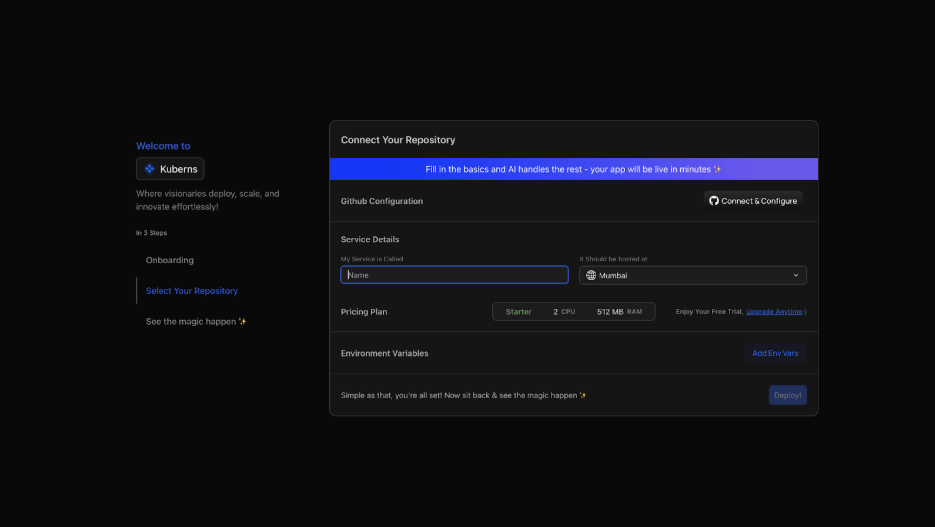
*Verify that the correct GitHub repository, branch, and backend root directory are selected before continuing.*
**Step 4: Add production environment variables:**
Enter the production database URL, authentication secrets, API keys, allowed origins, and callback URLs required by the code. Kuberns supports adding variables through the project environment configuration. Its environment-variable documentation describes the current workflow.

*Add every variable required by the backend while keeping credentials and secret values out of the repository.*
Do not copy the local `.env` file without reviewing it. Local URLs, development credentials, debug flags, and test service keys should not become production values.
**Step 5: Connect the production database:**
Create or select a persistent database and expose its connection string to the backend through the variable expected by the application. Confirm whether migrations run automatically or require an explicit release command. Back up important data before applying a migration that changes an existing production schema.
If PostgreSQL is part of the application, the [PostgreSQL deployment guide](https://kuberns.com/blogs/deploy-app-with-postgresql/) explains connection strings, migrations, persistence, and pooling without expanding this article into a database tutorial.
**Step 6: Start the deployment:**
Start the deployment after reviewing the configuration. Kuberns builds the selected revision and starts the backend process using the prepared environment. Follow the build output for dependency or compilation failures, then inspect runtime logs for startup, database, port, and configuration errors.

*Follow the deployment process and verify that dependency installation, the build, and backend startup complete successfully.*
**Step 7: Open the public HTTPS backend URL:**
When the process is healthy, open the generated URL and test `/health` or another safe public endpoint. A browser displaying the root route is not enough if your API does not define one. Test a known endpoint with the correct HTTP method and authentication requirements.
**Step 8: Review build and runtime logs:**
Confirm that the service stays running after startup and can reach its production dependencies. Logs should make it possible to distinguish a build failure from a runtime crash or an application-level error. Avoid logging access tokens, passwords, complete connection strings, or sensitive request bodies.

*Confirm that the backend remains healthy and that build and runtime logs are available from the deployed application dashboard.*
**Step 9: Add a custom API domain:**
The generated URL is enough to connect and test the application. A domain such as `api.example.com` gives the production API a stable address that is independent of the frontend. After the backend is verified, follow the [custom-domain setup guide](https://kuberns.com/blogs/add-custom-domain-to-your-deployed-app/) and update CORS, OAuth callbacks, webhooks, and the frontend API variable to the final domain.
 ## Connect Your Frontend to the Production Backend
Once the backend has a verified HTTPS URL, connect the production frontend to it.
1. Copy the public backend URL from the Kuberns dashboard.
2. Add it to the frontend's production API environment variable.
3. Add the frontend's production origin to the backend's CORS allowlist.
4. Add the final domains to authentication providers and other callback-based integrations.
5. Redeploy the frontend so build-time variables are included.
6. Open the live frontend and inspect its browser network requests.
Test a real user path, not only a public health endpoint. Sign in, load protected data, create or update a record, and verify that the change persists. If the browser still requests `localhost`, check for a hardcoded URL, a misspelled variable, or a frontend framework that embeds public variables during the build.
## Fix Common Localhost-to-Production Deployment Problems
Use logs and browser network details to identify which layer failed before changing infrastructure or code.
| Problem | Likely cause | What to check |
| --- | --- | --- |
| Application does not start | Incorrect start command, missing dependency, or wrong port binding | Build output, runtime logs, process command, and `PORT` handling |
| Frontend still calls localhost | Old API URL was hardcoded or embedded during an earlier build | Production frontend variable and a fresh frontend deployment |
| Browser reports a CORS error | Production frontend origin is absent or credentials are misconfigured | Exact origin, preflight response, allowed headers, and credential settings |
| Database connection fails | Local or invalid connection string, network restriction, or missing TLS option | Production `DATABASE_URL`, database status, and driver settings |
| OAuth login returns a redirect error | Production callback URL is not registered | Identity-provider callback and allowed-origin settings |
| Variable is undefined | Variable was not added or uses the wrong name | Kuberns environment configuration and framework naming rules |
| Build succeeds but the service stops | Runtime exception, migration failure, or invalid start process | Runtime logs and the first application error after startup |
| Uploaded files disappear | Files were written to ephemeral application storage | Durable file or object storage configuration |
For deeper diagnosis after the application is already deployed, use the guide to [fix an app that works locally but fails in production](https://kuberns.com/blogs/app-works-locally-fails-in-production/). Keeping that troubleshooting separate prevents this deployment guide from becoming a catalogue of unrelated failure cases.
## Verify That Your Backend Is Ready for Real Users
A successful deployment status is only the start. Verify the complete application before directing users to it:
- The public HTTPS URL and health endpoint respond consistently.
- The production frontend calls the public backend, not localhost.
- Sign-up, sign-in, sessions, and protected routes work as intended.
- The backend can read and write production data.
- Schema migrations completed without destroying existing data.
- CORS allows the intended frontend and rejects unexpected origins.
- OAuth callbacks, payment webhooks, email links, and other integrations use production URLs.
- Secrets do not appear in the repository, frontend bundle, or logs.
- Build and runtime logs are available for diagnosis.
- The application remains healthy after a restart or redeployment.
- Required uploads and database records remain persistent.
For a deeper review of source access, secrets, HTTPS, health checks, and backup workflows, see how [Kuberns secures production applications](https://kuberns.com/blogs/kuberns-application-security/).
Run these checks through the live frontend and directly against the API. The [web application pre-launch testing guide](https://kuberns.com/blogs/test-web-app-before-going-live/) provides a broader release test when the backend is part of a complete product.
## Move Your Backend From Localhost to Production
Moving beyond localhost means replacing local assumptions with explicit production configuration. Your backend needs a repeatable start command, platform-compatible port, protected environment variables, persistent database, correct CORS and callback values, public HTTPS endpoint, health checks, and useful logs.
Kuberns gives that prepared repository a direct deployment path. Connect GitHub, review the configuration detected by its deployment agent, add the values and data resources the application needs, deploy, and connect the resulting API URL to the frontend. The result is a backend that real users and services can reach without depending on your development machine.
## Connect Your Frontend to the Production Backend
Once the backend has a verified HTTPS URL, connect the production frontend to it.
1. Copy the public backend URL from the Kuberns dashboard.
2. Add it to the frontend's production API environment variable.
3. Add the frontend's production origin to the backend's CORS allowlist.
4. Add the final domains to authentication providers and other callback-based integrations.
5. Redeploy the frontend so build-time variables are included.
6. Open the live frontend and inspect its browser network requests.
Test a real user path, not only a public health endpoint. Sign in, load protected data, create or update a record, and verify that the change persists. If the browser still requests `localhost`, check for a hardcoded URL, a misspelled variable, or a frontend framework that embeds public variables during the build.
## Fix Common Localhost-to-Production Deployment Problems
Use logs and browser network details to identify which layer failed before changing infrastructure or code.
| Problem | Likely cause | What to check |
| --- | --- | --- |
| Application does not start | Incorrect start command, missing dependency, or wrong port binding | Build output, runtime logs, process command, and `PORT` handling |
| Frontend still calls localhost | Old API URL was hardcoded or embedded during an earlier build | Production frontend variable and a fresh frontend deployment |
| Browser reports a CORS error | Production frontend origin is absent or credentials are misconfigured | Exact origin, preflight response, allowed headers, and credential settings |
| Database connection fails | Local or invalid connection string, network restriction, or missing TLS option | Production `DATABASE_URL`, database status, and driver settings |
| OAuth login returns a redirect error | Production callback URL is not registered | Identity-provider callback and allowed-origin settings |
| Variable is undefined | Variable was not added or uses the wrong name | Kuberns environment configuration and framework naming rules |
| Build succeeds but the service stops | Runtime exception, migration failure, or invalid start process | Runtime logs and the first application error after startup |
| Uploaded files disappear | Files were written to ephemeral application storage | Durable file or object storage configuration |
For deeper diagnosis after the application is already deployed, use the guide to [fix an app that works locally but fails in production](https://kuberns.com/blogs/app-works-locally-fails-in-production/). Keeping that troubleshooting separate prevents this deployment guide from becoming a catalogue of unrelated failure cases.
## Verify That Your Backend Is Ready for Real Users
A successful deployment status is only the start. Verify the complete application before directing users to it:
- The public HTTPS URL and health endpoint respond consistently.
- The production frontend calls the public backend, not localhost.
- Sign-up, sign-in, sessions, and protected routes work as intended.
- The backend can read and write production data.
- Schema migrations completed without destroying existing data.
- CORS allows the intended frontend and rejects unexpected origins.
- OAuth callbacks, payment webhooks, email links, and other integrations use production URLs.
- Secrets do not appear in the repository, frontend bundle, or logs.
- Build and runtime logs are available for diagnosis.
- The application remains healthy after a restart or redeployment.
- Required uploads and database records remain persistent.
For a deeper review of source access, secrets, HTTPS, health checks, and backup workflows, see how [Kuberns secures production applications](https://kuberns.com/blogs/kuberns-application-security/).
Run these checks through the live frontend and directly against the API. The [web application pre-launch testing guide](https://kuberns.com/blogs/test-web-app-before-going-live/) provides a broader release test when the backend is part of a complete product.
## Move Your Backend From Localhost to Production
Moving beyond localhost means replacing local assumptions with explicit production configuration. Your backend needs a repeatable start command, platform-compatible port, protected environment variables, persistent database, correct CORS and callback values, public HTTPS endpoint, health checks, and useful logs.
Kuberns gives that prepared repository a direct deployment path. Connect GitHub, review the configuration detected by its deployment agent, add the values and data resources the application needs, deploy, and connect the resulting API URL to the frontend. The result is a backend that real users and services can reach without depending on your development machine.
 ## Frequently Asked Questions
### How do I deploy a backend from localhost to production?
Prepare a production start command, read configuration from environment variables, connect a production database, configure CORS and callbacks, push the code to GitHub, and deploy it on a platform that provides a public HTTPS URL, health checks, and logs. Then point the production frontend to that URL and test the complete application.
### Can other users access my localhost backend?
No. Localhost refers to the device making the request, so it normally exposes the backend only to your own computer. Other users need a publicly reachable production URL. A temporary tunnel can help with short tests, but it is not a replacement for production hosting.
### Do I need Docker to deploy my backend?
Not always. Many Node.js, Python, Java, Go, and other backends can be deployed directly when their dependencies and start command are declared correctly. Docker is useful when the application needs a custom operating-system environment, system packages, or a reproducible container image.
### How do I replace localhost with a production URL?
Deploy the backend first and copy its public HTTPS URL. Store that URL in the frontend's production environment variable, update allowed CORS origins and external callbacks, rebuild the frontend, and confirm that no production request still points to localhost.
### Where should I store production environment variables?
Store production variables in the deployment platform's environment settings or an approved secrets manager, not in source code or a committed `.env` file. Keep only safe placeholder names in `.env.example` and use separate credentials for development and production.
### How does a frontend connect to a deployed backend?
The frontend reads the backend's public HTTPS URL from a production environment variable and sends API requests to it. The backend must allow the frontend's exact origin through CORS when the applications use different origins.
### How do I connect a production database to my backend?
Create or select a persistent production database, add its connection string as a protected environment variable, run the required migrations, and verify both a read and a write through the deployed backend. Do not deploy a local database file unless the storage is explicitly persistent.
### Why is my deployed frontend still calling localhost?
The local API URL was probably embedded during the frontend build or remains hardcoded in the code. Update the frontend's production environment variable, confirm the variable name and build-time behavior for its framework, redeploy, and inspect the browser's network requests.
### How do I fix CORS after deployment?
Add the production frontend origin, including its scheme and port when relevant, to the backend's allowed-origin list. If requests include cookies or authorization credentials, configure credential support explicitly and do not combine credentials with a wildcard origin.
### Can Kuberns deploy Node.js and Python backends?
Kuberns supports deployment workflows for common backend stacks, including Node.js and Python applications. The repository must still declare its dependencies and expose a valid production process. Review the configuration detected from the repository before starting the deployment.
---
- [More Deployment Guides articles](https://kuberns.com/blogs/category/deployment-guides/1/)
- [All articles](https://kuberns.com/blogs/)
## Frequently Asked Questions
### How do I deploy a backend from localhost to production?
Prepare a production start command, read configuration from environment variables, connect a production database, configure CORS and callbacks, push the code to GitHub, and deploy it on a platform that provides a public HTTPS URL, health checks, and logs. Then point the production frontend to that URL and test the complete application.
### Can other users access my localhost backend?
No. Localhost refers to the device making the request, so it normally exposes the backend only to your own computer. Other users need a publicly reachable production URL. A temporary tunnel can help with short tests, but it is not a replacement for production hosting.
### Do I need Docker to deploy my backend?
Not always. Many Node.js, Python, Java, Go, and other backends can be deployed directly when their dependencies and start command are declared correctly. Docker is useful when the application needs a custom operating-system environment, system packages, or a reproducible container image.
### How do I replace localhost with a production URL?
Deploy the backend first and copy its public HTTPS URL. Store that URL in the frontend's production environment variable, update allowed CORS origins and external callbacks, rebuild the frontend, and confirm that no production request still points to localhost.
### Where should I store production environment variables?
Store production variables in the deployment platform's environment settings or an approved secrets manager, not in source code or a committed `.env` file. Keep only safe placeholder names in `.env.example` and use separate credentials for development and production.
### How does a frontend connect to a deployed backend?
The frontend reads the backend's public HTTPS URL from a production environment variable and sends API requests to it. The backend must allow the frontend's exact origin through CORS when the applications use different origins.
### How do I connect a production database to my backend?
Create or select a persistent production database, add its connection string as a protected environment variable, run the required migrations, and verify both a read and a write through the deployed backend. Do not deploy a local database file unless the storage is explicitly persistent.
### Why is my deployed frontend still calling localhost?
The local API URL was probably embedded during the frontend build or remains hardcoded in the code. Update the frontend's production environment variable, confirm the variable name and build-time behavior for its framework, redeploy, and inspect the browser's network requests.
### How do I fix CORS after deployment?
Add the production frontend origin, including its scheme and port when relevant, to the backend's allowed-origin list. If requests include cookies or authorization credentials, configure credential support explicitly and do not combine credentials with a wildcard origin.
### Can Kuberns deploy Node.js and Python backends?
Kuberns supports deployment workflows for common backend stacks, including Node.js and Python applications. The repository must still declare its dependencies and expose a valid production process. Review the configuration detected from the repository before starting the deployment.
---
- [More Deployment Guides articles](https://kuberns.com/blogs/category/deployment-guides/1/)
- [All articles](https://kuberns.com/blogs/)