# Self Host Mautic with AI | Deploy in One-Click With Kuberns
> Deploy Mautic self-hosted in minutes using AI-powered one-click deployment. Launch your production Mautic instance without server management.
- **Author**: vamsi-mullapudi
- **Published**: 2026-02-21
- **Modified**: 2026-03-25
- **Category**: Open Source
- **URL**: https://kuberns.com/blogs/deploy-mautic-in-one-click-with-ai/
---
[Mautic](https://mautic.org/) is a powerful open source marketing automation platform. It lets you build email campaigns, automate workflows, manage contacts, track user behaviour, and own your data completely. That’s why many businesses choose a self hosted Mautic setup.
But once you decide to deploy it on a real server, the questions start: Do I need Apache or Nginx? Which PHP version is required? How do I configure MySQL? Where do cron jobs go? How do I secure it with SSL?
A typical Mautic installation guide quickly turns into a checklist of server configuration tasks. And if even one piece is misconfigured, email automation, scheduled campaigns, or background tasks may stop working.
So the real challenge is not “How do I install Mautic?”
> The real challenge is: How do I [run Mautic in production without manually doing the configuration](https://kuberns.com/deploy/mautic)?
In this guide, we’ll look at how Mautic is usually installed on traditional servers, why it involves more setup than expected, and how you can launch a production-ready Mautic instance in minutes using [AI-powered one-click deployment on Kuberns](https://kuberns.com/deploy/mautic).
If you want to focus on marketing automation, not server configuration, keep reading.
### TL;DR
If you’re just trying to figure out the easiest way to install and run Mautic, here’s the short answer:
* Mautic requires a PHP server, MySQL database, cron jobs, and proper web server configuration to run in production.
* Most “Mautic installation guides” focus on manual setup using VPS, Apache or Nginx, and database configuration.
* Self-hosting Mautic gives you full control and data ownership, but it comes with infrastructure responsibility.
* With Kuberns, you don’t configure PHP, MySQL, cron jobs, or SSL manually. You select the [Mautic template](https://kuberns.com/deploy/mautic), click deploy, and complete setup in your browser.
## How Mautic Is Usually Installed? Which is the Simplest Way to Deploy?
When you look up how to install Mautic, most guides walk you through a manual server setup. You provision a VPS, install Apache or Nginx, set up the correct PHP version with required extensions, create a MySQL database, configure file permissions, and then upload or clone the Mautic files.
After that, you still need to configure cron jobs so campaigns, scheduled emails, and background tasks actually run. If cron is misconfigured, automations silently fail. On top of that, you must set up HTTPS, configure mail transport properly, and make sure your PHP limits are high enough for real campaign usage.
Running Mautic in production usually means managing a full PHP stack, database server, and scheduled task system.
### The Simplest Way to Deploy Mautic
The [simplest way to deploy Mautic](https://kuberns.com/deploy/mautic) is to remove the infrastructure layer entirely.
On Kuberns, you don’t install PHP. You don’t configure MySQL manually. You don’t set up cron jobs yourself. You don’t manage SSL certificates.
You select the Mautic template, choose your project name, and deploy. The platform prepares the runtime, configures the database, enables HTTPS, and launches a production-ready Mautic instance automatically.
Instead of configuring servers, you open the live URL and complete the setup wizard in your browser. That’s the difference between installing Mautic and actually running it.
 ## Deploy Mautic on Kuberns in One Click (Step-by-Step Guide)
Deploying Mautic on Kuberns is designed to remove the infrastructure complexity that usually comes with PHP applications. You don’t need to provision servers, configure databases manually, or set up cron jobs. The platform prepares the technical foundation so you can focus on using Mautic.
Here is the complete process.
### Step 1: Select the Mautic Template
Start by navigating to the [Templates page](https://kuberns.com/deploy). From there, choose the [Mautic one-click template](https://kuberns.com/deploy/mautic) and click Deploy. This page lists pre-configured deployment templates for popular open source tools. Locate Mautic in the list and click Deploy.
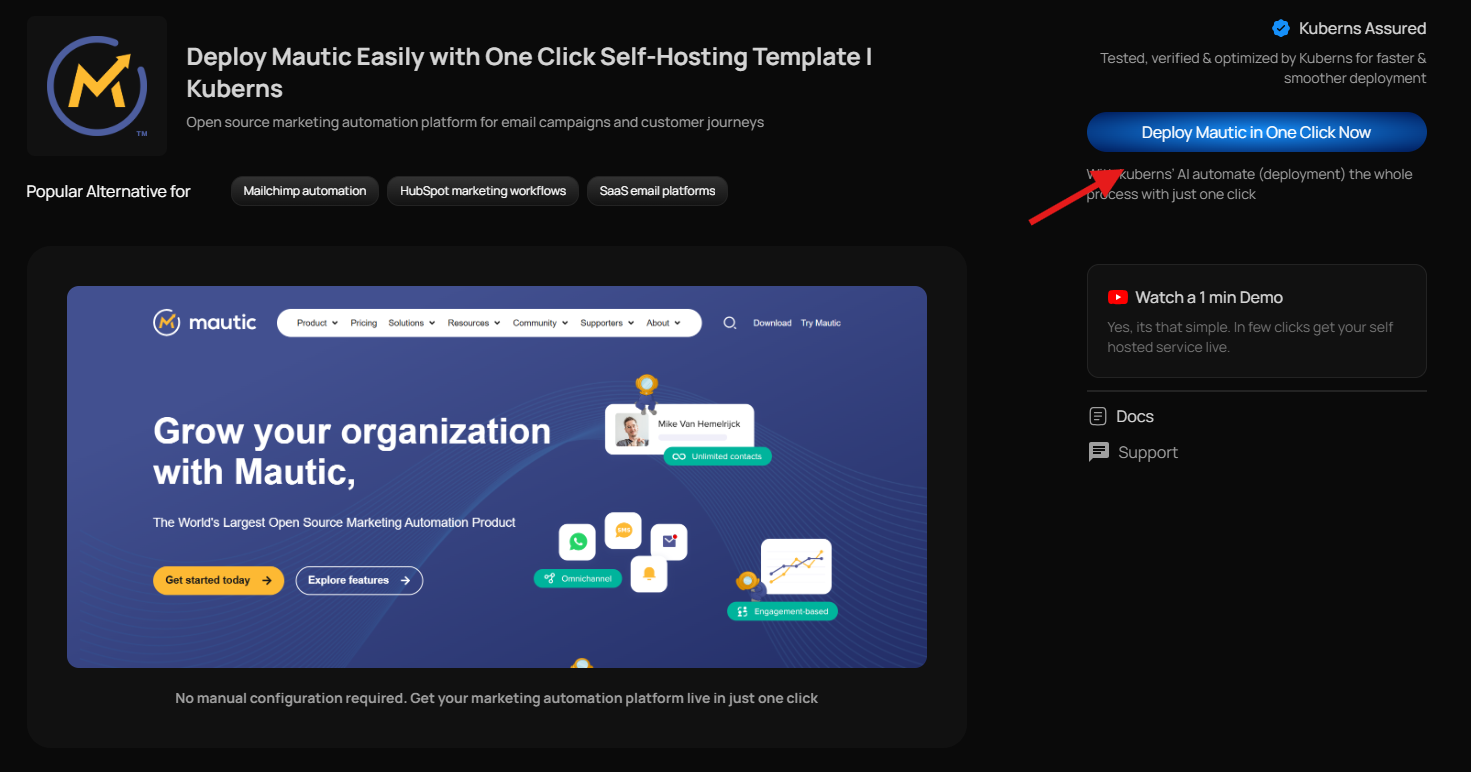
Unlike manual installations, where you start with a blank server and configure the entire stack yourself, this template is already structured for production. It includes the required PHP runtime, database preparation, and networking configuration. You are not building an environment from scratch. You are launching Mautic in a ready-to-run setup.
### Step 2: Enter Basic Project Details
After selecting the template, you will be asked to provide a few simple details such as your project name and preferred deployment region.
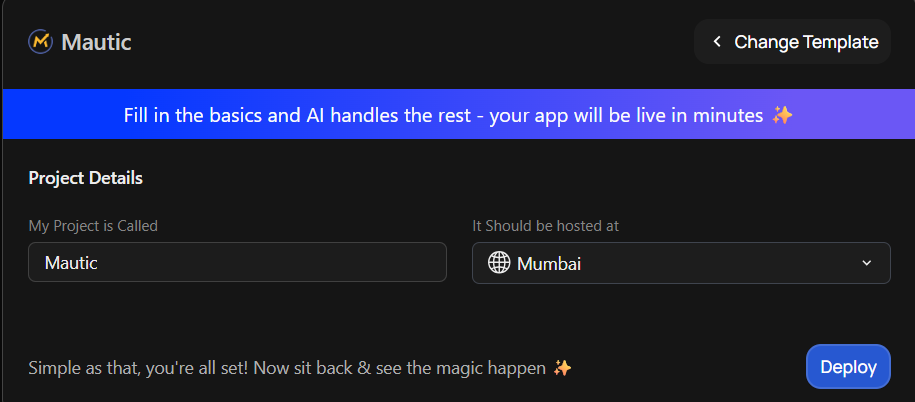
At this stage, you will notice something important: there are no environment variables to configure, no database credentials to paste, and no repository to connect. All the infrastructure components that Mautic requires are already prepared in the background.
This is very different from traditional installation guides, where you would manually create a MySQL database, configure PHP extensions, and edit configuration files before even accessing the application.
### Step 3: Launch the Deployment
Once you confirm your project details, click Deploy.
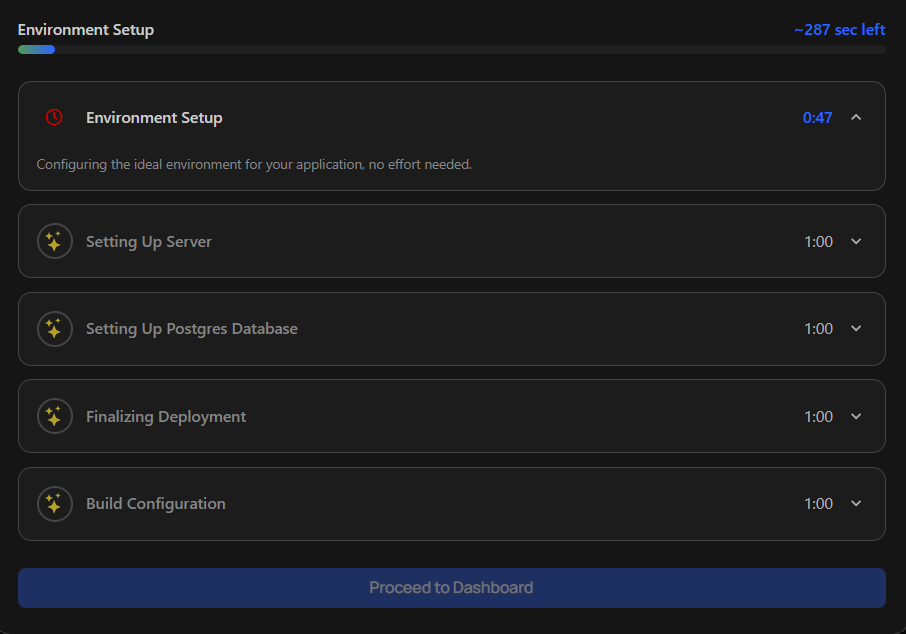
From here, the AI-powered deployment system takes over. It builds the Mautic container, provisions and connects the database automatically, configures the PHP environment correctly, sets up secure HTTPS access, and ensures the application runs in a production-ready state.
You do not configure Apache or Nginx. You do not set up SSL certificates manually. You do not define cron jobs through server-level commands. All these components are handled automatically as part of the deployment process.
The system prepares everything required for Mautic to function reliably, including background task handling for campaign automation.
### Step 4: Access the Dashboard
After deployment finishes, you will see a live URL inside your dashboard. Click this link to access your Mautic instance.
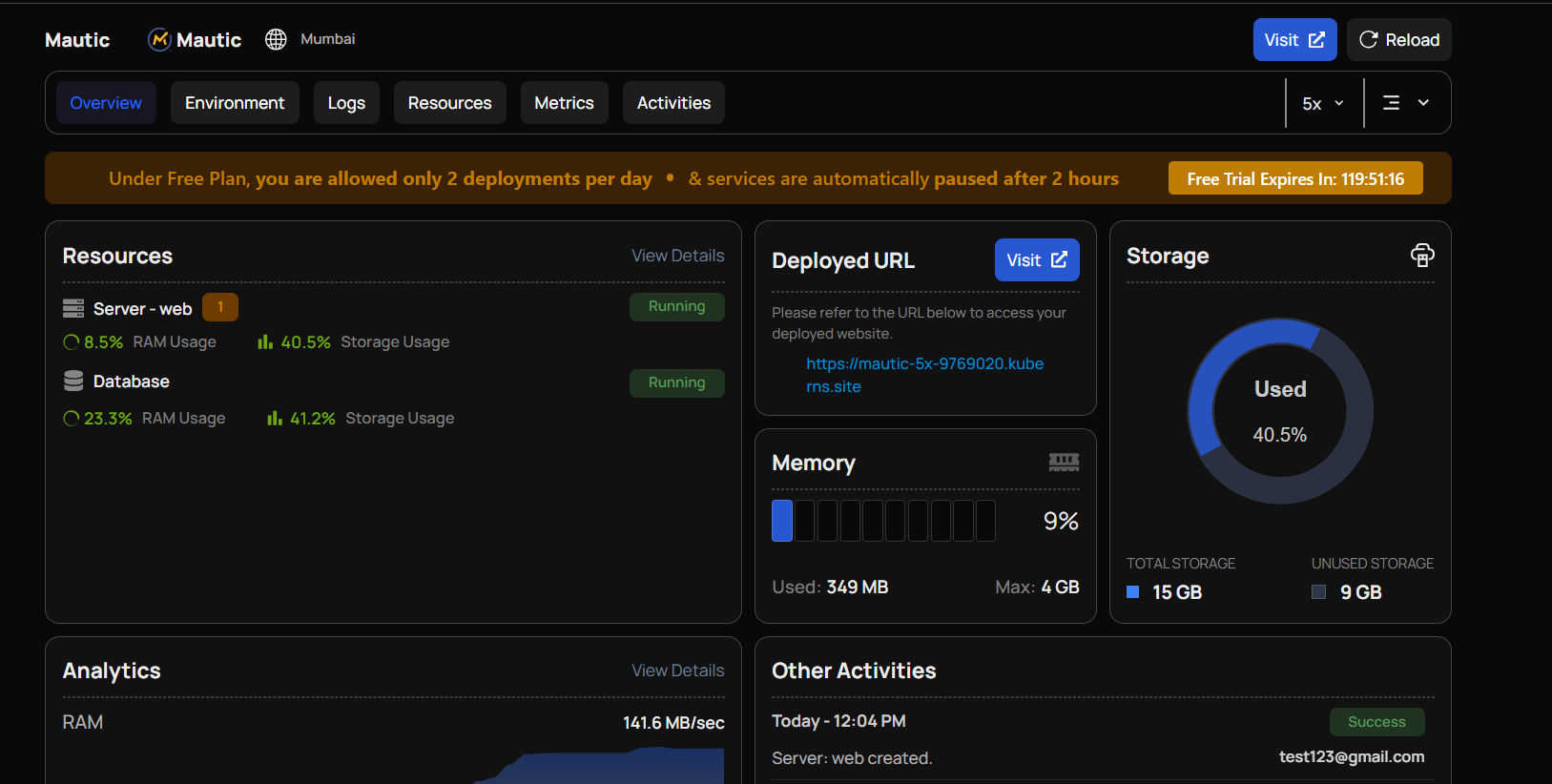
Since the infrastructure has already been prepared by Kuberns, you are only completing the Mautic-specific setup inside the browser. There is no server-level configuration remaining.
Once you finish the wizard, you are taken directly to the Mautic dashboard, where you can begin creating campaigns, setting up automation workflows, and managing contacts.
## Why Use Kuberns for Mautic?
Mautic is powerful, but it was designed to run on a properly configured server environment. When you install it manually, you are responsible for maintaining that environment over time. That includes PHP updates, database health, cron reliability, SSL certificates, and background task stability.
For many teams, especially marketing teams, this becomes the hidden cost of self-hosting.
Kuberns changes that experience.
On Kuberns, the infrastructure supporting those processes is managed automatically. The runtime environment is stable, HTTPS is enabled by default, and the system is monitored for reliability. This means your team focuses on building email campaigns and automation flows instead of debugging server configurations.
## Deploy Mautic on Kuberns Today
If you searched for how to install Mautic, you probably wanted one thing: control without complexity.
Mautic gives you ownership of your marketing automation stack. You control your data, your campaigns, your workflows, and your growth strategy. What most people don’t expect is the infrastructure work that comes with keeping it running reliably.
With Kuberns, you don’t need to configure PHP, provision databases manually, or worry about cron jobs breaking your automation. You select the Mautic template, deploy, and complete the setup in your browser. The infrastructure layer is already prepared.
If your goal is to self-host Mautic without turning into a system administrator, this is the simplest way to do it.
[Deploy Mautic on Kuberns and start building campaigns instead of configuring servers.](https://kuberns.com/deploy/mautic)
## Deploy Mautic on Kuberns in One Click (Step-by-Step Guide)
Deploying Mautic on Kuberns is designed to remove the infrastructure complexity that usually comes with PHP applications. You don’t need to provision servers, configure databases manually, or set up cron jobs. The platform prepares the technical foundation so you can focus on using Mautic.
Here is the complete process.
### Step 1: Select the Mautic Template
Start by navigating to the [Templates page](https://kuberns.com/deploy). From there, choose the [Mautic one-click template](https://kuberns.com/deploy/mautic) and click Deploy. This page lists pre-configured deployment templates for popular open source tools. Locate Mautic in the list and click Deploy.

Unlike manual installations, where you start with a blank server and configure the entire stack yourself, this template is already structured for production. It includes the required PHP runtime, database preparation, and networking configuration. You are not building an environment from scratch. You are launching Mautic in a ready-to-run setup.
### Step 2: Enter Basic Project Details
After selecting the template, you will be asked to provide a few simple details such as your project name and preferred deployment region.

At this stage, you will notice something important: there are no environment variables to configure, no database credentials to paste, and no repository to connect. All the infrastructure components that Mautic requires are already prepared in the background.
This is very different from traditional installation guides, where you would manually create a MySQL database, configure PHP extensions, and edit configuration files before even accessing the application.
### Step 3: Launch the Deployment
Once you confirm your project details, click Deploy.

From here, the AI-powered deployment system takes over. It builds the Mautic container, provisions and connects the database automatically, configures the PHP environment correctly, sets up secure HTTPS access, and ensures the application runs in a production-ready state.
You do not configure Apache or Nginx. You do not set up SSL certificates manually. You do not define cron jobs through server-level commands. All these components are handled automatically as part of the deployment process.
The system prepares everything required for Mautic to function reliably, including background task handling for campaign automation.
### Step 4: Access the Dashboard
After deployment finishes, you will see a live URL inside your dashboard. Click this link to access your Mautic instance.

Since the infrastructure has already been prepared by Kuberns, you are only completing the Mautic-specific setup inside the browser. There is no server-level configuration remaining.
Once you finish the wizard, you are taken directly to the Mautic dashboard, where you can begin creating campaigns, setting up automation workflows, and managing contacts.
## Why Use Kuberns for Mautic?
Mautic is powerful, but it was designed to run on a properly configured server environment. When you install it manually, you are responsible for maintaining that environment over time. That includes PHP updates, database health, cron reliability, SSL certificates, and background task stability.
For many teams, especially marketing teams, this becomes the hidden cost of self-hosting.
Kuberns changes that experience.
On Kuberns, the infrastructure supporting those processes is managed automatically. The runtime environment is stable, HTTPS is enabled by default, and the system is monitored for reliability. This means your team focuses on building email campaigns and automation flows instead of debugging server configurations.
## Deploy Mautic on Kuberns Today
If you searched for how to install Mautic, you probably wanted one thing: control without complexity.
Mautic gives you ownership of your marketing automation stack. You control your data, your campaigns, your workflows, and your growth strategy. What most people don’t expect is the infrastructure work that comes with keeping it running reliably.
With Kuberns, you don’t need to configure PHP, provision databases manually, or worry about cron jobs breaking your automation. You select the Mautic template, deploy, and complete the setup in your browser. The infrastructure layer is already prepared.
If your goal is to self-host Mautic without turning into a system administrator, this is the simplest way to do it.
[Deploy Mautic on Kuberns and start building campaigns instead of configuring servers.](https://kuberns.com/deploy/mautic)
 ## FAQs
### What is the easiest way to install Mautic?
The easiest way to install Mautic is to use a managed deployment platform that prepares the server environment automatically. Traditional installation requires configuring PHP, MySQL, cron jobs, and SSL manually. With [one-click deployment platforms like Kuberns](https://kuberns.com/deploy/mautic), you simply deploy and complete the setup wizard in your browser.
### Can I self host Mautic without technical experience?
Yes, but only if you use an [AI platform](https://kuberns.com/) that abstracts the infrastructure layer. Manual VPS installation requires knowledge of PHP configuration, database setup, and cron scheduling. Automated deployment platforms remove those steps while still giving you full data ownership.
### Where should I host Mautic?
You can host Mautic on a VPS, cloud provider like AWS or DigitalOcean, or through managed platforms. VPS hosting offers flexibility but requires ongoing maintenance. [AI Powered platforms like Kuberns](https://kuberns.com/deploy/mautic) simplify hosting by automating runtime configuration and security setup.
### Is there a one-click way to deploy Mautic?
Yes. [Kuberns provide one-click Mautic deployment](https://kuberns.com/deploy/mautic) where the runtime, database, and HTTPS are configured automatically. This eliminates manual server setup and allows you to focus directly on campaign building.
### Do I need Docker to run Mautic?
No, Docker is not required. Mautic can run on a traditional PHP server stack. However, regardless of whether you use Docker or a VPS, you must configure the environment correctly. Kuberns AI removes that responsibility.
---
- [More Open Source articles](https://kuberns.com/blogs/category/open-source/1/)
- [All articles](https://kuberns.com/blogs/)
## FAQs
### What is the easiest way to install Mautic?
The easiest way to install Mautic is to use a managed deployment platform that prepares the server environment automatically. Traditional installation requires configuring PHP, MySQL, cron jobs, and SSL manually. With [one-click deployment platforms like Kuberns](https://kuberns.com/deploy/mautic), you simply deploy and complete the setup wizard in your browser.
### Can I self host Mautic without technical experience?
Yes, but only if you use an [AI platform](https://kuberns.com/) that abstracts the infrastructure layer. Manual VPS installation requires knowledge of PHP configuration, database setup, and cron scheduling. Automated deployment platforms remove those steps while still giving you full data ownership.
### Where should I host Mautic?
You can host Mautic on a VPS, cloud provider like AWS or DigitalOcean, or through managed platforms. VPS hosting offers flexibility but requires ongoing maintenance. [AI Powered platforms like Kuberns](https://kuberns.com/deploy/mautic) simplify hosting by automating runtime configuration and security setup.
### Is there a one-click way to deploy Mautic?
Yes. [Kuberns provide one-click Mautic deployment](https://kuberns.com/deploy/mautic) where the runtime, database, and HTTPS are configured automatically. This eliminates manual server setup and allows you to focus directly on campaign building.
### Do I need Docker to run Mautic?
No, Docker is not required. Mautic can run on a traditional PHP server stack. However, regardless of whether you use Docker or a VPS, you must configure the environment correctly. Kuberns AI removes that responsibility.
---
- [More Open Source articles](https://kuberns.com/blogs/category/open-source/1/)
- [All articles](https://kuberns.com/blogs/)