# How to Deploy an MCP Server in 2026 (Complete Guide)
> Deploy an MCP server to production in 2026 without Docker or server config. Step-by-step guide for Node.js and Python MCP servers with HTTPS, auth, and CI/CD.
- **Author**: tom-weston
- **Published**: 2026-05-04
- **Modified**: 2026-05-04
- **Category**: AI & DevOps
- **URL**: https://kuberns.com/blogs/deploy-mcp-server/
---
You built an MCP server. It works perfectly on your machine. Now you need to make it accessible to Claude, Cursor, your team, or your AI agent pipeline, and that is where things get complicated.
STDIO transport only works locally. The moment you want a remote client to connect, you need an always-on HTTPS endpoint. That means switching to HTTP transport, binding to the right port, handling authentication, and finding a hosting platform that does not go to sleep every 15 minutes.
This guide covers the complete path from a working local MCP server to a live production deployment, step by step. For each stage, we will use [Kuberns](https://kuberns.com), the world's first agentic deployment platform, which detects your stack automatically and gets your MCP server live with HTTPS and CI/CD in under 5 minutes, without any Dockerfile or server configuration.
## What Is an MCP Server and Why Is Cloud Deployment Different
MCP (Model Context Protocol) is an open standard by Anthropic for connecting AI applications to external systems. Think of it as the USB-C port for AI: a standardized interface that lets AI clients like Claude, Cursor, and Windsurf connect to your tools, data sources, and APIs.
An MCP server exposes three types of capabilities:
- **Tools:** Functions the AI can call, such as querying a database, sending a Slack message, or fetching live data
- **Resources:** File-like data the AI can read, including documents, API responses, and logs
- **Prompts:** Reusable prompt templates for specific tasks
MCP servers run in two transport modes, and this is what determines whether cloud deployment even works:
| Transport | How It Works | Use Case |
|-----------|-------------|----------|
| **STDIO** | Runs as a local process via stdin/stdout | Local development, desktop AI clients only |
| **Streamable HTTP** | Persistent web server accessible over the network | Cloud deployment, remote teams, multiple clients |
When you deploy to production, you need **Streamable HTTP transport**. A STDIO server can only be spawned by a local AI client on the same machine and cannot be reached over the internet.
If you are new to deploying server-side applications, it helps to understand [what a PaaS is and how it compares to raw infrastructure](https://kuberns.com/blogs/best-paas-providers/). For MCP servers, a PaaS is almost always the right choice over managing your own VPS.
## Prepare Your MCP Server for Production
These two changes prevent the most common deployment failures. Once they are in place, [Kuberns](https://kuberns.com), the world's first agentic deployment platform, can read your repository and deploy without any additional configuration from you.
### 1. Switch to Streamable HTTP Transport
**Node.js MCP Server**
```javascript
import { McpServer } from "@modelcontextprotocol/sdk/server/mcp.js";
import { StreamableHTTPServerTransport } from "@modelcontextprotocol/sdk/server/streamableHttp.js";
import express from "express";
const app = express();
app.use(express.json());
const server = new McpServer({
name: "my-mcp-server",
version: "1.0.0",
});
// Register your tools
server.tool("get_data", "Fetches data from your source", {}, async () => {
return {
content: [{ type: "text", text: "Your tool response here" }],
};
});
// Mount MCP on /mcp endpoint
app.post("/mcp", async (req, res) => {
const transport = new StreamableHTTPServerTransport({
sessionIdHeader: "mcp-session-id",
});
await server.connect(transport);
await transport.handleRequest(req, res, req.body);
});
// Always read PORT from environment (cloud platforms inject this)
const PORT = process.env.PORT || 3000;
app.listen(PORT, () => {
console.log(`MCP server running on port ${PORT}`);
});
```
**Python MCP Server**
```python
from mcp.server.fastmcp import FastMCP
import os
mcp = FastMCP("my-mcp-server")
@mcp.tool()
def get_data() -> str:
"""Fetches data from your source."""
return "Your tool response here"
if __name__ == "__main__":
port = int(os.environ.get("PORT", 8000))
# Always bind to 0.0.0.0 in production, not 127.0.0.1
mcp.run(transport="streamable-http", host="0.0.0.0", port=port)
```
Two critical rules:
- Always read `PORT` from `process.env.PORT`. Cloud platforms assign a dynamic port and your server must use it.
- Always bind to `0.0.0.0` instead of `127.0.0.1`. Binding to localhost blocks all external traffic.
These same rules apply to any server-side app. If you have gone through the process before with a different stack, the pattern is identical to what is covered in the [Node.js deployment guide](https://kuberns.com/blogs/how-to-deploy-nodejs-app/) and the [Python deployment guide](https://kuberns.com/blogs/how-to-deploy-python-app-with-ai/).
### 2. Add a Start Script
**Node.js `package.json`:**
```json
{
"name": "my-mcp-server",
"type": "module",
"scripts": {
"start": "node server.js"
},
"dependencies": {
"@modelcontextprotocol/sdk": "^1.11.0",
"express": "^4.18.0"
}
}
```
**Python `Procfile`:**
```
web: python server.py
```
Make sure your code is pushed to a GitHub repository. Kuberns deploys directly from it and [auto-deploys on every Git push](https://kuberns.com/blogs/how-to-auto-deploy-your-apps-from-github-in-one-click/) so your server stays up to date without any manual steps.
 ## Deploy Your MCP Server on Kuberns
[Kuberns](https://kuberns.com) is the world's first agentic deployment platform, built on AWS. It reads your repository, detects your Node.js or Python stack automatically, and deploys your MCP server with HTTPS and CI/CD in under 5 minutes. No Dockerfile, no YAML, and no infrastructure config required.
### Step 1: Sign Up and Create an Account
Go to [kuberns.com](https://kuberns.com) and sign up with your Google or GitHub account. New accounts get free credits to deploy and test your first app at no cost.

### Step 2: Connect Your GitHub Repository
On the "Create Service" page, connect your GitHub account and select your MCP server repository.
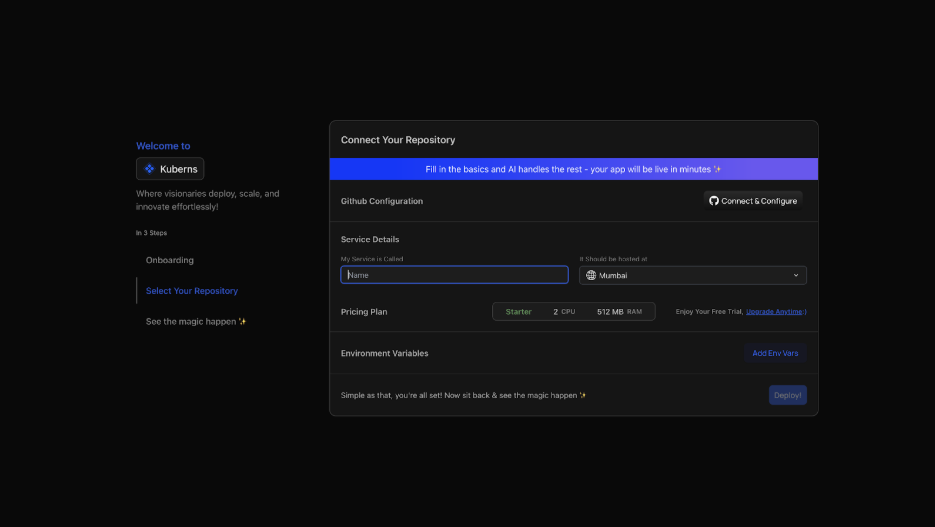
Kuberns AI scans your `package.json` or `requirements.txt` and automatically detects:
- Runtime: Node.js or Python
- Start command: `npm run start` or `python server.py`
- Port configuration
No manual configuration needed.
### Step 3: Add Environment Variables
Navigate to the Environment tab and add your production secrets.

For an MCP server you will typically add:
- `MCP_API_KEY`: a secret key to authenticate incoming AI client requests
- `MY_API_KEY`: any third-party API key your tools use
- `DATABASE_URL`: required if your tools query a database
- `NODE_ENV`: set to `production`
Kuberns encrypts all variables and injects them securely at runtime. Never commit secrets to your repository.
### Step 4: Click Deploy
Click the Deploy button and watch the real-time log stream as Kuberns handles everything:
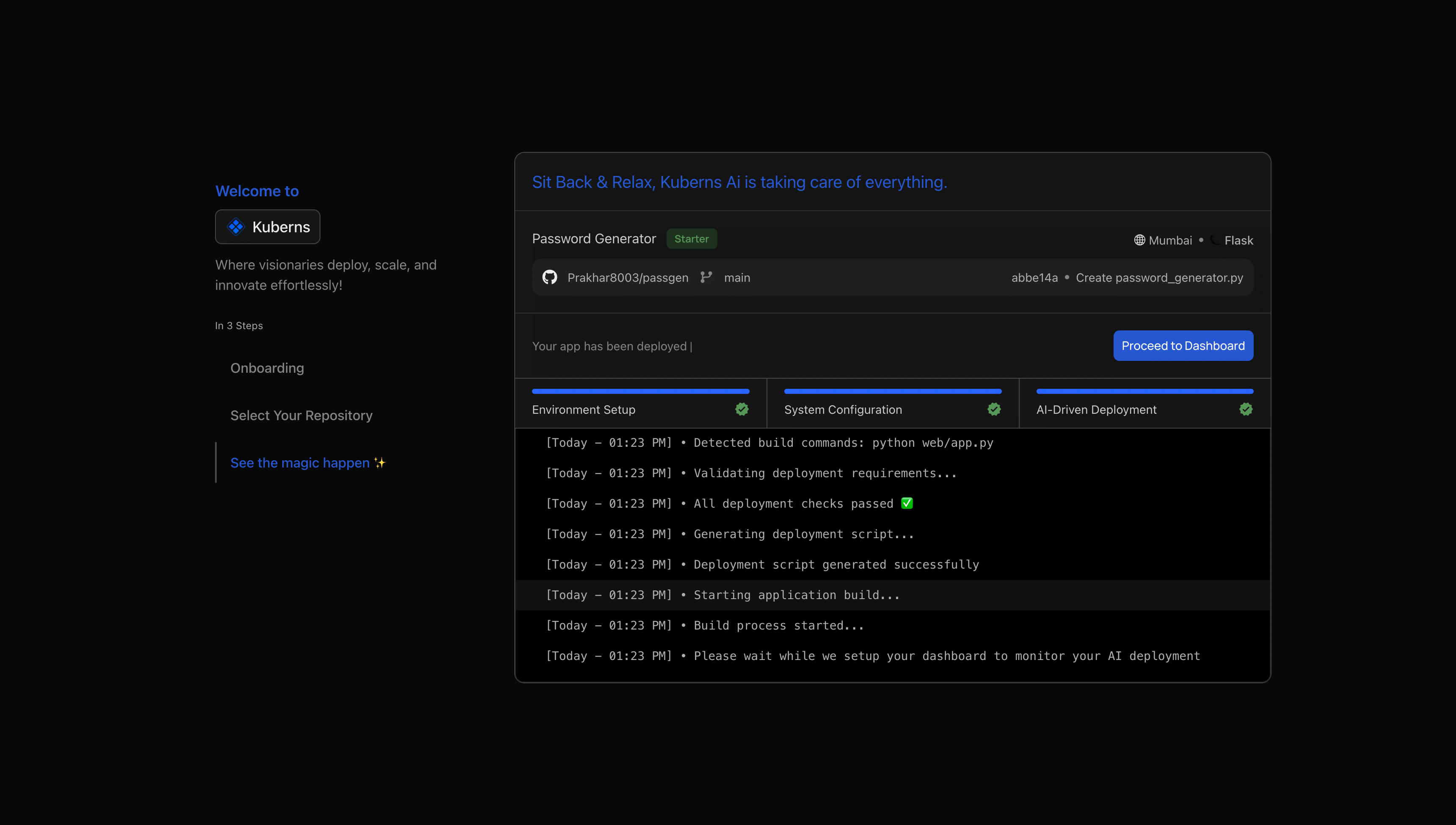
- Clones your repository from GitHub
- Installs all dependencies cleanly
- Starts your MCP server process
- Provisions compute on AWS in your chosen region
- Issues an SSL certificate automatically
- Assigns a live HTTPS URL to your server
Your MCP server is live in under 5 minutes. Every subsequent push to your connected GitHub branch triggers an automatic redeploy with no CI/CD pipeline to configure.
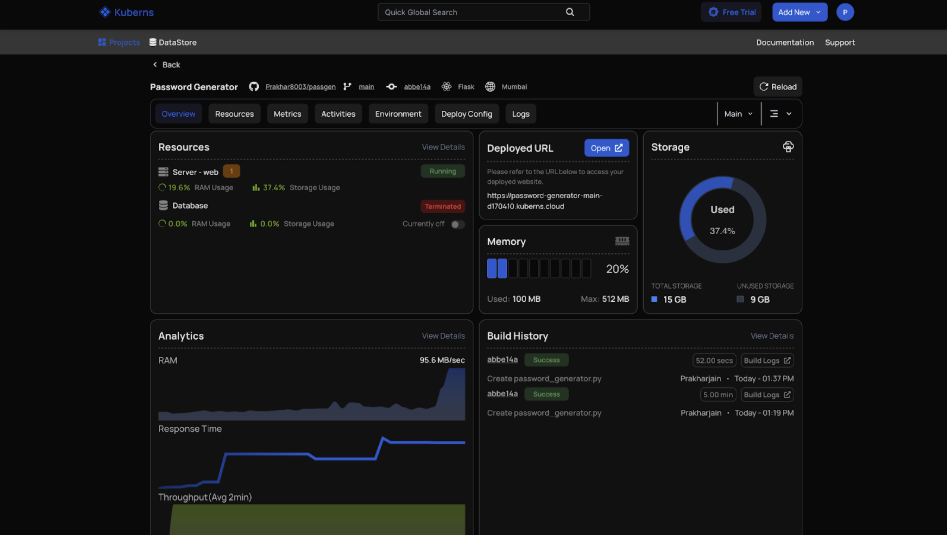
Your server is now accessible at a URL like:
```
https://your-app.kuberns.app/mcp
```
## Add Authentication to Your MCP Endpoint
Before sharing your MCP server URL with any client, add API key authentication. Without it, anyone who discovers your endpoint can use your tools.
**Node.js: add middleware before the MCP handler**
```javascript
// Validate API key on every request to /mcp
app.use("/mcp", (req, res, next) => {
const authHeader = req.headers["authorization"];
if (!authHeader || authHeader !== `Bearer ${process.env.MCP_API_KEY}`) {
return res.status(401).json({ error: "Unauthorized" });
}
next();
});
```
Set `MCP_API_KEY` as an environment variable in Kuberns. Share that key with anyone who needs to connect their AI client.
## Connect Your AI Client to the Deployed Server
Once your server is live, update your AI client config to point to the remote URL.
### Claude Desktop
Open `~/.config/claude/claude_desktop_config.json` (macOS/Linux) or `%APPDATA%\Claude\claude_desktop_config.json` (Windows):
```json
{
"mcpServers": {
"my-server": {
"url": "https://your-app.kuberns.app/mcp",
"headers": {
"Authorization": "Bearer YOUR_MCP_API_KEY"
}
}
}
}
```
### Cursor
Open `~/.cursor/mcp.json`:
```json
{
"mcpServers": {
"my-server": {
"url": "https://your-app.kuberns.app/mcp",
"headers": {
"Authorization": "Bearer YOUR_MCP_API_KEY"
}
}
}
}
```
### VS Code
In `settings.json`:
```json
{
"mcp": {
"servers": {
"my-server": {
"type": "http",
"url": "https://your-app.kuberns.app/mcp",
"headers": {
"Authorization": "Bearer YOUR_MCP_API_KEY"
}
}
}
}
}
```
Restart your AI client and it will connect to your deployed server automatically.
## Deploy Your MCP Server on Kuberns
[Kuberns](https://kuberns.com) is the world's first agentic deployment platform, built on AWS. It reads your repository, detects your Node.js or Python stack automatically, and deploys your MCP server with HTTPS and CI/CD in under 5 minutes. No Dockerfile, no YAML, and no infrastructure config required.
### Step 1: Sign Up and Create an Account
Go to [kuberns.com](https://kuberns.com) and sign up with your Google or GitHub account. New accounts get free credits to deploy and test your first app at no cost.

### Step 2: Connect Your GitHub Repository
On the "Create Service" page, connect your GitHub account and select your MCP server repository.

Kuberns AI scans your `package.json` or `requirements.txt` and automatically detects:
- Runtime: Node.js or Python
- Start command: `npm run start` or `python server.py`
- Port configuration
No manual configuration needed.
### Step 3: Add Environment Variables
Navigate to the Environment tab and add your production secrets.

For an MCP server you will typically add:
- `MCP_API_KEY`: a secret key to authenticate incoming AI client requests
- `MY_API_KEY`: any third-party API key your tools use
- `DATABASE_URL`: required if your tools query a database
- `NODE_ENV`: set to `production`
Kuberns encrypts all variables and injects them securely at runtime. Never commit secrets to your repository.
### Step 4: Click Deploy
Click the Deploy button and watch the real-time log stream as Kuberns handles everything:

- Clones your repository from GitHub
- Installs all dependencies cleanly
- Starts your MCP server process
- Provisions compute on AWS in your chosen region
- Issues an SSL certificate automatically
- Assigns a live HTTPS URL to your server
Your MCP server is live in under 5 minutes. Every subsequent push to your connected GitHub branch triggers an automatic redeploy with no CI/CD pipeline to configure.

Your server is now accessible at a URL like:
```
https://your-app.kuberns.app/mcp
```
## Add Authentication to Your MCP Endpoint
Before sharing your MCP server URL with any client, add API key authentication. Without it, anyone who discovers your endpoint can use your tools.
**Node.js: add middleware before the MCP handler**
```javascript
// Validate API key on every request to /mcp
app.use("/mcp", (req, res, next) => {
const authHeader = req.headers["authorization"];
if (!authHeader || authHeader !== `Bearer ${process.env.MCP_API_KEY}`) {
return res.status(401).json({ error: "Unauthorized" });
}
next();
});
```
Set `MCP_API_KEY` as an environment variable in Kuberns. Share that key with anyone who needs to connect their AI client.
## Connect Your AI Client to the Deployed Server
Once your server is live, update your AI client config to point to the remote URL.
### Claude Desktop
Open `~/.config/claude/claude_desktop_config.json` (macOS/Linux) or `%APPDATA%\Claude\claude_desktop_config.json` (Windows):
```json
{
"mcpServers": {
"my-server": {
"url": "https://your-app.kuberns.app/mcp",
"headers": {
"Authorization": "Bearer YOUR_MCP_API_KEY"
}
}
}
}
```
### Cursor
Open `~/.cursor/mcp.json`:
```json
{
"mcpServers": {
"my-server": {
"url": "https://your-app.kuberns.app/mcp",
"headers": {
"Authorization": "Bearer YOUR_MCP_API_KEY"
}
}
}
}
```
### VS Code
In `settings.json`:
```json
{
"mcp": {
"servers": {
"my-server": {
"type": "http",
"url": "https://your-app.kuberns.app/mcp",
"headers": {
"Authorization": "Bearer YOUR_MCP_API_KEY"
}
}
}
}
}
```
Restart your AI client and it will connect to your deployed server automatically.
 ## MCP Server Deployment Platform Comparison (2026)
| Platform | Auto-detect stack | Config required | Sleeps on idle | Free tier | Starting price | Best for |
|----------|-------------------|-----------------|----------------|-----------|----------------|----------|
| **Kuberns** | Yes | None | No | Yes ($14 credits) | $7/mo | MCP servers, AI agents, production APIs |
| Render | Yes | Build/start commands | Yes (15 min) | Yes | $7/mo | Hobby and small projects |
| Railway | Yes | Start command | No | $5 trial credit | $5/mo + usage | Prototypes |
| Fly.io | No (needs Dockerfile) | Dockerfile + fly.toml | No | Limited | $3/mo + usage | DevOps-comfortable teams |
| VPS (PM2 + Nginx) | Manual | Full server setup | No | No | ~$5/mo | Full control, experienced DevOps |
| AWS Lambda | No | SAM/CDK config | N/A (serverless) | Yes (limited) | Pay-per-use | Stateless, infrequent use |
For MCP servers that need to maintain persistent connections and serve multiple AI clients simultaneously, a long-running PaaS like Kuberns is the right choice. Serverless platforms like Lambda are not suited for streaming HTTP MCP connections. If you are comparing options more broadly, the [best PaaS providers in 2026](https://kuberns.com/blogs/best-paas-providers/) breaks down what to look for when evaluating platforms for production workloads.
## Common Deployment Issues and Fixes
| Issue | Cause | Fix |
|-------|-------|-----|
| Server unreachable after deploy | Bound to `127.0.0.1` | Change to `0.0.0.0` |
| Port error on startup | Hardcoded port number | Use `process.env.PORT` |
| 401 Unauthorized from AI client | Wrong API key in client config | Verify `Authorization` header matches `MCP_API_KEY` env var |
| Tools not discovered by client | Wrong endpoint path | Confirm URL ends with `/mcp` |
| Connection drops after ~60s | No keep-alive config | Add `server.keepAliveTimeout = 65000` in Node.js |
| CORS errors in browser-based clients | Missing CORS headers | Add `cors` middleware and allow AI client origins |
| App crashes on start | Missing environment variable | Check Kuberns logs tab for `undefined` errors, add missing vars |
## Production Checklist Before Sharing Your MCP URL
- [ ] Server bound to `0.0.0.0` and reading `PORT` from environment
- [ ] HTTPS endpoint (not plain HTTP)
- [ ] API key authentication on the `/mcp` endpoint
- [ ] All secrets stored as environment variables with nothing hardcoded in code
- [ ] Health check endpoint (`GET /health` returns 200)
- [ ] Tested end-to-end with at least one AI client (Claude Desktop or Cursor)
- [ ] Auto-deploy on Git push enabled
## What Kuberns Handles That You Would Do Manually
## MCP Server Deployment Platform Comparison (2026)
| Platform | Auto-detect stack | Config required | Sleeps on idle | Free tier | Starting price | Best for |
|----------|-------------------|-----------------|----------------|-----------|----------------|----------|
| **Kuberns** | Yes | None | No | Yes ($14 credits) | $7/mo | MCP servers, AI agents, production APIs |
| Render | Yes | Build/start commands | Yes (15 min) | Yes | $7/mo | Hobby and small projects |
| Railway | Yes | Start command | No | $5 trial credit | $5/mo + usage | Prototypes |
| Fly.io | No (needs Dockerfile) | Dockerfile + fly.toml | No | Limited | $3/mo + usage | DevOps-comfortable teams |
| VPS (PM2 + Nginx) | Manual | Full server setup | No | No | ~$5/mo | Full control, experienced DevOps |
| AWS Lambda | No | SAM/CDK config | N/A (serverless) | Yes (limited) | Pay-per-use | Stateless, infrequent use |
For MCP servers that need to maintain persistent connections and serve multiple AI clients simultaneously, a long-running PaaS like Kuberns is the right choice. Serverless platforms like Lambda are not suited for streaming HTTP MCP connections. If you are comparing options more broadly, the [best PaaS providers in 2026](https://kuberns.com/blogs/best-paas-providers/) breaks down what to look for when evaluating platforms for production workloads.
## Common Deployment Issues and Fixes
| Issue | Cause | Fix |
|-------|-------|-----|
| Server unreachable after deploy | Bound to `127.0.0.1` | Change to `0.0.0.0` |
| Port error on startup | Hardcoded port number | Use `process.env.PORT` |
| 401 Unauthorized from AI client | Wrong API key in client config | Verify `Authorization` header matches `MCP_API_KEY` env var |
| Tools not discovered by client | Wrong endpoint path | Confirm URL ends with `/mcp` |
| Connection drops after ~60s | No keep-alive config | Add `server.keepAliveTimeout = 65000` in Node.js |
| CORS errors in browser-based clients | Missing CORS headers | Add `cors` middleware and allow AI client origins |
| App crashes on start | Missing environment variable | Check Kuberns logs tab for `undefined` errors, add missing vars |
## Production Checklist Before Sharing Your MCP URL
- [ ] Server bound to `0.0.0.0` and reading `PORT` from environment
- [ ] HTTPS endpoint (not plain HTTP)
- [ ] API key authentication on the `/mcp` endpoint
- [ ] All secrets stored as environment variables with nothing hardcoded in code
- [ ] Health check endpoint (`GET /health` returns 200)
- [ ] Tested end-to-end with at least one AI client (Claude Desktop or Cursor)
- [ ] Auto-deploy on Git push enabled
## What Kuberns Handles That You Would Do Manually
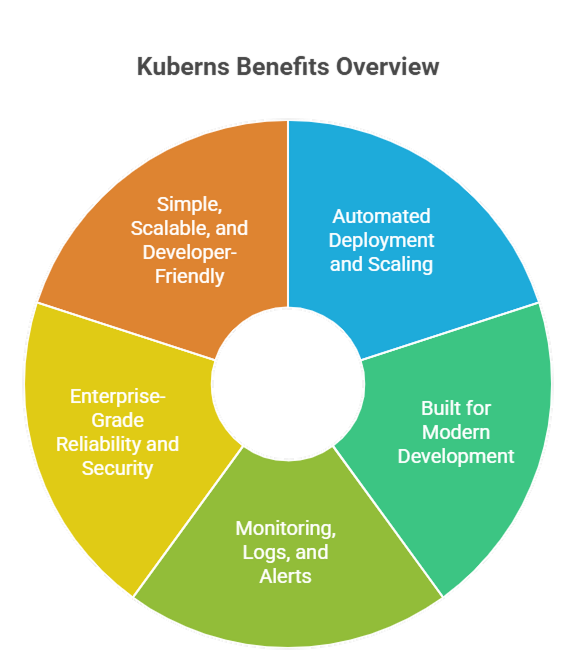 | What an MCP server needs in production | Manual / VPS | Kuberns |
|----------------------------------------|-------------|---------|
| HTTP server process management | PM2 + manual config | Automatic |
| SSL certificate | Certbot setup + renewal | Automatic |
| Environment variable injection | Server .env files | Encrypted dashboard |
| CI/CD on Git push | GitHub Actions YAML | Built-in |
| Auto-scaling on traffic spikes | Manual rules | AI-driven |
| Custom domain + HTTPS | DNS + Certbot | One-click |
| Crash recovery / auto-restart | PM2 ecosystem config | Automatic |
| Monitoring and logs | External stack | Built-in dashboard |
## Conclusion
Deploying an MCP server to production comes down to three things: switching to HTTP transport, reading `PORT` from the environment, and choosing a platform that handles everything else.
The local STDIO setup is fine for personal use. Once you need remote clients such as your team, your AI agents, or any external AI application, you need a real cloud deployment with HTTPS, persistent uptime, and proper authentication.
[Kuberns](https://kuberns.com) removes every infrastructure decision from that process. You push your code, Kuberns ships it live with HTTPS and auto-scaling, and your AI clients can start connecting in minutes. If you are building a full AI-powered application around your MCP server, the guide on [deploying a full stack app with AI](https://kuberns.com/blogs/deploy-full-stack-app-with-ai/) covers the broader deployment picture.
[Deploy your MCP server free on Kuberns](https://dashboard.kuberns.com/)
---
## Frequently Asked Questions
### Q: What is an MCP server?
An MCP (Model Context Protocol) server is a program that exposes tools, resources, and prompts to AI applications like Claude, Cursor, or ChatGPT via a standardized protocol. It acts as a bridge between AI clients and external data sources or APIs.
### Q: What is the difference between STDIO and HTTP transport in MCP?
STDIO transport runs the MCP server as a local process via stdin/stdout and is suited only for local development. HTTP (Streamable HTTP) transport runs the server as a persistent web service over the network, which is required for cloud deployment and serving multiple remote clients.
### Q: Can I deploy an MCP server without Docker?
Yes. [Kuberns](https://kuberns.com) is the world's first agentic deployment platform. It detects your Node.js or Python stack automatically and deploys your MCP server without requiring a Dockerfile, YAML configs, or any infrastructure setup. Connect your GitHub repo and deploy in minutes.
### Q: What port should an MCP server listen on in production?
Read the port from the `PORT` environment variable. Cloud platforms inject this automatically. Default to `3000` or `8000` locally if the variable is not set.
### Q: How do I secure an MCP server in production?
Validate an `Authorization: Bearer ` header on every incoming request to your `/mcp` endpoint. Store the key as an environment variable and share it only with trusted AI clients.
### Q: Which AI clients can connect to a deployed MCP server?
Claude Desktop, Claude.ai, Cursor, VS Code with Copilot, and Windsurf all support remote MCP servers over HTTP transport. Any application implementing the MCP client specification can connect.
### Q: Do I need Kubernetes to deploy an MCP server?
No. A single-instance deployment on a PaaS handles the vast majority of MCP server workloads. Platforms like [Kuberns](https://kuberns.com) handle auto-scaling and uptime without you managing Kubernetes directly.
### Q: How long does it take to deploy an MCP server on Kuberns?
Under 5 minutes for the first deployment. Subsequent auto-deployments on Git push take around 60 to 90 seconds.
---
- [More AI & DevOps articles](https://kuberns.com/blogs/category/ai-devops/1/)
- [All articles](https://kuberns.com/blogs/)
| What an MCP server needs in production | Manual / VPS | Kuberns |
|----------------------------------------|-------------|---------|
| HTTP server process management | PM2 + manual config | Automatic |
| SSL certificate | Certbot setup + renewal | Automatic |
| Environment variable injection | Server .env files | Encrypted dashboard |
| CI/CD on Git push | GitHub Actions YAML | Built-in |
| Auto-scaling on traffic spikes | Manual rules | AI-driven |
| Custom domain + HTTPS | DNS + Certbot | One-click |
| Crash recovery / auto-restart | PM2 ecosystem config | Automatic |
| Monitoring and logs | External stack | Built-in dashboard |
## Conclusion
Deploying an MCP server to production comes down to three things: switching to HTTP transport, reading `PORT` from the environment, and choosing a platform that handles everything else.
The local STDIO setup is fine for personal use. Once you need remote clients such as your team, your AI agents, or any external AI application, you need a real cloud deployment with HTTPS, persistent uptime, and proper authentication.
[Kuberns](https://kuberns.com) removes every infrastructure decision from that process. You push your code, Kuberns ships it live with HTTPS and auto-scaling, and your AI clients can start connecting in minutes. If you are building a full AI-powered application around your MCP server, the guide on [deploying a full stack app with AI](https://kuberns.com/blogs/deploy-full-stack-app-with-ai/) covers the broader deployment picture.
[Deploy your MCP server free on Kuberns](https://dashboard.kuberns.com/)
---
## Frequently Asked Questions
### Q: What is an MCP server?
An MCP (Model Context Protocol) server is a program that exposes tools, resources, and prompts to AI applications like Claude, Cursor, or ChatGPT via a standardized protocol. It acts as a bridge between AI clients and external data sources or APIs.
### Q: What is the difference between STDIO and HTTP transport in MCP?
STDIO transport runs the MCP server as a local process via stdin/stdout and is suited only for local development. HTTP (Streamable HTTP) transport runs the server as a persistent web service over the network, which is required for cloud deployment and serving multiple remote clients.
### Q: Can I deploy an MCP server without Docker?
Yes. [Kuberns](https://kuberns.com) is the world's first agentic deployment platform. It detects your Node.js or Python stack automatically and deploys your MCP server without requiring a Dockerfile, YAML configs, or any infrastructure setup. Connect your GitHub repo and deploy in minutes.
### Q: What port should an MCP server listen on in production?
Read the port from the `PORT` environment variable. Cloud platforms inject this automatically. Default to `3000` or `8000` locally if the variable is not set.
### Q: How do I secure an MCP server in production?
Validate an `Authorization: Bearer ` header on every incoming request to your `/mcp` endpoint. Store the key as an environment variable and share it only with trusted AI clients.
### Q: Which AI clients can connect to a deployed MCP server?
Claude Desktop, Claude.ai, Cursor, VS Code with Copilot, and Windsurf all support remote MCP servers over HTTP transport. Any application implementing the MCP client specification can connect.
### Q: Do I need Kubernetes to deploy an MCP server?
No. A single-instance deployment on a PaaS handles the vast majority of MCP server workloads. Platforms like [Kuberns](https://kuberns.com) handle auto-scaling and uptime without you managing Kubernetes directly.
### Q: How long does it take to deploy an MCP server on Kuberns?
Under 5 minutes for the first deployment. Subsequent auto-deployments on Git push take around 60 to 90 seconds.
---
- [More AI & DevOps articles](https://kuberns.com/blogs/category/ai-devops/1/)
- [All articles](https://kuberns.com/blogs/)