# The Fastest Way to Deploy a MERN App in 2026
> If you're searching for the fastest way to deploy your MERN app, here is the best Step-by-step guide to deploy on Kuberns in one click with Agentic AI.
- **Author**: suyash-tiwari
- **Published**: 2025-11-25
- **Modified**: 2026-03-27
- **Category**: Deployment Guides
- **URL**: https://kuberns.com/blogs/deploy-mern-app/
---
If you're looking for the fastest way to deploy a MERN app with automatic deployment on every push, a backend and frontend that just work together in production, and zero manual infrastructure configuration, you're in the right place.
The MERN stack is one of the most popular ways to build full-stack applications today, but deploying it to production comes with a checklist that can quickly become overwhelming.
You need a hosted MongoDB database, a Node.js server running your Express API, a built and deployed React frontend, environment variables configured correctly across services, API endpoints wired properly between frontend and backend, CORS handled securely, and HTTPS enabled for production.
On top of that, you often need to manage builds, restarts, and scaling separately for each part of the stack. Each of these steps can fail silently if misconfigured, leading to broken APIs, blank frontend screens, or deployment errors that are difficult to debug.
This is exactly what separates a working local MERN app from a production-ready deployment.
But now you have an alternative.
[Kuberns](https://kuberns.com/) is an agentic AI cloud platform that reads your MERN project, detects your tech stack automatically, installs dependencies, builds your app, starts your Node server, connects everything internally, provisions AWS infrastructure, and deploys your application with HTTPS and CI/CD enabled on every push, without requiring any configuration files from your side.
This guide walks you through a complete step-by-step MERN deployment, explains what usually makes deployment complex, and shows how platforms like Kuberns eliminate that complexity by handling the entire deployment workflow for you.
## Prerequisites (What Your MERN App Needs Before Deployment)
No Docker setup. No server configuration.
### 1. Project structure Kuberns can work with
Both monorepo (frontend and backend in the same repo) and split repos work on Kuberns. The monorepo pattern is most common for MERN apps:

### 2. Root package.json with build and start scripts
Kuberns reads the root package.json to know how to build your app and how to start it. These two scripts are required:

* build tells Kuberns how to compile your React frontend before starting the server
* start tells Kuberns how to run the production server
* Kuberns runs npm run build, then npm start automatically, no configuration needed
### 3. server.js with CORS and static file serving configured correctly
This is the most important file for a successful MERN deployment. Two things must be right: CORS must allow your frontend's production origin, and Express must serve the React build as static files so the whole app runs from one service.
The app.get('\*') catch-all at the bottom is what makes React Router work in production. Without it, any direct URL visit to /dashboard or /users/123 returns a 404 from Express because Express doesn't know about React routes. The catch-all returns index.html for every unmatched route, letting React Router handle navigation client-side.
> 💡 If your project heavily relies on a React frontend setup, you can also refer to our [React deployment](https://kuberns.com/blogs/deploying-react-app/) guide for deeper frontend-specific optimizations.
## How to Deploy a MERN App in Just One Click
Before jumping into the steps, here’s what the full deployment looks like in practice. The platform detects your MERN stack, builds your frontend and backend, connects everything, and gives you a live HTTPS URL.
This is exactly what your deployment will look like.
## Steps to deploy your Angular app in the fastest way with AI
[Kuberns](https://kuberns.com/) is an agentic AI cloud platform built on AWS infrastructure. For MERN apps, the AI detects your stack to find your project configuration, sets the build command and correct output directory automatically, configures SPA routing, issues SSL, and deploys with CI/CD with zero configuration files from your side.
### Step 1: Create Your Account and Project
Go to Kuberns and click on “Deploy with AI”. Create your account and set up your first project.

Kuberns offers a free tier to get started, and you can scale as your application grows. You don’t need to provision servers or choose infrastructure manually.
### Step 2: Connect Your GitHub Repository
On the project setup screen:
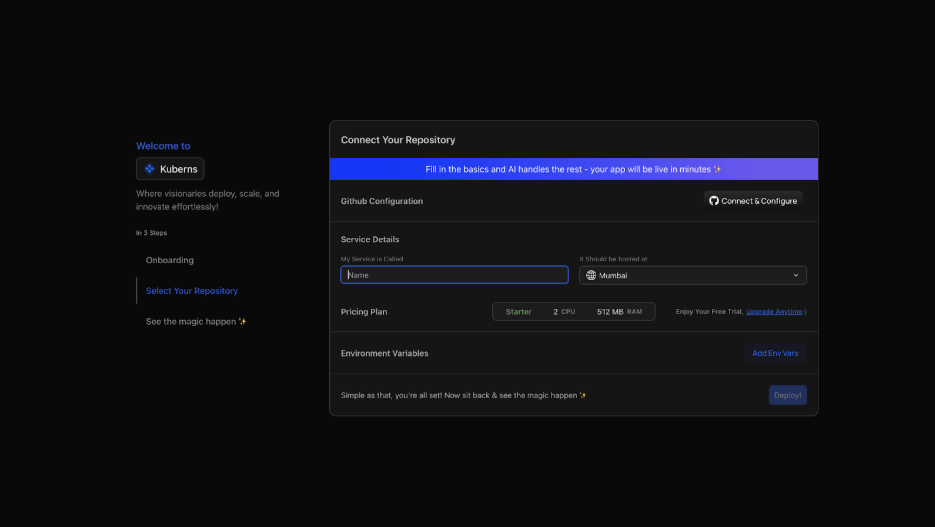
* Connect your GitHub account
* Select your MERN repository
* Choose the branch you want to deploy (usually main)
Once connected, the AI scans your project.
It automatically:
* detects your Node.js backend
* identifies your React frontend
* understands your project structure
* prepares the correct build and start configuration
You’re not writing configs, you’re just confirming what the AI detects.
### Step 3: Add Environment Variables
Before deploying, go to the Environment section.

You can:
* manually add key-value pairs, or
* Upload your .env file
Typical variables include:
* MONGO\_URI
* JWT\_SECRET
* REACT\_APP\_API\_URL or similar
For frontend environment variables (if your React app reads from .env at build time with Vite or CRA), add them here too:

All values are encrypted and never exposed in logs.
### Step 4: Click Deploy, Everything Runs Automatically
Click Deploy. From here, the platform handles the entire MERN deployment workflow.

The agentic AI:
* installs backend dependencies (npm install)
* builds the React frontend (npm run build)
* starts the Node.js server
* connects frontend and backend automatically
* configures internal routing between services
* provisions AWS infrastructure in your selected region
* enables HTTPS with SSL from the first request
* sets up CI/CD, every push triggers automatic redeployment

Your MERN app is live within minutes.
## What Kuberns Handles vs What You Handle Elsewhere
Deploying a MERN app manually or even on most platforms means handling multiple moving parts across frontend, backend, and database. Each part requires its own setup, configuration, and ongoing maintenance.
Here’s how that compares:
| MERN Deployment Requirement | Manual VPS | Render / Vercel | Kuberns |
| ------------------------------ | ----------------------------------- | ----------------------------- | --------------------------- |
| Node.js backend setup | Install Node, manage processes | Configure start commands | Automated by Agentic AI |
| React frontend build & hosting | Manual build + Nginx/static hosting | Auto build (separate service) | Automated by Agentic AI |
| MongoDB connection | Manual setup (Atlas or self-hosted) | Manual environment config | Auto-configured via env |
| Frontend ↔ Backend connection | Manual API URL setup | Manual | Automatically connected |
| Environment variables | Manual setup | Dashboard config | Secure + automated handling |
| CORS configuration | Manual debugging | Manual | Automatically handled |
| SSL / HTTPS | Certbot + renewal setup | Automatic | Automatic |
| CI/CD (auto deploy on push) | Manual pipelines | Basic Git deploy | Fully automated |
| Scaling frontend & backend | Manual | Limited control | Managed automatically |
| Monitoring & logs | Setup required | Basic | Built-in |
On most setups, you are responsible for making sure:
* Your frontend correctly calls your backend
* Your backend connects to your database
* Your environment variables are synced across services
* Your builds and deployments don’t break
And when something fails, debugging often means checking multiple services separately.
With Kuberns, the entire MERN stack is treated as a single system.
> 💡 Building a Next.js app instead of a separate React + Express MERN setup? Next.js handles SSR, API routes, and the frontend in one framework. See our Next.js deployment guide. Kuberns deploys it with the same one-click flow.
## MERN Production Deployment Checklist
* Root package.json has build script (cd client && npm install && npm run build) and start script (node server/server.js)
* server.js has CORS configured with process.env.CLIENT\_URL, not hardcoded domain
* server.js serves React static files in production with app.use(express.static(...)) and catch-all app.get('\*')
* The catch-all app.get('\*') comes after all app.use('/api/...') routes
* MONGODB\_URI uses an Atlas connection string, not localhost
* MongoDB Atlas Network Access has the correct IP or 0.0.0.0/0 whitelisted
* .env in .gitignore, confirmed not in repository
* All environment variables set in the Kuberns dashboard before the first deploy: MONGODB\_URI, NODE\_ENV=production, JWT\_SECRET, CLIENT\_URL, PORT
* Frontend API URL env var set before build: VITE\_API\_URL or REACT\_APP\_API\_URL
* process.env.PORT used for server port, not hardcoded
* React Router catch-all returns index.html for non-API routes
* Build logs show successful React compilation, and runtime logs show MongoDB Atlas connected
* Test a full flow: open the app URL, load data from the API, refresh on a React route.
## Conclusion
Deploying a MERN app is not just about making your code live. It involves setting up and connecting multiple parts, your database, backend, and frontend, in a way that works reliably in production.
Traditional approaches solve this in pieces. You deploy your frontend on one platform, your backend on another, and your database somewhere else. While this gives flexibility, it also increases complexity. Most of the effort goes into configuration, debugging, and keeping everything in sync rather than actually building your product.
That’s why many developers look for simpler ways to handle deployment.
Instead of managing multiple services and configurations, modern platforms are moving toward treating the application as a single system, where builds, infrastructure, and connections are handled together.
Kuberns follows this approach by automating the entire MERN deployment workflow. From detecting your project structure to building your frontend, running your backend, connecting services, and enabling CI/CD, everything is handled without requiring manual setup.
If your code is already on GitHub and your environment variables are ready, you can have your MERN app live in production within minutes.
[Deploy your MERN app with Kuberns ](https://dashboard.kuberns.com/login)
## Frequently Asked Questions
### How do I deploy a MERN app in 2026?
Push your MERN project to GitHub with the root package.json containing build and start scripts. Connect the repository on Kuberns. Add MONGODB\_URI, NODE\_ENV=production, JWT\_SECRET, and CLIENT\_URL as environment variables. Click Deploy. Kuberns runs npm run build to compile React, then npm start to run Express, which serves both the API and the React build from a single URL.
### Why does my MERN app show CORS errors in production?
CORS errors happen when your React frontend and Express backend run on different origins (different domains or ports). In production, configure cors() in Express with origin: process.env.CLIENT\_URL pointing to your frontend's exact production URL. On Kuberns with unified deployment, Express serving the React build, frontend and backend share the same origin and CORS is a non-issue entirely.
### Why can't MongoDB Atlas connect to my deployed app?
Two common causes: the MONGODB\_URI environment variable isn't set in the deployment platform's dashboard, or your server's IP address isn't whitelisted in Atlas Network Access. For PaaS platforms with dynamic IPs (Railway, Render, Fly.io), whitelist 0.0.0.0/0 in Atlas. For Kuberns, add the consistent project outbound IP or use 0.0.0.0/0 for simplicity.
### How do I serve my React frontend from Express in production?
Add two things to server.js after your API routes: app.use(express.static(path.join(\_\_dirname, '../client/build'))) to serve the static files, and app.get('\*', (req, res) => res.sendFile(...)) as a catch-all to return index.html for React Router routes. For Vite, the build output folder is dist instead of build. Kuberns handles the build step automatically, you just need the correct static path in your server.js.
### What is the best way to deploy a MERN stack application?
The simplest and most maintainable approach is unified deployment: Express serves both the API and the compiled React frontend from one service. This eliminates CORS complexity, reduces the number of services to manage, and makes environment variable management straightforward. On Kuberns, this unified pattern deploys in a single step with no server configuration.[ Deploy your MERN app now](https://dashboard.kuberns.com)
### Why does my React app return 404 on page refresh after deploying?
Express doesn't know about React Router routes. When a user refreshes /dashboard, Express looks for a file at that path, finds none, and returns 404. Fix this with a catch-all in server.js: app.get('\*', (req, res) => res.sendFile(path.join(\_\_dirname, '../client/build/index.html'))). This must come after all your API routes, or it intercepts API calls
### How do I deploy a MERN app with one click?
You can deploy a MERN app on Kuberns by connecting your GitHub repo and adding your environment variables. The platform handles builds, SSL, routing, and scaling.
### Does a MERN app need Docker?
Only if you are deploying manually. But platforms like Kuberns generate containers automatically from your code.
---
- [More Deployment Guides articles](https://kuberns.com/blogs/category/deployment-guides/1/)
- [All articles](https://kuberns.com/blogs/)
