# Deploy OpenClaw on Kuberns: One-Click Setup for a 24/7 AI Assistant
> Deploy OpenClaw, formerly Moltbot and Clawdbot, on Kuberns in one click. Run a secure, always-on AI assistant without managing servers or cloud infrastructure.
- **Author**: vamsi-mullapudi
- **Published**: 2026-02-09
- **Modified**: 2026-03-24
- **Category**: Open Source
- **URL**: https://kuberns.com/blogs/deploy-openclaw-on-kuberns-in-one-click/
---
## OpenClaw is now available on Kuberns
We’re excited to announce that OpenClaw (formerly Moltbot, earlier Clawdbot) can now be [deployed on Kuberns in just one click](https://kuberns.com/templates/open-claw)[.](https://kuberns.com/templates/open-claw)
OpenClaw has been gaining massive traction as a powerful open-source AI assistant that can run continuously, execute tasks, connect to external tools, and act on your behalf. Until now, deploying it meant dealing with Docker setups, cloud configuration, and long guides across platforms like DigitalOcean or Azure.
With Kuberns, that changes. You can now deploy OpenClaw as an always-on service without managing servers, containers, or infrastructure. Just connect your code, add your API keys, and Kuberns handles deployment, restarts, and scaling for you, no hassle.
This makes Kuberns one of the simplest and fastest ways to run OpenClaw as a 24/7 AI assistant in production.
## What is OpenClaw?

OpenClaw is an open-source AI assistant designed to go beyond chat. Instead of just answering questions, OpenClaw can take actions on your behalf. It can run continuously, respond to messages, trigger workflows, interact with external tools, and execute tasks based on instructions you give it.
At a high level, OpenClaw works like this:
* It connects to AI models like OpenAI, Anthropic, or NVIDIA APIs
* It listens for instructions from channels like Telegram, Slack, or webhooks
* It executes tasks using predefined tools and skills
* It keeps context and memory, so conversations and actions do not reset every time
Because it is open source and self-hosted, developers have full control over how it runs, what tools it can access, and how restricted or powerful it should be.
You can learn more about the project, its capabilities, and source code on the official OpenClaw GitHub repo at [openclaw.ai](https://github.com/openclaw/openclaw).
## Why deploy OpenClaw on Kuberns?
OpenClaw is designed to run continuously, listen for instructions, and take actions in real time. While it is easy to start locally, self-hosting it reliably on a server usually means dealing with Docker setups, environment variables, restarts, and ongoing maintenance. Over time, this operational overhead becomes the real bottleneck, not OpenClaw itself.
> [Kuberns](https://kuberns.com/) removes that complexity by turning OpenClaw into a managed, always-on service. You do not need to provision servers, configure containers, or worry about keeping the process alive.
Once deployed, Kuberns automatically handles restarts, health checks, and infrastructure management in the background, so OpenClaw keeps running without manual intervention.
### True one-click deployment
Another major advantage is how deployment is handled. Instead of following long guides and running multiple commands, Kuberns provides a clean deployment flow where you connect a repository or use a ready template, add your API keys, and deploy. This makes running OpenClaw feel closer to launching an app than setting up infrastructure.
### Cleaner and safer defaults
Security and control are also easier to manage on Kuberns. OpenClaw can be powerful, which means careless deployments can introduce risks. With Kuberns, secrets are handled through environment variables, SSH access is not required, and you can run OpenClaw with restricted permissions by default. This creates safer guardrails compared to running it directly on a VM.
### Lower operational cost
Finally, Kuberns offers a more predictable and cost-effective way to keep OpenClaw online. Instead of paying for large virtual machines that sit idle, OpenClaw runs on optimised infrastructure sized for its actual workload. This makes it practical to run a 24/7 AI assistant without overpaying for unused resources.
## How to set up OpenClaw on Kuberns
[Deploying OpenClaw on Kuberns takes only a few minutes](https://docs.kuberns.com/docs/open-source/OpenClaw). This is the [simplest and fastest way](https://kuberns.com/templates/open-claw)[ to deploy ](https://kuberns.com/templates/open-claw)[OpenClaw](https://kuberns.com/templates/open-claw) and start using it. There is no manual configuration, no local setup, and no complex cloud steps involved.
### Step 1: Open the OpenClaw One-Click Template
Go to the [Templates page](https://kuberns.com/templates) on Kuberns, select the OpjenClaw one-click template and click Deploy.
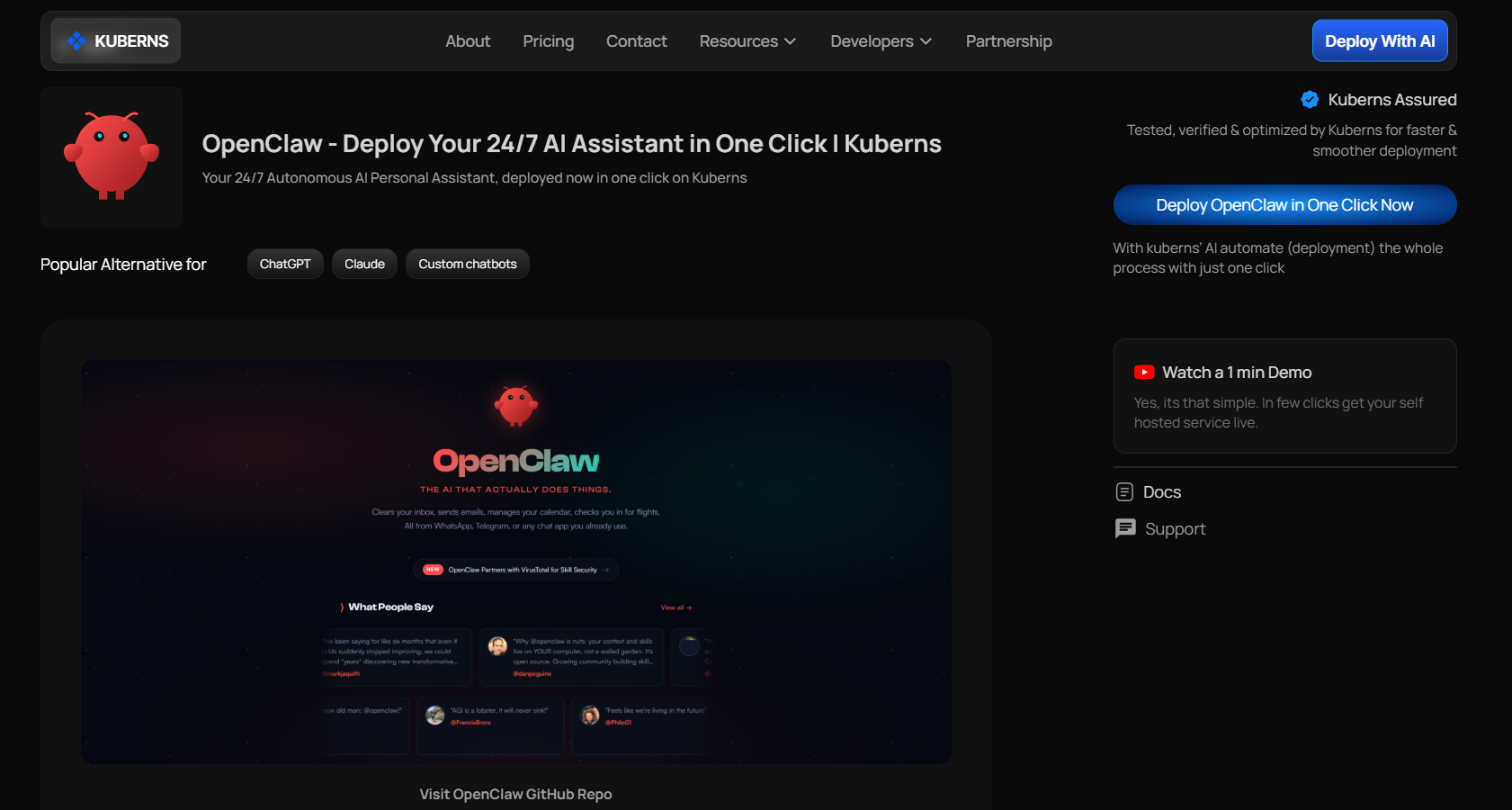
You don't need to fork the repository. It is already configured to work with Kuberns, so you do not need to change any code manually.
### Step 2: Add Basic Details and Required Environment Variables
[Sign up on Kuberns](https://dashboard.kuberns.com/) and connect your GitHub account.
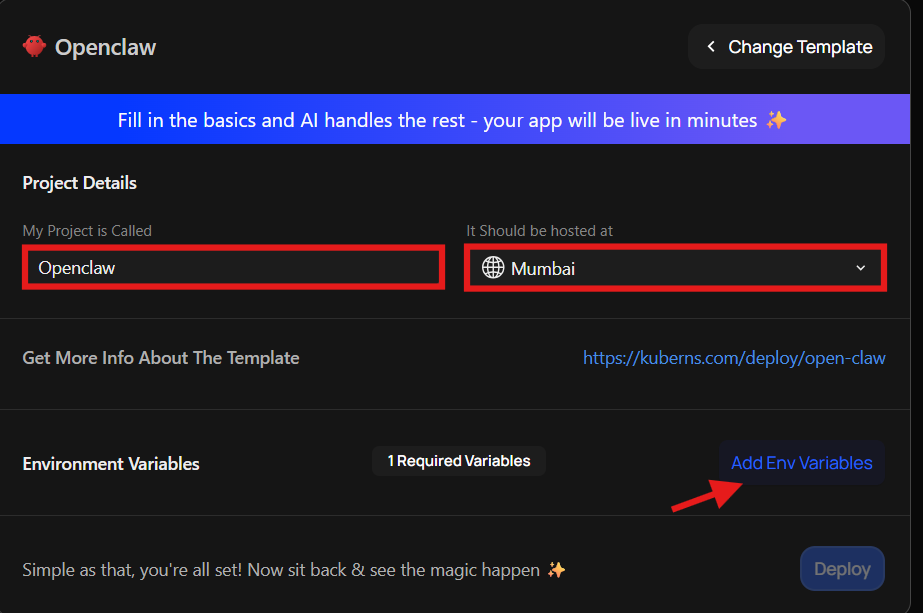
On the deployment screen, first enter your project name. This can be something like “My Openclaw Assistant” or “AI Assistant” Next, select the server region closest to your users to ensure better performance. \
Then, you will see the Environment Variables section showing that one environment variable is required. Click Add Env Variable and enter the required values.
### Step 3: Click Deploy
Click Deploy.
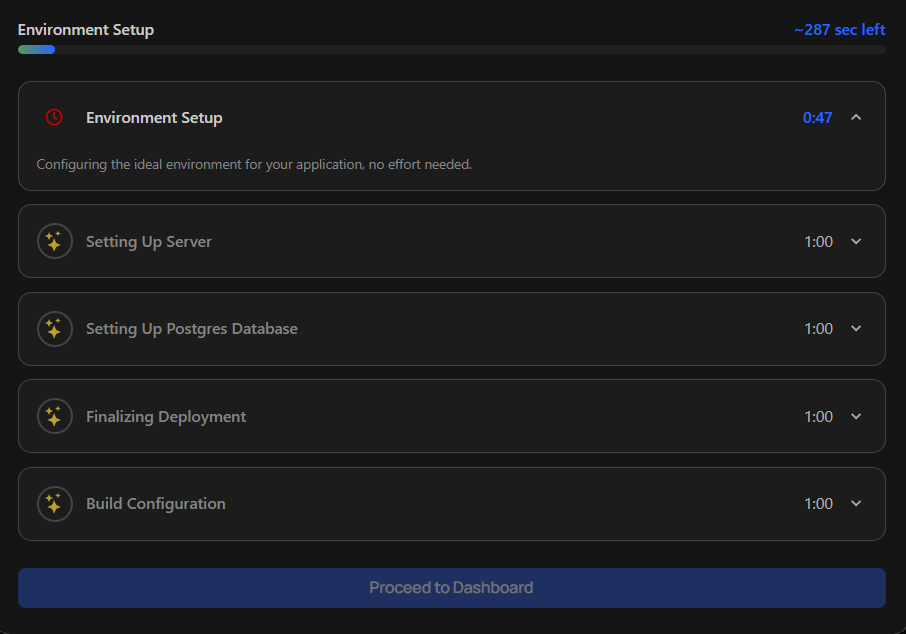
Kuberns will now deploy OpenClaw as an always-on service. You do not need to manage servers, containers, or restarts. Once deployment is complete, your OpenClaw instance is live and running online.
## Complete the OpenClaw setup
After deployment, click the [application URL shown in the Kuberns dashboard](https://dashboard.kuberns.com/). This opens the OpenClaw setup page.
### Step 4: Sign in to your account
On the setup page, add the username and password. Once done, proceed to the guided setup flow.
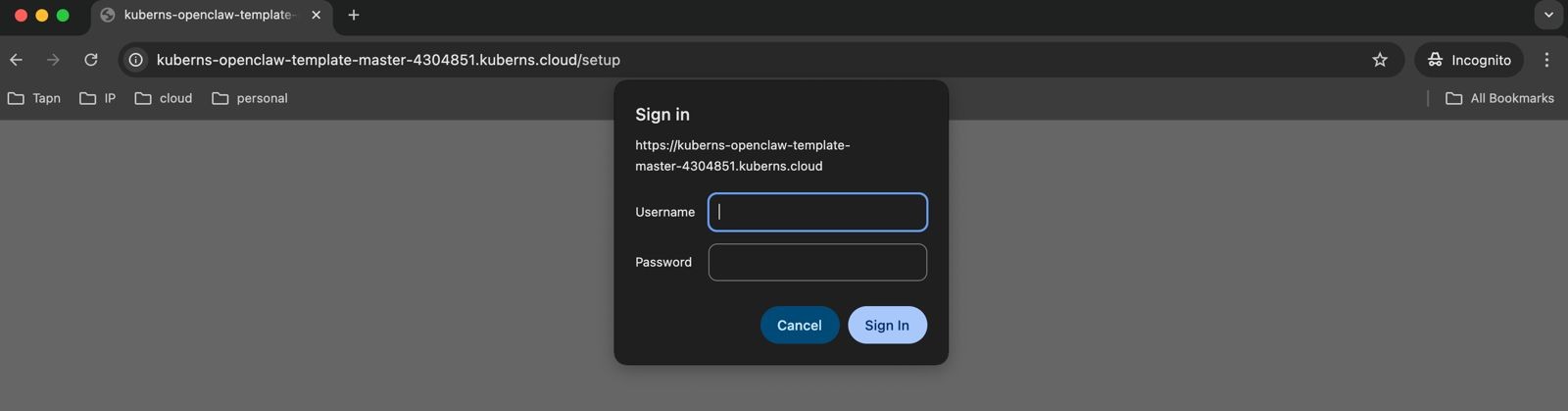
### Step 5: Follow the Simple setup flow
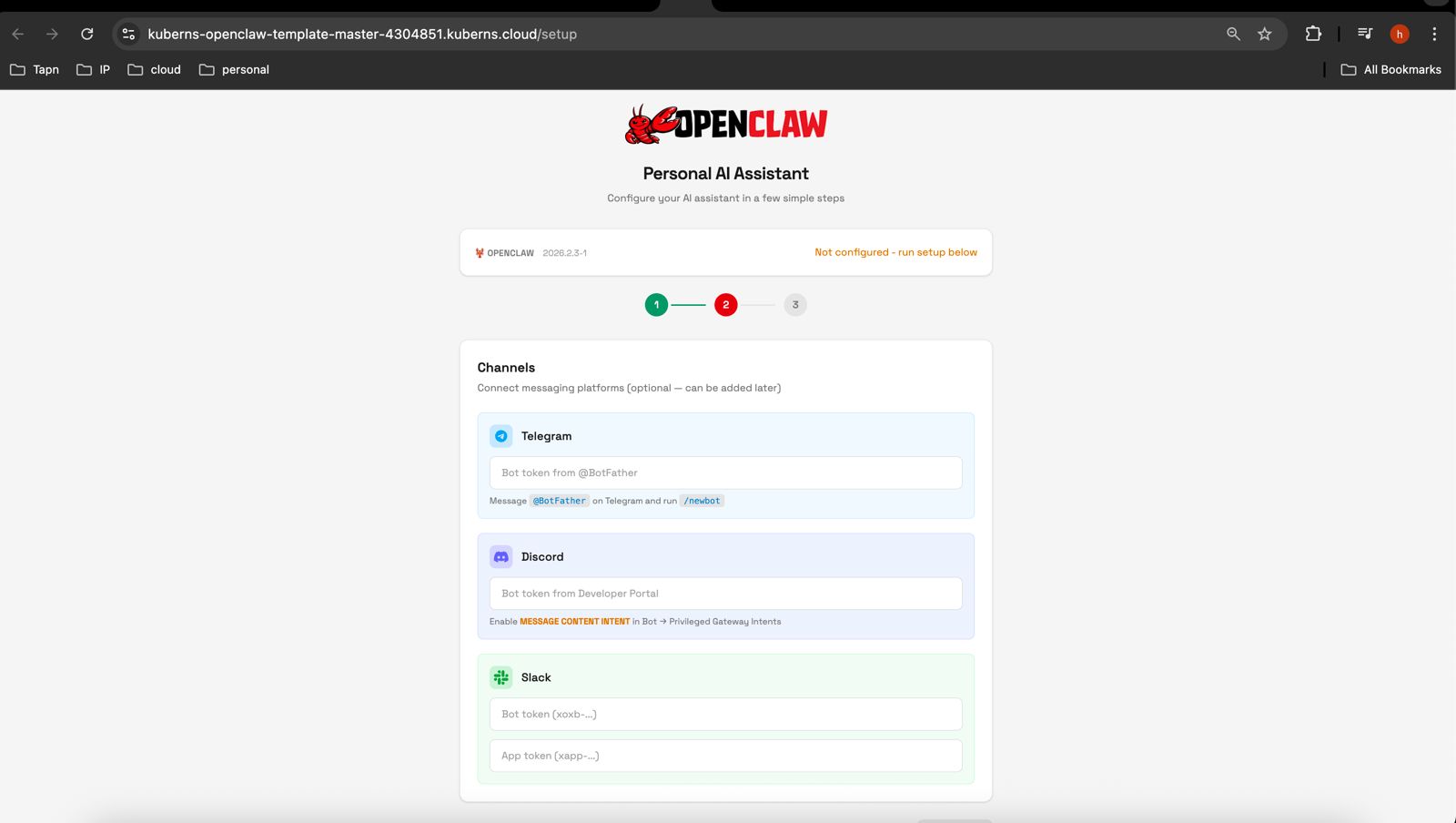
The setup screen walks you through three simple steps:
1. \*\*Select the required details (\*\*You can get the API Keys from [here](https://openrouter.ai/). Just go to [https://openrouter.ai/](https://openrouter.ai/) and create a new API Key and use that here.)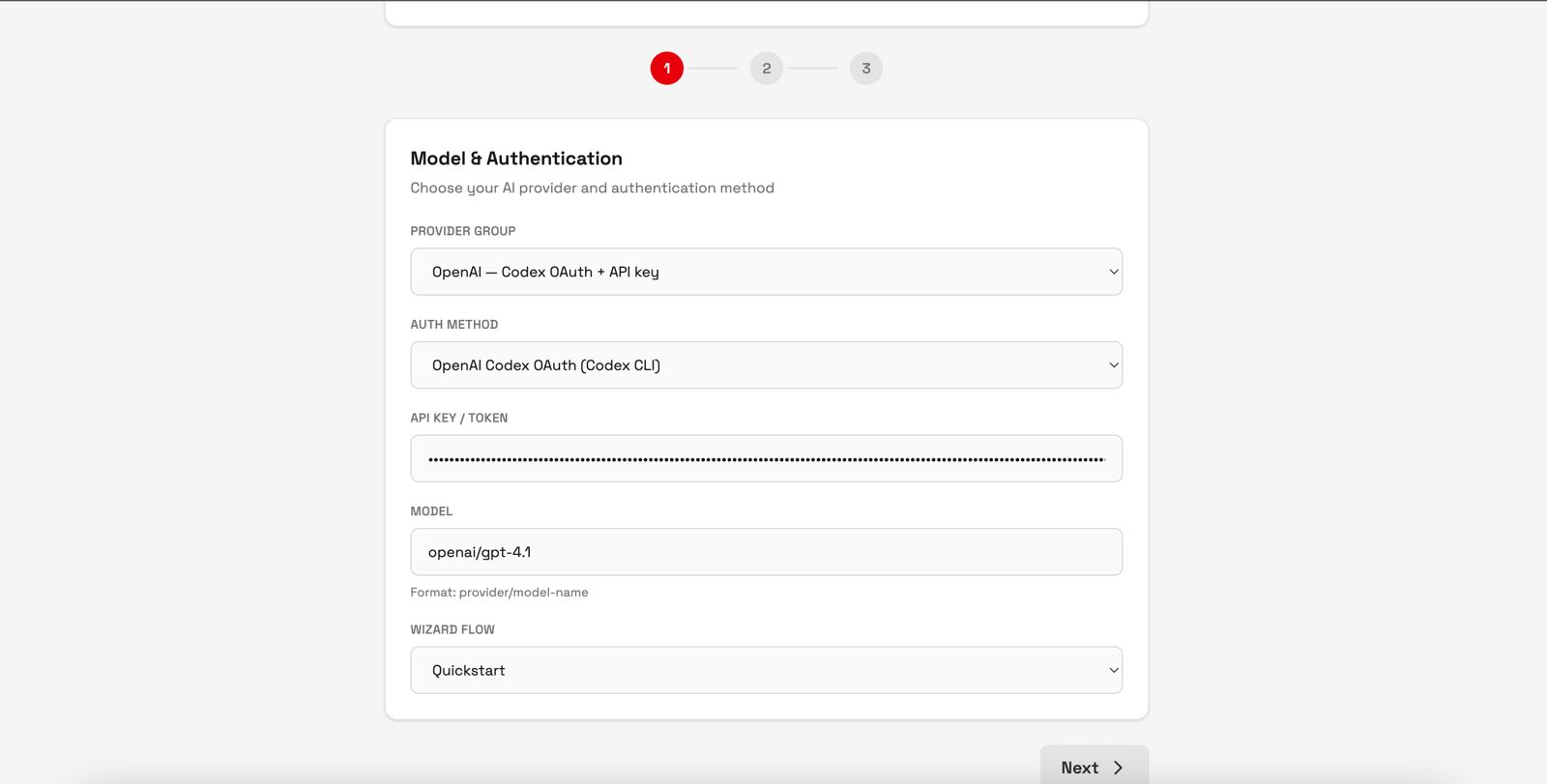
2. **Select Channels (Optional)**
3. **Click "Run Setup"**
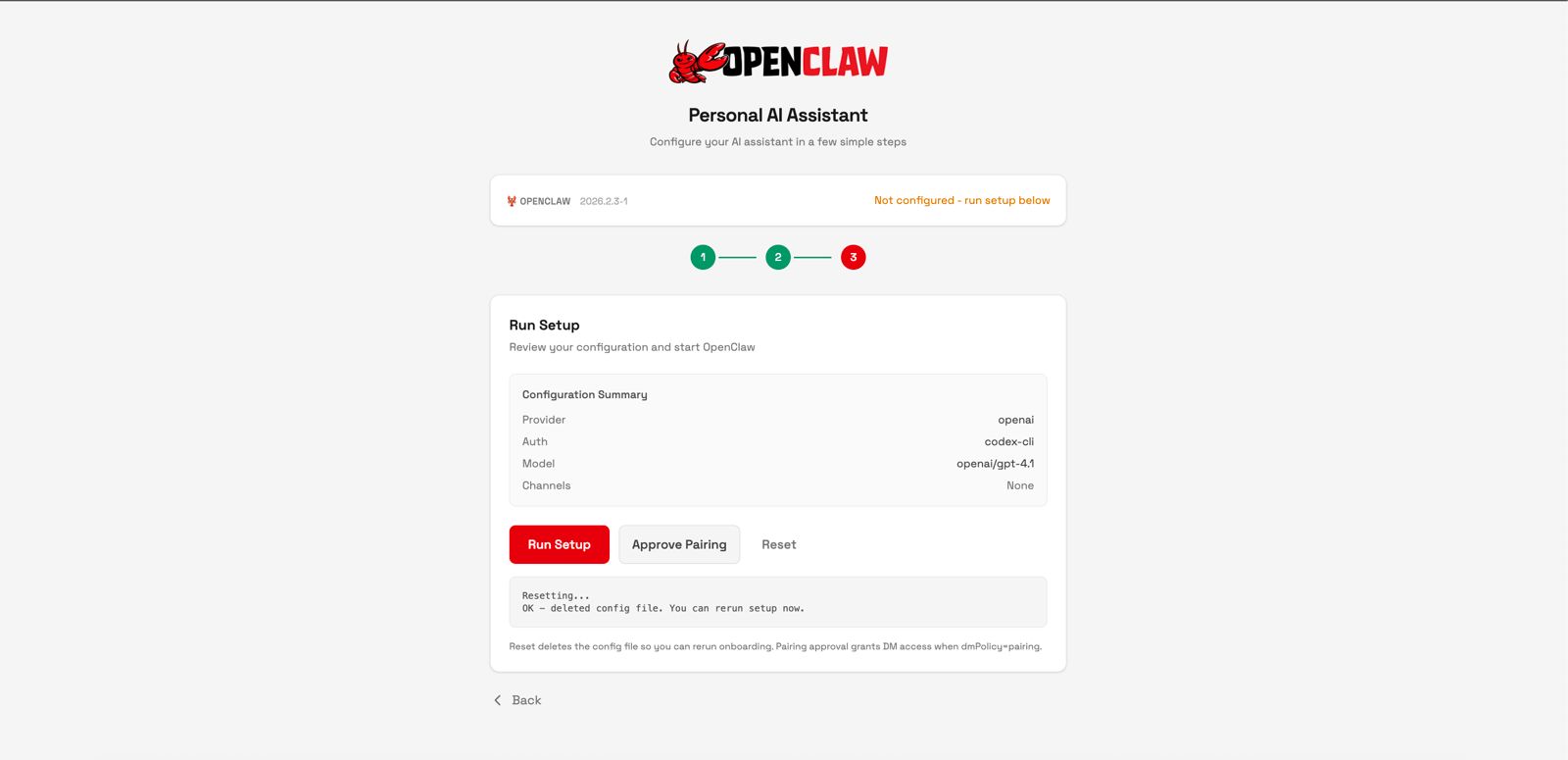
**That’s it. Within 30 seconds, OpenClaw is ready to use and fully operational.**
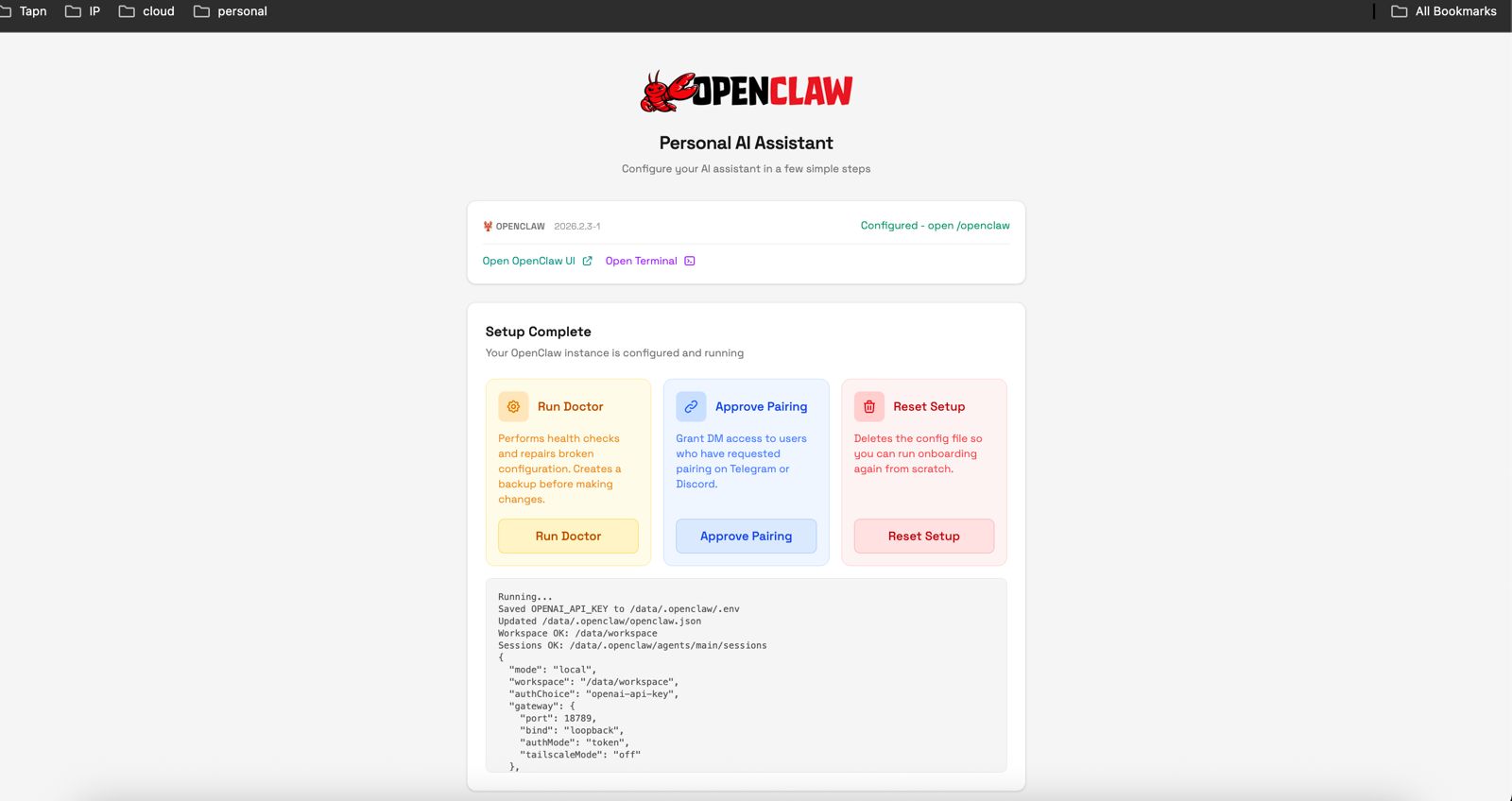
At this point, OpenClaw is live and running 24/7. You can start using it immediately.
#### **Explore How You can Self-Host OpenClaw in Simple Steps:**
## What makes Kuberns the default choice for openclaw deployment?
Most platforms can run OpenClaw. The real difference is how much work you need to do before and after deployment.
Built for applications, not just containers: On many cloud platforms, OpenClaw is treated like a generic container. You are responsible for wiring things together, understanding the platform’s limits, and keeping the service stable over time. That approach works, but it assumes you are comfortable managing infrastructure and making ongoing adjustments.
[Kuberns](https://kuberns.com/) is built specifically to remove that layer. OpenClaw is deployed as a managed application, not just a container. Kuberns handles restarts, health checks, and runtime stability automatically, so the agent stays online without constant attention.
Stays online without manual intervention: Another key difference is how Kuberns approaches defaults. The OpenClaw template on Kuberns is opinionated in a good way. It ships with sensible configurations, restricted permissions, and a clean environment variable setup. This reduces the risk of misconfiguration and makes it easier to run OpenClaw safely, especially for first-time users.
One place to manage logs, secrets, and deployments: Kuberns also keeps the developer experience simple. There is no need to jump between multiple dashboards or services to manage secrets, logs, or deployments. Everything lives in one place, which makes operating OpenClaw over weeks or months far less painful.
Built for always-on, long-running AI agents: Finally, Kuberns is designed around long-running services. OpenClaw is not a short-lived job or a serverless function. It needs to stay up, listen, and act continuously. Kuberns is optimised for exactly this kind of workload, making it a natural home for AI assistants that run 24/7.
### OpenClaw Use-Cases
* Build structured AI workflows, where multiple agents, tools, and steps work together, not just single chat prompts.
* Automate backend logic and decisions, replacing complex microservices with one controllable AI orchestration layer.
* Create internal AI tools for sales, support, ops, or product teams that follow company rules and data.
* React to events with AI, like webhooks, cron jobs, alerts, or system triggers, without manual intervention.
* Prototype and run AI products faster, with full control, self-hosting, and no vendor lock-in.
## How is the pricing comparison with other platforms?
When running OpenClaw, pricing usually becomes confusing because you are not just paying for compute. You are also paying for operational overhead, idle resources, and platform complexity.
On platforms like [DigitalOcean](https://www.digitalocean.com/community/tutorials/how-to-run-openclaw), OpenClaw typically runs on a full virtual machine or app container that stays online 24/7. Even if OpenClaw is idle for long periods, the VM keeps running, and billing continues. As you add storage, logs, or scale resources slightly, costs can grow faster than expected.
With [Microsoft Azure](https://techcommunity.microsoft.com/blog/appsonazureblog/%F0%9F%A6%9E-deploy-moltbot-to-azure-container-apps-your-247-ai-assistant-in-30-minutes/4490611) Container Apps, pricing depends on multiple variables such as vCPU seconds, memory usage, requests, and additional services. While powerful, this model often makes it harder to predict monthly costs, especially for long-running assistants like OpenClaw that are always online.
[Kuberns](https://kuberns.com/pricing) takes a simpler approach. OpenClaw runs as a managed, always-on service with clear resource limits and predictable pricing. You pay for the resources OpenClaw actually uses, without needing to overprovision a full VM or manage multiple cloud services just to keep it running.
> Because Kuberns hosts applications on optimised infrastructure and handles restarts, health checks, and deployment automatically, you avoid the hidden costs of maintenance time and operational complexity. For most developers, this makes [running OpenClaw on Kuberns](https://kuberns.com/templates/open-claw) both easier to budget and easier to maintain over the long term.
In short, if you want maximum control and are comfortable managing cloud infrastructure, traditional providers work. If you want a predictable, simpler way to run OpenClaw 24/7, Kuberns is usually the more practical option.
## Get started with OpenClaw on Kuberns
If you want to run OpenClaw as a reliable, always-on AI assistant without dealing with servers or complex cloud setup, Kuberns is the easiest way to get started.
You can deploy OpenClaw in just one click using the official Kuberns template. Add your API keys, deploy, and your assistant is live and running 24/7. No infrastructure to manage, no long setup guides to follow.
[Deploy OpenClaw on Kuberns](https://kuberns.com/templates/open-claw) (Get your AI assistant up and running in minutes.)
## Frequently Asked Questions (FAQ)
These questions are based on the most common things developers are asking right now about OpenClaw, deployment, and running it on managed platforms.
### What is the difference between OpenClaw, Moltbot, and Clawdbot?
They are the same project. OpenClaw was previously called Clawdbot and later Moltbot before being renamed to OpenClaw. The functionality and core idea remain the same, only the name has changed.
### Is OpenClaw safe to run on a server?
OpenClaw is powerful, which means safety depends on how it is deployed. Running it on a raw server with full shell access can be risky if not configured carefully. On managed platforms like [Kuberns](https://kuberns.com/), OpenClaw runs with safer defaults, controlled environment variables, and without direct SSH access, which significantly reduces risk.
### Does OpenClaw require a GPU?
No. Most users run OpenClaw using external AI APIs such as OpenAI, Anthropic, or NVIDIA APIs. In this setup, OpenClaw acts as the control layer and does not require a GPU on the server itself.
### Can OpenClaw run 24/7?
Yes. OpenClaw is designed to run continuously. On [Kuberns](https://kuberns.com/), it runs as an always-on service with automatic restarts and health checks, so it stays online without manual supervision.
### What happens if OpenClaw crashes or stops responding?
On Kuberns, the service is automatically restarted if it crashes. Logs are available in the dashboard so you can diagnose issues without accessing the underlying infrastructure.
### Can I [connect OpenClaw](https://kuberns.com/templates/open-claw) to Telegram, Slack, or other tools?
Yes. OpenClaw supports integrations through API tokens and webhooks. These can be added as environment variables during deployment or updated later without redeploying the application.
### Does OpenClaw store memory or conversation history?
That depends on how you configure it. You can run OpenClaw in a stateless mode for stricter isolation, or enable persistent storage to retain memory and logs across restarts.
### Can I scale OpenClaw for multiple users?
Yes, but OpenClaw is typically run as a single-agent service. For multi-user or multi-agent setups, teams usually deploy separate instances or manage task execution externally. [Kuberns](https://kuberns.com/) makes this easier by allowing multiple isolated deployments.
### Is this deployment suitable for production use?
Yes, for many use cases. [Kuberns is well-suited for running OpenClaw](https://kuberns.com/templates/open-claw) in production as a long-running service, especially when you want reliability without managing servers. For highly sensitive environments, additional restrictions and monitoring are still recommended.
### Can I stop or delete my OpenClaw deployment anytime?
Yes. You can stop, restart, or delete the deployment directly from the Kuberns dashboard. There are no long-lived servers to clean up manually.
---
- [More Open Source articles](https://kuberns.com/blogs/category/open-source/1/)
- [All articles](https://kuberns.com/blogs/)
 ## Frequently Asked Questions (FAQ)
These questions are based on the most common things developers are asking right now about OpenClaw, deployment, and running it on managed platforms.
### What is the difference between OpenClaw, Moltbot, and Clawdbot?
They are the same project. OpenClaw was previously called Clawdbot and later Moltbot before being renamed to OpenClaw. The functionality and core idea remain the same, only the name has changed.
### Is OpenClaw safe to run on a server?
OpenClaw is powerful, which means safety depends on how it is deployed. Running it on a raw server with full shell access can be risky if not configured carefully. On managed platforms like [Kuberns](https://kuberns.com/), OpenClaw runs with safer defaults, controlled environment variables, and without direct SSH access, which significantly reduces risk.
### Does OpenClaw require a GPU?
No. Most users run OpenClaw using external AI APIs such as OpenAI, Anthropic, or NVIDIA APIs. In this setup, OpenClaw acts as the control layer and does not require a GPU on the server itself.
### Can OpenClaw run 24/7?
Yes. OpenClaw is designed to run continuously. On [Kuberns](https://kuberns.com/), it runs as an always-on service with automatic restarts and health checks, so it stays online without manual supervision.
### What happens if OpenClaw crashes or stops responding?
On Kuberns, the service is automatically restarted if it crashes. Logs are available in the dashboard so you can diagnose issues without accessing the underlying infrastructure.
### Can I [connect OpenClaw](https://kuberns.com/templates/open-claw) to Telegram, Slack, or other tools?
Yes. OpenClaw supports integrations through API tokens and webhooks. These can be added as environment variables during deployment or updated later without redeploying the application.
### Does OpenClaw store memory or conversation history?
That depends on how you configure it. You can run OpenClaw in a stateless mode for stricter isolation, or enable persistent storage to retain memory and logs across restarts.
### Can I scale OpenClaw for multiple users?
Yes, but OpenClaw is typically run as a single-agent service. For multi-user or multi-agent setups, teams usually deploy separate instances or manage task execution externally. [Kuberns](https://kuberns.com/) makes this easier by allowing multiple isolated deployments.
### Is this deployment suitable for production use?
Yes, for many use cases. [Kuberns is well-suited for running OpenClaw](https://kuberns.com/templates/open-claw) in production as a long-running service, especially when you want reliability without managing servers. For highly sensitive environments, additional restrictions and monitoring are still recommended.
### Can I stop or delete my OpenClaw deployment anytime?
Yes. You can stop, restart, or delete the deployment directly from the Kuberns dashboard. There are no long-lived servers to clean up manually.
---
- [More Open Source articles](https://kuberns.com/blogs/category/open-source/1/)
- [All articles](https://kuberns.com/blogs/)
## Frequently Asked Questions (FAQ)
These questions are based on the most common things developers are asking right now about OpenClaw, deployment, and running it on managed platforms.
### What is the difference between OpenClaw, Moltbot, and Clawdbot?
They are the same project. OpenClaw was previously called Clawdbot and later Moltbot before being renamed to OpenClaw. The functionality and core idea remain the same, only the name has changed.
### Is OpenClaw safe to run on a server?
OpenClaw is powerful, which means safety depends on how it is deployed. Running it on a raw server with full shell access can be risky if not configured carefully. On managed platforms like [Kuberns](https://kuberns.com/), OpenClaw runs with safer defaults, controlled environment variables, and without direct SSH access, which significantly reduces risk.
### Does OpenClaw require a GPU?
No. Most users run OpenClaw using external AI APIs such as OpenAI, Anthropic, or NVIDIA APIs. In this setup, OpenClaw acts as the control layer and does not require a GPU on the server itself.
### Can OpenClaw run 24/7?
Yes. OpenClaw is designed to run continuously. On [Kuberns](https://kuberns.com/), it runs as an always-on service with automatic restarts and health checks, so it stays online without manual supervision.
### What happens if OpenClaw crashes or stops responding?
On Kuberns, the service is automatically restarted if it crashes. Logs are available in the dashboard so you can diagnose issues without accessing the underlying infrastructure.
### Can I [connect OpenClaw](https://kuberns.com/templates/open-claw) to Telegram, Slack, or other tools?
Yes. OpenClaw supports integrations through API tokens and webhooks. These can be added as environment variables during deployment or updated later without redeploying the application.
### Does OpenClaw store memory or conversation history?
That depends on how you configure it. You can run OpenClaw in a stateless mode for stricter isolation, or enable persistent storage to retain memory and logs across restarts.
### Can I scale OpenClaw for multiple users?
Yes, but OpenClaw is typically run as a single-agent service. For multi-user or multi-agent setups, teams usually deploy separate instances or manage task execution externally. [Kuberns](https://kuberns.com/) makes this easier by allowing multiple isolated deployments.
### Is this deployment suitable for production use?
Yes, for many use cases. [Kuberns is well-suited for running OpenClaw](https://kuberns.com/templates/open-claw) in production as a long-running service, especially when you want reliability without managing servers. For highly sensitive environments, additional restrictions and monitoring are still recommended.
### Can I stop or delete my OpenClaw deployment anytime?
Yes. You can stop, restart, or delete the deployment directly from the Kuberns dashboard. There are no long-lived servers to clean up manually.
---
- [More Open Source articles](https://kuberns.com/blogs/category/open-source/1/)
- [All articles](https://kuberns.com/blogs/)