# How to Deploy a Python App on Render (2026) - Complete Guide
> Deploy a Python app on Render in 2026 with this step-by-step guide covering Flask, Django, and FastAPI. Then see why Kuberns is a faster, smarter alternative.
- **Author**: omkar-anbhule
- **Published**: 2026-05-02
- **Modified**: 2026-05-02
- **Category**: Deployment Guides
- **URL**: https://kuberns.com/blogs/deploy-python-app-on-render/
---
Render is one of the more popular choices for deploying Python apps in 2026. It supports Flask, Django, FastAPI, and plain Python out of the box, connects to GitHub, and gets your app live without server setup.
But before you commit to the manual build command and start command configuration Render requires, it is worth knowing the limitations you will hit, especially the free tier sleep behavior, the cold starts, and the per-service pricing that stacks up quickly in production.
This guide covers exactly how to deploy a Python app on Render, what to watch out for, and why many developers have moved to [Kuberns](https://kuberns.com/) as a faster, smarter alternative that removes the friction entirely.
## Prerequisites: Prepare Your Python App for Render
These steps take less than ten minutes and prevent the most common Render deployment failures.
### 1. Add a requirements.txt
Render installs your dependencies by running `pip install -r requirements.txt`. Every package your app needs must be listed here.
For Flask:
```
flask==3.0.3
gunicorn==22.0.0
```
For FastAPI:
```
fastapi==0.111.0
uvicorn[standard]==0.29.0
```
For Django:
```
django==5.0.6
gunicorn==22.0.0
whitenoise==6.7.0
dj-database-url==2.1.0
psycopg2-binary==2.9.9
```
If you are missing gunicorn (Flask/Django) or uvicorn (FastAPI) in your requirements, your deployment will fail with a "command not found" error.
### 2. Bind to the PORT Environment Variable
Render injects `PORT` dynamically. Your app must listen on `0.0.0.0` at that port, not a hardcoded value.
For Flask:
```python
import os
from flask import Flask
app = Flask(__name__)
if __name__ == '__main__':
port = int(os.environ.get('PORT', 5000))
app.run(host='0.0.0.0', port=port)
```
For FastAPI, pass `--port $PORT` in your start command. Gunicorn and uvicorn both read the `PORT` environment variable when you pass it as a flag.
### 3. Push Your Code to GitHub
Render deploys from your repository. Push your latest code before connecting:
```bash
git add .
git commit -m "Prepare for Render deployment"
git push origin main
```
That is the complete prerequisite list. No Dockerfile required, no YAML config, no CLI to install.
 ## How to Deploy a Python App on Render (Step by Step)
### Step 1: Sign Up and Connect GitHub
Go to [render.com](https://render.com) and create an account. Connect your GitHub account when prompted so Render can access your repositories.
### Step 2: Create a New Web Service

In the Render dashboard, click **New** and select **Web Service**. Choose the repository that contains your Python app and select the branch you want to deploy from.
### Step 3: Configure Build and Start Commands
This is where Render requires manual setup. You need to tell it exactly how to install and run your app.
**Build command** (installs dependencies):
```
pip install -r requirements.txt
```
**Start command** depends on your framework:
| Framework | Start Command |
|---|---|
| Flask | `gunicorn app:app` |
| Django | `gunicorn yourproject.wsgi` |
| FastAPI | `uvicorn main:app --host 0.0.0.0 --port $PORT` |
For Django, also add a pre-deploy command to run migrations:
```
python manage.py migrate
```
> **On [Kuberns](https://kuberns.com/), you never touch any of this.** There is no build command to type, no start command to figure out, and no pre-deploy command to configure. The agentic AI detects whether you are running Flask, Django, or FastAPI, configures the correct WSGI or ASGI server automatically, and runs migrations for Django apps without any input from you. Connect your repo, add environment variables, click Deploy.
### Step 4: Choose an Instance Type
Render's free instance has a hard limitation: it spins down after 15 minutes of inactivity. The next incoming request triggers a cold start that takes 30 to 60 seconds. For any production Python API, this is a real problem. Users hit a blank screen or a timeout error while the service wakes up.
| Instance | Price | RAM | Cold starts |
|---|---|---|---|
| Free | $0/month | 512 MB | Yes, after 15 min idle |
| Starter | $7/month | 512 MB | No |
| Standard | $25/month | 2 GB | No |
For production, the Starter tier is the minimum. That is $7 per service, per month, before you add a database.
### Step 5: Add Environment Variables
Under the **Advanced** section, add your app secrets:
- `SECRET_KEY` for Django or Flask
- `DATABASE_URL` if connecting to a database
- `DEBUG` set to `False` for production
- Any API keys your app uses
Render encrypts and injects these at runtime.
### Step 6: Deploy
Click **Create Web Service**. Render runs your build command, starts your app using the start command you specified, and assigns an `onrender.com` URL. The first build usually takes 2 to 5 minutes depending on your dependencies.
Every future push to the connected branch triggers an automatic redeploy.
## Where Render Falls Short for Python Apps

Render works well for getting a Python app live quickly. But as your app grows, you will run into limitations that cause friction.
**Cold starts on the free tier kill user experience.** Free web services sleep after 15 minutes. If your Python API receives a request after a period of inactivity, the user waits 30 to 60 seconds for a response. This is not acceptable for a real product. You are forced to upgrade to a paid tier just to get predictable response times.
**Manual start commands lead to silent failures.** Render does not auto-detect your Python framework. If your start command is wrong, your deployment shows as live but your app returns 502 or 503 errors. Debugging this means reading through build logs to find a misconfigured gunicorn path or a missing module. Platforms like [Kuberns](https://kuberns.com/) auto-detect your framework and configure the server correctly without you specifying a single command.
**Per-service pricing adds up fast.** One Python web service at $7/month. A Postgres database at $7/month. Add a background worker and you are at $21/month before your app does anything significant. If you need a staging environment, that doubles. See the [Render vs Kuberns comparison](https://kuberns.com/blogs/railway-vs-render-vs-kuberns/) for a detailed cost breakdown.
**No autoscaling on lower tiers.** Horizontal autoscaling, running multiple instances in parallel to handle traffic spikes, is only available on Render's Professional workspace plan. If you are on the Hobby tier, a traffic spike means slow responses or errors, not automatic scaling.
**Reddit users have noticed too.**


These are not edge cases. Cold starts, failed deployments from misconfigured start commands, and surprise billing are the most common complaints from Python developers on Render.
## How to Deploy a Python App on Render (Step by Step)
### Step 1: Sign Up and Connect GitHub

Go to [render.com](https://render.com) and create an account. Connect your GitHub account when prompted so Render can access your repositories.
### Step 2: Create a New Web Service

In the Render dashboard, click **New** and select **Web Service**. Choose the repository that contains your Python app and select the branch you want to deploy from.
### Step 3: Configure Build and Start Commands
This is where Render requires manual setup. You need to tell it exactly how to install and run your app.
**Build command** (installs dependencies):
```
pip install -r requirements.txt
```
**Start command** depends on your framework:
| Framework | Start Command |
|---|---|
| Flask | `gunicorn app:app` |
| Django | `gunicorn yourproject.wsgi` |
| FastAPI | `uvicorn main:app --host 0.0.0.0 --port $PORT` |
For Django, also add a pre-deploy command to run migrations:
```
python manage.py migrate
```
> **On [Kuberns](https://kuberns.com/), you never touch any of this.** There is no build command to type, no start command to figure out, and no pre-deploy command to configure. The agentic AI detects whether you are running Flask, Django, or FastAPI, configures the correct WSGI or ASGI server automatically, and runs migrations for Django apps without any input from you. Connect your repo, add environment variables, click Deploy.
### Step 4: Choose an Instance Type
Render's free instance has a hard limitation: it spins down after 15 minutes of inactivity. The next incoming request triggers a cold start that takes 30 to 60 seconds. For any production Python API, this is a real problem. Users hit a blank screen or a timeout error while the service wakes up.
| Instance | Price | RAM | Cold starts |
|---|---|---|---|
| Free | $0/month | 512 MB | Yes, after 15 min idle |
| Starter | $7/month | 512 MB | No |
| Standard | $25/month | 2 GB | No |
For production, the Starter tier is the minimum. That is $7 per service, per month, before you add a database.
### Step 5: Add Environment Variables
Under the **Advanced** section, add your app secrets:
- `SECRET_KEY` for Django or Flask
- `DATABASE_URL` if connecting to a database
- `DEBUG` set to `False` for production
- Any API keys your app uses
Render encrypts and injects these at runtime.
### Step 6: Deploy
Click **Create Web Service**. Render runs your build command, starts your app using the start command you specified, and assigns an `onrender.com` URL. The first build usually takes 2 to 5 minutes depending on your dependencies.
Every future push to the connected branch triggers an automatic redeploy.
## Where Render Falls Short for Python Apps

Render works well for getting a Python app live quickly. But as your app grows, you will run into limitations that cause friction.
**Cold starts on the free tier kill user experience.** Free web services sleep after 15 minutes. If your Python API receives a request after a period of inactivity, the user waits 30 to 60 seconds for a response. This is not acceptable for a real product. You are forced to upgrade to a paid tier just to get predictable response times.
**Manual start commands lead to silent failures.** Render does not auto-detect your Python framework. If your start command is wrong, your deployment shows as live but your app returns 502 or 503 errors. Debugging this means reading through build logs to find a misconfigured gunicorn path or a missing module. Platforms like [Kuberns](https://kuberns.com/) auto-detect your framework and configure the server correctly without you specifying a single command.
**Per-service pricing adds up fast.** One Python web service at $7/month. A Postgres database at $7/month. Add a background worker and you are at $21/month before your app does anything significant. If you need a staging environment, that doubles. See the [Render vs Kuberns comparison](https://kuberns.com/blogs/railway-vs-render-vs-kuberns/) for a detailed cost breakdown.
**No autoscaling on lower tiers.** Horizontal autoscaling, running multiple instances in parallel to handle traffic spikes, is only available on Render's Professional workspace plan. If you are on the Hobby tier, a traffic spike means slow responses or errors, not automatic scaling.
**Reddit users have noticed too.**


These are not edge cases. Cold starts, failed deployments from misconfigured start commands, and surprise billing are the most common complaints from Python developers on Render.
 ## The Faster Way: Deploy Your Python App on Kuberns

[Kuberns](https://kuberns.com/) is an agentic AI deployment platform built on AWS. It reads your Python project, detects your framework automatically, installs dependencies, configures the correct WSGI or ASGI server, and deploys your app with HTTPS, CI/CD, and auto-scaling enabled. No start commands, no Procfile, no cold starts.
### Step 1: Create Your Kuberns Account
Go to [kuberns.com](https://kuberns.com/) and sign up. New accounts get free credits. No credit card needed to start.
### Step 2: Connect Your GitHub Repository
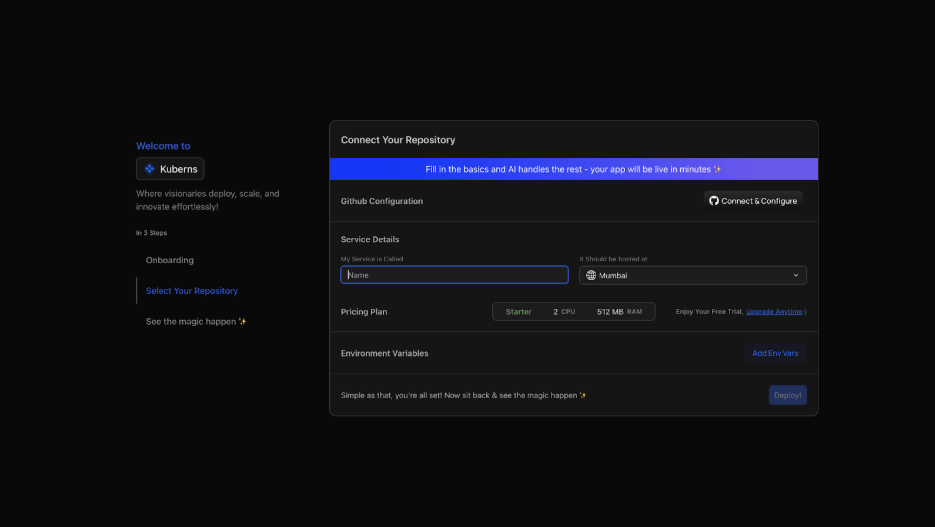
On the **Creating a Service** page, connect your GitHub account and select your Python repository and branch.
Kuberns AI scans your project immediately:
- Detects Flask from `app.py` and `requirements.txt`
- Detects Django from `manage.py` and `settings.py`
- Detects FastAPI from your main module and `uvicorn` dependency
You do not select a start command. The AI figures it out.
### Step 3: Add Environment Variables

Add your `SECRET_KEY`, `DATABASE_URL`, and other secrets in the Environment tab. Click **Add Env Vars** to add individually or **Upload .env file** to import all at once.
Kuberns encrypts every value at rest. They never appear in build logs.
### Step 4: Click Deploy

Click **Deploy**. Kuberns agentic AI takes over:
- Installs all dependencies from `requirements.txt`
- Configures gunicorn or uvicorn based on your detected framework
- Runs database migrations automatically for Django apps
- Provisions AWS compute in your chosen region
- Issues an SSL certificate and assigns a live HTTPS URL
- Enables monitoring, logging, and AI-driven auto-scaling
- Sets up CI/CD for every future push to the connected branch
### Step 5: Your Python App is Live

Your app is live with a verified HTTPS URL in under five minutes. No sleep behavior, no cold starts, no manual server configuration to maintain.
## Render vs Kuberns: Python Deployment Comparison
| Feature | Render | Kuberns |
|---|---|---|
| Auto-detects Python framework | No, manual start command | Yes, agentic AI detects Flask/Django/FastAPI |
| Cold starts | Yes, on free tier | No |
| Free tier available | Yes, with sleep | Yes, with free credits |
| Build config required | Yes, build + start commands | No |
| Autoscaling | Professional plan only | Built in, AI-driven |
| Infrastructure | Render cloud | AWS |
| CI/CD | Yes, auto-deploy on push | Yes, auto-deploy on push |
| Starting price | $7/month per service | $7/month |
| Monitoring | Basic | AI-driven with proactive alerts |
For a Python app that needs to stay responsive, scale with traffic, and not require you to debug start command errors at midnight, Kuberns is the cleaner choice.
Read the full [Render alternatives guide](https://kuberns.com/blogs/best-render-alternatives/) to see how the platforms compare across more scenarios.
## The Faster Way: Deploy Your Python App on Kuberns

[Kuberns](https://kuberns.com/) is an agentic AI deployment platform built on AWS. It reads your Python project, detects your framework automatically, installs dependencies, configures the correct WSGI or ASGI server, and deploys your app with HTTPS, CI/CD, and auto-scaling enabled. No start commands, no Procfile, no cold starts.
### Step 1: Create Your Kuberns Account
Go to [kuberns.com](https://kuberns.com/) and sign up. New accounts get free credits. No credit card needed to start.
### Step 2: Connect Your GitHub Repository

On the **Creating a Service** page, connect your GitHub account and select your Python repository and branch.
Kuberns AI scans your project immediately:
- Detects Flask from `app.py` and `requirements.txt`
- Detects Django from `manage.py` and `settings.py`
- Detects FastAPI from your main module and `uvicorn` dependency
You do not select a start command. The AI figures it out.
### Step 3: Add Environment Variables

Add your `SECRET_KEY`, `DATABASE_URL`, and other secrets in the Environment tab. Click **Add Env Vars** to add individually or **Upload .env file** to import all at once.
Kuberns encrypts every value at rest. They never appear in build logs.
### Step 4: Click Deploy

Click **Deploy**. Kuberns agentic AI takes over:
- Installs all dependencies from `requirements.txt`
- Configures gunicorn or uvicorn based on your detected framework
- Runs database migrations automatically for Django apps
- Provisions AWS compute in your chosen region
- Issues an SSL certificate and assigns a live HTTPS URL
- Enables monitoring, logging, and AI-driven auto-scaling
- Sets up CI/CD for every future push to the connected branch
### Step 5: Your Python App is Live

Your app is live with a verified HTTPS URL in under five minutes. No sleep behavior, no cold starts, no manual server configuration to maintain.
## Render vs Kuberns: Python Deployment Comparison
| Feature | Render | Kuberns |
|---|---|---|
| Auto-detects Python framework | No, manual start command | Yes, agentic AI detects Flask/Django/FastAPI |
| Cold starts | Yes, on free tier | No |
| Free tier available | Yes, with sleep | Yes, with free credits |
| Build config required | Yes, build + start commands | No |
| Autoscaling | Professional plan only | Built in, AI-driven |
| Infrastructure | Render cloud | AWS |
| CI/CD | Yes, auto-deploy on push | Yes, auto-deploy on push |
| Starting price | $7/month per service | $7/month |
| Monitoring | Basic | AI-driven with proactive alerts |
For a Python app that needs to stay responsive, scale with traffic, and not require you to debug start command errors at midnight, Kuberns is the cleaner choice.
Read the full [Render alternatives guide](https://kuberns.com/blogs/best-render-alternatives/) to see how the platforms compare across more scenarios.
 ## Frequently Asked Questions
**Do I need a Dockerfile to deploy Python on Render?**
No. Render detects Python from your `requirements.txt` and runs a native Python buildpack. You only need a Dockerfile if you want full control over the runtime environment.
**Why does my Python app on Render show as deployed but return 502 errors?**
The most common cause is a wrong start command. Render does not validate your start command before deployment. If gunicorn cannot find your app module (for example `app:app` when your file is named `wsgi.py`), the service starts but immediately crashes. Check the service logs in the Render dashboard for the exact error.
**How do I run Django migrations on Render?**
Add `python manage.py migrate` as a pre-deploy command in the Render service settings under the **Advanced** section. This runs migrations before traffic is switched to the new deployment.
**Can I connect a PostgreSQL database to my Python app on Render?**
Yes. Create a Render PostgreSQL service, copy the internal connection URL, and add it as `DATABASE_URL` in your web service's environment variables. Note: the free Postgres tier expires after 30 days and gets deleted if not upgraded.
**Is Render or Kuberns better for FastAPI?**
For a simple FastAPI prototype, Render works. For a production FastAPI app that needs to stay awake, scale with traffic, and deploy without configuring uvicorn manually, [Kuberns](https://kuberns.com/) is the stronger choice. The agentic AI detects FastAPI and configures uvicorn correctly without you specifying a single command.
**Does Render support Python background workers?**
Yes. Render has a Background Worker service type that runs a long-running Python process. Background workers require at least a Starter ($7/month) instance and are billed separately from your web service.
---
- [More Deployment Guides articles](https://kuberns.com/blogs/category/deployment-guides/1/)
- [All articles](https://kuberns.com/blogs/)
## Frequently Asked Questions
**Do I need a Dockerfile to deploy Python on Render?**
No. Render detects Python from your `requirements.txt` and runs a native Python buildpack. You only need a Dockerfile if you want full control over the runtime environment.
**Why does my Python app on Render show as deployed but return 502 errors?**
The most common cause is a wrong start command. Render does not validate your start command before deployment. If gunicorn cannot find your app module (for example `app:app` when your file is named `wsgi.py`), the service starts but immediately crashes. Check the service logs in the Render dashboard for the exact error.
**How do I run Django migrations on Render?**
Add `python manage.py migrate` as a pre-deploy command in the Render service settings under the **Advanced** section. This runs migrations before traffic is switched to the new deployment.
**Can I connect a PostgreSQL database to my Python app on Render?**
Yes. Create a Render PostgreSQL service, copy the internal connection URL, and add it as `DATABASE_URL` in your web service's environment variables. Note: the free Postgres tier expires after 30 days and gets deleted if not upgraded.
**Is Render or Kuberns better for FastAPI?**
For a simple FastAPI prototype, Render works. For a production FastAPI app that needs to stay awake, scale with traffic, and deploy without configuring uvicorn manually, [Kuberns](https://kuberns.com/) is the stronger choice. The agentic AI detects FastAPI and configures uvicorn correctly without you specifying a single command.
**Does Render support Python background workers?**
Yes. Render has a Background Worker service type that runs a long-running Python process. Background workers require at least a Starter ($7/month) instance and are billed separately from your web service.
---
- [More Deployment Guides articles](https://kuberns.com/blogs/category/deployment-guides/1/)
- [All articles](https://kuberns.com/blogs/)