# How to Deploy Your RAG Application Safely to Production
> Deploy your RAG application on Kuberns with a production API, background ingestion, persistent vector storage, secure secrets, monitoring, and scaling.
- **Author**: parth-kanpariya
- **Published**: 2026-10-02
- **Modified**: 2026-10-02
- **Category**: Deployment Guides
- **URL**: https://kuberns.com/blogs/deploy-rag-application/
---
To **deploy a RAG application to production**, separate the user-facing API from document ingestion, connect persistent vector and application storage, move credentials into environment variables, add authentication and tenant-level retrieval filters, and deploy each long-running process with health checks and logs.
A local retrieval-augmented generation demonstration may upload a PDF, create embeddings, and answer a question inside one process. A production application must keep that workflow reliable while several users upload documents, background jobs run, services restart, and model or database requests fail.
This guide uses [Kuberns](https://kuberns.com/) for the deployment workflow. Your RAG framework, model provider, embedding model, and vector database remain choices inside the application.
## What Does a Production RAG Application Need?
A production RAG application is not only a chat endpoint connected to a vector database. It is a coordinated system for receiving documents, processing them asynchronously, storing vectors and metadata, enforcing access controls, retrieving permitted context, generating answers, and monitoring the complete request path.
| Component | Production responsibility |
| --- | --- |
| Web or API service | Accept queries, uploads, and authenticated requests |
| Ingestion worker | Parse, chunk, embed, and index documents |
| Job queue | Move long-running ingestion outside web requests |
| PostgreSQL or application database | Store users, tenants, document metadata, and job state |
| Vector storage | Store embeddings and retrieve relevant chunks |
| File or object storage | Preserve original uploaded documents |
| Model providers | Generate embeddings and answers |
| Authentication layer | Identify users and authorize document access |
| Monitoring | Track failures, latency, ingestion state, retrieval quality, and costs |
A practical deployment has two connected paths:
```text
User query -> API -> Retrieval -> Vector store -> Model provider
Document upload -> Queue -> Ingestion worker -> File storage + Vector store
```
The distinction matters because query traffic and ingestion have different failure modes. In a current community discussion about production RAG stacks in 2026, developers identify ingestion, stale data, duplicate facts, orchestration, provenance, monitoring, and infrastructure as recurring production concerns. The local retrieval loop is only one part of the deployed product.
## Prepare the RAG Application for Production Deployment
Before choosing infrastructure, make each application process explicit. A maintainable repository might separate API, ingestion, retrieval, authentication, and storage logic:
```text
app/
api/
ingestion/
retrieval/
auth/
storage/
models/
```
That structure does not require a large microservice architecture. A small application can stay in one repository and still expose separate web and worker processes.
### Separate Query Traffic From Document Ingestion
The API should accept a document, record an ingestion job, and return a stable job identifier. A worker can then parse the file, split it into chunks, call the embedding provider, write vectors, and update the document status.
Moving this work outside the request prevents a large upload from consuming API capacity or failing because of an HTTP timeout. It also gives ingestion its own retry, concurrency, memory, and scaling controls.
When a queue is unnecessary for the first version, the application can use a database-backed job table. The essential point is that a long-running ingestion task should be recoverable and should not disappear when the web request ends.
### Add Health and Readiness Endpoints
Add a lightweight process health endpoint that confirms the API is running. A separate readiness check can verify required dependencies such as PostgreSQL or the vector store.
Avoid calling an LLM or embedding model during every health check. Provider latency and rate limits should not make a healthy API appear unavailable. Track those providers through application metrics and controlled synthetic requests instead.
For production server commands, port binding, and service-health preparation beyond the RAG pipeline, see the [backend application deployment guide](https://kuberns.com/blogs/how-to-deploy-backend-applications-with-ai/).
### Move Configuration and Secrets Out of the Repository
Production values vary by architecture, but a RAG application commonly expects variables such as:
```text
DATABASE_URL
VECTOR_DATABASE_URL
VECTOR_DATABASE_API_KEY
MODEL_API_KEY
EMBEDDING_MODEL
GENERATION_MODEL
OBJECT_STORAGE_BUCKET
OBJECT_STORAGE_ACCESS_KEY
OBJECT_STORAGE_SECRET_KEY
JWT_SECRET
ALLOWED_ORIGINS
```
Use the exact names required by your code. Keep a `.env.example` with safe placeholders, but never commit live database credentials, provider keys, storage secrets, or authentication secrets. The [production environment variable guide](https://kuberns.com/blogs/environment-variables-in-production/) explains how to separate configuration across local, staging, and production environments.
## Deploy a RAG Application on Kuberns With Agentic AI
Kuberns is an **Agentic AI platform for deployment**. It can inspect a connected repository, prepare the supported runtime configuration, and organize application processes and data resources within an environment. You still control retrieval behavior, security rules, data handling, and provider choices in the application.

### Step 1: Push the Production Repository to GitHub
Before connecting the project, confirm that:
- Dependencies are declared and locked where appropriate.
- The API has a production start command.
- The server binds to `0.0.0.0` and reads its assigned port from the environment.
- The web and ingestion-worker commands are documented.
- Local database files, generated indexes, and uploaded documents are not committed.
- Health endpoints are available.
- Shutdown and interrupted-job behavior are handled safely.
If the project contains a frontend, API, and worker, clear directories and process names make the detected configuration easier to review.
The [full-stack application deployment guide](https://kuberns.com/blogs/deploy-full-stack-app-with-ai/) explains how to organize related frontend and backend services when the RAG product also includes a web interface.
### Step 2: Connect the Repository to Kuberns
Create a project, connect the relevant GitHub installation, and select the repository and production branch. Choose from the regions currently available in the dashboard and start the deployment analysis.
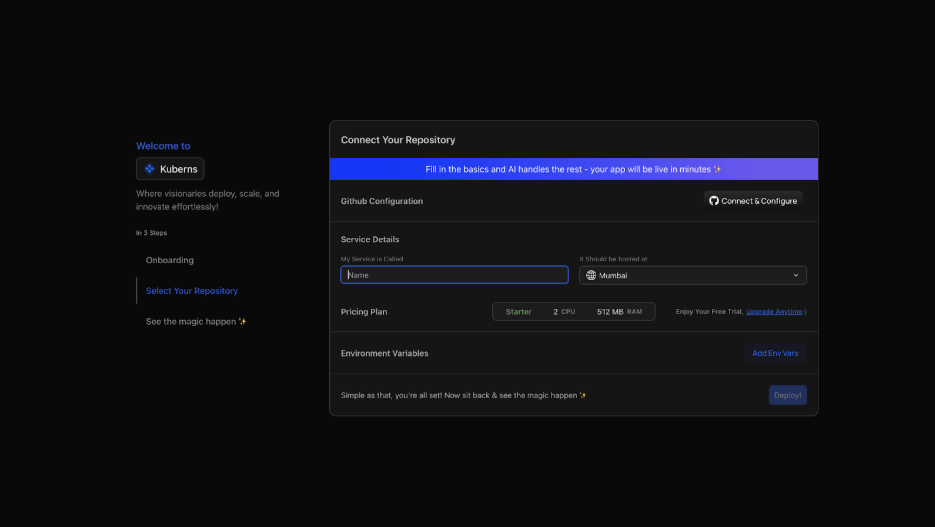
The deployment agent can detect the framework, root directory, dependencies, ports, build commands, process commands, Dockerfiles, variable names, and supporting resources. Review the result before deploying. The official Kuberns getting-started guide documents this repository-based workflow.
### Step 3: Configure the API and Ingestion Worker
Map each long-running process to an application resource:
| RAG process | Deployment role |
| --- | --- |
| FastAPI or another backend | Web/server process |
| Document parsing and embedding | Background worker |
| Celery task processing | Celery worker |
| Scheduled source synchronization | Worker or scheduled application process |
| PostgreSQL | Managed data resource or external connection |
| Redis | Managed cache or external connection |
Kuberns documents support for servers, background workers, databases, queues, caches, Celery, and Node workers in its resources and scaling documentation. Confirm that the detected process commands match the repository rather than assuming every custom ingestion design can be inferred automatically.
### Step 4: Connect Persistent Data and File Storage
A RAG application usually has three storage responsibilities:
1. **Application data:** Users, tenants, permissions, document records, and job state.
2. **Retrieval data:** Embeddings, chunks, indexes, and retrieval metadata.
3. **Original files:** Uploaded PDFs, documents, images, or source exports.
Do not depend on an application-local Chroma, FAISS, SQLite, or uploads directory unless the deployment explicitly provides persistent storage for it. Files written only to an ephemeral runtime can disappear after a restart or replacement.
PostgreSQL with `pgvector` can cover relational records and vector search for some projects. Other systems keep application metadata in PostgreSQL and connect a dedicated vector database. The correct choice depends on dataset size, filters, retrieval behavior, team experience, and operational requirements. The [PostgreSQL application deployment guide](https://kuberns.com/blogs/deploy-app-with-postgresql/) covers connection variables, migrations, pooling, and persistence in more detail.
### Step 5: Add Production Environment Variables
Add the model credentials, database URLs, vector-store values, storage credentials, authentication secrets, and frontend origins required by the application. Kuberns allows variables to be entered manually or uploaded from an environment file, as described in its environment-variable documentation.

Use different credentials for development and production. Limit each credential to the permissions the application needs, and rotate any key that was previously committed or exposed in logs.
### Step 6: Deploy and Inspect Every Service
Start the deployment and follow both build and runtime logs. Confirm:

- Dependencies install successfully.
- The API starts on the expected host and port.
- The worker starts with the correct queue or job source.
- The database and vector store are reachable.
- Required schema migrations complete.
- Health checks return the expected status.
- The embedding model fits within the selected memory resources if it runs locally.
- Missing variables and provider errors do not expose secret values.
A successful build only proves that the application artifact was created. The API, worker, storage, and provider integrations must also function together at runtime.

### Step 7: Test the Complete Production RAG Flow
Use one known document and one question with a verifiable answer:
1. Sign in as a test user.
2. Upload the document.
3. Confirm that the application creates an ingestion job.
4. Confirm that the worker parses, embeds, and indexes it.
5. Verify that document metadata and vector records are written.
6. Ask the known-answer question.
7. Inspect the retrieved source and generated response.
8. Remove the user's permission or delete the document.
9. Confirm that its content can no longer be retrieved.
This test validates the deployed system rather than only checking whether its homepage loads.
## How Should Multi-Tenant RAG Applications Isolate Customer Data?
Tenant isolation must be enforced before or during retrieval, not after retrieved passages reach the model. Every document, chunk, upload, and query should be associated with an authenticated tenant identity. Retrieval must search only the permitted tenant partition or namespace.
Microsoft's guidance for a secure multitenant RAG architecture describes the API layer as a governance point and emphasizes restricting access to documents according to the user's identity and authorization context.
Apply that principle throughout the system:
- Derive the tenant from authenticated credentials instead of trusting a client-supplied tenant ID.
- Store document ownership and access rules in application metadata.
- Use tenant-aware vector partitions, namespaces, collections, or enforced metadata filters.
- Authorize the query before vector retrieval.
- Consider separate indexes or storage for workloads requiring stronger isolation.
- Propagate revocation and deletion to files, metadata, chunks, and vectors.
- Add automated tests that attempt cross-tenant retrieval.
The need is visible in developer discussions about turning a RAG MVP into a multi-user production application. Community discussion can reveal the problem, but the security design should follow documented architecture guidance and the requirements of the application.
## What Usually Breaks When a Local RAG App Reaches Production?
| Problem | Likely cause | Response |
| --- | --- | --- |
| Upload request times out | Parsing and embedding run inside the API request | Move ingestion to a worker |
| Documents disappear | Files or vectors use ephemeral local storage | Use persistent or external storage |
| Answers use stale content | Reindexing or deletion propagation failed | Track document and index versions |
| A customer sees another tenant's source | Retrieval lacks enforced tenant scoping | Apply isolation before retrieval |
| API slows during ingestion | Query and ingestion compete for resources | Isolate or scale the worker |
| Costs rise unexpectedly | Duplicate ingestion, excess chunks, retries, or large prompts | Track ingestion and query usage separately |
| Build succeeds but API is unreachable | Incorrect host, port, or start command | Review runtime configuration and logs |
| Worker repeats the same write | Retry logic is not idempotent | Use stable job and document identifiers |
An embedding-model change can also make old and new vectors incompatible. Store the embedding model and index version with each ingestion record so the system can identify which documents require reindexing.
Discussions about running RAG in production on a constrained budget show why query serving and embedding workloads should be measured separately. A worker that embeds large document batches has a different resource profile from an API that retrieves a few chunks for each question.
## How to Monitor a RAG Application in Production
Production RAG needs two kinds of monitoring. Operational monitoring shows whether the services are running. Retrieval evaluation shows whether the system is finding useful and permitted evidence.
### Monitor Application Reliability
Track:
- API error rate and response latency
- Worker queue depth and job duration
- Failed and repeatedly retried ingestion jobs
- Database and vector-store connectivity
- Model-provider errors and rate limits
- CPU, memory, storage, and network usage
- Document age and the delay between upload and searchable status
Give each query and ingestion job a request or trace identifier. That makes it possible to connect an answer to the retrieved chunks, model call, tenant, and application logs without placing confidential document content in general-purpose logs.
### Evaluate Retrieval Quality Separately
Infrastructure metrics cannot prove that an answer used the correct evidence. Maintain a small, reviewed set of questions with known relevant documents and expected behavior. Run it after changes to parsing, chunking, embeddings, metadata, filters, reranking, or prompts.
Measure whether:
- The expected source was retrieved.
- Irrelevant or duplicate chunks entered the context.
- Deleted or unauthorized documents remained searchable.
- Citations point to the actual supporting source.
- The system abstains when evidence is missing.
- Retrieval latency and generation cost stay within the product's limits.
This distinction makes failures easier to diagnose. If the correct evidence was never retrieved, changing the generation prompt is unlikely to solve the root problem.
## Deploy RAG Close to US Customers
For a product serving US customers, select the available region closest to the majority of users and keep tightly coupled services geographically close. The API, worker, application database, and vector store exchange data frequently, so unnecessary distance can increase ingestion and query latency.
Before onboarding B2B customers, document:
- Where uploaded documents, vectors, metadata, and backups are stored
- Which model and embedding providers receive content
- How long source files and derived vectors are retained
- How customer deletion requests propagate through every layer
- Which team members and services can access production data
- How secrets are rotated and production access is reviewed
Do not assume that selecting a deployment region controls every external provider. Review the data-handling and regional options of the model, vector database, and storage providers separately.
Teams handling private business documents should also review how [Kuberns protects applications in production](https://kuberns.com/blogs/kuberns-application-security/) and compare those platform controls with their own application-level access requirements.
## Why Kuberns Fits a Multi-Service RAG Deployment
The value of Kuberns in this workflow is not that it designs the retrieval system. It reduces the deployment work around the API, worker, data resources, environments, and configuration.
| Production requirement | Relevant Kuberns capability |
| --- | --- |
| Deploy API code from GitHub | Repository-based deployment workflow |
| Run ingestion outside web traffic | Background-worker resources |
| Connect application data | Managed resources or external service variables |
| Protect provider credentials | Environment-variable management |
| Separate testing and production | Multiple application environments |
| Increase resources as usage grows | CPU, memory, replica, and supported storage controls |
| Diagnose failures | Build logs, service logs, and resource metrics |
| Organize related processes | Application services and resources within an environment |
Kuberns does not choose the chunking strategy, validate retrieval quality, or guarantee tenant isolation inside application code. Those remain engineering responsibilities. Its role is to make the complete application easier to deploy and operate without requiring the team to assemble the surrounding infrastructure workflow from scratch.
If the team needs to compare this managed workflow with direct cloud configuration, the [AWS production deployment checklist](https://kuberns.com/blogs/aws-production-deployment-checklist/) shows the broader infrastructure work involved in preparing an application for production.
If the RAG code is specifically built with LangChain, the [LangChain deployment guide](https://kuberns.com/blogs/deploy-langchain-app/) covers framework-specific packaging and API preparation. If the product is primarily a conversational interface with chat history, the [AI chatbot deployment guide](https://kuberns.com/blogs/deploy-ai-chatbot/) covers that narrower application flow.
## Deploy the Complete RAG System
A production RAG application is a set of connected workloads: an authenticated API, recoverable ingestion, persistent files and vectors, tenant-scoped retrieval, model integrations, and monitoring for both system health and answer quality.
Kuberns provides an Agentic AI platform for deployment that can organize the web process, worker, data resources, environment variables, deployment logs, and scaling controls around that system. You keep control of the retrieval architecture while reducing the infrastructure work required to take it from a local demonstration to a production application.
[Deploy your RAG application on Kuberns](https://dashboard.kuberns.com/)
 ## Frequently Asked Questions
### What is the best way to deploy a RAG application to production?
Deploy the RAG API separately from document ingestion, use persistent storage for application data, vectors, and original files, keep credentials in environment variables, enforce authorization during retrieval, and monitor both service health and retrieval quality. Kuberns can manage the web process, workers, data resources, deployment configuration, and scaling controls around that application architecture.
### Can I deploy a FastAPI RAG application without Docker?
Yes, when the deployment platform can detect and run the Python application directly. The repository still needs declared dependencies, a production start command, platform-compatible port binding, and separate process definitions when ingestion runs as a worker. A custom container remains useful when the application requires system packages or a specialized runtime.
### Does a production RAG application need a separate vector database?
Not always. PostgreSQL with pgvector can store relational data and vectors for many applications. A dedicated vector database may be appropriate when the project requires its indexing, filtering, scale, or retrieval features. Choose based on the workload instead of assuming every RAG application needs another service.
### Should document ingestion run inside the RAG API service?
Short operations can run synchronously, but parsing, chunking, embedding, and indexing large documents should normally run in a background worker. This prevents uploads from blocking API capacity and allows ingestion to retry and scale independently.
### How do I prevent data leakage between RAG tenants?
Derive the tenant identity from authenticated credentials, associate every document and chunk with that tenant, and restrict vector retrieval through tenant-specific partitions, namespaces, collections, or enforced filters. Test cross-tenant queries and propagate access revocation and deletion to every storage layer.
### Where should a production RAG application store uploaded documents?
Store original uploads in durable file or object storage rather than an ephemeral application directory. Keep document ownership, ingestion state, and version metadata in the application database, and keep vectors in a persistent vector store.
### How do I monitor a production RAG application?
Monitor API errors and latency, worker queue depth, failed ingestion jobs, database and vector-store connectivity, provider errors, and resource usage. Separately evaluate whether the expected sources were retrieved, whether evidence is stale or duplicated, and whether changes to parsing, embeddings, or ranking reduce answer quality.
### How much does it cost to run RAG in production?
Production RAG cost depends on API and worker compute, persistent storage, vector search, embedding calls, generation tokens, retries, and monitoring. Measure ingestion and query workloads separately because document processing can have a very different resource and model-cost profile from user questions.
---
- [More Deployment Guides articles](https://kuberns.com/blogs/category/deployment-guides/1/)
- [All articles](https://kuberns.com/blogs/)
## Frequently Asked Questions
### What is the best way to deploy a RAG application to production?
Deploy the RAG API separately from document ingestion, use persistent storage for application data, vectors, and original files, keep credentials in environment variables, enforce authorization during retrieval, and monitor both service health and retrieval quality. Kuberns can manage the web process, workers, data resources, deployment configuration, and scaling controls around that application architecture.
### Can I deploy a FastAPI RAG application without Docker?
Yes, when the deployment platform can detect and run the Python application directly. The repository still needs declared dependencies, a production start command, platform-compatible port binding, and separate process definitions when ingestion runs as a worker. A custom container remains useful when the application requires system packages or a specialized runtime.
### Does a production RAG application need a separate vector database?
Not always. PostgreSQL with pgvector can store relational data and vectors for many applications. A dedicated vector database may be appropriate when the project requires its indexing, filtering, scale, or retrieval features. Choose based on the workload instead of assuming every RAG application needs another service.
### Should document ingestion run inside the RAG API service?
Short operations can run synchronously, but parsing, chunking, embedding, and indexing large documents should normally run in a background worker. This prevents uploads from blocking API capacity and allows ingestion to retry and scale independently.
### How do I prevent data leakage between RAG tenants?
Derive the tenant identity from authenticated credentials, associate every document and chunk with that tenant, and restrict vector retrieval through tenant-specific partitions, namespaces, collections, or enforced filters. Test cross-tenant queries and propagate access revocation and deletion to every storage layer.
### Where should a production RAG application store uploaded documents?
Store original uploads in durable file or object storage rather than an ephemeral application directory. Keep document ownership, ingestion state, and version metadata in the application database, and keep vectors in a persistent vector store.
### How do I monitor a production RAG application?
Monitor API errors and latency, worker queue depth, failed ingestion jobs, database and vector-store connectivity, provider errors, and resource usage. Separately evaluate whether the expected sources were retrieved, whether evidence is stale or duplicated, and whether changes to parsing, embeddings, or ranking reduce answer quality.
### How much does it cost to run RAG in production?
Production RAG cost depends on API and worker compute, persistent storage, vector search, embedding calls, generation tokens, retries, and monitoring. Measure ingestion and query workloads separately because document processing can have a very different resource and model-cost profile from user questions.
---
- [More Deployment Guides articles](https://kuberns.com/blogs/category/deployment-guides/1/)
- [All articles](https://kuberns.com/blogs/)