# Best Way to Deploy Your Shopify App to Production in 2026
> This is the simplest way to deploy your Shopify app with Kuberns, connect its production URL, configure secure variables, and test it for real merchants.
- **Author**: parth-kanpariya
- **Published**: 2026-09-22
- **Modified**: 2026-09-22
- **Category**: Deployment Guides
- **URL**: https://kuberns.com/blogs/deploy-shopify-app-to-production/
---
Your Shopify app works locally, but `shopify app dev` is a development environment. To make the app available to merchants, deploy its web application to a public HTTPS host, connect that URL to the production Shopify configuration, release its configuration or extensions through Shopify CLI and test the installation on a development store.
A Shopify app normally has two deployment operations. Kuberns deploys the external application server, including its backend routes, sessions, database connections and webhook endpoints. The `shopify app deploy` command releases Shopify configuration and extensions as an app version. It does not host the external web application.
This guide uses Kuberns for the hosted full-stack application and Shopify CLI for Shopify-managed configuration and extensions. It is for developers whose app already works locally, not merchants trying to deploy a Shopify store or theme.
## TL;DR: How to Deploy a Shopify App to Production
- Prepare a separate production Shopify configuration and confirm which Shopify app it targets.
- Verify that the repository can build and start without the local Shopify development tunnel.
- Connect the GitHub repository to Kuberns and add production variables and persistent resources.
- Deploy the application and verify its stable HTTPS URL and runtime logs.
- Set the hosted URL in the application environment and Shopify production configuration.
- Release configuration or extension changes through Shopify CLI.
- Install the production app on a development or test store and verify the complete merchant workflow.
The key distinction is that Kuberns runs the application server while Shopify stores and releases the app configuration and extensions.
## What Does a Shopify App Need Before Deployment?
A Shopify app can include more infrastructure than its embedded interface suggests. When a merchant opens the app inside Shopify Admin, Shopify loads the interface from the application's hosted HTTPS URL. The server may then authenticate requests, call Shopify APIs, read or write application data, receive webhooks and start background work.
The typical request path looks like this:
`Merchant → Shopify Admin → Hosted application on Kuberns → Database, webhooks and background services`
Not every app requires every component. An extension-only app may not have an external backend. A full-stack Shopify app commonly needs the following preparation.
**A production Shopify configuration:** Shopify recommends separate configuration files for development and production so continued local development does not overwrite the production environment. It also recommends considering a separate production app record in the Dev Dashboard, even when both environments use the same repository. The current Shopify hosting-service deployment guide documents the configuration workflow.
**A deployable repository:** Confirm that dependencies install, the production build completes and the start command works without the local development tunnel. The process must listen on the port expected by the hosting environment. Use the repository's `package.json`, Dockerfile and template documentation as the source of truth rather than copying commands from a different Shopify stack.
**Production environment variables:** Shopify's React Router deployment guidance lists `SHOPIFY_APP_URL`, `SHOPIFY_API_KEY` and `SHOPIFY_API_SECRET` as required variables, with `SCOPES` and `PORT` depending on the app's setup. The repository may require additional database, email, storage, queue, billing or third-party API values. Store secrets outside the repository and follow the complete guide to [manage production environment variables](https://kuberns.com/blogs/environment-variables-in-production/).
**Persistent sessions and application data:** Installations, access tokens, sessions, settings and merchant data must survive restarts and redeployments. Do not depend on process memory or an ephemeral local file for state that real merchants need. Shopify notes that the default SQLite setup requires persistent filesystem support and can limit multi-container deployments. If the application uses PostgreSQL, follow the dedicated guide to [deploy an application with PostgreSQL](https://kuberns.com/blogs/deploy-app-with-postgresql/).
**A store for production verification:** Keep a development or appropriate test store available so the production app can be installed and tested before it reaches merchants.
A recent Shopify developer hosting discussion shows developers comparing VPSs, managed application platforms and external databases for this exact transition. The thread demonstrates the demand for a practical hosting workflow, but Shopify's documentation remains the authority for platform behavior.
## The Easiest Way to Deploy a Shopify App to Production

[Kuberns](https://kuberns.com/) is an Agentic AI platform for deployment designed for full-stack and complex backend projects. For a Shopify app, it manages the hosted application workflow while Shopify CLI continues to manage Shopify configuration and extensions.
### Step 1: Prepare the Production Shopify Configuration
Create or link the configuration that will represent the production app. Shopify documents `shopify app config link` for connecting a local project to an app configuration and `shopify app env show` for retrieving values such as the client ID, client secret and scopes.
Before continuing, confirm:
- The selected configuration points to the intended production Shopify app.
- Development and production credentials are separate.
- Required scopes are correct.
- Extension identifiers belong to the correct app.
- No local tunnel URL is intended to remain in the final configuration.
Do not assume a separate staging app is mandatory. Add one only when the release risk and team workflow justify it.
### Step 2: Connect the Shopify App Repository to Kuberns
Sign in to Kuberns, connect GitHub and choose the repository that contains the Shopify app. Select the production branch and confirm the application root if the project is inside a monorepo.
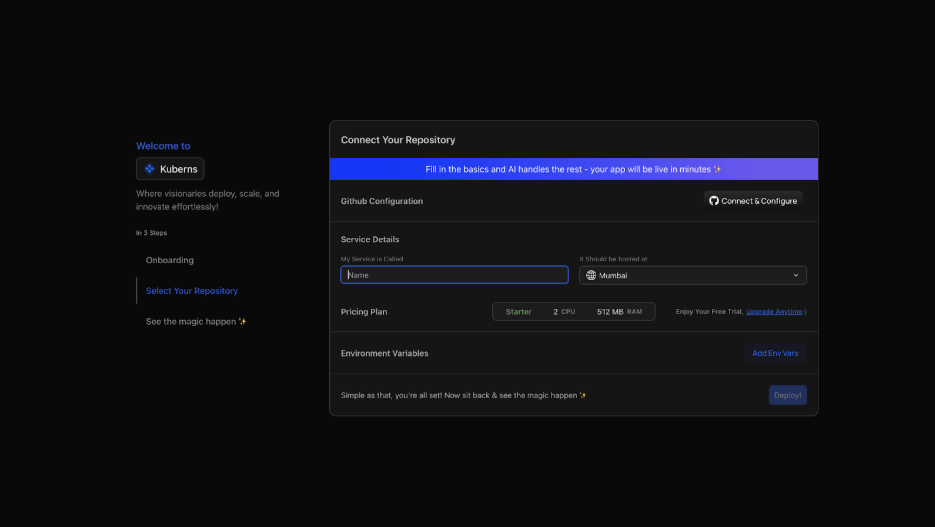
Review the detected application configuration, including the runtime, build command and start command. These review points keep the deployment visible, but they are not separate infrastructure tasks the developer must assemble manually.
Kuberns is deploying the external web application in this step. It is not replacing Shopify CLI or releasing Shopify-hosted extensions.
### Step 3: Add Production Variables and Persistent Resources
Add the production Shopify credentials and every repository-specific variable required by the app. At minimum, most current React Router template deployments need the Shopify client ID, client secret and public application URL. Add the requested scopes when the installation method requires them.
| Variable | Purpose | Where to get the value |
|---|---|---|
| `SHOPIFY_API_KEY` | Identifies the production Shopify app | Production configuration or `shopify app env show` |
| `SHOPIFY_API_SECRET` | Authenticates the production app server | Production configuration or `shopify app env show` |
| `SHOPIFY_APP_URL` | Sets the public HTTPS origin of the hosted application | Stable Kuberns service URL |
| `SCOPES` | Declares requested Shopify API permissions when required by the setup | Production Shopify configuration |
| Database URL | Connects persistent sessions and application data | Selected production datastore |
These are common values, not a complete universal list. Check the repository's `.env.example`, Shopify configuration and application code for additional required variables. Some repositories also use a production-mode variable or third-party credentials. Never copy development secrets into production without reviewing each value.
If the app stores sessions, installations or application data, connect the required persistent database. Follow the repository's migration procedure and do not assume migrations run automatically during deployment.
The public application URL creates a sequencing dependency. Use the stable HTTPS origin shown for the Kuberns service as `SHOPIFY_APP_URL`. If the final URL becomes available only after initial provisioning, complete that provisioning, add the URL to both Kuberns and the production Shopify configuration, and redeploy before testing merchant installation. The exact screen sequence should be confirmed against the current dashboard during final review.
### Step 4: Deploy the Hosted Application
Click Deploy and follow the build and runtime output. A completed deployment should produce a running service with a public HTTPS URL, but the deployment status alone does not prove that the Shopify app works.

Verify that:
- Dependencies install and the production build succeeds.
- The intended start command launches.
- The process remains running.
- The public route responds over HTTPS.
- Database migrations complete through the repository's intended process.
- Logs contain no missing-variable, connection or restart errors.
> Your Shopify app already works locally. [Connect its repository to Kuberns](https://dashboard.kuberns.com/) and create the hosted production application without assembling the deployment workflow manually.
### Step 5: Connect the Hosted URL and Deploy Shopify Configuration
Set the same hosted origin consistently across the application environment and production Shopify configuration. For current React Router apps, this usually means setting `SHOPIFY_APP_URL`, `application_url` and the permitted authentication redirect URLs.

Check for common mismatches:
- `SHOPIFY_APP_URL` still points to localhost or an old deployment.
- `application_url` differs from the hosted origin.
- Redirect URLs use a different scheme, host or path.
- Production credentials were mixed with development credentials.
- Webhook configuration still points to a temporary tunnel.
After confirming that Shopify CLI targets the production configuration, release the required configuration and extension changes with the appropriate `shopify app deploy` command. If the project uses a named production configuration, select it explicitly according to the repository's setup.
After the command completes, open the production app in Shopify's Dev Dashboard and inspect the released app version. Confirm that the displayed application and redirect URLs match the Kuberns HTTPS origin before installing the app on a test store.
> **Important:** `shopify app deploy` releases Shopify configuration and extensions. It does not upload or run the external application hosted through Kuberns.
### Step 6: Install and Test the Production App
Install the production app on a development or suitable test store. Shopify's deployment guide recommends testing the deployed app after updating its URLs and app version.
Verify:
- The installation completes successfully.
- The embedded interface opens inside Shopify Admin.
- Authentication returns to the hosted application.
- Sessions remain usable after a restart or redeployment.
- Requested permissions match the intended scopes.
- Installation and application data persist.
- Webhooks reach the hosted endpoint.
- Billing works in the appropriate test flow, if applicable.
- Uninstall behavior works.
- The app's primary merchant workflow completes.
- Build and runtime logs contain no unexplained failures.
Shopify's current authentication documentation explains that current CLI templates handle the common token flow, while access scopes determine what the app may do. The final test should confirm that the deployed configuration behaves as intended rather than reimplementing the authentication flow.
Use the broader guide to [test a web app before going live](https://kuberns.com/blogs/test-web-app-before-going-live/) for configuration, security, monitoring and recovery checks outside the Shopify-specific flow.
## How Should You Test Shopify Webhooks in Production?
A Shopify webhook requires more than a reachable endpoint. Trigger an event that should create a delivery, verify that the hosted endpoint receives it and confirm that the application authenticates the request using Shopify's prescribed verification method.
The official Shopify webhook documentation explains that subscriptions can be declared through `shopify.app.toml` or the GraphQL Admin API. It also recommends verifying HMAC signatures and using `X-Shopify-Webhook-Id` to identify duplicate deliveries.
Your production test should confirm that:
- The correct production endpoint receives the expected topic.
- HMAC verification succeeds before the payload is trusted.
- Duplicate deliveries do not duplicate important actions.
- The handler returns promptly.
- Longer processing moves to a background task when the application requires it.
- A missed or failed event can be reconciled when the application's data model requires it.
Shopify does not guarantee ordering across webhook topics and warns that deliveries can be missed or mishandled. Applications that depend on synchronized Shopify data should plan reconciliation instead of treating webhook delivery as an infallible event log.
A production-readiness discussion among Shopify developers also highlights webhook reliability, queues, partial failures and database connections as recurring operational concerns. Use those experiences to identify risks, while following Shopify's documentation for implementation decisions.
## What Happens When You Update the Shopify App?
The hosted application and Shopify app version have separate release lifecycles. A normal server-code update does not necessarily require a new Shopify app version. Likewise, running Shopify CLI does not update the external server.
| What changed? | Required action |
|---|---|
| Server or application code | Deploy the updated repository through Kuberns |
| Environment variable | Update it securely and restart or redeploy as required |
| Database schema | Run the reviewed production migration |
| Shopify extension | Release a new Shopify app version through Shopify CLI |
| Shopify configuration | Deploy the updated configuration through Shopify CLI |
| Broken application release | Restore the previous working Kuberns deployment |
Record the repository commit and Shopify app version associated with each production release. If an application update fails, follow a prepared process to [roll back the deployment](https://kuberns.com/blogs/how-to-rollback-a-deployment/).
## Common Shopify App Deployment Problems
| Problem | Likely cause | What to check |
|---|---|---|
| App works locally but does not open in Shopify Admin | Shopify still points to localhost, a tunnel or an old deployment | `SHOPIFY_APP_URL`, `application_url`, redirect URLs and HTTPS |
| Authentication or installation repeatedly restarts | URL, credentials, cookies or session storage do not match production | Hosted origin, production app credentials, proxy settings and persistent sessions |
| Installed stores disappear after redeployment | Sessions or installation records use memory or ephemeral storage | Production session adapter and database persistence |
| Webhooks work locally but fail in production | Old endpoint, wrong secret, failed verification or handler failure | Subscription configuration, HMAC verification, response behavior and logs |
| Extension changes are missing | Hosted server changed but no Shopify app version was released | Shopify CLI target, deployment output and released app version |
| Server changes are missing | Shopify configuration was released but the repository was not deployed | Kuberns branch, deployed commit and runtime status |
| Development data appears in production | Development and production environments were mixed | Shopify app record, credentials, variables and database |
| Build succeeds but the application does not respond | Runtime, start command or port is incorrect | Kuberns runtime logs, start script and platform port |
Do not solve these issues by repeatedly changing every setting. Compare the hosted origin, Shopify configuration, environment variables and deployed commit systematically so the cause remains visible.
## Shopify App Production Deployment Checklist
- [ ] Production Shopify app and configuration are selected.
- [ ] Production credentials are stored securely outside the repository.
- [ ] GitHub repository and production branch are connected.
- [ ] Production build and start commands work.
- [ ] Persistent database or storage is connected where required.
- [ ] Database migrations are reviewed and applied.
- [ ] Kuberns deployment exposes a stable HTTPS URL.
- [ ] `SHOPIFY_APP_URL` matches the hosted origin.
- [ ] `application_url` and redirect URLs are correct.
- [ ] Shopify configuration and extension changes are released.
- [ ] Production app is installed on a development or test store.
- [ ] Authentication and embedded loading work.
- [ ] Sessions and application data survive a restart.
- [ ] Webhook delivery, verification and duplicate handling are tested.
- [ ] Billing is tested where applicable.
- [ ] Build and runtime logs are reviewed.
- [ ] The previous application release can be restored.
## Deploy Your Shopify App for Real Merchants
Your Shopify app already works locally. The remaining work is to give its server a stable production environment, connect that environment to Shopify and verify the complete merchant installation flow.
Kuberns handles the hosted application deployment from GitHub, while Shopify CLI manages Shopify configuration and extensions. Together, these two releases take the app from local development to a production service merchants can install and use.
[Deploy your Shopify app with Kuberns](https://dashboard.kuberns.com/) and verify the production workflow on a development store before inviting merchants.
 ## Frequently Asked Questions
### Does shopify app deploy host my Shopify app?
No. The shopify app deploy command builds and releases Shopify app configuration and extensions as an app version. It does not host the external web application. The application server still needs to run on a hosting platform such as Kuberns and expose the HTTPS URL used by Shopify.
### Where can I host a Shopify app?
Host the app on a platform that can run its production server, expose a stable HTTPS URL, store required secrets, connect persistent data and receive authenticated Shopify and webhook requests. Kuberns provides a GitHub-based deployment workflow for full-stack and backend Shopify applications.
### Does a Shopify app need a database?
Many Shopify apps need persistent storage for installations, sessions, access tokens, merchant settings, billing state or application data. An extension-only app might not need an external database. If the app stores state, that data must survive restarts and deployments rather than depend on temporary memory or an ephemeral filesystem.
### Should development and production use separate Shopify configurations?
Yes, separate development and production configurations prevent local URLs, test credentials and experimental settings from changing the production app. Shopify also recommends considering a separate production app record in the Dev Dashboard, even when development and production use the same repository.
### How do I move a Shopify app from localhost to production?
Deploy the application server to a public HTTPS host, add its production credentials and persistent storage, set SHOPIFY_APP_URL, update application_url and allowed redirect URLs, and deploy the Shopify configuration. Then install the production app on a test store and verify the complete merchant flow.
### How do I deploy updates to a live Shopify app?
Deploy server-code changes through the application hosting platform. Release Shopify configuration or extension changes through Shopify CLI. Apply reviewed database migrations separately when required. A server update does not automatically release extensions, and shopify app deploy does not update the externally hosted server.
### How do I know if my Shopify app is ready for production?
Install the production app on a development or test store and verify authentication, embedded loading, persistent sessions, database writes, webhooks, billing where applicable, uninstall behavior, logs and the primary merchant workflow. Confirm that the hosted application and Shopify app version both correspond to the intended production release.
---
- [More Deployment Guides articles](https://kuberns.com/blogs/category/deployment-guides/1/)
- [All articles](https://kuberns.com/blogs/)
## Frequently Asked Questions
### Does shopify app deploy host my Shopify app?
No. The shopify app deploy command builds and releases Shopify app configuration and extensions as an app version. It does not host the external web application. The application server still needs to run on a hosting platform such as Kuberns and expose the HTTPS URL used by Shopify.
### Where can I host a Shopify app?
Host the app on a platform that can run its production server, expose a stable HTTPS URL, store required secrets, connect persistent data and receive authenticated Shopify and webhook requests. Kuberns provides a GitHub-based deployment workflow for full-stack and backend Shopify applications.
### Does a Shopify app need a database?
Many Shopify apps need persistent storage for installations, sessions, access tokens, merchant settings, billing state or application data. An extension-only app might not need an external database. If the app stores state, that data must survive restarts and deployments rather than depend on temporary memory or an ephemeral filesystem.
### Should development and production use separate Shopify configurations?
Yes, separate development and production configurations prevent local URLs, test credentials and experimental settings from changing the production app. Shopify also recommends considering a separate production app record in the Dev Dashboard, even when development and production use the same repository.
### How do I move a Shopify app from localhost to production?
Deploy the application server to a public HTTPS host, add its production credentials and persistent storage, set SHOPIFY_APP_URL, update application_url and allowed redirect URLs, and deploy the Shopify configuration. Then install the production app on a test store and verify the complete merchant flow.
### How do I deploy updates to a live Shopify app?
Deploy server-code changes through the application hosting platform. Release Shopify configuration or extension changes through Shopify CLI. Apply reviewed database migrations separately when required. A server update does not automatically release extensions, and shopify app deploy does not update the externally hosted server.
### How do I know if my Shopify app is ready for production?
Install the production app on a development or test store and verify authentication, embedded loading, persistent sessions, database writes, webhooks, billing where applicable, uninstall behavior, logs and the primary merchant workflow. Confirm that the hosted application and Shopify app version both correspond to the intended production release.
---
- [More Deployment Guides articles](https://kuberns.com/blogs/category/deployment-guides/1/)
- [All articles](https://kuberns.com/blogs/)