# How to Deploy Spring Boot App to Production in 2026
> Here is the easiest way to deploy a Spring Boot app to production in 2026. Connect GitHub to Kuberns, configure env vars, health checks, SSL, and go live.
- **Author**: parth-kanpariya
- **Published**: 2025-11-22
- **Modified**: 2026-09-05
- **Category**: Deployment Guides
- **URL**: https://kuberns.com/blogs/deploy-springboot-application/
---
If you're searching for how to deploy a Spring Boot application to production, the real decision is not only where to host the JAR. It is how much of the production setup you want to manage yourself.
Spring Boot is one of the most production-ready Java frameworks available. Embedded Tomcat means no separate web server configuration. The fat JAR bundles all dependencies. Spring Boot Actuator exposes health endpoints out of the box. The framework genuinely does a lot of the production work for you but the infrastructure layer between your JAR and a live HTTPS URL still involves JVM sizing, heap configuration, process management, SSL certificates, and scaling rules that vary by platform.
In 2026, the simpler path from a packaged JAR to a live production deployment is using an agentic AI platform for deployment. Kuberns reads your Spring Boot project, runs your Maven or Gradle build, starts the JAR with production runtime settings, configures health checks, issues SSL, and reduces the manual work usually involved in server setup.
[See the Spring Boot one-click deployment template to experience the Agentic AI deployment](https://kuberns.com/services/springboot)
## TL;DR
- **Kuberns**: fastest path when you want GitHub-based Spring Boot deployment with agentic AI assistance, SSL, health checks, and less manual server work
- **AWS Elastic Beanstalk**: managed AWS option but requires .ebextensions config and RDS setup
- **Heroku**: clean Git deploy but expensive for production (no free tier, paid dynos + PostgreSQL add-on)
- **Railway/Render**: simple deploys but manual JVM flags and cold starts on free tier
- **Koyeb**: scale-to-zero but 3 to 15 second cold starts on JVM
- **VPS (systemd)**: maximum control, full day setup, ongoing maintenance
## Prerequisites Needed Before You Deploy
Spring Boot reads environment-specific configuration at startup. Getting this right prevents the most common production failures: database connections that work locally but fail in production, debug endpoints accidentally exposed, and migrations running destructively.
### 1. A Spring Boot project that builds cleanly
Kuberns reads your pom.xml (Maven) or build.gradle (Gradle) and runs the build automatically. Confirm your build works locally first.
See the [Spring Boot official deployment docs](https://docs.spring.io/spring-boot/how-to/deployment/index.html) for the full packaging reference.

Kuberns detects which build tool you're using from the project root and runs the correct command automatically, so most teams do not need to start by writing custom deployment files.
### 2. server.port reading from an environment variable
This is the single most important prerequisite for any PaaS deployment. Kuberns and every managed platform injects the port your app should listen on via a PORT environment variable. If your app hardcodes port 8080, the platform's health check connects to the wrong port and marks the deployment as failed.

The $syntax reads PORT from the environment and falls back to 8080 locally. This works identically on Kuberns, Heroku, Railway, and any other PaaS.
### 3. Spring Boot Actuator in your dependencies
Kuberns health-checks your app against /actuator/health to know when it's truly ready to serve traffic. Without Actuator, the platform can't distinguish between "JVM started" and "application context fully loaded and ready."
**Maven:**

**Gradle:**

Then in application.properties:

That's the complete list for a clean managed deployment path. You avoid the usual manual server setup work such as installing Java on a VPS, writing a systemd service, configuring Nginx, and managing SSL certificates yourself.
> 💡 Building a microservices architecture with multiple Spring Boot services? See our guide on [microservice deployment](https://kuberns.com/blogs/how-to-deploy-microservices-without-managing-multiple-tools/) for how to deploy and coordinate multiple Java services with independent CI/CD pipelines.
## How to Deploy a Spring Boot Application?
Before the steps, here's the deployment flow in real time. The agentic AI detects a Spring Boot project, runs the build, and helps move it toward a live HTTPS URL:
## Step-by-Step Guide to Deploy a Spring Boot Application on Kuberns
[Kuberns](https://kuberns.com/) is an agentic AI platform for deployment. For Spring Boot applications, it reads your pom.xml or build.gradle, detects the Java version, runs the build, starts the JAR with production runtime settings, configures health checks against your Actuator endpoint, and helps you deploy with SSL and CI/CD from one workflow.
### Step 1: Create Your Account and Project
Go to [Kuberns](https://kuberns.com) and create your account. Add your basic project details.

Kuberns offers a Trial Option, and paid plans start at $7. [See what each tier includes](https://kuberns.com/pricing)
### Step 2: Connect GitHub
On the "Creating a Service" page, connect your GitHub account, add the project name and region.
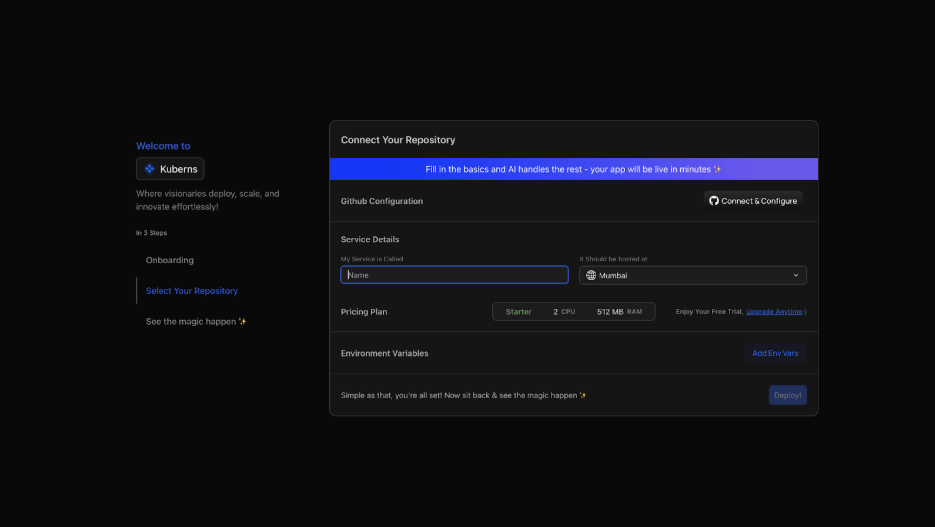
* Click "Connect & Configure" and authorise Kuberns access to your repositories
* Select your Spring Boot repository and branch (main)
* Kuberns reads your pom.xml or build.gradle, detects your Java version, identifies the Spring Boot version, and configures the build command and JAR path
### Step 3: Set Environment Variables
Navigate to the Environment section before deploying:

* Click "Add Env Vars" and input key-value pairs manually, or
* Click "Upload .env file" to import all variables at once
Upload your .env file directly or add key-value pairs manually. Kuberns encrypts all values at rest; they never appear in build logs.

### Step 4: Deploy with Agentic AI
Click Deploy. From here, the agentic AI deployment workflow:

* Runs mvn clean package -DskipTests or ./gradlew build based on your build system
* Locates the output JAR in target/ or build/libs/
* Starts the application: java [JVM flags] -jar your-app.jar
* Helps configure production runtime settings for the selected service
* Configures health checks against /actuator/health, the platform knows when your app is truly ready
* Issues an SSL certificate, HTTPS from the first request
* Enables CI/CD, every GitHub push triggers a fresh build and deploy

Your Spring Boot application can move from GitHub to a live deployment without the usual VPS setup flow.
Experience the [agentic AI deployment](https://kuberns.com/) now.
### What Kuberns Handles vs What You'd Otherwise Configure?
| Spring Boot production requirement | Manual VPS | Heroku / Railway / Render | Kuberns |
| ---------------------------------- | ------------------------- | ------------------------- | ----------------------------- |
| Maven / Gradle build | SSH + manual run | Procfile build command | Automated by Agentic AI |
| JVM runtime settings | Manual flag configuration | Manual env var | Guided in the deployment flow |
| Process and service setup | systemd / process manager | Platform specific | Managed deployment workflow |
| Health check configuration | Manual endpoint config | Platform specific | Auto-detects /actuator/health |
| SSL certificate | Certbot + renewal | Automatic | Automatic |
| CI/CD on push | GitHub Actions setup | Yes (most) | Built into One Dashboard |
> 💡 Thinking about running Spring Boot on a VPS vs a managed platform? See our guide on [cloud cost optimisation](https://kuberns.com/blogs/how-to-implement-cost-optimisation-on-aws/) to understand where manual infrastructure work adds ongoing cost.
## Pain Points About Spring Boot Deployment on Other Platforms
The [community on Reddit](https://www.reddit.com/r/SpringBoot/comments/1aszarc/easiest_way_yo_deploy_a_spring_boot_app_in/) consistently surfaces the same friction points. These are real production experiences from Java developers managing Spring Boot in production.
### AWS Elastic Beanstalk
[Elastic Beanstalk](https://kuberns.com/blogs/aws-elastic-beanstalk-alternatives/) is the go-to AWS service for teams that want managed Spring Boot deployment without full Kubernetes overhead. The community pain points are well-documented: .ebextensions/ configuration files for anything beyond basic deployment, separate RDS setup and VPC configuration for database connectivity, deployment timeouts on large JARs during rolling updates, and the overhead of understanding how EB maps to underlying EC2, ELB, and Auto Scaling resources. Teams without AWS expertise consistently underestimate the initial setup time.
### Heroku
Clean Git-based deployment, Procfile-based start command, managed PostgreSQL add-on. The community consensus since 2022: the free tier is gone, and the combination of dyno pricing plus PostgreSQL add-on makes production Spring Boot hosting on Heroku significantly more expensive than alternatives.
A t2.micro equivalent on [Heroku (eco dynos)](https://kuberns.com/blogs/heroku-pricing-explained/) starts at $5/month but the dyno sleeps after 30 minutes of inactivity, unacceptable for production APIs. Paid dynos that don't sleep start at $7/month, but add a PostgreSQL add-on and you're paying $12 to 25/month for what amounts to a small instance.
### Koyeb
Among the platforms that support Spring Boot without Dockerfiles, [Koyeb](https://kuberns.com/blogs/koyeb-alternatives/) is the most commonly mentioned alternative in the SpringBoot community. It provides autoscaling and scale-to-zero. The limitation: scale-to-zero means your first request after idle periods experiences a cold start; the JVM startup time for Spring Boot (typically 3 to 15 seconds for a standard app) is the cold start latency users experience.
### VPS (Manual Java + systemd)
Maximum control. Developers managing Spring Boot on a raw VPS write a systemd service file, configure JVM flags manually, set up Nginx as a reverse proxy (not strictly required but standard for SSL termination), and manage JDK updates themselves.
The community is consistent: this is a viable long-term setup with effort upfront and maintenance ongoing. One developer in the r/SpringBoot thread described it: "Set it up once, it runs forever with minimal maintenance. But the initial setup is a full day if you're new to it."
The Java-specific differentiator: Kuberns gives Spring Boot teams a deployment workflow that understands Maven, Gradle, JAR output, environment variables, and health checks, so developers spend less time stitching together the production path manually.
[Explore Kuberns pricing and instance tiers](https://kuberns.com/pricing#calculator)
## Conclusion
Spring Boot is production-ready out of the box, with embedded Tomcat, health endpoints via Actuator, and configuration externalisation through environment variables. What's not included is the infrastructure layer: JVM tuning, autoscaling, SSL, process management, and platform integration. That gap is either filled by your team (VPS, AWS directly) or by a platform that handles it for you.
Kuberns is built for Java teams that want to deploy Spring Boot from GitHub without turning every release into infrastructure work. The agentic AI deployment workflow builds your JAR, helps configure the runtime, checks your Actuator endpoint, and moves the app toward production without a manual VPS setup.
Your Spring Boot project is packaged. Your GitHub repo is ready. The next step is connecting it to a deployment workflow that can take it live with less manual setup.
[Deploy with Agentic AI on Kuberns](https://dashboard.kuberns.com)
## Frequently Asked Questions on Spring Boot Deployment
### How do I deploy a Spring Boot application to production?
You can deploy a Spring Boot app using a virtual machine, a container-based workflow like Docker, or an automated deployment platform. The best method depends on how much configuration you want to handle yourself. Platforms like Kuberns simplify this by building and deploying the app automatically from your GitHub repository.
### What is the easiest way to deploy a Spring Boot application?
The easiest method is using an automated deployment service that detects your project, builds it, sets up the runtime, and deploys it without requiring manual steps. Kuberns is a good example because it does not require Dockerfiles, server setup, or Kubernetes configuration.
### What is the easiest way to deploy a Spring Boot JAR so it auto-scales and I never touch servers?
A simple path is to push your Spring Boot project to GitHub with pom.xml or build.gradle committed, connect the repository on Kuberns, and click Deploy. The agentic AI deployment workflow reads your project, runs the build, starts the JAR with production runtime settings, configures health checks against /actuator/health, issues HTTPS, and helps reduce manual server work.
### What are the minimum VPS requirements for a Spring Boot application?
The absolute minimum is 1 vCPU with 512 MB RAM, workable only for lightweight internal tools with no real concurrent users. The JVM heap alone uses 256 to 512 MB, plus Spring Boot application context uses approximately 150 to 200 MB, plus your app runtime footprint. Recommended minimum for production with real users is 2 vCPU with 1 to 2 GB RAM. With Java 21 virtual threads, a 1 GB instance handles significantly higher concurrency than traditional thread-per-request models.
With Java 21 virtual threads, a 1 GB instance can handle higher concurrency than traditional thread-per-request models depending on workload type. On Kuberns, you can choose an instance tier and use the deployment workflow to reduce the manual runtime setup.
### How do I deploy a Java Spring Boot application?
The fastest path is to package with mvn clean package or ./gradlew build, push to GitHub, connect on Kuberns, add environment variables, and click Deploy. The agentic AI deployment workflow handles the build and production setup. For manual VPS deployment, the process involves installing Java, transferring the JAR via SCP, writing a systemd service file, and configuring Nginx for SSL.
### What is hosting a Spring Boot application on a cloud platform vs a VPS?
A VPS gives you a Linux server where you install Java, configure JVM flags, write a systemd service for process management, and manage everything yourself. A deployment platform like Kuberns reduces that work by helping with build setup, runtime configuration, process management, SSL, and scaling from one workflow.
### How do I deploy a Spring Boot application to AWS?
For AWS, the native path usually uses Elastic Beanstalk or EC2 directly. Elastic Beanstalk reduces some server work, while EC2 gives more control but requires more manual setup. If your goal is to avoid cloud-console configuration and server operations, Kuberns gives a simpler GitHub-based deployment workflow for Spring Boot apps.
### What is Spring Boot deployment?
Deploying a Spring Boot application means packaging it as a JAR with mvn clean package or ./gradlew build, then running that JAR on a server with java -jar app.jar. Production deployment additionally requires JVM heap configuration, process management so the app restarts on crash, SSL and HTTPS, environment variable injection for secrets, and a database connection. Platforms like Kuberns handle all of these layers automatically.
### What is the best free platform to deploy a Spring Boot app in 2026?
Free options can work for testing a Spring Boot app, but they usually include tradeoffs such as sleep, scale-to-zero, trial credits, or cold starts. Render has a free tier for web services with spin-down behavior, Railway commonly works with trial-style credits, and Koyeb offers scale-to-zero. Kuberns offers a Trial Option and paid plans starting at $7 for teams that want a managed deployment workflow for production.
### Does Render support Spring Boot deployment for free in 2026?
Yes, Render supports Spring Boot deployment and has a free tier for web services. However, free tier services on Render spin down after 15 minutes of inactivity. When a request comes in after idle time, the JVM must restart from scratch, adding 3 to 15 seconds of cold start latency to the first request. For production APIs this is not acceptable. Render paid plans start at $7 per month and keep the service running continuously.
### What Java version does Spring Boot 3 require?
Spring Boot 3 requires Java 17 as the minimum version. Spring Boot 3.2 and later also support Java 21, which introduced virtual threads via Project Loom. Before deployment, check the Java version in your pom.xml, build.gradle, or runtime configuration so your cloud platform uses the same version.
### Can I deploy a Spring Boot app on Vercel?
No. Vercel does not support JVM runtimes, so a Java Spring Boot application cannot be deployed there directly. Vercel is built for serverless functions and frontend frameworks, not long-running JVM processes. For a Spring Boot backend, use a platform built for Java such as Kuberns, and pair it with Vercel only if you are hosting a separate frontend there.
---
- [More Deployment Guides articles](https://kuberns.com/blogs/category/deployment-guides/1/)
- [All articles](https://kuberns.com/blogs/)