# The Best Way to Deploy a Python Telegram Bot in 2026
> Deploy a Telegram bot in 2026 with Python. No server setup, no cold starts, 24/7 uptime guaranteed. One-click deployment with webhook and polling covered.
- **Author**: parth-kanpariya
- **Published**: 2025-11-25
- **Modified**: 2026-06-25
- **Category**: Deployment Guides
- **URL**: https://kuberns.com/blogs/deploy-telegram-bot/
---
If you're searching for the simplest way to deploy a Telegram bot for free and keep it running 24/7 without touching a server, you're in the right place.
Building the bot is the easy part: BotFather, thirty lines of Python, done. Keeping it alive is where most developers get stuck. Close your laptop, and the bot goes offline. Deploy to a free tier, and it sleeps after fifteen minutes. Try a VPS, and you're suddenly writing systemd service files for something that should just run.
The answer to get your telegram bot live in 2026 is Kuberns' Agentic AI: just connect your GitHub repository, add your bot token as an environment variable, and click Deploy. Your bot runs 24/7 on AWS infrastructure, no sleep mode, no cold starts, automatic restarts if it crashes, and CI/CD on every push.
This guide covers exactly how to do it: the five prerequisites your Python bot needs before any deployment, the step-by-step Kuberns walkthrough, polling vs webhooks explained briefly, and the common errors that cause silent failures.
This is the [easiest way to deploy](https://dashboard.kuberns.com) your Telegram bot in 2026 (Picked by experts)
## TL;DR: Simplest Way to Deploy a Telegram Bot in 2026
* Push your Python bot to GitHub, connect it to Kuberns, add your bot token as an environment variable, and deploy.
* Your bot runs 24/7 with no sleep mode, no cold starts, and no server to manage.
* Kuberns free tier gives you $14 in compute credits for $7 - polling bots stay online permanently.
* **Render's free tier sleeps after 15 minutes** - not suitable for polling bots.
* **Vercel and AWS Lambda** cannot run polling bots at all.
* Kuberns is the simplest free option that actually keeps your bot running around the clock.
## Prerequisites Your Python Bot Needs Before You Deploy:
Before any platform can run your [Telegram](https://telegram.org/) bot, five things need to be in order. Missing any one of them causes a deployment that reports success but leaves the bot silently offline.
### 1. Get a bot token from BotFather
Every Telegram bot starts with a token. If you haven't created one yet:
1. Open Telegram and search for @BotFather
2. Send /newbot
3. Choose a display name (e.g. "Price Alert Bot") and a username ending in bot (e.g. price\_alert\_bot)
4. BotFather replies with your token: 7123456789\:ABCdefGHIjklMNOpqrsTUVwxyz
That token is the master key to your bot. Anyone who has it can send messages as your bot, read conversations, and shut it down. Never put it in your code and never commit it to GitHub. It lives only in your deployment platform's environment variables dashboard.
### 2. A requirements.txt with every dependency listed
When you deploy, the platform reads requirements.txt and installs your packages fresh on the server. If a library your bot imports is missing from this file, the deployment looks successful, but the bot crashes immediately on startup with a ModuleNotFoundError.
**For python-telegram-bot (the most popular Python library):**

**For pyTelegramBotAPI (also widely used):**

Generate the exact versions from your local environment:

After generating, review the file. pip freeze captures everything, including dev tools you don't need on the server. Keep only what your bot actually imports.
### 3. A bot.py entry file at the root of your repository
The platform needs one file to start your bot. Name it bot.py or main.py and place it at the root of your project. Here's a complete, production-ready Python bot that handles the most common deployment gotchas:

### 4. Token read from an environment variable (never hardcoded)
For local development, create a .env file:

Add .env to .gitignore before your first commit so it never touches GitHub. When you deploy, you'll set TELEGRAM\_BOT\_TOKEN directly in the [Kuberns dashboard](https://dashboard.kuberns.com/login).
Building a webhook-based bot with Flask instead of polling? See our [Flask deployment](https://kuberns.com/blogs/how-to-deploy-flask-app/) guide; the same requirements.txt and GitHub setup apply, with Flask handling the incoming POST requests from Telegram.
 ## This is the Easiest Way to Deploy a Telegram Bot
[Kuberns](https://kuberns.com/) is an agentic AI cloud platform. For Python Telegram bots, the AI reads your requirements.txt, detects Python, installs dependencies, starts python bot.py, and keeps the process running permanently with no idle timeout. Your bot stays online whether it's handling ten messages a day or ten thousand.
### Step 1: Create Your Account and Project
Go to[ kuberns](https://kuberns.com) and click "Deploy with AI". Create your account and add basic details of your account.

Kuberns has a free tier to start. After that, $7 gets you $14 in compute credits, 2X value to apply toward your deployment.
### Step 2: Connect Your GitHub Repository
On the "Creating a Service" page, just connect your GitHub account, add the project name and region.
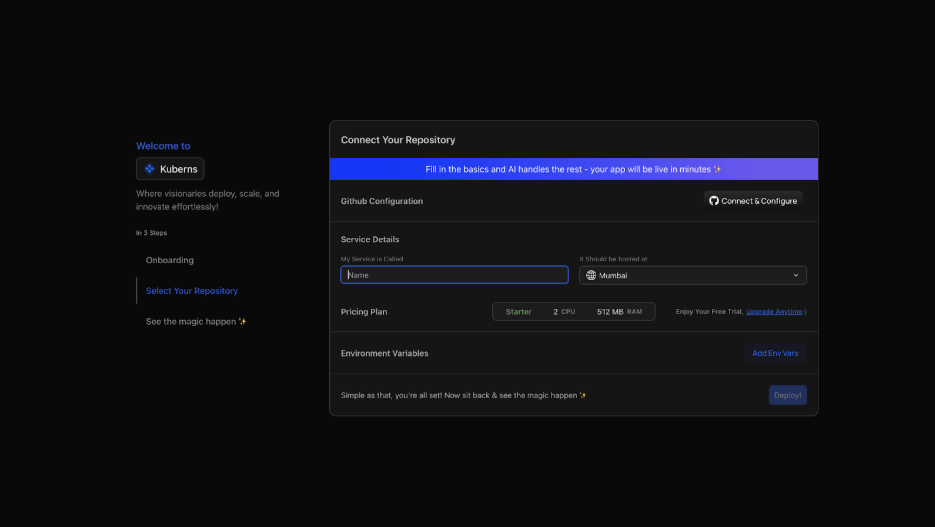
* Click "Connect to GitHub" and authorise Kuberns access
* Select your Telegram bot repository and the main branch
* Kuberns reads your requirements.txt, detects Python, and configures the start command automatically
### Step 3: Add Your Environment Variable
Navigate to the Environment section before deploying:

* Click "Add Env Vars" and input key-value pairs manually, or
* Click "Upload .env file" to import all variables at once
In the Environment section, add:

If your bot connects to external services like OpenAI, a database, or a weather API, add those keys here too. All values are encrypted at rest and never appear in your build logs or deployment output.
### Step 4: Deploy- The AI Takes Over
Click Deploy. From here, you watch rather than configure. The platform takes over from here:

* Installs all packages from requirements.txt
* Starts your bot: python bot.py
* Keeps the process running permanently, no inactivity shutdown
* Restarts the bot automatically if it ever crashes
* Redeploys on every GitHub push, push new code and your bot updates in seconds with zero downtime
* Provides real-time logs so you can see exactly what your bot is doing
Open Telegram and send /start to your bot. It replies instantly. Your bot is live 24/7.

[Deploy your Telegram bot](https://dashboard.kuberns.com/login) on Kuberns Now with Agentic AI
## This is the Easiest Way to Deploy a Telegram Bot
[Kuberns](https://kuberns.com/) is an agentic AI cloud platform. For Python Telegram bots, the AI reads your requirements.txt, detects Python, installs dependencies, starts python bot.py, and keeps the process running permanently with no idle timeout. Your bot stays online whether it's handling ten messages a day or ten thousand.
### Step 1: Create Your Account and Project
Go to[ kuberns](https://kuberns.com) and click "Deploy with AI". Create your account and add basic details of your account.

Kuberns has a free tier to start. After that, $7 gets you $14 in compute credits, 2X value to apply toward your deployment.
### Step 2: Connect Your GitHub Repository
On the "Creating a Service" page, just connect your GitHub account, add the project name and region.

* Click "Connect to GitHub" and authorise Kuberns access
* Select your Telegram bot repository and the main branch
* Kuberns reads your requirements.txt, detects Python, and configures the start command automatically
### Step 3: Add Your Environment Variable
Navigate to the Environment section before deploying:

* Click "Add Env Vars" and input key-value pairs manually, or
* Click "Upload .env file" to import all variables at once
In the Environment section, add:

If your bot connects to external services like OpenAI, a database, or a weather API, add those keys here too. All values are encrypted at rest and never appear in your build logs or deployment output.
### Step 4: Deploy- The AI Takes Over
Click Deploy. From here, you watch rather than configure. The platform takes over from here:

* Installs all packages from requirements.txt
* Starts your bot: python bot.py
* Keeps the process running permanently, no inactivity shutdown
* Restarts the bot automatically if it ever crashes
* Redeploys on every GitHub push, push new code and your bot updates in seconds with zero downtime
* Provides real-time logs so you can see exactly what your bot is doing
Open Telegram and send /start to your bot. It replies instantly. Your bot is live 24/7.

[Deploy your Telegram bot](https://dashboard.kuberns.com/login) on Kuberns Now with Agentic AI
 ## Polling vs Webhook: Which Is Your Bot Using?
This distinction matters because it determines what your host needs to do, and it's the reason some free platforms can't run Telegram bots at all.
### Polling: The default for most Python bots
Your bot runs as a persistent, long-running process, continuously asking Telegram: "Any new messages?" This is what app.run\_polling() does in the code above.
Works on: Any platform that supports persistent background processes, Kuberns, VPS, paid Render and Railway tiers.
Does not work on: Serverless platforms like Vercel, AWS Lambda, or Google Cloud Functions. These terminate after each request and have no way to maintain a continuous polling loop. A polling Telegram bot simply cannot run on a serverless host.
For most bots, polling is the right choice. Zero configuration, no HTTPS setup, no webhook registration, it works immediately after your bot starts. Kuberns runs polling bots as persistent background processes with no idle timeout.
### Webhook: For bots using a web framework or expecting high traffic
Telegram pushes updates directly to a URL you specify. Every incoming message arrives as a POST request to your server.
All Kuberns deployments get a public HTTPS URL automatically. Register your webhook after deploying:

One important rule: polling and webhooks cannot run simultaneously. If you have a webhook set from a previous deployment and want to switch to polling, delete the webhook first:

For your first deployment, start with polling. It requires no HTTPS registration, no webhook URL, and no additional configuration. You can always switch to webhooks later if your bot needs to scale beyond what polling handles efficiently.
> Building a FastAPI webhook handler for a high-traffic bot? See our [FastAPI deployment](https://kuberns.com/blogs/fastapi-deployment-guide/) guide. Async FastAPI processes Telegram updates faster than synchronous frameworks, making it the best Python choice for bots handling hundreds of messages per second.
## Deployment Checklist For Telegram Bot
Before you share your bot link publicly, run through this:
* Bot token from BotFather, set as TELEGRAM\_BOT\_TOKEN environment variable only, never in code
* requirements.txt complete, generated with pip freeze, all imports covered
* bot.py at repository root, reads token with os.environ\["TELEGRAM\_BOT\_TOKEN"]
* .env in .gitignore, confirmed not committed to repository
* drop\_pending\_updates=True in app.run\_polling(), avoids message backlog on restart
* GitHub repository connected to Kuberns
* TELEGRAM\_BOT\_TOKEN set in Kuberns environment dashboard
* Build logs show no errors, runtime logs show "Bot running, polling for messages..."
* /start command tested in Telegram, bot replies immediately
* For webhook bots: webhook registered at your Kuberns deployment URL
* Auto-redeploy confirmed: push a small commit, verify the bot updates without manual steps
## Your Bot Is Ready, Deploy It Now With AI
You've written the code. You have the token. The hard part is already done.
Everything between your Python script and a bot running 24/7 on production infrastructure is four steps on Kuberns: connect your GitHub repository, add TELEGRAM\_BOT\_TOKEN as an environment variable, click Deploy, and send /start in Telegram. That's it.
No server to provision, no systemd service to write, no Nginx config to touch, no sleep timer counting down in the background.
Your bot runs on AWS infrastructure, the same reliability that powers some of the largest applications in the world at a fraction of the cost of managing it yourself. The free tier gets you started today. When you need more, $7 gets you $14 in compute credits.
Push your code to GitHub and ship it.
[Deploy your Telegram bot on Kuberns in just one click Now](https://dashboard.kuberns.com)
## Polling vs Webhook: Which Is Your Bot Using?
This distinction matters because it determines what your host needs to do, and it's the reason some free platforms can't run Telegram bots at all.
### Polling: The default for most Python bots
Your bot runs as a persistent, long-running process, continuously asking Telegram: "Any new messages?" This is what app.run\_polling() does in the code above.
Works on: Any platform that supports persistent background processes, Kuberns, VPS, paid Render and Railway tiers.
Does not work on: Serverless platforms like Vercel, AWS Lambda, or Google Cloud Functions. These terminate after each request and have no way to maintain a continuous polling loop. A polling Telegram bot simply cannot run on a serverless host.
For most bots, polling is the right choice. Zero configuration, no HTTPS setup, no webhook registration, it works immediately after your bot starts. Kuberns runs polling bots as persistent background processes with no idle timeout.
### Webhook: For bots using a web framework or expecting high traffic
Telegram pushes updates directly to a URL you specify. Every incoming message arrives as a POST request to your server.
All Kuberns deployments get a public HTTPS URL automatically. Register your webhook after deploying:

One important rule: polling and webhooks cannot run simultaneously. If you have a webhook set from a previous deployment and want to switch to polling, delete the webhook first:

For your first deployment, start with polling. It requires no HTTPS registration, no webhook URL, and no additional configuration. You can always switch to webhooks later if your bot needs to scale beyond what polling handles efficiently.
> Building a FastAPI webhook handler for a high-traffic bot? See our [FastAPI deployment](https://kuberns.com/blogs/fastapi-deployment-guide/) guide. Async FastAPI processes Telegram updates faster than synchronous frameworks, making it the best Python choice for bots handling hundreds of messages per second.
## Deployment Checklist For Telegram Bot
Before you share your bot link publicly, run through this:
* Bot token from BotFather, set as TELEGRAM\_BOT\_TOKEN environment variable only, never in code
* requirements.txt complete, generated with pip freeze, all imports covered
* bot.py at repository root, reads token with os.environ\["TELEGRAM\_BOT\_TOKEN"]
* .env in .gitignore, confirmed not committed to repository
* drop\_pending\_updates=True in app.run\_polling(), avoids message backlog on restart
* GitHub repository connected to Kuberns
* TELEGRAM\_BOT\_TOKEN set in Kuberns environment dashboard
* Build logs show no errors, runtime logs show "Bot running, polling for messages..."
* /start command tested in Telegram, bot replies immediately
* For webhook bots: webhook registered at your Kuberns deployment URL
* Auto-redeploy confirmed: push a small commit, verify the bot updates without manual steps
## Your Bot Is Ready, Deploy It Now With AI
You've written the code. You have the token. The hard part is already done.
Everything between your Python script and a bot running 24/7 on production infrastructure is four steps on Kuberns: connect your GitHub repository, add TELEGRAM\_BOT\_TOKEN as an environment variable, click Deploy, and send /start in Telegram. That's it.
No server to provision, no systemd service to write, no Nginx config to touch, no sleep timer counting down in the background.
Your bot runs on AWS infrastructure, the same reliability that powers some of the largest applications in the world at a fraction of the cost of managing it yourself. The free tier gets you started today. When you need more, $7 gets you $14 in compute credits.
Push your code to GitHub and ship it.
[Deploy your Telegram bot on Kuberns in just one click Now](https://dashboard.kuberns.com)
 ## Frequently Asked Questions
### What is the simplest way to deploy a Telegram bot for free in 2026?
Connect your GitHub repository to Kuberns, add TELEGRAM\_BOT\_TOKEN as an environment variable, and click Deploy. Kuberns installs your dependencies, starts python bot.py, and keeps it running 24/7 with no sleep mode on its free tier. From signup to a responding bot takes under five minutes.[ Start for free](https://dashboard.kuberns.com)
### What is the best free hosting for a Telegram bot in Python in 2026?
For bots that need to respond instantly and stay online continuously, Kuberns's free tier is the best option in 2026, no idle shutdown, no cold starts, persistent process. After the free tier, $7 gets you $14 in compute credits (2x value). Render's free tier sleeps after 15 minutes, making it unsuitable for polling bots. Vercel and AWS Lambda can't run polling bots at all.
### How do I keep my Telegram bot running 24/7 for free?
Use a platform that keeps persistent long-running processes alive without an inactivity timeout. Kuberns's free tier does exactly this, your polling bot runs continuously with no idle shutdown. The most common mistake is deploying on Render's free tier, which sleeps services that don't receive inbound HTTP requests. A polling bot never receives inbound requests, so it sleeps almost immediately.
### Should my Telegram bot use polling or webhooks?
Start with polling. app.run\_polling() requires zero configuration, no HTTPS setup, and no webhook registration, it works immediately on any platform that supports persistent processes. Switch to webhooks only if you're integrating a web framework into your bot or handling very high message volume where polling overhead becomes a bottleneck. On Kuberns, polling bots run permanently with no idle limit.
### How do I deploy a Telegram bot without a server?
Use Kuberns. Connect your GitHub repo, add your bot token as an environment variable, click Deploy. Kuberns provides the server, manages the process lifecycle, handles restarts, issues SSL certificates for webhook bots, and keeps everything running with nothing for you to configure. No SSH access required.
### What happens to my Telegram bot on Render's free tier in 2026?
Render's free tier shuts down web services after 15 minutes of inactivity. A polling Telegram bot makes no inbound HTTP requests, so the platform sees it as idle and shuts it down almost immediately after deployment. Messages sent to the bot go unanswered until the service wakes back up, which takes 30–60 seconds. Render's paid tier removes this limit, but for free hosting without a sleep penalty, Kuberns's free tier is better suited for Telegram bots.
### Can I deploy a Telegram bot without Docker?
Yes. On Kuberns, push bot.py and requirements.txt to GitHub, connect the repository, add TELEGRAM\_BOT\_TOKEN, and click Deploy. No Dockerfile, no Procfile, no YAML files. Kuberns detects Python automatically from your project structure and handles the rest.
---
- [More Deployment Guides articles](https://kuberns.com/blogs/category/deployment-guides/1/)
- [All articles](https://kuberns.com/blogs/)
## Frequently Asked Questions
### What is the simplest way to deploy a Telegram bot for free in 2026?
Connect your GitHub repository to Kuberns, add TELEGRAM\_BOT\_TOKEN as an environment variable, and click Deploy. Kuberns installs your dependencies, starts python bot.py, and keeps it running 24/7 with no sleep mode on its free tier. From signup to a responding bot takes under five minutes.[ Start for free](https://dashboard.kuberns.com)
### What is the best free hosting for a Telegram bot in Python in 2026?
For bots that need to respond instantly and stay online continuously, Kuberns's free tier is the best option in 2026, no idle shutdown, no cold starts, persistent process. After the free tier, $7 gets you $14 in compute credits (2x value). Render's free tier sleeps after 15 minutes, making it unsuitable for polling bots. Vercel and AWS Lambda can't run polling bots at all.
### How do I keep my Telegram bot running 24/7 for free?
Use a platform that keeps persistent long-running processes alive without an inactivity timeout. Kuberns's free tier does exactly this, your polling bot runs continuously with no idle shutdown. The most common mistake is deploying on Render's free tier, which sleeps services that don't receive inbound HTTP requests. A polling bot never receives inbound requests, so it sleeps almost immediately.
### Should my Telegram bot use polling or webhooks?
Start with polling. app.run\_polling() requires zero configuration, no HTTPS setup, and no webhook registration, it works immediately on any platform that supports persistent processes. Switch to webhooks only if you're integrating a web framework into your bot or handling very high message volume where polling overhead becomes a bottleneck. On Kuberns, polling bots run permanently with no idle limit.
### How do I deploy a Telegram bot without a server?
Use Kuberns. Connect your GitHub repo, add your bot token as an environment variable, click Deploy. Kuberns provides the server, manages the process lifecycle, handles restarts, issues SSL certificates for webhook bots, and keeps everything running with nothing for you to configure. No SSH access required.
### What happens to my Telegram bot on Render's free tier in 2026?
Render's free tier shuts down web services after 15 minutes of inactivity. A polling Telegram bot makes no inbound HTTP requests, so the platform sees it as idle and shuts it down almost immediately after deployment. Messages sent to the bot go unanswered until the service wakes back up, which takes 30–60 seconds. Render's paid tier removes this limit, but for free hosting without a sleep penalty, Kuberns's free tier is better suited for Telegram bots.
### Can I deploy a Telegram bot without Docker?
Yes. On Kuberns, push bot.py and requirements.txt to GitHub, connect the repository, add TELEGRAM\_BOT\_TOKEN, and click Deploy. No Dockerfile, no Procfile, no YAML files. Kuberns detects Python automatically from your project structure and handles the rest.
---
- [More Deployment Guides articles](https://kuberns.com/blogs/category/deployment-guides/1/)
- [All articles](https://kuberns.com/blogs/)