# How to Deploy a Low-Latency API for Users Across the US
> Deploy a low-latency API for US users with Kuberns. Avoid idle spin-down, keep the database nearby, add health checks, and verify first-request speed.
- **Author**: parth-kanpariya
- **Published**: 2026-10-02
- **Modified**: 2026-10-02
- **Category**: Deployment Guides
- **URL**: https://kuberns.com/blogs/deploy-us-api-without-cold-starts/
---
To **deploy an API without idle-period cold starts**, run it as a persistent application service that keeps at least one process available. Place the API and its primary database in the same or a nearby US region, add readiness checks, and compare first-request latency with normal response time before sending production traffic to it.
This guide is for developers who already have a working Node.js, Express, NestJS, FastAPI, Flask, Django, or similar backend. It uses [Kuberns](https://kuberns.com/) for the deployment workflow and focuses on the availability decisions that matter when US customers, authentication, payments, webhooks, or external integrations depend on the API.
Here, “without cold starts” means avoiding a hosting configuration that intentionally shuts down the API after inactivity. A process can still initialize during a deployment, restart, recovery event, or scaling operation. No hosting platform can truthfully promise that application startup will never occur.
## Why Are Cold Starts a Production API Problem?
A cold start adds initialization work before an API can handle a request. Depending on the deployment model, the platform may need to allocate compute, start the runtime, load the application, and open connections to the database or other services.
That delay is especially disruptive for APIs. A browser user may wait through a slow page, but a payment webhook, mobile client, monitoring probe, or business integration may have a fixed timeout and retry policy. One developer described a Node and Express API taking roughly 30 to 50 seconds to respond after sleeping in a discussion about hosting a backend API.

This behavior is tied to the selected service and plan. Some free hosting tiers intentionally stop an idle web service and initialize it again when a new request arrives, while paid or minimum-capacity configurations may keep application processes available. Check the lifecycle behavior of the exact plan instead of assuming every service from a provider works the same way.
If you need the causes, platform behavior, and diagnostic process in more depth, read the existing guide to [understanding and diagnosing deployment cold starts](https://kuberns.com/blogs/cold-start-problem-deployment/). This article focuses on deploying a completed API with predictable availability for US users.
## Which Deployment Model Avoids Idle Spin-Down?
Use a persistent application service when a production API must remain ready between requests. Provisioned serverless capacity can also provide predictable startup behavior, but it requires the correct capacity configuration.
| Deployment model | What can happen after inactivity? | Appropriate for |
| --- | --- | --- |
| Scale-to-zero | Compute may stop and initialize on the next request | Experiments and workloads that tolerate delayed responses |
| Persistent application service | At least one application process remains available | Authentication, payments, webhooks, and customer-facing APIs |
| Provisioned serverless capacity | Pre-initialized capacity is maintained up to its configured level | Teams that need serverless scaling and can manage capacity |
Serverless does not automatically mean slow. AWS documents that Lambda Provisioned Concurrency pre-initializes execution environments before requests arrive. Capacity above the provisioned amount may still use on-demand environments, so the configuration must match the expected workload.
Do not use repeated external pings as the production solution. A ping can conceal an unsuitable service model, may conflict with provider rules, and cannot guarantee capacity during deployments, recovery, or scaling. Choose an always-available resource or a supported minimum-capacity setting instead.
[Deploy an always-available API with Kuberns](https://dashboard.kuberns.com/)
## What Does a Low-Latency US API Architecture Require?
A responsive US-facing API requires more than a warm application process. The API, database, and dependent services form one request path, and the slowest link determines what the user experiences.
```text
US users
↓
API in an appropriate available US region
↓
Primary database in the same or a nearby region
↓
Storage, queues, and external services
```
Make the region decision using evidence from the application:
- Where are most API callers located?
- Where does the primary database run?
- Which external services does every request depend on?
- Do customers have data-location requirements?
- What latency do synthetic tests show from relevant US locations?
- Which regions and resource plans are currently available from the platform?
The API and database should ordinarily be close because a single request may perform several database round trips. Vercel gives similar guidance in its function region documentation, which recommends running compute close to its data source. A CDN can cache static or explicitly cacheable responses, but it cannot remove database round trips from authenticated or write-heavy API requests.
Choosing any US region does not guarantee low latency throughout the country. Measure from the locations that represent actual customers.
## Prepare the API for Production Deployment
The example workflow uses a GitHub repository containing a Node.js or FastAPI API, a PostgreSQL database, environment variables, and `/health` and `/ready` endpoints. The same preparation applies to NestJS, Flask, Django, and similar long-running backend services.
### Define the Production Process
Use a production start command rather than a development watcher. The process must read the port assigned by the platform and listen on `0.0.0.0` when running inside a container.
For a Node.js API, the core binding looks like this:
```js
const port = process.env.PORT || 3000;
const server = app.listen(port, '0.0.0.0', () => {
console.log(`API listening on ${port}`);
});
```
Also handle graceful shutdown so a deployment can stop accepting new traffic, finish active requests, and close database connections before the process exits. The official Kuberns Node.js deployment guide provides a complete production preparation example.
### Add Health and Readiness Endpoints
Use separate checks when the application needs to distinguish process health from traffic readiness:
- `/health` confirms that the API process is running.
- `/ready` confirms that the API can serve traffic and reach required dependencies.
Keep the basic health endpoint lightweight. Do not call a payment provider, email service, or large external API every time the platform checks process health. A readiness check may verify critical dependencies, but it should have a strict timeout and avoid expensive work.
### Move Production Values Into Environment Variables
The API may require values such as:
```text
DATABASE_URL
JWT_SECRET
STRIPE_SECRET_KEY
WEBHOOK_SECRET
ALLOWED_ORIGINS
NODE_ENV
```
Use the names expected by your application. Commit a safe `.env.example` when useful, but never commit live credentials. Rotate any secret that has already appeared in source control or public logs.
### Confirm Database Behavior
Before deployment, decide how the application will:
- Create and reuse database connections.
- Limit the connection pool.
- Apply schema migrations safely.
- Handle a temporarily unavailable database.
- Close connections during shutdown.
A warm API can still have a slow first request if its database sleeps or the application opens a new remote connection for every call.
## Deploy a US-Facing API on Kuberns With Agentic AI
Kuberns is an **Agentic AI platform for deployment**. It can analyze a connected repository, propose the supported runtime configuration, provision resources, and start the managed build and deployment pipeline. You remain responsible for the API's business logic, security rules, migrations, dependency choices, and availability requirements.
### Step 1: Connect the GitHub Repository
Open the Kuberns dashboard, choose the GitHub installation that can access the project, and select the repository and production branch. Prepare the required secrets before starting so the service can connect to production dependencies.
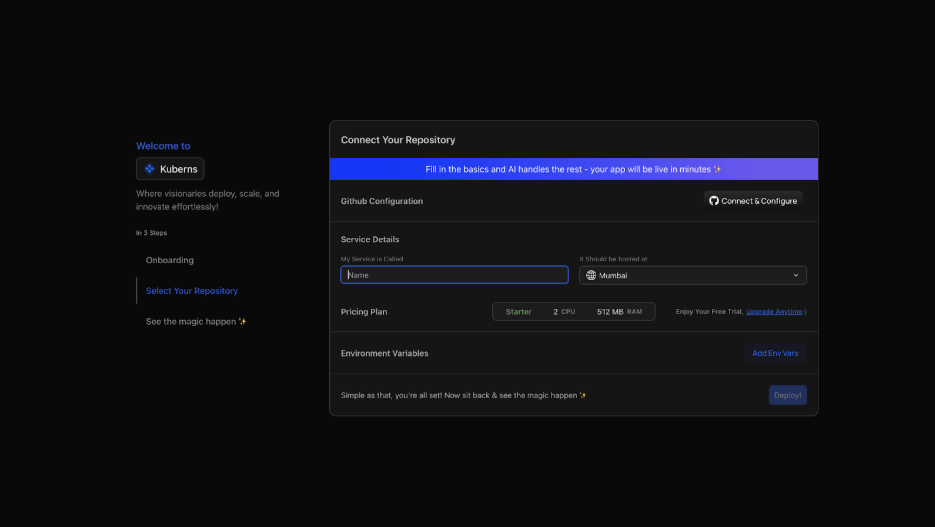
The official Kuberns getting-started documentation explains the current repository and branch selection flow.
### Step 2: Review the Detected API Service
Review the framework, root directory, dependency file, port, build command, start command, and proposed resources. In a monorepo, confirm that the root points to the backend package rather than the repository root or frontend.
Kuberns documents that its temporary deployment agent can detect source layout, runtime requirements, ports, commands, Dockerfiles, variable names, and supporting resources. Detection is a starting point, not a substitute for checking the production configuration.
### Step 3: Select an Appropriate Available Region
Choose from the regions currently offered in the dashboard. Prefer the region that best balances:
- The measured location of most users.
- Proximity to the primary database.
- Proximity to important dependent services.
- Customer or contractual data requirements.
- The required resource and plan availability.
If most customers are on the US East Coast and the primary PostgreSQL database is also there, locating the API nearby will usually remove more network delay than placing the API closer to a smaller user group while leaving the database across the country.
### Step 4: Configure Environment Variables and the Database
Add the production database URL, authentication secrets, webhook credentials, allowed origins, and any other required configuration. Kuberns allows variables to be added during service creation and managed from the deployed environment, as described in its environment-variable documentation.

Place the database in the same or a nearby region when practical. Set a connection limit that both the API and database can support, then run migrations through a controlled deployment step rather than from every application replica at startup.
### Step 5: Deploy the API
Start the deployment and follow the analysis, build, and runtime phases. A completed build proves that the artifact was created, but the API is not ready until its process starts, listens on the expected port, connects to the database, and passes its readiness check.

### Step 6: Review Build and Runtime Logs
Check the logs for:
- A successful dependency installation and build.
- The expected production start command.
- A message confirming the bound host and port.
- Successful database initialization.
- Completed migrations.
- Passing health and readiness checks.
- Missing variables or repeated restart events.
Kuberns provides deployment and post-deployment logs through the dashboard, according to its logging documentation. Do not print credential values, access tokens, or complete database URLs in application logs.

### Step 7: Add the Production Domain
Connect the production API hostname after the service is healthy. Then update:
- The frontend API base URL.
- CORS and trusted-origin settings.
- OAuth callback URLs.
- Payment and integration webhooks.
- Mobile application configuration.
- Monitoring and synthetic checks.
Test authentication and payment flows before directing all production traffic to the new hostname.
[Connect your repository and deploy your backend on Kuberns](https://dashboard.kuberns.com/)
## How Do You Verify That the API Does Not Sleep?
Do not treat one successful request immediately after deployment as proof. Measure the first request after a representative idle period and compare it with several subsequent requests. Consistency matters more than one fast sample.
Test at least:
1. `/health`, to confirm the process responds.
2. `/ready`, to confirm required dependencies are available.
3. An unauthenticated endpoint.
4. An authenticated endpoint.
5. A database-backed read and write.
6. An intentionally invalid request, to verify safe error handling.
7. A webhook endpoint, when the application receives external events.
Record DNS lookup time, connection and TLS time, time to first byte, complete response time, database duration, and HTTP status. Repeat the same test after an extended idle period and from more than one relevant US location.
If the first request is slow, correlate its timestamp with runtime logs and infrastructure events. A new process start indicates a cold start. A slow database connection, cache miss, DNS lookup, or third-party API can create a similar symptom without the application process restarting.
## Keep the Database From Becoming the New Bottleneck
Avoiding API idle spin-down solves only one part of the request path. A distant or sleeping database can still make the first request slow, and an oversized connection pool can overwhelm the database when replicas increase.
Review:
- **Region placement:** Keep frequently communicating services close.
- **Connection reuse:** Use a pool rather than opening a new connection per request.
- **Pool limits:** Budget connections across every application replica.
- **Query duration:** Index frequent filters and inspect slow queries.
- **Timeouts:** Fail predictably instead of allowing requests to hang indefinitely.
- **Migrations:** Run schema changes once through a controlled process.
- **External services:** Measure authentication, payment, storage, and provider latency separately.
For a broader framework-neutral preparation workflow, use the [backend application deployment guide](https://kuberns.com/blogs/how-to-deploy-backend-applications-with-ai/). Express users can follow the [Express REST API deployment guide](https://kuberns.com/blogs/deploy-express-rest-api-kuberns/) for framework-specific packaging and commands.
## What Should You Monitor for US Users?
Monitor the experience from outside the hosting environment, not only the server's internal execution time. A healthy production view includes:
- Availability and HTTP status from relevant US locations.
- Median, p95, and p99 response time.
- Time to first byte.
- Error and timeout rates.
- Process restarts and recovery events.
- Database connection and query duration.
- Resource utilization and replica count.
- Webhook failures and retry volume.
Separate idle-period tests from deployment and scaling tests. A persistent service can avoid sleep-related wake-ups while a new deployment or additional replica still has normal initialization work.
If the application will eventually serve both North American and European customers, the [US and Europe application deployment guide](https://kuberns.com/blogs/deploy-web-app-for-us-and-europe/) covers the wider data and multi-region architecture decision. Keep this API in one region until measurements and business requirements justify the added operational complexity.
## Common Problems After Deployment
| Problem | Likely cause | What to check |
| --- | --- | --- |
| First request remains unusually slow | The service or a dependency still scales to zero | Resource lifecycle, database behavior, and startup logs |
| Every database-backed request is slow | API and database are far apart or queries are inefficient | Region placement, query plans, and database duration |
| Build succeeds but the API is unavailable | The process uses the wrong port, host, or start command | Runtime logs and service configuration |
| Readiness check fails | The route is incorrect or a required dependency is unavailable | Readiness response and dependency timeouts |
| Browser requests fail | Production CORS configuration is incomplete | Allowed origins, methods, headers, and credentials |
| Webhooks time out | Slow request handling or synchronous background work | Availability, request duration, queues, and provider retries |
| Database connections fail under load | Pool size exceeds database capacity | Per-replica and total connection limits |
| Requests fail during deployment | The process does not shut down gracefully | Signal handling and in-flight request draining |
For safe releases after the first deployment, see how to [prepare an API for zero-downtime deployments](https://kuberns.com/blogs/zero-downtime-deployment/).
## Why Kuberns Fits a Persistent API Deployment
Kuberns supports the operating workflow around a production backend. Its documentation describes GitHub repository deployment, temporary agent-based configuration analysis, application server resources, environment variables, logs, metrics, domains, scaling controls, and AWS-backed infrastructure orchestration.
| Production API requirement | Relevant Kuberns workflow |
| --- | --- |
| Deploy code from GitHub | Repository and branch-based deployment |
| Prepare the runtime | Agent-assisted stack and command detection |
| Protect configuration | Environment-variable management |
| Run a backend process | Server resource in the selected environment |
| Inspect deployment failures | Build and runtime logs |
| Review application behavior | Dashboard metrics and activities |
| Increase resources when justified | Supported CPU, memory, replica, and topology controls |
Kuberns does not make every API request inherently faster than every alternative, and it cannot remove initialization from deployments or new replicas. Its value here is giving the team one managed path to deploy and operate the API while selecting resources and a region that fit the required availability model.
Before sending production traffic, confirm the selected Kuberns plan, region, resource topology, and lifecycle settings meet the API's availability and capacity requirements. Available options are loaded in the dashboard and may vary.
## Deploy an API That Is Ready When Users Call It
Do not select API hosting only because it is free or takes one click to start. When real customers, authentication, payments, webhooks, or integrations depend on the backend, use a deployment model that does not intentionally shut down the service after inactivity.
Place the API close to its primary database and target users, configure health and readiness checks, review production logs, and measure the first request after idle periods from relevant US locations. Kuberns provides an Agentic AI platform for deployment that brings the repository, runtime configuration, resources, logs, and operating controls into one managed workflow.
[Deploy your US-facing API with Kuberns](https://dashboard.kuberns.com/)
 ## Frequently Asked Questions
### What causes API cold starts?
An API cold start occurs when its hosting platform must initialize compute, start the runtime, load application code, and open required connections before processing a request. Idle scale-to-zero policies are one cause, but new deployments, restarts, recovery, and scaling can also introduce startup time.
### How can I host an API without idle spin-down?
Use a persistent application service that keeps at least one process available, or configure supported minimum or provisioned capacity. Confirm the exact service behavior instead of assuming every paid or serverless configuration works the same way.
### Is free hosting suitable for a production API?
Free hosting can be useful for experiments, demonstrations, and workloads that tolerate delayed responses. It is a poor fit when the service intentionally sleeps but authentication, payments, webhooks, or customer integrations require predictable availability.
### Should my API and database use the same US region?
They should ordinarily be in the same or nearby regions because a typical API makes repeated database round trips. The final choice should also consider user location, dependent services, data-location requirements, availability, and measured latency.
### Can a CDN eliminate backend API latency?
No. A CDN can serve cacheable content closer to users, but personalized, authenticated, write-heavy, and database-backed requests still reach application compute and its dependencies. Regional placement and application performance still matter.
### Are serverless APIs always affected by cold starts?
No. Serverless platforms use different runtime, pre-warming, and capacity models. Some provide provisioned or minimum capacity specifically for predictable startup latency. Evaluate the selected configuration rather than treating every serverless deployment as identical.
### Should I ping my API periodically to keep it awake?
Periodic pings are not a reliable production architecture. They can conflict with platform rules, hide the real availability model, and do not guarantee capacity during restarts or scaling. Use an appropriate persistent service or supported minimum-capacity configuration.
### How do I test whether my API has cold starts?
Measure a first request after a representative idle period and compare it with several immediate follow-up requests. Correlate the result with startup logs, instance events, database connection time, and health-check status so another slow dependency is not mistaken for application startup.
### Which API endpoints require predictable availability?
Authentication, payments, webhooks, mobile backends, customer-facing data endpoints, and machine-to-machine integrations usually need predictable availability because callers may have fixed timeouts and retry policies.
### Can Kuberns deploy a persistent backend API?
Kuberns can deploy backend server resources from a GitHub repository and provide environment configuration, logs, metrics, domains, and resource controls. Confirm the selected resource plan and lifecycle configuration provide the availability required by the API before directing production traffic to it.
---
- [More Deployment Guides articles](https://kuberns.com/blogs/category/deployment-guides/1/)
- [All articles](https://kuberns.com/blogs/)
## Frequently Asked Questions
### What causes API cold starts?
An API cold start occurs when its hosting platform must initialize compute, start the runtime, load application code, and open required connections before processing a request. Idle scale-to-zero policies are one cause, but new deployments, restarts, recovery, and scaling can also introduce startup time.
### How can I host an API without idle spin-down?
Use a persistent application service that keeps at least one process available, or configure supported minimum or provisioned capacity. Confirm the exact service behavior instead of assuming every paid or serverless configuration works the same way.
### Is free hosting suitable for a production API?
Free hosting can be useful for experiments, demonstrations, and workloads that tolerate delayed responses. It is a poor fit when the service intentionally sleeps but authentication, payments, webhooks, or customer integrations require predictable availability.
### Should my API and database use the same US region?
They should ordinarily be in the same or nearby regions because a typical API makes repeated database round trips. The final choice should also consider user location, dependent services, data-location requirements, availability, and measured latency.
### Can a CDN eliminate backend API latency?
No. A CDN can serve cacheable content closer to users, but personalized, authenticated, write-heavy, and database-backed requests still reach application compute and its dependencies. Regional placement and application performance still matter.
### Are serverless APIs always affected by cold starts?
No. Serverless platforms use different runtime, pre-warming, and capacity models. Some provide provisioned or minimum capacity specifically for predictable startup latency. Evaluate the selected configuration rather than treating every serverless deployment as identical.
### Should I ping my API periodically to keep it awake?
Periodic pings are not a reliable production architecture. They can conflict with platform rules, hide the real availability model, and do not guarantee capacity during restarts or scaling. Use an appropriate persistent service or supported minimum-capacity configuration.
### How do I test whether my API has cold starts?
Measure a first request after a representative idle period and compare it with several immediate follow-up requests. Correlate the result with startup logs, instance events, database connection time, and health-check status so another slow dependency is not mistaken for application startup.
### Which API endpoints require predictable availability?
Authentication, payments, webhooks, mobile backends, customer-facing data endpoints, and machine-to-machine integrations usually need predictable availability because callers may have fixed timeouts and retry policies.
### Can Kuberns deploy a persistent backend API?
Kuberns can deploy backend server resources from a GitHub repository and provide environment configuration, logs, metrics, domains, and resource controls. Confirm the selected resource plan and lifecycle configuration provide the availability required by the API before directing production traffic to it.
---
- [More Deployment Guides articles](https://kuberns.com/blogs/category/deployment-guides/1/)
- [All articles](https://kuberns.com/blogs/)