# Read This Before Deploying Vue on Netlify
> Deploy Vue 3 on Netlify with the right build config. Covers the SPA routing 404 fix, VITE_ env vars, Netlify limits, and when Kuberns is the better option.
- **Author**: harsh-kanani
- **Published**: 2026-06-09
- **Modified**: 2026-06-09
- **Category**: Deployment Guides
- **URL**: https://kuberns.com/blogs/deploy-vue-on-netlify/
---
You can deploy a Vue 3 app on Netlify. Connect your GitHub repo, set the build command, and a static Vue SPA is live in minutes. But Netlify has real edges that most guides skip entirely, and they tend to show up after you have already shipped.
The SPA routing 404 on page refresh. The `VITE_` prefix your environment variables silently require. The credit-based billing introduced in September 2025 that makes cost prediction harder than it looks. The hard wall you hit the moment your Vue app needs a backend. These are not edge cases. They are the standard experience for Vue developers on Netlify.
This guide covers the full deployment setup that works, the limitations worth knowing before you commit, and why developers moving past hobby projects are choosing [Kuberns](https://kuberns.com) instead. Kuberns deploys Vue apps using an AI agent that detects your stack automatically, handles all configuration, and prompts for environment variables without a single config file.
## Limitations You Should Know Before You Use Netlify
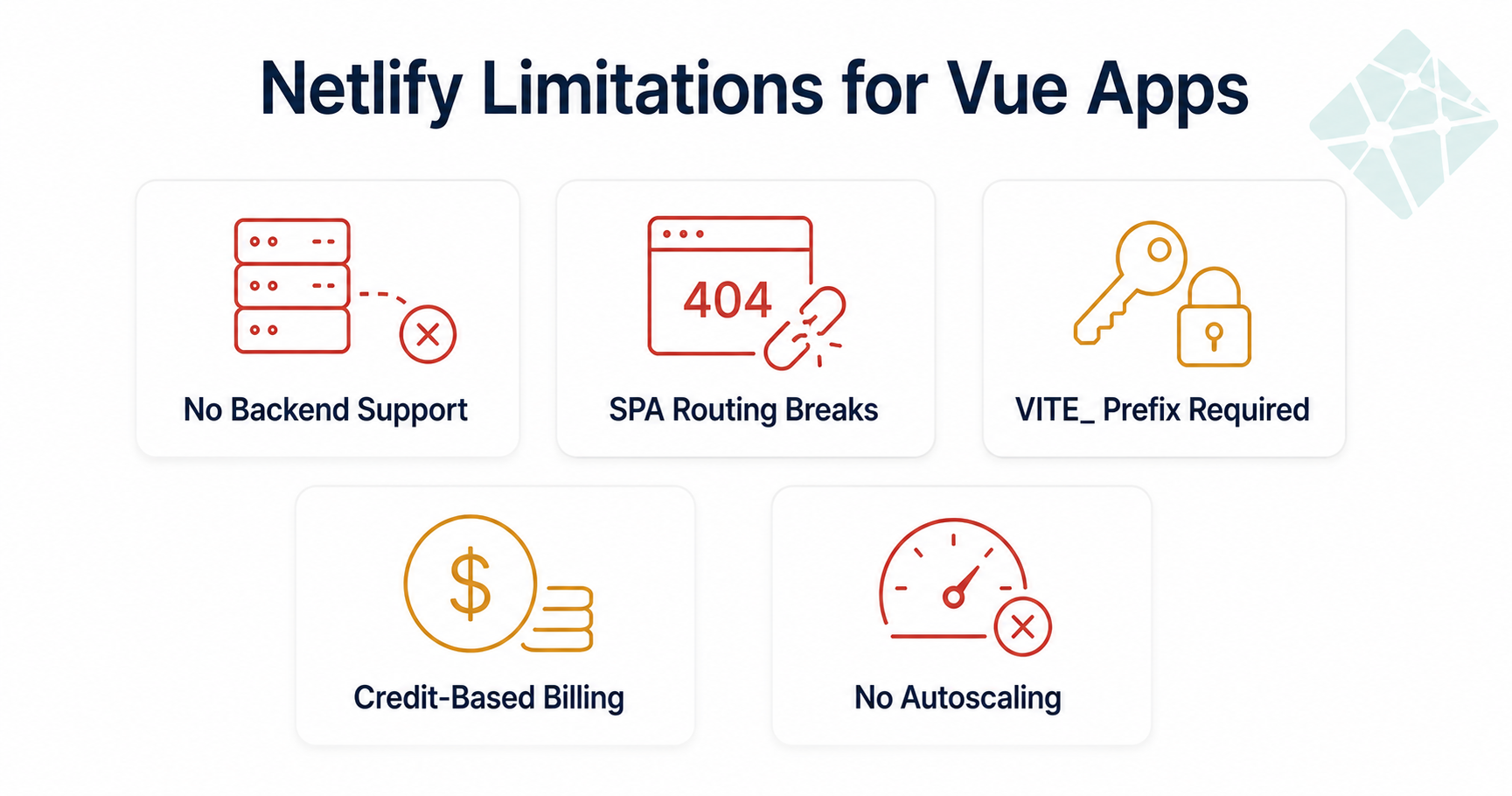
Most Vue deployment guides skip this section entirely. They show you the happy path and leave you to discover the edges on your own. Here is what actually matters before you commit to Netlify for a Vue project.
### Vue Is a Static SPA on Netlify: Backends Will Not Work
Netlify is a CDN-hosting platform. It deploys your Vue build output as static files and serves them globally. There is no persistent Node.js server, no process manager, no ability to run an Express or Fastify backend alongside your frontend.
Developers building full-stack Vue apps with a Node or Express API discover this after connecting their repo and wondering why their backend routes return nothing. If your Vue project is a pure frontend SPA calling external APIs, Netlify works. If your project includes a backend, Netlify is not the right platform for the full stack. You would need to deploy the backend separately or use a platform that handles both in one deploy.
> Not sure whether Netlify fits your full-stack setup? Read [can you deploy a backend on Netlify](https://kuberns.com/blogs/can-you-deploy-backend-on-netlify/) before committing your architecture to it.
### SPA Routing Breaks Out of the Box
Vue Router in `history` mode handles routing entirely on the client side. When a user navigates directly to `/dashboard` or refreshes the browser on any route, Netlify looks for a real file at that path, finds nothing, and returns a 404. This does not happen in local development, which means it catches developers on their first deploy without warning.
The fix exists and is simple, but it is completely manual. You have to remember to add it on every new Vue project you deploy to Netlify.
### Environment Variables Require the `VITE_` Prefix
Vue 3 with Vite only exposes variables prefixed with `VITE_` to client-side code. If you set `API_URL` in the Netlify dashboard, your Vue app cannot read it. You must name it `VITE_API_URL` and access it via `import.meta.env.VITE_API_URL`.
There is no warning when this goes wrong. Your app builds successfully. Your variable is just `undefined` at runtime. Developers debugging why their API calls fail in production while working locally have spent hours on this before finding the cause. It is a [silent environment variable failure](https://kuberns.com/blogs/app-works-locally-fails-in-production/) that Netlify does not surface.
### Credit-Based Billing Since September 2025
Netlify replaced its bandwidth and build-minutes model with a credit-based system in September 2025. Credits are consumed across build time, serverless function calls, and bandwidth. The free tier gives 300 credits per month.
The problem is that cost prediction is harder with credits than with straightforward GB and minute limits. A Vue project in active development, with multiple developers pushing to feature branches and preview deploys firing on every PR, burns through credits faster than expected. There is no hard cap unless you set one manually, and the Pro plan at $20 per month adds function invocation costs on top.
### No Autoscaling
Netlify does not scale your serverless functions automatically based on traffic. For any Vue app with variable traffic hitting Netlify Functions, you manage cold starts and invocation limits yourself. A traffic spike means queued requests and degraded response times, not automatic resource allocation.
### Free Tier Is Limited for Real Projects
The 300 credits per month works for hobby projects and portfolios with minimal traffic and occasional deploys. For any Vue app with real users, active CI/CD pipelines, and feature branches generating preview builds, you hit the ceiling quickly. The step up to Pro costs $20 per month and still does not include autoscaling or a backend runtime.
> Most of these limitations do not show up until you are already in production. Read our [full breakdown of Netlify pricing](https://kuberns.com/blogs/netlify-pricing/) to understand exactly what you are getting on each tier before committing.
## How to Deploy Vue on Netlify Step by Step
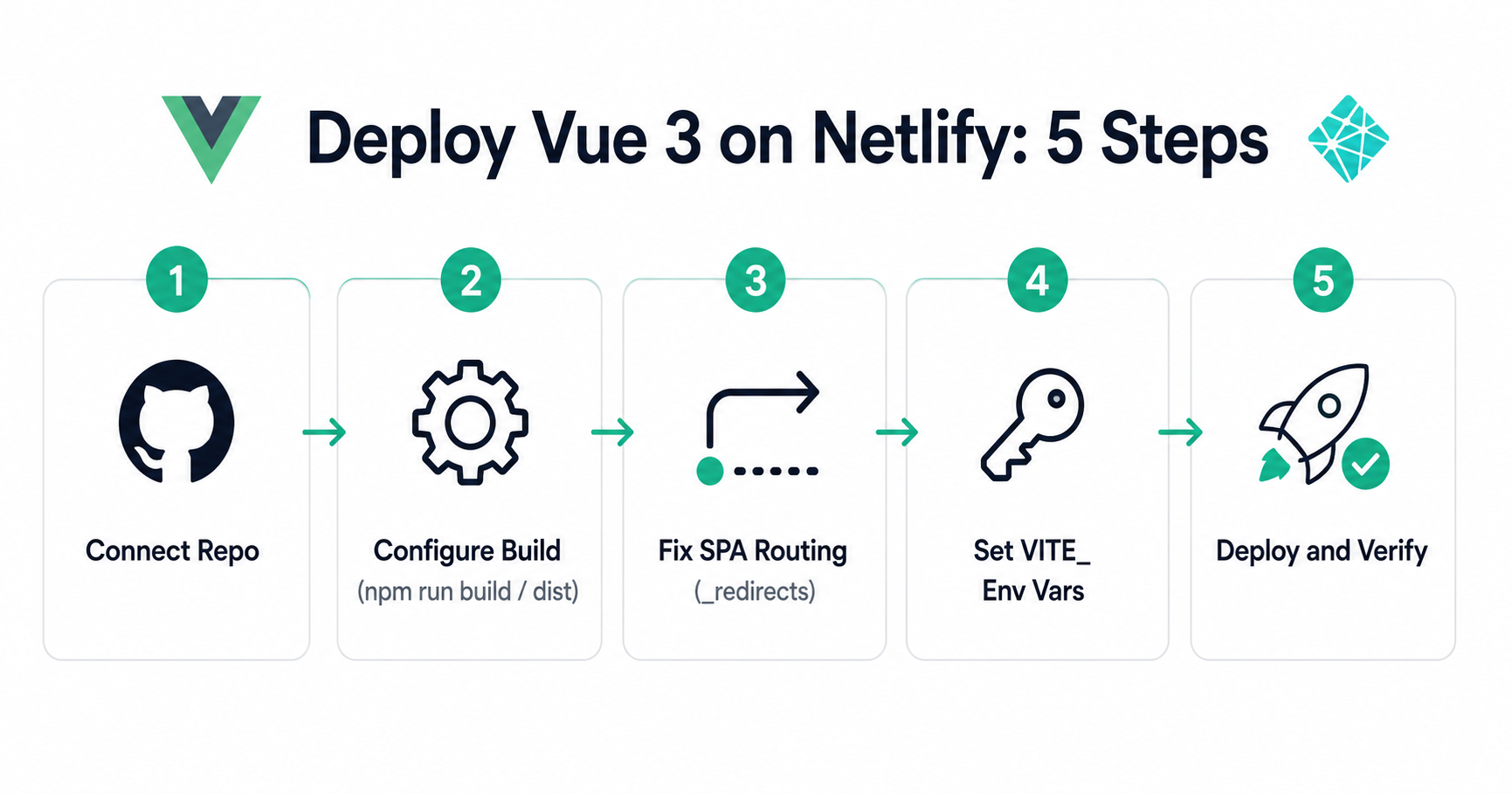
Here is the complete setup that works for Vue 3 + Vite projects.
### Prerequisites
Before you open the Netlify dashboard, make sure you have:
- Your Vue 3 app pushed to a GitHub, GitLab, or Bitbucket repository
- The app builds locally with `npm run build` without errors
- Node.js 18 or later installed (Netlify supports Node 18 and 20)
- A `dist/` folder generated locally to confirm your build output path
### Step 1: Connect Your Repo to Netlify
Log into [netlify.com](https://www.netlify.com), click **Add new site**, and select **Import an existing project**. Authorise Netlify to access your repository host and choose your Vue project.
### Step 2: Configure Build Settings
Netlify auto-detects Vite in most cases and suggests the following:
- **Build command:** `npm run build`
- **Publish directory:** `dist`
Verify these match your actual `vite.config.js` output before saving. If you have customised `build.outDir` in your Vite config, update the publish directory to match. A wrong publish directory means Netlify deploys an empty site with no error message.
### Step 3: Fix SPA Routing
Vue Router in `history` mode requires every URL to serve `index.html`. Without this fix, any direct URL or page refresh returns a 404.
Create a `_redirects` file in your `public/` folder:
```
/* /index.html 200
```
Vite automatically copies everything in `public/` to the build output, so this file will be present in `dist/` after every build.
Alternatively, add this to a `netlify.toml` file in your project root:
```toml
[[redirects]]
from = "/*"
to = "/index.html"
status = 200
```
If you are using Vue Router in `hash` mode (`createWebHashHistory`), routing works without this fix. But hash mode produces URLs like `/#/dashboard`, which most production apps avoid for SEO and UX reasons.
### Step 4: Set Environment Variables
Open **Site configuration > Environment variables** in the Netlify dashboard. Add every variable your app needs.
Every variable that needs to be accessible in your Vue components must be prefixed with `VITE_`:
```
VITE_API_URL=https://api.yourapp.com
VITE_STRIPE_KEY=pk_live_...
```
Access them in your code using:
```js
const apiUrl = import.meta.env.VITE_API_URL
```
Variables without the `VITE_` prefix are available only in build scripts and server-side contexts, not in the browser bundle.
### Step 5: Deploy and Verify
Netlify triggers a build automatically when you push to your configured branch. Check the deploy log for errors. Common first-deploy failures include:
- Wrong publish directory (check `vite.config.js` `build.outDir`)
- Missing `_redirects` file causing 404 on all routes except the root
- Environment variables set without the `VITE_` prefix returning `undefined`
- Node.js version mismatch between local and Netlify build environment
> Deployment failures that happen in production but not locally almost always come down to environment configuration differences. See [why software deployments fail in production](https://kuberns.com/blogs/why-do-software-deployments-fail/) and what to check first when your deploy log shows success but the app does not work.
 ## Why Netlify Is Not the Right Fit for Most Vue Apps
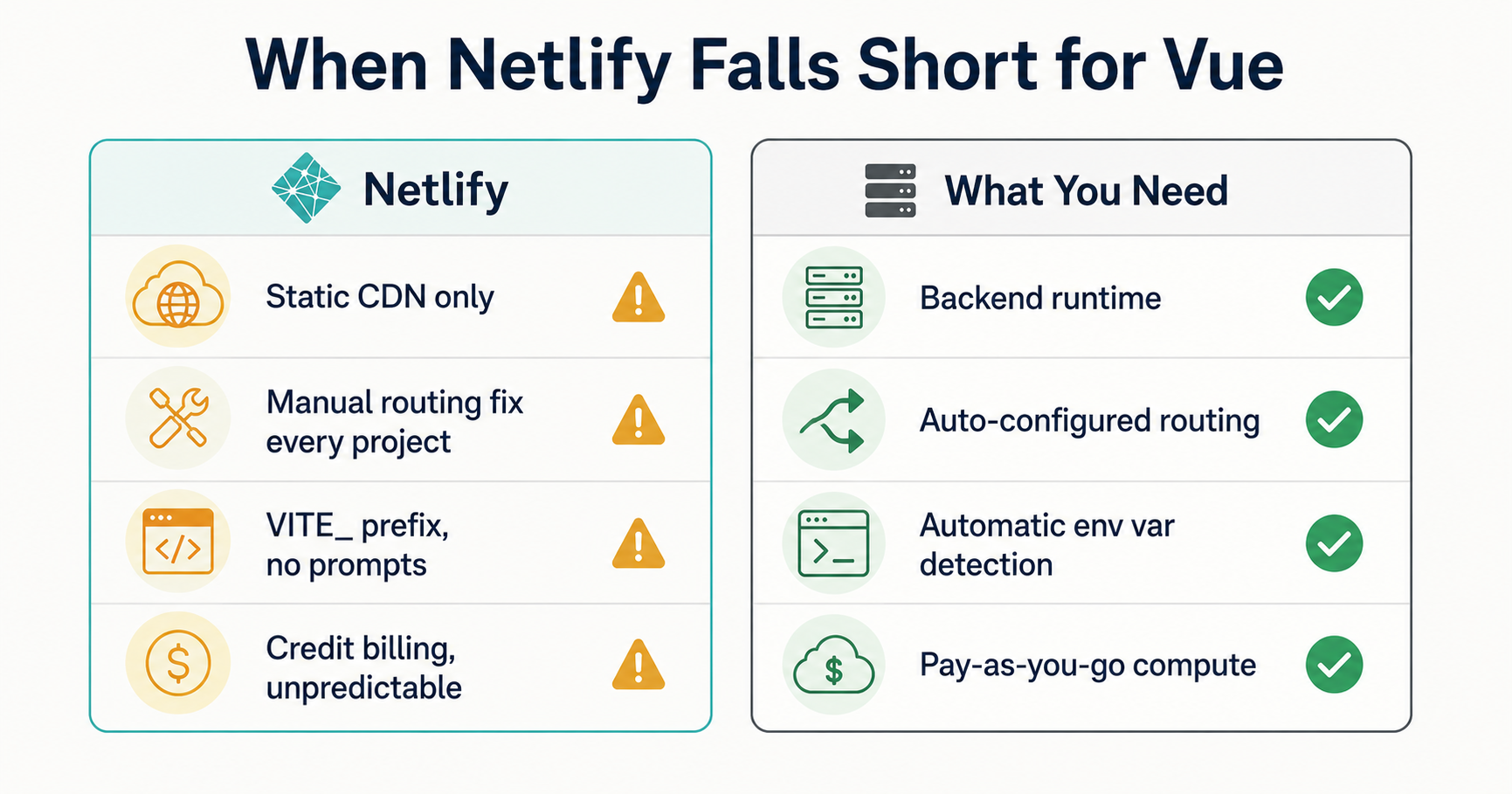
Netlify was built for static sites and JAMstack frontends. Vue 3, especially when paired with a backend or used in a full-stack setup, is a different kind of project. That mismatch creates friction at every layer.
The SPA redirect rule is a manual tax you pay on every new Vue project. The `VITE_` prefix is a silent production killer that Netlify does nothing to warn you about. The credit billing model rewards small, infrequent deployments and penalises active development teams.
There is no backend runtime, no persistent server, no way to run your Node API on the same platform as your Vue frontend without a workaround. Teams that start with Netlify for a full-stack Vue project end up splitting their deployment across two platforms, which introduces its own CORS, environment variable, and debugging overhead.
Netlify is a reasonable choice for a Vue portfolio or a simple marketing site with no backend. For a Vue app with real users, active development, environment variables, or any server-side logic, the limitations stack up quickly.
### What Are Developers Switching to Instead of Netlify?
Developers moving away from Netlify for Vue apps are landing on platforms designed for full-stack deployments. [Kuberns](https://kuberns.com) is the most common switch for Vue teams. The reason is the same one that drives the Angular migration: Kuberns uses an AI agent that reads your project, detects your Vue 3 and Vite setup automatically, and handles all deployment configuration without any manual steps. No `netlify.toml`, no `_redirects` file, no `VITE_` prefix conventions to remember. You push your code, the AI handles the rest, and your app is live.
> See what other developers are moving to in our [comparison of the best Netlify alternatives](https://kuberns.com/blogs/best-netlify-alternatives/).
## Best Way to Deploy Vue App Is On Kuberns with Agentic AI
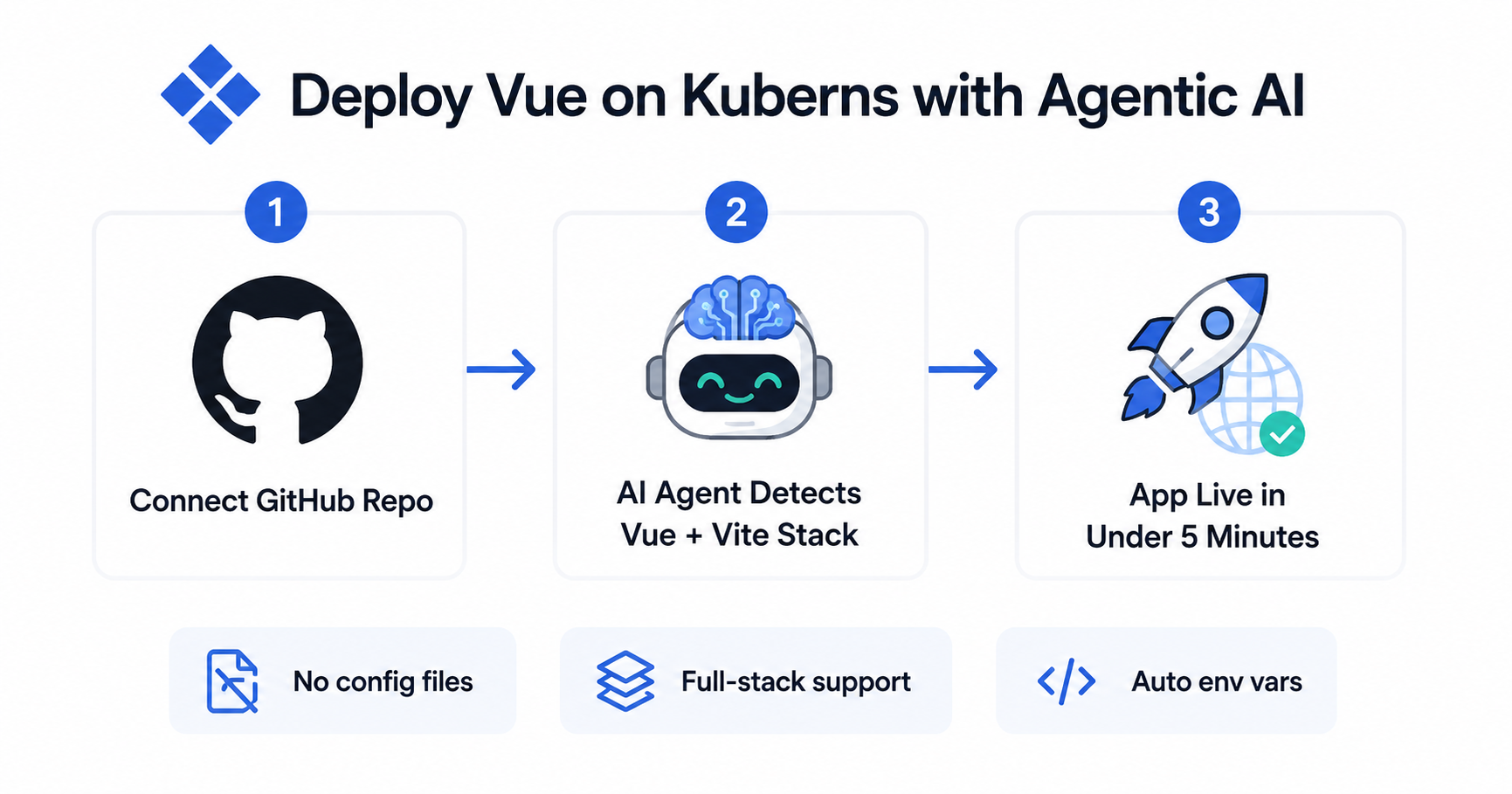
[Kuberns](https://kuberns.com) was built for full-stack deployments, not retrofitted for them. When you push a Vue project, the Kuberns AI agent reads your codebase, detects Vue 3 and Vite, identifies your build output path, and configures everything automatically.
No `netlify.toml`. No `_redirects` file. No `VITE_` prefix requirement. No manual environment variable wiring.
**How it works:**
**Step 1. Connect your GitHub repo**
Link your repository to Kuberns. Every push to your configured branch triggers an automatic deploy.
**Step 2. AI agent detects your Vue setup**
The AI agent reads your project. It detects Vue 3, identifies your Vite build config, determines whether you have a backend alongside your frontend, and prompts you to input the environment variables your app needs. You fill in the values. Kuberns handles the rest.
**Step 3. Deploy and your app is live**
Kuberns builds your app, configures routing automatically, injects your environment variables securely, and deploys. Static assets go to the CDN. If your Vue project includes a Node backend, that deploys alongside it in the same workflow. No plugins, no config files, no post-deploy surprises.
Kuberns uses a pay-as-you-go model. You pay only for the compute you use, with no credit limits or per-user pricing. [Start deploying your Vue app on Kuberns](https://dashboard.kuberns.com).
> Curious what actually happens when you click deploy? Read [what one-click deployment does](https://kuberns.com/blogs/what-does-one-click-deployment-do/) and why removing manual config steps removes the most common source of deployment failures.
## Why Kuberns Beats Netlify for Vue Deployments
| | **Netlify** | **Kuberns** |
|---|---|---|
| Vue SPA routing | Manual `_redirects` file required | Automatic, no config needed |
| Environment variables | `VITE_` prefix required, no prompting | AI agent surfaces and prompts for required vars |
| Backend support | Not supported (static CDN only) | Full-stack Vue with Node backend in one deploy |
| Build config | Requires `netlify.toml` for non-defaults | Zero config files needed |
| Pricing model | Credit-based, hard to predict | Pay-as-you-go, compute only |
| Free tier | 300 credits/month | Pay only for what you use |
| Scaling | Manual invocation limit management | Managed automatically |
| Framework detection | Auto-detects Vite, no backend awareness | AI detects full Vue stack including backend |
The difference is not just convenience. It is architecture. Netlify is a platform where you configure your Vue app to fit the platform. Kuberns is a platform where the AI adapts to your app.
For a static Vue portfolio, Netlify works. For a production Vue app with environment variables, routing, a backend, and active development, Kuberns removes the friction that Netlify introduces at every step.
> Deploying other frameworks on the same stack? See how [deploying Node.js on Netlify compares](https://kuberns.com/blogs/deploy-nodejs-on-netlify-and-why-kuberns-is-a-smarter-choice/) and why teams running Vue with a Node backend move both to a single platform.
Netlify can deploy a Vue 3 app. The steps are documented, the platform is established, and for a pure static SPA it works. But the SPA routing workaround, the `VITE_` prefix requirement, the backend limitation, and the unpredictable credit billing add up to real friction for any Vue project beyond a hobby site.
[Kuberns](https://kuberns.com) removes all of that. The AI agent handles your Vue stack end to end, from detecting your Vite config to configuring routing to prompting for environment variables. You push your code. Kuberns handles the rest.
Stop working around platform limitations. [Deploy your Vue app on Kuberns](https://dashboard.kuberns.com) and let the AI handle it from the first push.
## Why Netlify Is Not the Right Fit for Most Vue Apps

Netlify was built for static sites and JAMstack frontends. Vue 3, especially when paired with a backend or used in a full-stack setup, is a different kind of project. That mismatch creates friction at every layer.
The SPA redirect rule is a manual tax you pay on every new Vue project. The `VITE_` prefix is a silent production killer that Netlify does nothing to warn you about. The credit billing model rewards small, infrequent deployments and penalises active development teams.
There is no backend runtime, no persistent server, no way to run your Node API on the same platform as your Vue frontend without a workaround. Teams that start with Netlify for a full-stack Vue project end up splitting their deployment across two platforms, which introduces its own CORS, environment variable, and debugging overhead.
Netlify is a reasonable choice for a Vue portfolio or a simple marketing site with no backend. For a Vue app with real users, active development, environment variables, or any server-side logic, the limitations stack up quickly.
### What Are Developers Switching to Instead of Netlify?
Developers moving away from Netlify for Vue apps are landing on platforms designed for full-stack deployments. [Kuberns](https://kuberns.com) is the most common switch for Vue teams. The reason is the same one that drives the Angular migration: Kuberns uses an AI agent that reads your project, detects your Vue 3 and Vite setup automatically, and handles all deployment configuration without any manual steps. No `netlify.toml`, no `_redirects` file, no `VITE_` prefix conventions to remember. You push your code, the AI handles the rest, and your app is live.
> See what other developers are moving to in our [comparison of the best Netlify alternatives](https://kuberns.com/blogs/best-netlify-alternatives/).
## Best Way to Deploy Vue App Is On Kuberns with Agentic AI

[Kuberns](https://kuberns.com) was built for full-stack deployments, not retrofitted for them. When you push a Vue project, the Kuberns AI agent reads your codebase, detects Vue 3 and Vite, identifies your build output path, and configures everything automatically.
No `netlify.toml`. No `_redirects` file. No `VITE_` prefix requirement. No manual environment variable wiring.
**How it works:**
**Step 1. Connect your GitHub repo**
Link your repository to Kuberns. Every push to your configured branch triggers an automatic deploy.
**Step 2. AI agent detects your Vue setup**
The AI agent reads your project. It detects Vue 3, identifies your Vite build config, determines whether you have a backend alongside your frontend, and prompts you to input the environment variables your app needs. You fill in the values. Kuberns handles the rest.
**Step 3. Deploy and your app is live**
Kuberns builds your app, configures routing automatically, injects your environment variables securely, and deploys. Static assets go to the CDN. If your Vue project includes a Node backend, that deploys alongside it in the same workflow. No plugins, no config files, no post-deploy surprises.
Kuberns uses a pay-as-you-go model. You pay only for the compute you use, with no credit limits or per-user pricing. [Start deploying your Vue app on Kuberns](https://dashboard.kuberns.com).
> Curious what actually happens when you click deploy? Read [what one-click deployment does](https://kuberns.com/blogs/what-does-one-click-deployment-do/) and why removing manual config steps removes the most common source of deployment failures.
## Why Kuberns Beats Netlify for Vue Deployments
| | **Netlify** | **Kuberns** |
|---|---|---|
| Vue SPA routing | Manual `_redirects` file required | Automatic, no config needed |
| Environment variables | `VITE_` prefix required, no prompting | AI agent surfaces and prompts for required vars |
| Backend support | Not supported (static CDN only) | Full-stack Vue with Node backend in one deploy |
| Build config | Requires `netlify.toml` for non-defaults | Zero config files needed |
| Pricing model | Credit-based, hard to predict | Pay-as-you-go, compute only |
| Free tier | 300 credits/month | Pay only for what you use |
| Scaling | Manual invocation limit management | Managed automatically |
| Framework detection | Auto-detects Vite, no backend awareness | AI detects full Vue stack including backend |
The difference is not just convenience. It is architecture. Netlify is a platform where you configure your Vue app to fit the platform. Kuberns is a platform where the AI adapts to your app.
For a static Vue portfolio, Netlify works. For a production Vue app with environment variables, routing, a backend, and active development, Kuberns removes the friction that Netlify introduces at every step.
> Deploying other frameworks on the same stack? See how [deploying Node.js on Netlify compares](https://kuberns.com/blogs/deploy-nodejs-on-netlify-and-why-kuberns-is-a-smarter-choice/) and why teams running Vue with a Node backend move both to a single platform.
Netlify can deploy a Vue 3 app. The steps are documented, the platform is established, and for a pure static SPA it works. But the SPA routing workaround, the `VITE_` prefix requirement, the backend limitation, and the unpredictable credit billing add up to real friction for any Vue project beyond a hobby site.
[Kuberns](https://kuberns.com) removes all of that. The AI agent handles your Vue stack end to end, from detecting your Vite config to configuring routing to prompting for environment variables. You push your code. Kuberns handles the rest.
Stop working around platform limitations. [Deploy your Vue app on Kuberns](https://dashboard.kuberns.com) and let the AI handle it from the first push.
 ## Frequently Asked Questions
**Can you deploy Vue on Netlify?**
Yes. Netlify supports Vue 3 deployments via Vite with automatic framework detection. For static Vue SPAs, the setup is straightforward. The two issues most developers hit are the SPA routing 404 on page refresh (requires a manual `_redirects` rule) and the `VITE_` prefix requirement for environment variables.
**What is the build command for Vue on Netlify?**
The build command for a Vue 3 + Vite app on Netlify is `npm run build`. The publish directory is `dist`. Netlify auto-detects Vite in most cases and suggests these settings. If you have customised `build.outDir` in `vite.config.js`, update the Netlify publish directory to match.
**Why does my Vue app show a 404 error on Netlify after refresh?**
Vue Router in `history` mode handles routing on the client. When you refresh a page or navigate directly to a route like `/dashboard`, Netlify looks for a physical file at that path, finds nothing, and returns a 404. The fix is to add a `_redirects` file in your `public/` folder with the rule `/* /index.html 200`. This tells Netlify to serve `index.html` for every route and let Vue Router handle the rest.
**How do I use environment variables in Vue on Netlify?**
Every variable that needs to be accessible in Vue components must be prefixed with `VITE_`. Set them in the Netlify dashboard under Site configuration > Environment variables. Access them in your code using `import.meta.env.VITE_YOUR_VAR`. Variables set without the `VITE_` prefix will be `undefined` in the browser bundle, with no build error or warning.
**Can Netlify host a Vue app with a backend?**
No. Netlify deploys Vue as a static SPA served from a CDN. There is no persistent Node.js server. If your Vue app includes an Express, Fastify, or Node backend, that backend cannot run on Netlify. You would need to deploy the backend on a separate platform or use Kuberns, which supports full-stack Vue deployments with frontend and backend in a single workflow.
**Is Netlify free for Vue apps?**
Netlify has a free tier with 300 credits per month. Since September 2025, Netlify uses a credit-based billing model where credits are consumed by build time, function invocations, and bandwidth. For hobby projects and portfolios the free tier is sufficient. For Vue apps in active development with multiple team members, CI/CD pipelines, and preview builds, credits run out faster than expected.
**What is the publish directory for Vue 3 on Netlify?**
For Vue 3 projects using Vite, the publish directory is `dist`. Vite outputs the production build there by default. If you have set a custom `build.outDir` in `vite.config.js`, use that path as the publish directory in Netlify instead.
**Does Netlify support Vue Router history mode?**
Netlify supports Vue Router `history` mode only if you add a redirect rule. Without it, direct URLs and page refreshes return a 404. Add a `_redirects` file in your `public/` folder with `/* /index.html 200`, or configure the same rule in `netlify.toml`. This is not automatic and must be set on every Vue project deployed to Netlify.
**What is a better alternative to Netlify for Vue deployments?**
[Kuberns](https://kuberns.com) is a strong alternative for Vue deployments. Its AI agent detects your Vue 3 and Vite setup automatically, handles routing without a `netlify.toml`, prompts for environment variables without the `VITE_` prefix requirement, and supports full-stack Vue apps with a backend in one deploy. Kuberns uses a pay-as-you-go model with no credit limits.
**How does Kuberns deploy Vue apps differently from Netlify?**
Kuberns uses an agentic AI that reads your project, detects Vue 3 and Vite automatically, configures routing, and prompts for environment variables without requiring any config files or naming conventions. You do not need a `_redirects` file, `netlify.toml`, or the `VITE_` prefix. Kuberns also supports full-stack Vue deployments with a Node or Express backend, which Netlify does not support on standard plans.
---
- [More Deployment Guides articles](https://kuberns.com/blogs/category/deployment-guides/1/)
- [All articles](https://kuberns.com/blogs/)
## Frequently Asked Questions
**Can you deploy Vue on Netlify?**
Yes. Netlify supports Vue 3 deployments via Vite with automatic framework detection. For static Vue SPAs, the setup is straightforward. The two issues most developers hit are the SPA routing 404 on page refresh (requires a manual `_redirects` rule) and the `VITE_` prefix requirement for environment variables.
**What is the build command for Vue on Netlify?**
The build command for a Vue 3 + Vite app on Netlify is `npm run build`. The publish directory is `dist`. Netlify auto-detects Vite in most cases and suggests these settings. If you have customised `build.outDir` in `vite.config.js`, update the Netlify publish directory to match.
**Why does my Vue app show a 404 error on Netlify after refresh?**
Vue Router in `history` mode handles routing on the client. When you refresh a page or navigate directly to a route like `/dashboard`, Netlify looks for a physical file at that path, finds nothing, and returns a 404. The fix is to add a `_redirects` file in your `public/` folder with the rule `/* /index.html 200`. This tells Netlify to serve `index.html` for every route and let Vue Router handle the rest.
**How do I use environment variables in Vue on Netlify?**
Every variable that needs to be accessible in Vue components must be prefixed with `VITE_`. Set them in the Netlify dashboard under Site configuration > Environment variables. Access them in your code using `import.meta.env.VITE_YOUR_VAR`. Variables set without the `VITE_` prefix will be `undefined` in the browser bundle, with no build error or warning.
**Can Netlify host a Vue app with a backend?**
No. Netlify deploys Vue as a static SPA served from a CDN. There is no persistent Node.js server. If your Vue app includes an Express, Fastify, or Node backend, that backend cannot run on Netlify. You would need to deploy the backend on a separate platform or use Kuberns, which supports full-stack Vue deployments with frontend and backend in a single workflow.
**Is Netlify free for Vue apps?**
Netlify has a free tier with 300 credits per month. Since September 2025, Netlify uses a credit-based billing model where credits are consumed by build time, function invocations, and bandwidth. For hobby projects and portfolios the free tier is sufficient. For Vue apps in active development with multiple team members, CI/CD pipelines, and preview builds, credits run out faster than expected.
**What is the publish directory for Vue 3 on Netlify?**
For Vue 3 projects using Vite, the publish directory is `dist`. Vite outputs the production build there by default. If you have set a custom `build.outDir` in `vite.config.js`, use that path as the publish directory in Netlify instead.
**Does Netlify support Vue Router history mode?**
Netlify supports Vue Router `history` mode only if you add a redirect rule. Without it, direct URLs and page refreshes return a 404. Add a `_redirects` file in your `public/` folder with `/* /index.html 200`, or configure the same rule in `netlify.toml`. This is not automatic and must be set on every Vue project deployed to Netlify.
**What is a better alternative to Netlify for Vue deployments?**
[Kuberns](https://kuberns.com) is a strong alternative for Vue deployments. Its AI agent detects your Vue 3 and Vite setup automatically, handles routing without a `netlify.toml`, prompts for environment variables without the `VITE_` prefix requirement, and supports full-stack Vue apps with a backend in one deploy. Kuberns uses a pay-as-you-go model with no credit limits.
**How does Kuberns deploy Vue apps differently from Netlify?**
Kuberns uses an agentic AI that reads your project, detects Vue 3 and Vite automatically, configures routing, and prompts for environment variables without requiring any config files or naming conventions. You do not need a `_redirects` file, `netlify.toml`, or the `VITE_` prefix. Kuberns also supports full-stack Vue deployments with a Node or Express backend, which Netlify does not support on standard plans.
---
- [More Deployment Guides articles](https://kuberns.com/blogs/category/deployment-guides/1/)
- [All articles](https://kuberns.com/blogs/)