# Deploy React App to Production Without Manual Setup
> Deploy React apps to production in 2026 with GitHub, Vite or CRA, env vars, SPA routing, SSL, CDN, CI/CD, logs, full-stack APIs, and Kuberns agentic AI.
- **Author**: suyash-tiwari
- **Published**: 2025-11-04
- **Modified**: 2026-09-12
- **Category**: Deployment Guides
- **URL**: https://kuberns.com/blogs/deploying-react-app/
---
To deploy a React app in 2026, create a production build, publish the correct output folder, add secure environment variables, enable HTTPS, configure SPA routing, and connect CI/CD from GitHub. For Vite projects, the output folder is usually `dist/`. For Create React App, it is usually `build/`.
The best platform depends on what you are shipping. Vercel, Netlify, Cloudflare Pages, and GitHub Pages work well for static React frontends. Kuberns is a better fit when your React app is part of a full-stack product with a Node.js backend, database connection, logs, deployment history, secure env vars, and agentic AI for deployment in one workflow.
This guide covers the practical setup developers search for most often: Vite vs Create React App builds, automatic SSL and CDN hosting, SPA routing fixes, full-stack React with Node.js and PostgreSQL, and the cleanest way to deploy from GitHub without manual server setup.
[See how Kuberns deploys apps with agentic AI](https://kuberns.com/services)
## Prerequisites (What You Need for an Error-Free Deployment)
Getting these three things right before you deploy prevents the most common failures. None of them requires DevOps knowledge.
### 1. Know your build tool and its output directory
This is the most common cause of "deployment succeeded but blank screen" failures. React apps built with different tools output to different folders. If the platform's publish directory does not match, it can serve an empty or incorrect build.
| Build tool | Build command | Output folder |
| ---------------- | ------------- | ------------- |
| Vite | npm run build | dist/ |
| Create React App | npm run build | build/ |
Not sure which one you use? Check your `package.json`:

On Kuberns, agentic AI for deployment can detect common React project patterns and apply the correct build command and output directory.
### 2. Environment variables must use the correct prefix
React exposes environment variables to the browser at build time, not runtime. Each build tool uses a different prefix to decide what gets included in the browser bundle. Use the wrong prefix and your variables will be undefined in production, even though the build succeeds cleanly.

These values belong in your deployment platform's environment [dashboard](https://dashboard.kuberns.com/login), not hardcoded in source files and not committed to GitHub.
For a frontend-only React app, you usually do not need a Dockerfile, server config, or Procfile.
On a VPS, you would also configure Nginx, compression, caching headers, SSL certificates, and routing. On Vercel or Netlify, you may still need to confirm the publish directory and add a redirect rule for SPA routes. On [Kuberns](https://kuberns.com/), those deployment layers are handled inside the platform workflow.
> **💡 Deploying a full-stack app where the React frontend calls a Node.js API? See our guide on how to [deploy a Node.js app](https://kuberns.com/blogs/how-to-deploy-nodejs-app/)**
## How to Deploy Your React App on Kuberns
Before diving into the steps, here's something worth two minutes of your time.
This walkthrough shows the agentic AI detecting a React project and taking it from GitHub repo to live production URL. Watch what happens after you click Deploy:
## Step-by-Step: Deploy a React App on Kuberns
Kuberns is an Agentic AI platform for deployment built for production apps on AWS infrastructure. For supported React projects, it can detect your framework, apply the right build settings, connect GitHub, configure HTTPS, and keep logs and deployment history in one dashboard.
### Step 1: Create Your Account and Project
Go to [Kuberns](https://kuberns.com) and click "Deploy with AI". Create your account and add the basic project details.

Kuberns has a Trial Option to start. Paid plans start at $7, with bundle packs available for teams that want additional savings. [See what each tier includes](https://kuberns.com/pricing)
### Step 2: Connect GitHub
On the "Creating a Service" page, connect your GitHub account, add the project name, and choose your region.
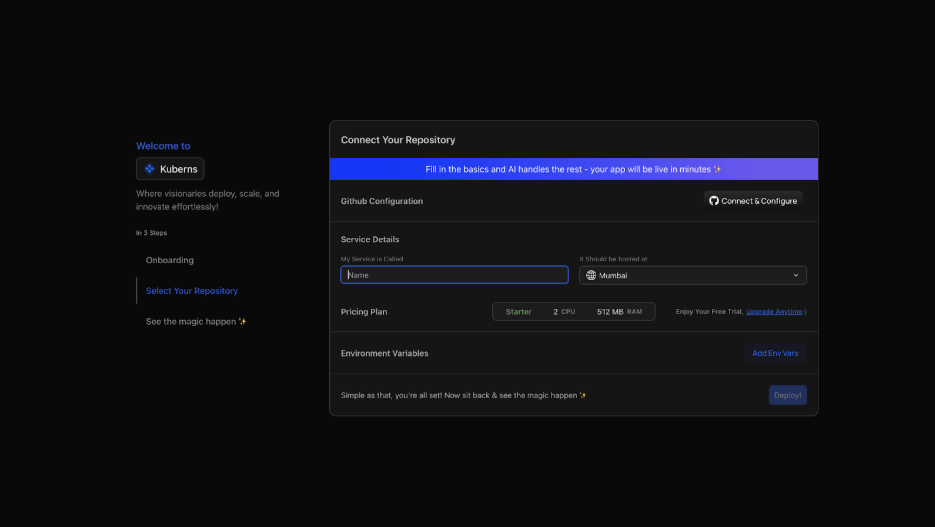
* Click "Connect & Configure" and authorise Kuberns access to your repositories
* Select your React repository and the branch you're deploying from (main)
* Kuberns scans your project, identifies common React build tools such as Vite or Create React App, and prepares the build command and output directory for review
### Step 3: Set Environment Variables
Navigate to the Environment section before deploying:

* Click "Add Env Vars" and input key-value pairs manually, or
* Click "Upload .env file" to import all variables at once
### Step 4: Click Deploy
Click Deploy. From here, the Kuberns deployment workflow:

* Installs dependencies from package.json
* Runs npm run build with the correctly detected configuration
* Optimises and bundles your static assets
* Enables HTTPS for the production URL
* Supports React SPA routing for direct route access and refresh
* Connects GitHub-based deployments
* Keeps build logs and deployment history available in the dashboard

Your app is live within minutes. The production URL, build logs, and deployment history are available from one dashboard.
> **💡 Comparing Kuberns to Vercel or Netlify specifically? Jump to the [platform comparison](https://kuberns.com/blogs/netlify-vs-vercel-vs-kuberns/) for a side-by-side breakdown covering SSL, CDN, preview deployments, full-stack support, and real pricing across platforms.**
### Deploying a Full-Stack React App with Node.js and PostgreSQL?
Several of the most-searched React deployment queries in 2026 are specifically about full-stack setups: "simplest way to deploy React Node.js PostgreSQL full-stack app", "best deployment platforms for react node.js full stack apps."
These are developers who have outgrown static-only hosting and need a deployment workflow that keeps the frontend, API, and database configuration connected.
The standard workaround, React on Vercel or Netlify, Node.js separately on Render or Railway, works but creates operational friction immediately. Two dashboards. Two billing accounts. Two CI/CD pipelines. Two sets of environment variables. When something breaks in production, you're switching between platforms to find where. That overhead compounds over time.
Kuberns can keep the complete stack inside a single project. Here is the typical setup:
#### The Node.js backend
Deploy your Node.js API as a backend service in the same Kuberns project. It gets its own production URL, for example `https://api.yourapp.kuberns.cloud`. Make sure CORS allows your React frontend domain:

#### The React frontend
Deploy your React app as a frontend service in the same project. Point it at the backend with an environment variable:

In your React components:

**PostgreSQL**
Connect to a managed PostgreSQL provider such as [Neon](https://neon.tech), [Supabase](https://supabase.com), or AWS RDS. Add the connection string to the Node.js backend environment variables only. Database credentials should never reach the React frontend:

Both services deploy from the same GitHub push, with unified logs, shared environment management, and a single CI/CD pipeline. When you push a commit that touches both the frontend and backend, both redeploy automatically in the correct order.
> **💡 Using FastAPI or Flask as your backend instead of Node.js? The same Kuberns multi-service workflow applies. See the [FastAPI deployment](https://kuberns.com/blogs/fastapi-deployment-guide/) guide and [Flask deployment](https://kuberns.com/blogs/how-to-deploy-flask-app/) guide for the Python-specific configuration.**
## React Deployment Platform Comparison (2026)
| Platform | Auto SSL | Full-stack Support | SPA Routing | Free Tier | Starting Price | Best For |
| ---------------- | -------- | -------------------------------- | ------------------- | ----------------------------- | ----------------------------------- | ---------------------------------------------- |
| Kuberns | Yes | Full-stack (frontend + API) | Automatic | Yes, includes credits | $7 per month | Production apps, full-stack React with backend |
| Vercel | Yes | Serverless backend only | Yes | Free for non-commercial use | $20 per user per month | Frontend-heavy apps, Next.js, portfolios |
| Netlify | Yes | Functions only (limited backend) | Yes | Free tier available | $19 per user per month | JAMstack sites, content platforms |
| Render | Yes | Full-stack with backend | Manual setup | Free tier (with sleep limits) | $7 per month | Full-stack apps needing persistent backend |
| Cloudflare Pages | Yes | Workers-based backend | Yes | Generous free tier | Free, paid plans from $20 per month | High-traffic static sites with edge logic |
| Railway | Yes | Full-stack (manual setup) | Manual setup | $5 trial credit | $5 per month plus usage | Prototypes and early-stage apps |
| GitHub Pages | Yes | Static only | Requires workaround | Free | Free | Personal projects, documentation, portfolios |
## Conclusion
Deploying a React app in 2026 is straightforward when the build settings, environment variables, HTTPS, SPA routing, and CI/CD are handled correctly. The hard part is no longer running `npm run build`. The hard part is choosing a platform that fits the type of React app you are shipping.
For pure frontends, Vercel and Netlify are strong, chosen based on commercial use terms and team pricing. For full-stack React apps with real backends and databases, Kuberns removes the multi-platform split entirely. One project, one GitHub push, everything live.
If your React app is becoming a real product with backend services, databases, and production traffic, Kuberns gives you one place to deploy and manage it with agentic AI for deployment.
**[Deploy your React app on Kuberns](https://dashboard.kuberns.com)**
## Frequently Asked Questions
### What is the fastest and easiest way to deploy a React app in 2026?
The fastest way is to connect your GitHub repository to a deployment platform, confirm the React build command, set the output folder, add env vars, and deploy. Kuberns simplifies this for supported React projects by detecting Vite or CRA settings and keeping SSL, SPA routing, CI/CD, logs, and deployment history in one workflow. [Start now](https://dashboard.kuberns.com)
### Which platforms include automatic SSL and a global CDN for React apps?
Kuberns, Vercel, Netlify, and Cloudflare Pages are common choices for React apps that need automatic SSL and CDN delivery. Vercel and Netlify are popular for frontend-only apps. Kuberns is stronger when the same project also needs backend deployment, secure env vars, logs, and CI/CD. [Compare Kuberns tiers](https://kuberns.com/pricing)
### Why does my React app show 404 when I refresh the page?
React routes often exist only in the browser router. When the server receives a direct request for `/dashboard`, it may look for a physical file and return 404. The fix is a catch-all rewrite to `index.html`, such as `/* /index.html 200` on Netlify or a rewrite rule on Vercel. Kuberns supports this inside the deployment workflow for React apps.
### How do I deploy a full-stack React app with Node.js and PostgreSQL?
Deploy React as a Frontend Service and Node.js as a Backend Service in the same Kuberns project. Set VITE\_API\_URL pointing to the Node.js URL. Add DATABASE\_URL to the backend environment variables only. Both services redeploy from the same GitHub push with unified CI/CD.
### Do I need a server to deploy a React app?
No, React builds to static files served by a CDN. No server is required for the frontend. If your React app calls an API, the API needs a server, but the React frontend does not.
### Where should I deploy my React app?
For a frontend-only React app, Vercel, Netlify, Cloudflare Pages, or GitHub Pages can work well. For a full-stack React app with a Node.js backend and database, Kuberns is a stronger fit because it keeps frontend services, backend services, env vars, logs, SSL, and CI/CD in one project.
### What are the best platforms for deploying a React app with automatic SSL and CDN?
The best platforms for deploying a React app with automatic SSL and CDN in 2026 include Kuberns, Vercel, Netlify, and Cloudflare Pages. Vercel and Netlify are common frontend choices. Kuberns is useful when the React frontend is part of a larger app with backend services and environment variables.
### What are the best AI tools that deploy React apps automatically?
Kuberns is an Agentic AI platform for deployment that can detect React project settings, apply the right build command and output directory, connect GitHub deployment, configure SSL, support SPA routing, and manage CI/CD from one workflow. Vercel and Netlify also automate many frontend deployment steps, especially for static apps.
### How do preview deployments work?
Preview deployments give every pull request its own live URL, a real production-equivalent build for testing before merging. Kuberns, Vercel, and Netlify all include this. When you open a PR, the platform builds and deploys that branch and posts the URL directly to the PR thread.
---
- [More Deployment Guides articles](https://kuberns.com/blogs/category/deployment-guides/1/)
- [All articles](https://kuberns.com/blogs/)
