# How to Deploy a Deno App in 2026 (Complete Guide)
> Deploy a Deno app to production in 2026 without SSH, Docker, or server config. Step-by-step guide on Kuberns with AI automation, env vars, and auto-scaling.
- **Author**: omkar-anbhule
- **Published**: 2026-04-24
- **Modified**: 2026-04-24
- **Category**: Deployment Guides
- **URL**: https://kuberns.com/blogs/how-to-deploy-a-deno-app/
---
You have built a Deno app. It runs cleanly on your machine. Now you need it in production, with HTTPS configured, environment variables secured, automatic restarts, and git-push deploys that just work.
If you have tried deploying Deno manually before, you know the friction. Setting up a VPS, configuring a reverse proxy, wiring up SSL, writing a startup service, and hoping it all survives a reboot. That is a full afternoon of work before your app is actually live.
This guide covers the fastest path from your Deno project to a live production URL using [Kuberns](https://kuberns.com), an AI-agentic deployment platform. Connect your repo, add your environment variables, and watch the AI agent deploy your app to production in under 5 minutes.
## What Makes Deno Different in Production
Deno is a secure JavaScript and TypeScript runtime built on V8. Unlike Node.js, it ships with TypeScript support built in, a secure-by-default permissions model, and a modern standard library. In 2026 with Deno 2.0, it also has full npm compatibility, so you can use the entire npm ecosystem alongside Deno-native modules.
For production deployment, Deno runs as a long-lived server process. It needs a platform that can manage that process reliably, inject environment variables securely, provision SSL automatically, and scale under traffic without manual work. That is exactly what Kuberns handles for you. If you have deployed a [Node.js app](https://kuberns.com/blogs/how-to-deploy-nodejs-app/) or a [TypeScript app](https://kuberns.com/blogs/how-to-deploy-a-typescript-app/) before, the experience on Kuberns is identical.
## Before You Deploy: One Thing to Check
Make sure your Deno project is pushed to a GitHub repository. Kuberns deploys directly from GitHub, so that is the only thing you need in place before getting started. No Dockerfile, no config files, no CLI tools to install.
 ## Step-by-Step: Deploy a Deno App on Kuberns
[Kuberns](https://kuberns.com) is an AI-agentic deployment platform. It detects your Deno project, sets up the runtime, starts your server, provisions HTTPS, and enables CI/CD, all in one click. No config files, no YAML pipelines, no DevOps knowledge required.
### Step 1: Sign Up and Create an Account

Go to [kuberns.com](https://kuberns.com) and click "Deploy with AI". Sign up with GitHub or Google. New accounts include free credits, enough to run a Deno app in production without a credit card.
### Step 2: Connect Your GitHub Repository
On the "Create Service" page, connect your GitHub account and select your Deno repository and branch.
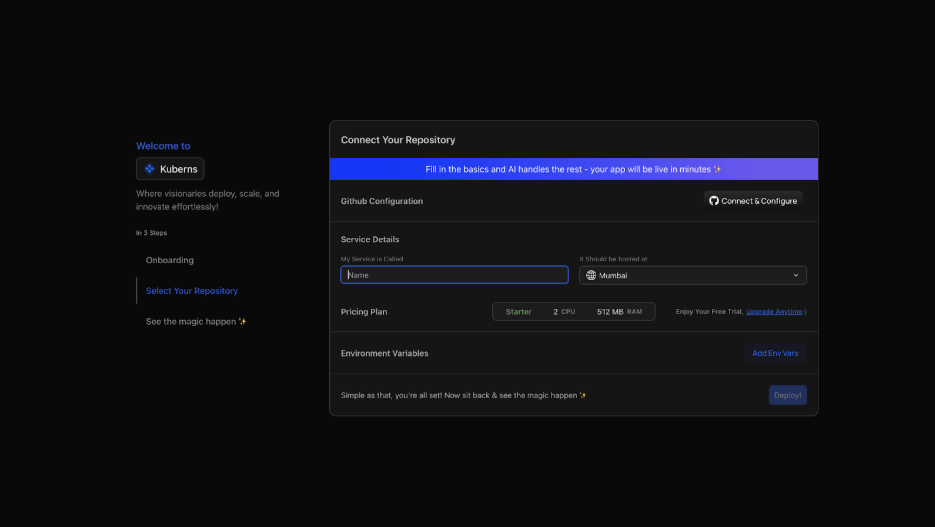
Kuberns AI scans your project and automatically detects:
- Runtime: Deno
- Start command from your `deno.json` task file
- Deno version from your project config
You do not configure any of this manually. The AI reads your project and sets up the entire pipeline for you.
### Step 3: Add Environment Variables
Go to the Environment tab and add your production secrets.

For a typical Deno app, you might add variables like:
```
DATABASE_URL=postgresql://username:password@host:5432/dbname
API_SECRET_KEY=your_secret_key_here
DENO_ENV=production
```
You can add them one by one or paste your `.env` file directly. Kuberns encrypts every variable and injects them securely at runtime. Your app reads them via `Deno.env.get()`.
### Step 4: Click Deploy
Hit Deploy and watch the real-time build logs as Kuberns Agentic AI takes over:

- Clones your repository from GitHub
- Detects the Deno runtime and resolves all dependencies
- Runs your start command
- Provisions AWS compute in your selected region
- Issues an SSL certificate automatically
- Assigns a live HTTPS URL to your application
- Sets up CI/CD so every push to your branch triggers a zero-downtime redeploy
Your Deno app is live in under five minutes.

## Deploying Deno with a Database
Most production Deno apps connect to a database. The setup on Kuberns is straightforward.
Add your `DATABASE_URL` in the Kuberns dashboard Environment tab. Your Deno app reads it at runtime via `Deno.env.get("DATABASE_URL")`. This works with PostgreSQL, MySQL, Supabase, Neon, and any database that accepts a standard connection string.
If your database requires SSL (common with managed databases like Supabase or AWS RDS), append `?sslmode=require` to the connection string. No additional Kuberns config is needed.
Kuberns injects all environment variables securely before the process starts, so your database connection is ready from the first request. The same approach works for any backend service you deploy, whether it is a [NestJS app](https://kuberns.com/blogs/deploy-nestjs-app/), a [Django app](https://kuberns.com/blogs/how-to-deploy-django-app-in-one-click-with-ai/), or a full-stack application.
## What Kuberns Handles That You Would Otherwise Do Manually
| What Deno needs in production | Manual / VPS | Kuberns |
|---|---|---|
| Deno runtime installation | Install and version-pin manually | Auto-detected |
| Start command configuration | Write startup scripts manually | AI detects from deno.json |
| Process crash recovery | systemd or PM2 setup | Automatic |
| Reverse proxy | Manual Nginx configuration | Not required |
| SSL certificate | Certbot setup and renewal cron | Automatic |
| Environment variables | Manage .env files on the server | Encrypted in dashboard |
| Auto-scaling | Manual resource configuration | AI-driven |
| CI/CD pipeline | GitHub Actions YAML file | Built-in, triggers on git push |
| Custom domain and HTTPS | DNS configuration and Certbot | One-click in dashboard |
| Monitoring and logs | Third-party tool setup | Built-in, zero config |
## Why Teams Deploy Deno on Kuberns
Kuberns is built for modern runtimes. Whether you are running a Deno HTTP server, a Hono REST API, or a Fresh framework app, Kuberns detects the runtime, configures it correctly, and keeps it running without any DevOps work on your part.
- **Agentic AI deployment**: auto-detects Deno, sets the start command, no config needed
- **Automatic HTTPS**: TLS certificates provisioned and renewed without manual steps
- **Zero cold starts**: your Deno server stays warm and responsive at all times
- **Autoscaling**: adjusts resources in real time based on actual traffic
- **Git-push deploys**: every push to main redeploys in under 2 minutes with zero downtime
- **Unified monitoring**: logs, metrics, and alerts in one dashboard
- **No DevOps team required**: the AI handles everything from first deploy to production incidents
[Start deploying your Deno app for free](https://dashboard.kuberns.com/)
## Step-by-Step: Deploy a Deno App on Kuberns
[Kuberns](https://kuberns.com) is an AI-agentic deployment platform. It detects your Deno project, sets up the runtime, starts your server, provisions HTTPS, and enables CI/CD, all in one click. No config files, no YAML pipelines, no DevOps knowledge required.
### Step 1: Sign Up and Create an Account

Go to [kuberns.com](https://kuberns.com) and click "Deploy with AI". Sign up with GitHub or Google. New accounts include free credits, enough to run a Deno app in production without a credit card.
### Step 2: Connect Your GitHub Repository
On the "Create Service" page, connect your GitHub account and select your Deno repository and branch.

Kuberns AI scans your project and automatically detects:
- Runtime: Deno
- Start command from your `deno.json` task file
- Deno version from your project config
You do not configure any of this manually. The AI reads your project and sets up the entire pipeline for you.
### Step 3: Add Environment Variables
Go to the Environment tab and add your production secrets.

For a typical Deno app, you might add variables like:
```
DATABASE_URL=postgresql://username:password@host:5432/dbname
API_SECRET_KEY=your_secret_key_here
DENO_ENV=production
```
You can add them one by one or paste your `.env` file directly. Kuberns encrypts every variable and injects them securely at runtime. Your app reads them via `Deno.env.get()`.
### Step 4: Click Deploy
Hit Deploy and watch the real-time build logs as Kuberns Agentic AI takes over:

- Clones your repository from GitHub
- Detects the Deno runtime and resolves all dependencies
- Runs your start command
- Provisions AWS compute in your selected region
- Issues an SSL certificate automatically
- Assigns a live HTTPS URL to your application
- Sets up CI/CD so every push to your branch triggers a zero-downtime redeploy
Your Deno app is live in under five minutes.

## Deploying Deno with a Database
Most production Deno apps connect to a database. The setup on Kuberns is straightforward.
Add your `DATABASE_URL` in the Kuberns dashboard Environment tab. Your Deno app reads it at runtime via `Deno.env.get("DATABASE_URL")`. This works with PostgreSQL, MySQL, Supabase, Neon, and any database that accepts a standard connection string.
If your database requires SSL (common with managed databases like Supabase or AWS RDS), append `?sslmode=require` to the connection string. No additional Kuberns config is needed.
Kuberns injects all environment variables securely before the process starts, so your database connection is ready from the first request. The same approach works for any backend service you deploy, whether it is a [NestJS app](https://kuberns.com/blogs/deploy-nestjs-app/), a [Django app](https://kuberns.com/blogs/how-to-deploy-django-app-in-one-click-with-ai/), or a full-stack application.
## What Kuberns Handles That You Would Otherwise Do Manually
| What Deno needs in production | Manual / VPS | Kuberns |
|---|---|---|
| Deno runtime installation | Install and version-pin manually | Auto-detected |
| Start command configuration | Write startup scripts manually | AI detects from deno.json |
| Process crash recovery | systemd or PM2 setup | Automatic |
| Reverse proxy | Manual Nginx configuration | Not required |
| SSL certificate | Certbot setup and renewal cron | Automatic |
| Environment variables | Manage .env files on the server | Encrypted in dashboard |
| Auto-scaling | Manual resource configuration | AI-driven |
| CI/CD pipeline | GitHub Actions YAML file | Built-in, triggers on git push |
| Custom domain and HTTPS | DNS configuration and Certbot | One-click in dashboard |
| Monitoring and logs | Third-party tool setup | Built-in, zero config |
## Why Teams Deploy Deno on Kuberns
Kuberns is built for modern runtimes. Whether you are running a Deno HTTP server, a Hono REST API, or a Fresh framework app, Kuberns detects the runtime, configures it correctly, and keeps it running without any DevOps work on your part.
- **Agentic AI deployment**: auto-detects Deno, sets the start command, no config needed
- **Automatic HTTPS**: TLS certificates provisioned and renewed without manual steps
- **Zero cold starts**: your Deno server stays warm and responsive at all times
- **Autoscaling**: adjusts resources in real time based on actual traffic
- **Git-push deploys**: every push to main redeploys in under 2 minutes with zero downtime
- **Unified monitoring**: logs, metrics, and alerts in one dashboard
- **No DevOps team required**: the AI handles everything from first deploy to production incidents
[Start deploying your Deno app for free](https://dashboard.kuberns.com/)
 ---
## Frequently Asked Questions
### What is the easiest way to deploy a Deno app in 2026?
The easiest way is [Kuberns](https://kuberns.com). Connect your GitHub repo, add environment variables, and click Deploy. The AI detects your Deno runtime, starts your server, provisions SSL, and sets up CI/CD. No Dockerfile, no YAML, no server config.
### Do I need Docker to deploy a Deno app?
No. Kuberns auto-detects your Deno project and handles the full deployment pipeline without a Dockerfile. Push your code to GitHub, connect the repo, and the platform takes it from there.
### Can I deploy a Deno app with a database on Kuberns?
Yes. Add your `DATABASE_URL` as an environment variable in the Kuberns dashboard. Deno reads it via `Deno.env.get("DATABASE_URL")` at runtime. Works with PostgreSQL, MySQL, Supabase, Neon, and any other database that accepts a connection string.
### How long does Deno deployment take on Kuberns?
Under 5 minutes for the first deployment. Subsequent auto-deployments triggered by git push typically take 60 to 90 seconds.
### Does Deno support npm packages on Kuberns?
Yes. Deno 2.0 has full npm compatibility. Import packages using `npm:` specifiers and Kuberns resolves them at deploy time just like native Deno modules.
### How do I enable auto-deploy for my Deno app on Kuberns?
Connect your GitHub repository during Kuberns project setup. Every push to your configured branch automatically triggers a rebuild and zero-downtime redeploy. No GitHub Actions workflow file needed.
### Can I use Hono, Oak, or Fresh with Deno on Kuberns?
Yes. Kuberns runs your Deno app as a standard server process. Any HTTP framework including Hono, Oak, Fresh, or plain `Deno.serve` works out of the box. As long as your server listens on the `PORT` environment variable, Kuberns routes traffic to it automatically.
### Is Deno better than Node.js for production?
Deno offers built-in TypeScript support, a secure-by-default permissions system, and a modern standard library with no `node_modules` clutter. Many teams find it faster to set up and safer to run. On Kuberns, both Deno and Node.js apps deploy with the same zero-config experience. You pick the runtime that fits your project best.
### Do I need to configure Nginx or a process manager for Deno on Kuberns?
No. Kuberns manages the process lifecycle and routing internally. Your Deno server starts, stays running, and recovers from crashes automatically. There is nothing to install or configure.
---
- [More Deployment Guides articles](https://kuberns.com/blogs/category/deployment-guides/1/)
- [All articles](https://kuberns.com/blogs/)
---
## Frequently Asked Questions
### What is the easiest way to deploy a Deno app in 2026?
The easiest way is [Kuberns](https://kuberns.com). Connect your GitHub repo, add environment variables, and click Deploy. The AI detects your Deno runtime, starts your server, provisions SSL, and sets up CI/CD. No Dockerfile, no YAML, no server config.
### Do I need Docker to deploy a Deno app?
No. Kuberns auto-detects your Deno project and handles the full deployment pipeline without a Dockerfile. Push your code to GitHub, connect the repo, and the platform takes it from there.
### Can I deploy a Deno app with a database on Kuberns?
Yes. Add your `DATABASE_URL` as an environment variable in the Kuberns dashboard. Deno reads it via `Deno.env.get("DATABASE_URL")` at runtime. Works with PostgreSQL, MySQL, Supabase, Neon, and any other database that accepts a connection string.
### How long does Deno deployment take on Kuberns?
Under 5 minutes for the first deployment. Subsequent auto-deployments triggered by git push typically take 60 to 90 seconds.
### Does Deno support npm packages on Kuberns?
Yes. Deno 2.0 has full npm compatibility. Import packages using `npm:` specifiers and Kuberns resolves them at deploy time just like native Deno modules.
### How do I enable auto-deploy for my Deno app on Kuberns?
Connect your GitHub repository during Kuberns project setup. Every push to your configured branch automatically triggers a rebuild and zero-downtime redeploy. No GitHub Actions workflow file needed.
### Can I use Hono, Oak, or Fresh with Deno on Kuberns?
Yes. Kuberns runs your Deno app as a standard server process. Any HTTP framework including Hono, Oak, Fresh, or plain `Deno.serve` works out of the box. As long as your server listens on the `PORT` environment variable, Kuberns routes traffic to it automatically.
### Is Deno better than Node.js for production?
Deno offers built-in TypeScript support, a secure-by-default permissions system, and a modern standard library with no `node_modules` clutter. Many teams find it faster to set up and safer to run. On Kuberns, both Deno and Node.js apps deploy with the same zero-config experience. You pick the runtime that fits your project best.
### Do I need to configure Nginx or a process manager for Deno on Kuberns?
No. Kuberns manages the process lifecycle and routing internally. Your Deno server starts, stays running, and recovers from crashes automatically. There is nothing to install or configure.
---
- [More Deployment Guides articles](https://kuberns.com/blogs/category/deployment-guides/1/)
- [All articles](https://kuberns.com/blogs/)