# How to Deploy a TypeScript App in 2026 (Complete Step-by-Step Guide)
> Deploy a TypeScript app to production in 2026 without SSH, Docker, or server setup. Step-by-step guide on Kuberns with AI automation, env vars, and auto-scaling.
- **Author**: team-kuberns
- **Published**: 2026-04-21
- **Modified**: 2026-04-21
- **Category**: Deployment Guides
- **URL**: https://kuberns.com/blogs/how-to-deploy-a-typescript-app/
---
You have built a TypeScript app. It works perfectly on localhost. Now you need it live in production, with HTTPS, environment variables configured correctly, a database connected, and deployments that trigger automatically on every Git push. [Kuberns](https://kuberns.com), the world's first agentic deployment platform, makes this possible in under five minutes without touching a single server.
If you have ever tried the manual route, you know the overhead. A Linux server, Node.js installed on it, PM2 to keep the process alive, Nginx as a reverse proxy, Certbot fighting you over SSL, and a CI/CD pipeline assembled from GitHub Actions YAML. The gap between working locally and running in production can swallow an entire day before anything is actually live.
This guide covers the fastest path from your TypeScript app to a live production URL on Kuberns, the code changes most developers miss before deploying, and how to handle databases, environment variables, and auto-scaling with zero infrastructure work.
## What Makes TypeScript Deployment Different from Plain JavaScript
TypeScript does not run directly in production. Node.js executes JavaScript, so you must compile your TypeScript source to JavaScript before deploying. The deployment flow looks like this:
```
TypeScript source (.ts) --> tsc compiler --> JavaScript output in dist/ --> Node.js runs it
```
This introduces two requirements that plain JavaScript apps do not have:
**Your app must be built before it starts.** TypeScript compiles your code into a `dist/` folder. The production start command is `node dist/index.js`, not `node index.ts`.
**Your build step must run before the start step.** Your deployment platform needs to know: run `npm run build` first, then run `npm start`.
On [Kuberns](https://kuberns.com), the agentic AI reads your `package.json`, detects TypeScript, and sets up the correct build and start pipeline automatically. You do not configure anything manually.
## Step-by-Step: Deploy Your TypeScript App on Kuberns
[Kuberns](https://kuberns.com) is the world's first agentic deployment platform, built on AWS. It auto-detects your TypeScript project, compiles it, starts your app, handles SSL, and manages auto-scaling without any configuration from you.
### Step 1: Sign Up and Create an Account
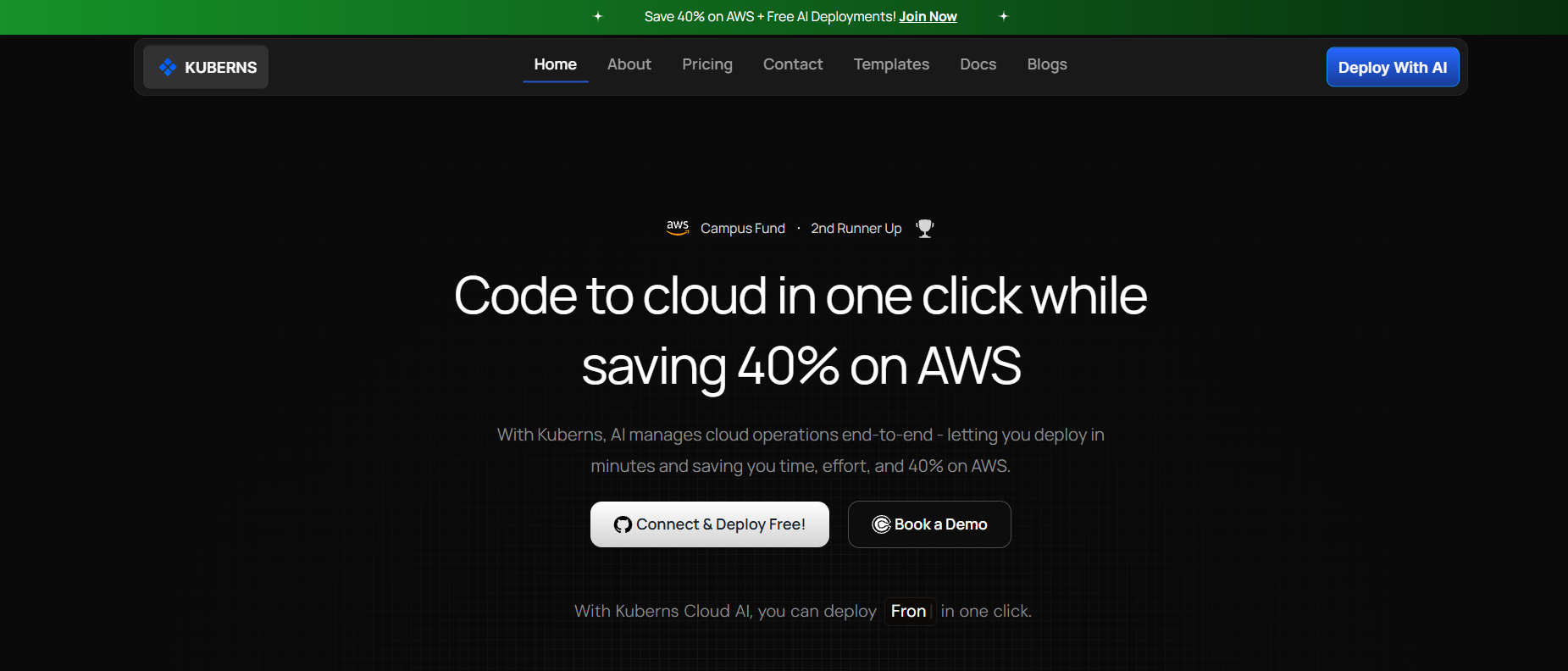
Go to [kuberns.com](https://kuberns.com) and sign up with your Google or GitHub account. New accounts include free credits to deploy and test your first app at no cost.
### Step 2: Connect Your GitHub Repository
On the "Create Service" page, connect your GitHub account and select your TypeScript repository.
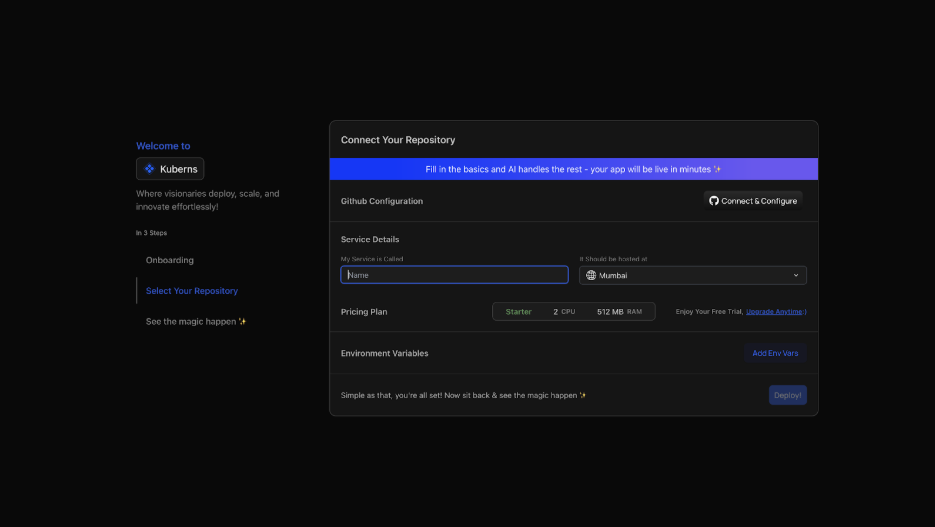
Kuberns AI automatically scans your `package.json` and detects:
- Language: TypeScript / Node.js
- Build command: `npm run build`
- Start command: `npm start`
- Node.js version from the `engines` field
You do not select any of this manually. The agentic AI reads your project and configures the pipeline for you.
### Step 3: Add Environment Variables
Navigate to the Environment tab and add your production secrets.

For a typical TypeScript app you will add variables like:
- `NODE_ENV` — set to `production`
- `DATABASE_URL` — your database connection string
- `API_KEY` or `JWT_SECRET` — any secrets your app uses
- Any third-party service keys
You can add them one by one or upload your `.env` file directly. Kuberns encrypts them and injects them securely at runtime. Never commit `.env` files to your repository.
### Step 4: Click Deploy
Click the Deploy button. The Kuberns agent takes over and you can watch it deploy your application in real time.
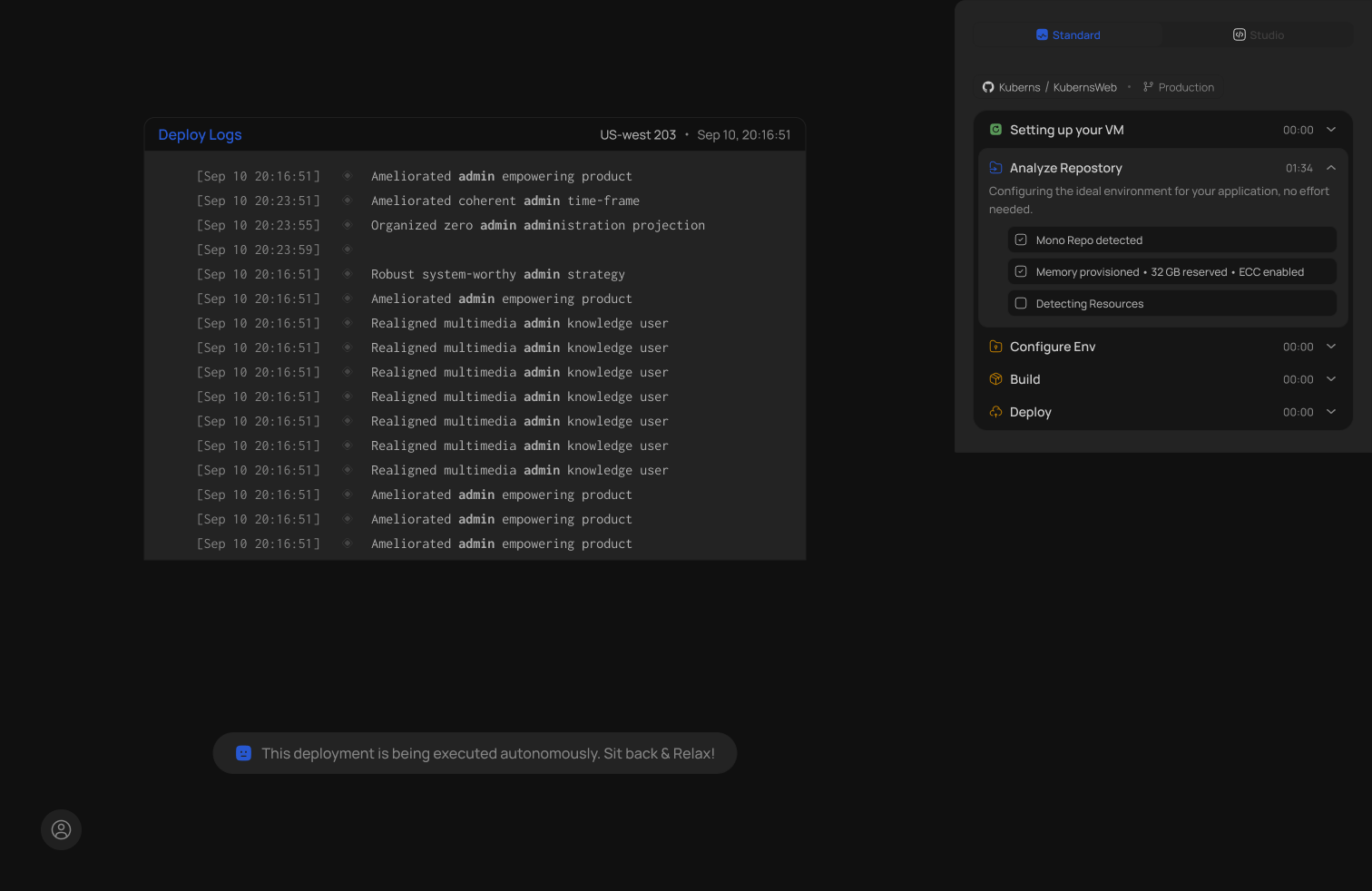
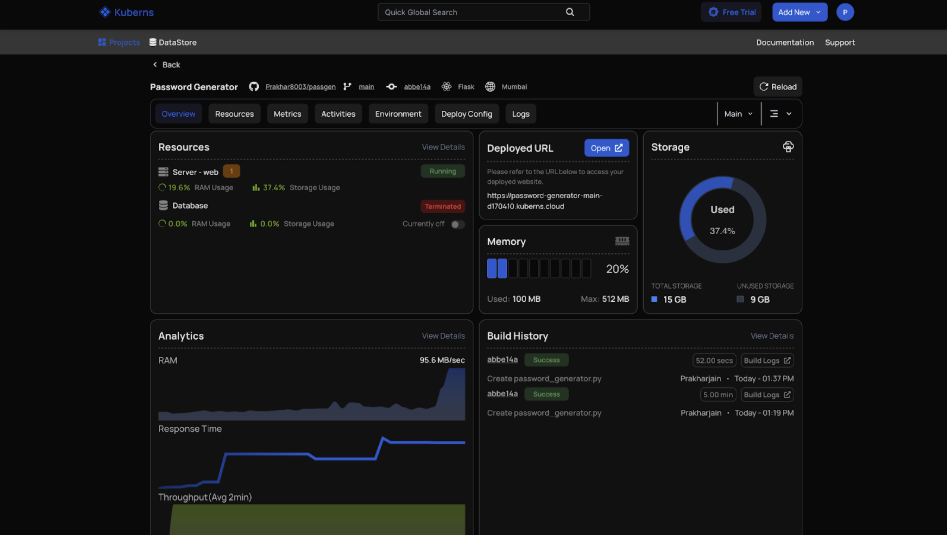
Your TypeScript app is live in under five minutes. Every push to your connected GitHub branch triggers an automatic redeploy. No GitHub Actions YAML needed.
## Prerequisites: Prepare Your TypeScript App for Production
These steps take less than ten minutes and prevent the most common deployment failures.
### 1. Set Up tsconfig.json
Your `tsconfig.json` tells the TypeScript compiler where to put the compiled output. For production, it should look like this:
```json
{
"compilerOptions": {
"target": "ES2020",
"module": "CommonJS",
"outDir": "./dist",
"rootDir": "./src",
"strict": true,
"esModuleInterop": true,
"skipLibCheck": true,
"noEmitOnError": true,
"resolveJsonModule": true
},
"include": ["src/**/*"],
"exclude": ["node_modules", "dist"]
}
```
Key settings:
- `outDir: ./dist` compiled JavaScript goes into the `dist/` folder
- `rootDir: ./src` all your TypeScript source lives in `src/`
- `noEmitOnError: true` build fails if there are type errors, which blocks broken code from reaching production
### 2. Bind to process.env.PORT
This is the most common reason TypeScript apps fail silently in the cloud. Every deployment platform injects a dynamic port via the `PORT` environment variable. Your app must listen on that port.
For a TypeScript Express API, update your entry file:
```typescript
import express from 'express';
const app = express();
const port = process.env.PORT || 3000;
app.use(express.json());
app.get('/', (req, res) => {
res.json({ status: 'running' });
});
app.listen(port, () => {
console.log(`Server running on port ${port}`);
});
```
If you hardcode `app.listen(3000)`, the platform assigns a different port and your app becomes unreachable.
### 3. Configure package.json Scripts
Kuberns reads your `scripts` block to determine the build and start commands. Your `package.json` needs these:
```json
{
"scripts": {
"build": "tsc",
"start": "node dist/index.js",
"dev": "ts-node src/index.ts"
},
"engines": {
"node": ">=20.0.0"
}
}
```
No Procfile. No Dockerfile. No additional configuration files. The `build` and `start` scripts are all Kuberns needs.
### 4. Add a .gitignore
```
node_modules/
dist/
.env
```
Never commit `node_modules` or `dist/`. The build runs on the server during deployment.
### 5. Push to GitHub
Kuberns deploys directly from your Git repository. If your project is not on GitHub yet:
```bash
git init
git add .
git commit -m "Initial TypeScript app"
git branch -M main
git remote add origin https://github.com/yourusername/your-typescript-app.git
git push -u origin main
```
## Deploying a TypeScript App with a Database
Most TypeScript apps connect to a database. Here is what to configure for a production deployment.
### Use Environment Variables for All Database Config
Never hardcode credentials. Access them via `process.env`:
```typescript
import { Pool } from 'pg';
const pool = new Pool({
connectionString: process.env.DATABASE_URL,
ssl: process.env.NODE_ENV === 'production'
? { rejectUnauthorized: false }
: false,
});
export default pool;
```
Set `ssl: { rejectUnauthorized: false }` when connecting to managed databases like AWS RDS, Supabase, or Neon.
### Add DATABASE_URL to Kuberns
In the Kuberns dashboard, add your `DATABASE_URL` environment variable. The format for PostgreSQL is:
```
postgresql://username:password@host:5432/database_name
```
Kuberns injects it securely at runtime. Your TypeScript app reads it via `process.env.DATABASE_URL`.
### TypeScript with Prisma on Kuberns
If you are using Prisma ORM, add a `postinstall` script to generate the Prisma client automatically during the build:
```json
{
"scripts": {
"postinstall": "prisma generate",
"build": "tsc",
"start": "node dist/index.js"
}
}
```
For running migrations in production, update your start script:
```json
"start": "npx prisma migrate deploy && node dist/index.js"
```
## What Kuberns Handles That You Would Do Manually
| What TypeScript needs in production | Manual / VPS | Kuberns |
|---|---|---|
| TypeScript compile step | Configure CI manually | AI detects and runs automatically |
| Process manager (PM2) | Install and configure | Not needed |
| Nginx reverse proxy | Manual config | Not required |
| SSL certificate | Certbot setup and renewal | Automatic |
| Environment variables | Server env files | Encrypted in dashboard |
| Auto-scaling | Manual rules | AI-driven |
| CI/CD pipeline | GitHub Actions YAML | Built-in on Git push |
| Custom domain and HTTPS | DNS config and Certbot | One-click in dashboard |
| Crash recovery | PM2 ecosystem config | Automatic |
 ## Common TypeScript Deployment Errors and Fixes
**Build fails: "tsc: command not found"**
TypeScript is in `devDependencies` but not being installed. Fix: make sure your build command runs `npm ci` (not `npm ci --production`) so devDependencies are installed. On Kuberns this is handled automatically.
**App starts but immediately crashes**
Usually a missing environment variable. Check the Kuberns logs tab for `TypeError: Cannot read properties of undefined`. Add the missing variable to the Environment section and redeploy.
**Port binding error on startup**
Your entry file is hardcoding a port. Replace `app.listen(3000)` with `app.listen(process.env.PORT || 3000)`.
**"Cannot find module './dist/index'"**
Your `outDir` in `tsconfig.json` does not match the path in your `start` script. If `outDir` is `./dist` and your entry is `src/index.ts`, the compiled output is `dist/index.js`. Update your start script accordingly.
**Path aliases not resolving at runtime**
TypeScript path aliases (e.g. `@/utils`) are resolved at compile time by `tsc` but Node.js does not understand them at runtime. Install `tsc-alias` and update your build script:
```json
"build": "tsc && tsc-alias"
```
## TypeScript Deployment Platform Comparison (2026)
| Platform | Auto-detect TS build | Config required | Free tier | Sleeps on idle | Auto-scaling | Best for |
|---|---|---|---|---|---|---|
| Kuberns | Yes, reads package.json | None | Yes (free credits) | No | AI-driven | Full-stack APIs, SaaS, production TS apps |
| Heroku | Partial, needs Procfile | Procfile required | No | No | Manual | Simple apps, legacy projects |
| Render | Yes | Build/start commands | Yes (sleeps) | Yes, 15 min | Rules-based | Heroku migrations |
| Railway | Yes | Start command | Trial credits | No | Limited | Prototypes |
| DigitalOcean App Platform | Yes | Build/run commands | No | No | Rules-based | Teams with DevOps knowledge |
| VPS (PM2 + Nginx) | Manual | Full server config | No | No | Manual | Full control, DevOps teams |
## Why Developers Choose Kuberns for TypeScript Apps
TypeScript is the default for serious Node.js, NestJS, and full-stack projects in 2026. These teams cannot afford deployments that require a DevOps engineer to configure pipelines, manage PM2 processes, and renew SSL certificates manually.
Kuberns, as the world's first agentic deployment platform, handles the full lifecycle: compile, deploy, scale, monitor. You push code. Kuberns ships it. Auto-scaling handles traffic spikes. Built-in monitoring catches issues before users do.
Heroku, Render, and Railway are deployment platforms. Kuberns is a different category entirely. It is the world's first agentic deployment platform, meaning the AI does not just run a script, it manages your deployment for you. You push code. Kuberns takes it live.
If you are also building with NestJS, see the [NestJS deployment guide](https://kuberns.com/blogs/deploy-nestjs-app/) for framework-specific setup. For Node.js apps without TypeScript, the [Node.js deployment guide](https://kuberns.com/blogs/deploy-nodejs-app/) has you covered.
[Deploy your TypeScript app on Kuberns today. Your first deployment is free.](https://dashboard.kuberns.com)
## Common TypeScript Deployment Errors and Fixes
**Build fails: "tsc: command not found"**
TypeScript is in `devDependencies` but not being installed. Fix: make sure your build command runs `npm ci` (not `npm ci --production`) so devDependencies are installed. On Kuberns this is handled automatically.
**App starts but immediately crashes**
Usually a missing environment variable. Check the Kuberns logs tab for `TypeError: Cannot read properties of undefined`. Add the missing variable to the Environment section and redeploy.
**Port binding error on startup**
Your entry file is hardcoding a port. Replace `app.listen(3000)` with `app.listen(process.env.PORT || 3000)`.
**"Cannot find module './dist/index'"**
Your `outDir` in `tsconfig.json` does not match the path in your `start` script. If `outDir` is `./dist` and your entry is `src/index.ts`, the compiled output is `dist/index.js`. Update your start script accordingly.
**Path aliases not resolving at runtime**
TypeScript path aliases (e.g. `@/utils`) are resolved at compile time by `tsc` but Node.js does not understand them at runtime. Install `tsc-alias` and update your build script:
```json
"build": "tsc && tsc-alias"
```
## TypeScript Deployment Platform Comparison (2026)
| Platform | Auto-detect TS build | Config required | Free tier | Sleeps on idle | Auto-scaling | Best for |
|---|---|---|---|---|---|---|
| Kuberns | Yes, reads package.json | None | Yes (free credits) | No | AI-driven | Full-stack APIs, SaaS, production TS apps |
| Heroku | Partial, needs Procfile | Procfile required | No | No | Manual | Simple apps, legacy projects |
| Render | Yes | Build/start commands | Yes (sleeps) | Yes, 15 min | Rules-based | Heroku migrations |
| Railway | Yes | Start command | Trial credits | No | Limited | Prototypes |
| DigitalOcean App Platform | Yes | Build/run commands | No | No | Rules-based | Teams with DevOps knowledge |
| VPS (PM2 + Nginx) | Manual | Full server config | No | No | Manual | Full control, DevOps teams |
## Why Developers Choose Kuberns for TypeScript Apps
TypeScript is the default for serious Node.js, NestJS, and full-stack projects in 2026. These teams cannot afford deployments that require a DevOps engineer to configure pipelines, manage PM2 processes, and renew SSL certificates manually.
Kuberns, as the world's first agentic deployment platform, handles the full lifecycle: compile, deploy, scale, monitor. You push code. Kuberns ships it. Auto-scaling handles traffic spikes. Built-in monitoring catches issues before users do.
Heroku, Render, and Railway are deployment platforms. Kuberns is a different category entirely. It is the world's first agentic deployment platform, meaning the AI does not just run a script, it manages your deployment for you. You push code. Kuberns takes it live.
If you are also building with NestJS, see the [NestJS deployment guide](https://kuberns.com/blogs/deploy-nestjs-app/) for framework-specific setup. For Node.js apps without TypeScript, the [Node.js deployment guide](https://kuberns.com/blogs/deploy-nodejs-app/) has you covered.
[Deploy your TypeScript app on Kuberns today. Your first deployment is free.](https://dashboard.kuberns.com)
 ## FAQ
### What is the easiest way to deploy a TypeScript app in 2026?
The easiest way is using Kuberns. Connect your GitHub repo, add environment variables, and click deploy. The agentic AI handles the TypeScript build, SSL, scaling, and monitoring automatically without any server configuration.
### Do I need Docker to deploy a TypeScript app?
No. Kuberns auto-detects TypeScript projects and handles the build and deployment pipeline without requiring a Dockerfile.
### Does TypeScript run directly in production?
No. Node.js runs JavaScript, not TypeScript. You compile your TypeScript source to JavaScript using `tsc` before deploying. Kuberns runs this build step automatically as part of the deploy pipeline.
### How do I set the port for a TypeScript app in production?
Always bind to `process.env.PORT` in your entry file. Cloud platforms inject a dynamic port at runtime and your app must listen on it, not a hardcoded value like `3000`.
### Can I deploy a TypeScript app with a database on Kuberns?
Yes. Add your `DATABASE_URL` as an environment variable in the Kuberns dashboard. Your TypeScript app reads it at runtime via `process.env.DATABASE_URL` and connects to any database including PostgreSQL, MySQL, or MongoDB.
### How long does TypeScript app deployment take on Kuberns?
Under 5 minutes for the first deployment. Subsequent auto-deployments on Git push take around 60 to 90 seconds.
### Does Kuberns support TypeScript with Prisma or TypeORM?
Yes. Add a `postinstall` script to run `prisma generate` automatically during the build. For migrations, add `npx prisma migrate deploy` to your start script and Kuberns runs it on every deploy.
---
- [More Deployment Guides articles](https://kuberns.com/blogs/category/deployment-guides/1/)
- [All articles](https://kuberns.com/blogs/)
## FAQ
### What is the easiest way to deploy a TypeScript app in 2026?
The easiest way is using Kuberns. Connect your GitHub repo, add environment variables, and click deploy. The agentic AI handles the TypeScript build, SSL, scaling, and monitoring automatically without any server configuration.
### Do I need Docker to deploy a TypeScript app?
No. Kuberns auto-detects TypeScript projects and handles the build and deployment pipeline without requiring a Dockerfile.
### Does TypeScript run directly in production?
No. Node.js runs JavaScript, not TypeScript. You compile your TypeScript source to JavaScript using `tsc` before deploying. Kuberns runs this build step automatically as part of the deploy pipeline.
### How do I set the port for a TypeScript app in production?
Always bind to `process.env.PORT` in your entry file. Cloud platforms inject a dynamic port at runtime and your app must listen on it, not a hardcoded value like `3000`.
### Can I deploy a TypeScript app with a database on Kuberns?
Yes. Add your `DATABASE_URL` as an environment variable in the Kuberns dashboard. Your TypeScript app reads it at runtime via `process.env.DATABASE_URL` and connects to any database including PostgreSQL, MySQL, or MongoDB.
### How long does TypeScript app deployment take on Kuberns?
Under 5 minutes for the first deployment. Subsequent auto-deployments on Git push take around 60 to 90 seconds.
### Does Kuberns support TypeScript with Prisma or TypeORM?
Yes. Add a `postinstall` script to run `prisma generate` automatically during the build. For migrations, add `npx prisma migrate deploy` to your start script and Kuberns runs it on every deploy.
---
- [More Deployment Guides articles](https://kuberns.com/blogs/category/deployment-guides/1/)
- [All articles](https://kuberns.com/blogs/)