# This is the Quickest Way to Deploy Your Flask App in 2026
> This is the fastest way to deploy Flask to production in 2026. No Gunicorn config, Dockerfile, or Nginx needed. Deploy from GitHub to live URL in one click.
- **Author**: manav-dobariya
- **Published**: 2025-11-05
- **Modified**: 2026-07-10
- **Category**: Deployment Guides
- **URL**: https://kuberns.com/blogs/how-to-deploy-flask-app/
---
Deploying a Flask app to production in 2026 does not require a Gunicorn config file, a Dockerfile, an Nginx reverse proxy setup, or a Certbot SSL configuration. The standard manual path through these steps takes 30 to 60 minutes and is still what most Flask deployment guides walk you through, largely because Flask's own built-in server is explicitly not meant for production traffic and needs a real WSGI server in front of it.
Kuberns removes that manual path entirely: connect your GitHub repository, add your environment variables, and click Deploy. The agentic AI detects your Flask stack, configures Gunicorn automatically, provisions AWS compute, enables HTTPS, and sets up CI/CD on every Git push. From signup to a live production URL with monitoring and auto-scaling takes under 5 minutes. For the official Flask production reference, see the [Flask documentation](https://flask.palletsprojects.com/en/stable/).
## TL;DR
- No Gunicorn config, Dockerfile, or Nginx setup required
- Connect GitHub repo to Kuberns, add env vars, click Deploy
- Agentic AI configures the full production stack automatically
- HTTPS, auto-scaling, CI/CD, and monitoring included by default
- Live production URL in under 5 minutes
## Prerequisites (What You Need Before Deploying)
Before deploying, you need just three things: a Flask app, a requirements.txt, and a GitHub account.
A minimal Flask app. If you don't have one, create app.py:

A requirements.txt. Kuberns reads this to install your dependencies. Generate it from your virtual environment:

Make sure Flask appears in it. If you're using a database, include those dependencies too (e.g. Flask-SQLAlchemy, psycopg2-binary).
A [GitHub account](https://github.com/) with your Flask project pushed to a repository. That's it, no Procfile, no Dockerfile, no Gunicorn config file required.
> **💡 Why not `app.run()` in production?** Flask's built-in development server is single-threaded, not designed for concurrent requests, and explicitly warns against production use. You need a WSGI server like Gunicorn. On Kuberns, the Agentic AI configures Gunicorn automatically, you never write a line of WSGI configuration.
## Step-by-Step Guide to Deploy a Flask App on Kuberns
Kuberns is an agentic AI cloud platform built on AWS infrastructure specifically designed for production Flask deployments. It auto-detects your Flask stack, configures the WSGI server, sets up HTTPS, and deploys with zero configuration files required from your side.
For a one-click deployment template, check out the [Kuberns Flask deployment page](https://kuberns.com/services/flask).
### Step 1: Sign Up and Create an Account
If you are a new user, sign up at [Kuberns](https://kuberns.com) with a Google/Github account and **add your basic project details.**

### Step 2: Connect Your GitHub Repository
On the "Creating a Service" page, connect your GitHub account, add the project name and region.
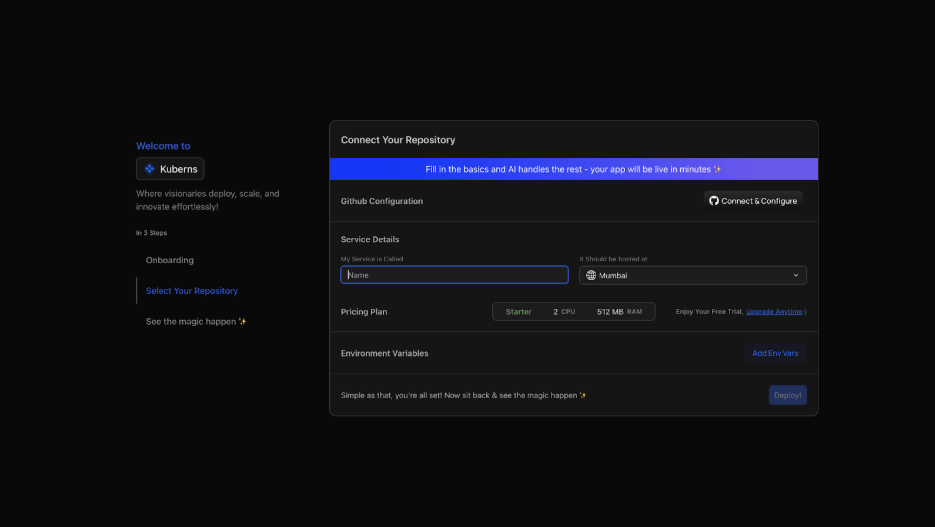
If this is your first time on Kuberns, you'll need to authorise GitHub access:
* Click "Connect to GitHub"
* Grant Kuberns access to your repositories
* Select your organisation, repository, and branch from the list
Once connected, Kuberns automatically detects your Flask project structure, Python runtime, and requirements.txt dependencies, no template selection or framework configuration needed.
### Step 3: Configure Environment Variables
Navigate to the Environment section of your service setup:
* Click "Add Env Vars" and input key-value pairs manually, or
* Click "Upload .env file" to import all variables at once

Example of an env Variable:

With the Agentic AI feature on Kuberns, our agents analyse your code and suggest an env variable to add. So you don't get confused as to where to get it.
Click "Save & Close" when done. Never hardcode secrets in your source code; always pass them as environment variables. Kuberns securely injects them into your Flask runtime at deploy time.
### Step 4: Click Deploy, Let the AI Take Over
Click Deploy. Watch the real-time log stream as Kuberns Agentic AI takes over:
* Clones your repository
* Installs dependencies from requirements.txt
* Detects your Flask application entry point automatically
* Configures Gunicorn as the WSGI server. No gunicorn\_config.py needed
* Builds the container and provisions AWS compute in your chosen region
* Configures HTTPS and assigns your public domain
* Enables auto-scaling and real-time monitoring

Within a few minutes, your Flask app is live.

**You can manage everything from the AI Dashboard.**
Your Kuberns Dashboard is your production control room. From here you can:
* Open your deployed URL
* View live usage stats and performance metrics
* Check server resources, database, and background workers
* View detailed metrics, analytics, and build history
* Configure environment variables after deployment
* Customise your deploy config: add pre-build or post-build scripts, configure root directory
* Monitor real-time logs and filter them as needed
[Deploy with Agentic AI on Kuberns](https://dashboard.kuberns.com) on Kuberns in just one click now
### Watch how you can deploy your Flask app in under 5 minutes
## What Kuberns Handles That You Do Manually on Other Platforms?
Every other Flask deployment method requires you to configure or maintain at least some of these. On Kuberns, none of them is your problem:
| What's needed for production | Other platforms | Kuberns |
| ---------------------------- | -------------------------------------- | ----------------------------------------------- |
| Gunicorn WSGI configuration | You configure it | Agentic AI handles it |
| Procfile or Dockerfile | Required on most PaaS | Not needed. Agentic AI handles it automatically |
| Nginx reverse proxy | Manual setup on VPS | Not needed. Agentic AI handles it automatically |
| SSL / HTTPS certificate | Manual (Certbot) or platform config | Automatic |
| Auto-scaling rules | Manual rules or not available | AI-driven, automatic |
| Monitoring and logs | Separate tooling (Prometheus, Datadog) | Built in, zero setup needed |
| CI/CD pipeline | Build yourself (GitHub Actions) | Included, automatic on push |
| Cost optimisation | Manual (FinOps) | AI-driven continuously |
## Kuberns vs Other Flask Deployment Methods
Developers deploying Flask in 2026 have several options. Here's how they compare on the factors that actually matter when you're trying to get an app live and keep it running.
| Method | Setup time | Config required | Free tier | HTTPS auto | Monitoring included | Best for |
| ---------------------- | ---------- | ----------------------------------------------------------- | -------------------------- | ---------------- | ------------------- | ------------------------------------------ |
| Kuberns | \~5 min | None (Agentic AI handles everything) | Yes (Starter) | Yes | Yes, built in | Fastest way to go from code to production |
| Render | \~15 min | Procfile or dashboard start command | Yes (sleeps on inactivity) | Yes | Basic | Simple PaaS, Heroku migrations |
| Railway | \~10 min | Start command (gunicorn main\:app) | $5 trial credit | Yes | Basic | Rapid prototyping, usage-based billing |
| VPS + Gunicorn + Nginx | 30-60 min | Gunicorn config, Nginx config, systemd service, Certbot SSL | No | Manual (Certbot) | No | Full infrastructure control |
| AWS Elastic Beanstalk | 20-30 min | .ebextensions/ config, EB CLI setup | No | Yes | Partial | Teams already on AWS |
| Google Cloud Run | 15-20 min | Dockerfile required | Free tier (limited) | Yes | Partial | Containerised, serverless-style |
The key difference across all other options: every one of them requires your team to write and maintain at least one configuration file: a Procfile, a start command, a Gunicorn config, a Dockerfile, or an EB extension. If you are specifically evaluating Railway for Flask, read [why your Flask app can break on Railway](https://kuberns.com/blogs/deploy-flask-on-railway/) before committing.
Every one of them requires a separate decision about monitoring.
Kuberns removes all of those decisions. The agentic AI observes real traffic, right-sizes compute, and keeps your Flask app running without your team touching a configuration file after the initial deployment. For a detailed breakdown of how PaaS platforms compare for Python apps, see [PythonAnywhere vs Render vs Kuberns](https://kuberns.com/blogs/pythonanywhere-vs-render-vs-kuberns-ai/).
## Conclusion
Deploying a Flask app to production used to mean an afternoon of configuring WSGI servers, reverse proxies, and SSL certificates. In 2026 that is no longer the default path. Kuberns removes the entire configuration layer: your Flask app goes from a GitHub repository to a live production URL with Gunicorn, HTTPS, auto-scaling, monitoring, and CI/CD without a single configuration file. See [what Kuberns is and how it works](https://kuberns.com/blogs/what-is-kuberns-the-simplest-way-to-build-deploy-and-scale-full-stack-apps/) for the full platform overview.
If you have a Flask app ready on GitHub, you can have it live in under 5 minutes. Connect your repository, add your environment variables, and let the agentic AI handle the rest.
[Deploy with Agentic AI on Kuberns](https://dashboard.kuberns.com)
## Frequently Asked Questions on Flask Deployment
### What is the fastest way to deploy a Flask app?
Kuberns is the fastest production deployment for Flask in 2026. Connect your GitHub repository, add environment variables, click Deploy. The Agentic AI handles Gunicorn, HTTPS, auto-scaling, and monitoring automatically. From signup to live URL takes under 5 minutes with zero configuration files required.
### How is Kuberns different from Heroku or Render?
Heroku and Render still require manual configuration files such as a Procfile or start command and have limited scaling models. Kuberns replaces the entire configuration process with agentic AI that auto-detects your stack, configures Gunicorn, sets up HTTPS, and right-sizes compute automatically, with no configuration files to write or maintain after the initial deploy and AWS costs that run up to 40% lower.
### Can I monitor my Flask app after deployment?
Yes. Kuberns includes built-in real-time monitoring, logs, and alerts. You can view your app's performance, CPU usage, and deployment history directly from the dashboard, no external logging tools needed.
### Is Flask deployment on Kuberns secure?
Absolutely. Every Flask app runs inside an isolated, encrypted container with automatic SSL certificates and environment variable protection.
### How do I deploy a Flask app for free?
Kuberns offers free tier and $14 credits for $7 payment in compute credits with every new account, enough to run a Flask app for approximately 30 days on the t4g.nano instance. Render offers a free tier but services sleep after 15 minutes of inactivity, making it unsuitable for production APIs. Railway gives $5 in one-time trial credit. For production workloads that need to stay live, Kuberns is the most cost-effective starting point. [See Kuberns Flask pricing](https://kuberns.com/pricing)
### Do I need Gunicorn to deploy a Flask app?
Yes, Flask's built-in development server is explicitly not designed for production use. It's single-threaded and not hardened for real traffic. Gunicorn is the standard WSGI server for Python web apps in production. On Kuberns, Gunicorn is configured automatically by the AI, you never write a Gunicorn configuration file.
### How do I deploy a Flask app with a database?
Add your database connection string as an environment variable such as `DATABASE_URL` during the Kuberns environment variables setup before clicking Deploy. Kuberns securely injects it into your Flask runtime. For managed databases, Supabase and Neon both work well with Flask and provide PostgreSQL with connection pooling.
### Can I deploy Flask without Docker?
Yes. Kuberns deploys Flask directly from your GitHub repository with no Dockerfile required. The AI detects your stack and handles containerisation behind the scenes. Render and Railway also support Dockerfile-free deployment. Only VPS deployments and some cloud platforms (AWS ECS, Google Cloud Run) require a Dockerfile.
### How do I redeploy after making changes?
On Kuberns, every push to your connected branch triggers an automatic redeploy via the built-in CI/CD pipeline. No webhook setup, no GitHub Actions configuration required: push to GitHub and your app updates automatically. You can also trigger manual redeploys and view full build history from the [Kuberns dashboard](https://dashboard.kuberns.com).
### What are Flask production deployment best practices in 2026?
The key Flask production best practices in 2026 are: use Gunicorn as your WSGI server instead of the built-in Flask dev server; never hardcode secrets and always use environment variables; enable HTTPS via SSL certificates; add a health check endpoint for your load balancer; use a managed database with connection pooling; set up structured logging; and automate deploys via CI/CD on every Git push. On Kuberns, Gunicorn configuration, HTTPS, CI/CD, and monitoring are all handled automatically by the agentic AI.
### What is the easiest platform to deploy a Flask app in 2026?
Kuberns is the easiest platform to deploy Flask in 2026. It requires no Procfile, no Dockerfile, and no Gunicorn configuration. You connect your GitHub repository, add environment variables, and click Deploy. The agentic AI handles the entire productio
---
- [More Deployment Guides articles](https://kuberns.com/blogs/category/deployment-guides/1/)
- [All articles](https://kuberns.com/blogs/)

 ## Frequently Asked Questions on Flask Deployment
### What is the fastest way to deploy a Flask app?
Kuberns is the fastest production deployment for Flask in 2026. Connect your GitHub repository, add environment variables, click Deploy. The Agentic AI handles Gunicorn, HTTPS, auto-scaling, and monitoring automatically. From signup to live URL takes under 5 minutes with zero configuration files required.
### How is Kuberns different from Heroku or Render?
Heroku and Render still require manual configuration files such as a Procfile or start command and have limited scaling models. Kuberns replaces the entire configuration process with agentic AI that auto-detects your stack, configures Gunicorn, sets up HTTPS, and right-sizes compute automatically, with no configuration files to write or maintain after the initial deploy and AWS costs that run up to 40% lower.
### Can I monitor my Flask app after deployment?
Yes. Kuberns includes built-in real-time monitoring, logs, and alerts. You can view your app's performance, CPU usage, and deployment history directly from the dashboard, no external logging tools needed.
### Is Flask deployment on Kuberns secure?
Absolutely. Every Flask app runs inside an isolated, encrypted container with automatic SSL certificates and environment variable protection.
### How do I deploy a Flask app for free?
Kuberns offers free tier and $14 credits for $7 payment in compute credits with every new account, enough to run a Flask app for approximately 30 days on the t4g.nano instance. Render offers a free tier but services sleep after 15 minutes of inactivity, making it unsuitable for production APIs. Railway gives $5 in one-time trial credit. For production workloads that need to stay live, Kuberns is the most cost-effective starting point. [See Kuberns Flask pricing](https://kuberns.com/pricing)
### Do I need Gunicorn to deploy a Flask app?
Yes, Flask's built-in development server is explicitly not designed for production use. It's single-threaded and not hardened for real traffic. Gunicorn is the standard WSGI server for Python web apps in production. On Kuberns, Gunicorn is configured automatically by the AI, you never write a Gunicorn configuration file.
### How do I deploy a Flask app with a database?
Add your database connection string as an environment variable such as `DATABASE_URL` during the Kuberns environment variables setup before clicking Deploy. Kuberns securely injects it into your Flask runtime. For managed databases, Supabase and Neon both work well with Flask and provide PostgreSQL with connection pooling.
### Can I deploy Flask without Docker?
Yes. Kuberns deploys Flask directly from your GitHub repository with no Dockerfile required. The AI detects your stack and handles containerisation behind the scenes. Render and Railway also support Dockerfile-free deployment. Only VPS deployments and some cloud platforms (AWS ECS, Google Cloud Run) require a Dockerfile.
### How do I redeploy after making changes?
On Kuberns, every push to your connected branch triggers an automatic redeploy via the built-in CI/CD pipeline. No webhook setup, no GitHub Actions configuration required: push to GitHub and your app updates automatically. You can also trigger manual redeploys and view full build history from the [Kuberns dashboard](https://dashboard.kuberns.com).
### What are Flask production deployment best practices in 2026?
The key Flask production best practices in 2026 are: use Gunicorn as your WSGI server instead of the built-in Flask dev server; never hardcode secrets and always use environment variables; enable HTTPS via SSL certificates; add a health check endpoint for your load balancer; use a managed database with connection pooling; set up structured logging; and automate deploys via CI/CD on every Git push. On Kuberns, Gunicorn configuration, HTTPS, CI/CD, and monitoring are all handled automatically by the agentic AI.
### What is the easiest platform to deploy a Flask app in 2026?
Kuberns is the easiest platform to deploy Flask in 2026. It requires no Procfile, no Dockerfile, and no Gunicorn configuration. You connect your GitHub repository, add environment variables, and click Deploy. The agentic AI handles the entire productio
---
- [More Deployment Guides articles](https://kuberns.com/blogs/category/deployment-guides/1/)
- [All articles](https://kuberns.com/blogs/)
## Frequently Asked Questions on Flask Deployment
### What is the fastest way to deploy a Flask app?
Kuberns is the fastest production deployment for Flask in 2026. Connect your GitHub repository, add environment variables, click Deploy. The Agentic AI handles Gunicorn, HTTPS, auto-scaling, and monitoring automatically. From signup to live URL takes under 5 minutes with zero configuration files required.
### How is Kuberns different from Heroku or Render?
Heroku and Render still require manual configuration files such as a Procfile or start command and have limited scaling models. Kuberns replaces the entire configuration process with agentic AI that auto-detects your stack, configures Gunicorn, sets up HTTPS, and right-sizes compute automatically, with no configuration files to write or maintain after the initial deploy and AWS costs that run up to 40% lower.
### Can I monitor my Flask app after deployment?
Yes. Kuberns includes built-in real-time monitoring, logs, and alerts. You can view your app's performance, CPU usage, and deployment history directly from the dashboard, no external logging tools needed.
### Is Flask deployment on Kuberns secure?
Absolutely. Every Flask app runs inside an isolated, encrypted container with automatic SSL certificates and environment variable protection.
### How do I deploy a Flask app for free?
Kuberns offers free tier and $14 credits for $7 payment in compute credits with every new account, enough to run a Flask app for approximately 30 days on the t4g.nano instance. Render offers a free tier but services sleep after 15 minutes of inactivity, making it unsuitable for production APIs. Railway gives $5 in one-time trial credit. For production workloads that need to stay live, Kuberns is the most cost-effective starting point. [See Kuberns Flask pricing](https://kuberns.com/pricing)
### Do I need Gunicorn to deploy a Flask app?
Yes, Flask's built-in development server is explicitly not designed for production use. It's single-threaded and not hardened for real traffic. Gunicorn is the standard WSGI server for Python web apps in production. On Kuberns, Gunicorn is configured automatically by the AI, you never write a Gunicorn configuration file.
### How do I deploy a Flask app with a database?
Add your database connection string as an environment variable such as `DATABASE_URL` during the Kuberns environment variables setup before clicking Deploy. Kuberns securely injects it into your Flask runtime. For managed databases, Supabase and Neon both work well with Flask and provide PostgreSQL with connection pooling.
### Can I deploy Flask without Docker?
Yes. Kuberns deploys Flask directly from your GitHub repository with no Dockerfile required. The AI detects your stack and handles containerisation behind the scenes. Render and Railway also support Dockerfile-free deployment. Only VPS deployments and some cloud platforms (AWS ECS, Google Cloud Run) require a Dockerfile.
### How do I redeploy after making changes?
On Kuberns, every push to your connected branch triggers an automatic redeploy via the built-in CI/CD pipeline. No webhook setup, no GitHub Actions configuration required: push to GitHub and your app updates automatically. You can also trigger manual redeploys and view full build history from the [Kuberns dashboard](https://dashboard.kuberns.com).
### What are Flask production deployment best practices in 2026?
The key Flask production best practices in 2026 are: use Gunicorn as your WSGI server instead of the built-in Flask dev server; never hardcode secrets and always use environment variables; enable HTTPS via SSL certificates; add a health check endpoint for your load balancer; use a managed database with connection pooling; set up structured logging; and automate deploys via CI/CD on every Git push. On Kuberns, Gunicorn configuration, HTTPS, CI/CD, and monitoring are all handled automatically by the agentic AI.
### What is the easiest platform to deploy a Flask app in 2026?
Kuberns is the easiest platform to deploy Flask in 2026. It requires no Procfile, no Dockerfile, and no Gunicorn configuration. You connect your GitHub repository, add environment variables, and click Deploy. The agentic AI handles the entire productio
---
- [More Deployment Guides articles](https://kuberns.com/blogs/category/deployment-guides/1/)
- [All articles](https://kuberns.com/blogs/)