# Easiest Way to Deploy a Node.js App in 2026
> Deploy a Node.js app in 2026 without touching a server,step-by-step guide on Kuberns. No SSH, no Nginx, no PM2 configuration needed.
- **Author**: parth-kanpariya
- **Published**: 2025-11-10
- **Modified**: 2026-03-27
- **Category**: Deployment Guides
- **URL**: https://kuberns.com/blogs/how-to-deploy-nodejs-app/
---
Are you searching for the easiest way to deploy your Node.js app to production without configuring servers, setting up SSH, or writing Nginx configs?
You've built your Node.js app. It works locally. Now you need it live. And if you've ever tried the manual route, provisioning a VPS, installing PM2, setting up Nginx as a reverse proxy, fighting SSL certificates, and configuring firewall rules, you already know that gap between "working locally" and "running in production" can cost an entire weekend.
This guide covers the fastest zero-SSH path from your Node.js app to a live production URL, with the specific code fixes most beginners miss, a full-stack section for React + Node.js + PostgreSQL apps and a comparison of every major platform so you can make the right call for your use case.
## Prerequisites (What You Need Before Deploying)
Before deploying node js app, you need just two things.
### 1. Your package.json must have a start script
Every deployment platform runs npm start to boot your app. If it's missing, the deployment succeeds, but the app never starts.

Replace index.js with whatever your entry file is: app.js, server.js, src/index.js, etc.
### 2. Your app must listen to process.env.PORT, not a hardcoded port
This is the #1 reason Node.js apps fail to deploy. Every cloud platform injects its own dynamic port via the PORT environment variable. If your app hardcodes port 3000, the platform can't connect to it, and the deployment will fail silently.

> “On a VPS or manual deployment, you also need to install PM2 as a process manager, configure Nginx as a reverse proxy, and set up SSL with Certbot. On [Kuberns](https://kuberns.com/), none of those steps exist, the platform handles them automatically.”
### 3. Your project must be on GitHub

That's the complete prerequisite list for Kuberns. No Procfile, no Dockerfile, no YAML configuration.
 ## Step-by-Step Guide to deploy a Node Js on Kuberns
Kuberns is an agentic AI cloud platform built on AWS infrastructure. It auto-detects your Node.js runtime, installs dependencies from package.json, starts your app automatically, and handles SSL, scaling, and monitoring with zero configuration from your side.
### Step 1: Sign Up and Create an Account
If you are a new user, sign up at[ kuberns](https://kuberns.com) with a Google/Github account and add basic details of your account.

### Step 2: Connect Your GitHub Repository
On the "Creating a Service" page, just connect your github your account, add the project name and region.
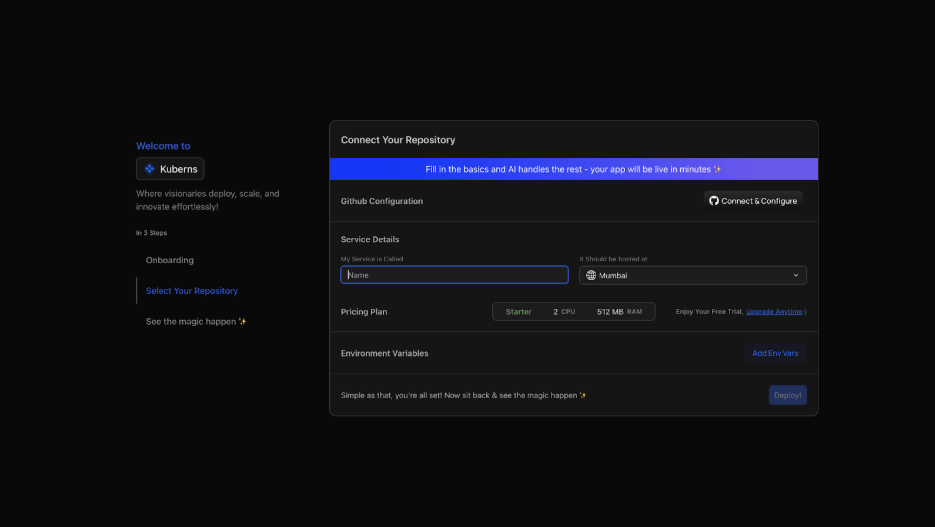
If this is your first time on Kuberns, you'll need to authorise GitHub access:
* Click "Connect to Configure" and authorise Kuberns access
* Select your organisation, repository, and branch (main)
* Kuberns AI automatically detects your Node.js runtime version and reads your package.json, no manual runtime selection needed
> “Other platforms like Heroku require you to create a Procfile, specify the Node.js version in an engines field, and install their CLI before deploying. On Kuberns, you connect your repo and the AI handles detection automatically.”
### Step 3: Set Environment Variables
Navigate to the Environment section. Add any secrets your app needs:

* Add key-value pairs manually, or click "Upload .env file" to import all at once
* Kuberns encrypts and injects them securely at runtime
Click "Save & Close" when done. Never hardcode secrets in your source code; always pass them as environment variables. Kuberns securely injects them into your Flask runtime at deploy time.
### Step 4: Click Deploy, Let the AI Take Over
Click Deploy. Watch the real-time log stream as Kuberns Agentic AI takes over:

* Clones your repository
* Runs npm install to install all dependencies
* Detects your Node.js entry point from package.json
* Starts your app via npm start
* Provisions AWS compute in your chosen region
* Issues an SSL certificate and assigns a production URL
* Enables auto-scaling and monitoring, built in, zero setup
Your Node.js app is live within minutes. Every push to your connected GitHub branch triggers an automatic redeploy, no GitHub Actions, no webhook configuration needed.

## What Kuberns Handles That You Do Manually on Other Platforms
| What production Node.js needs | Manual / VPS | Kuberns |
| ----------------------------- | ------------------------- | -------------------------- |
| Process manager (PM2) | Install and configure | AI handles it |
| Nginx reverse proxy | Manual config | Not needed |
| SSL certificate (Certbot) | Manual setup + renewal | Automatic |
| Port binding and routing | Manual | Automatic |
| Auto-scaling on traffic | Manual scaling rules | AI-driven |
| Monitoring and live logs | Third-party tools | Built in, zero setup |
| CI/CD pipeline | Build with GitHub Actions | Included. triggers on push |
| Custom domain + DNS | Manual DNS config + SSL | Dashboard, one click |
| Auto-restart on crash | PM2 config | Automatic |
| Cost optimisation | Manual FinOps | AI-driven continuously |
Kuberns also fully supports:
* WebSocket servers: persistent connections are maintained automatically, auto-scales for real-time traffic
* Multi-service deployments: deploy frontend and backend from the same repository with separate build commands
* Cron jobs and background workers: define scheduled tasks directly from the dashboard
[Deploy your Node.js app on Kuberns](https://dashboard.kuberns.com)
## Node.js Deployment Platform Comparison (2026)
| Platform | Auto-detect Node.js | Config required | Free tier | Sleeps on idle | Starting price | SSH required | Auto-scaling | Best for |
| ------------------------- | ------------------- | --------------------- | ----------------- | ----------------------- | -------------- | ------------ | ------------ | ---------------------------------------- |
| Kuberns | Yes | None | Yes ($14 credits) | No | $7/mo | No | AI-driven | Full-stack Node.js, APIs, SaaS, zero-ops |
| Heroku | Yes (Procfile) | Procfile required | No (removed 2022) | No | $5/mo (Basic) | No | Manual | Beginners learning; legacy apps |
| Render | Yes | Dashboard config | Yes (sleeps) | Yes — 15 min | $7/mo | No | Rules-based | Full-stack, Heroku migrations |
| Railway | Yes | Start command | $5 trial credit | No (but credits expire) | $5/mo + usage | No | Limited | Prototypes, short-lived projects |
| DigitalOcean App Platform | Yes | Build/run commands | No | No | $5/mo | No | Rules-based | Teams with some DevOps knowledge |
| VPS (PM2 + Nginx) | Manual | PM2 + Nginx + SSL | No | No | \~$5/mo | Yes | Manual only | Full control, DevOps teams |
| AWS Elastic Beanstalk | Yes | .ebextensions/ config | No | No | Pay-as-you-go | No | Yes | AWS-native enterprise teams |
## Step-by-Step Guide to deploy a Node Js on Kuberns
Kuberns is an agentic AI cloud platform built on AWS infrastructure. It auto-detects your Node.js runtime, installs dependencies from package.json, starts your app automatically, and handles SSL, scaling, and monitoring with zero configuration from your side.
### Step 1: Sign Up and Create an Account
If you are a new user, sign up at[ kuberns](https://kuberns.com) with a Google/Github account and add basic details of your account.

### Step 2: Connect Your GitHub Repository
On the "Creating a Service" page, just connect your github your account, add the project name and region.

If this is your first time on Kuberns, you'll need to authorise GitHub access:
* Click "Connect to Configure" and authorise Kuberns access
* Select your organisation, repository, and branch (main)
* Kuberns AI automatically detects your Node.js runtime version and reads your package.json, no manual runtime selection needed
> “Other platforms like Heroku require you to create a Procfile, specify the Node.js version in an engines field, and install their CLI before deploying. On Kuberns, you connect your repo and the AI handles detection automatically.”
### Step 3: Set Environment Variables
Navigate to the Environment section. Add any secrets your app needs:

* Add key-value pairs manually, or click "Upload .env file" to import all at once
* Kuberns encrypts and injects them securely at runtime
Click "Save & Close" when done. Never hardcode secrets in your source code; always pass them as environment variables. Kuberns securely injects them into your Flask runtime at deploy time.
### Step 4: Click Deploy, Let the AI Take Over
Click Deploy. Watch the real-time log stream as Kuberns Agentic AI takes over:

* Clones your repository
* Runs npm install to install all dependencies
* Detects your Node.js entry point from package.json
* Starts your app via npm start
* Provisions AWS compute in your chosen region
* Issues an SSL certificate and assigns a production URL
* Enables auto-scaling and monitoring, built in, zero setup
Your Node.js app is live within minutes. Every push to your connected GitHub branch triggers an automatic redeploy, no GitHub Actions, no webhook configuration needed.

## What Kuberns Handles That You Do Manually on Other Platforms
| What production Node.js needs | Manual / VPS | Kuberns |
| ----------------------------- | ------------------------- | -------------------------- |
| Process manager (PM2) | Install and configure | AI handles it |
| Nginx reverse proxy | Manual config | Not needed |
| SSL certificate (Certbot) | Manual setup + renewal | Automatic |
| Port binding and routing | Manual | Automatic |
| Auto-scaling on traffic | Manual scaling rules | AI-driven |
| Monitoring and live logs | Third-party tools | Built in, zero setup |
| CI/CD pipeline | Build with GitHub Actions | Included. triggers on push |
| Custom domain + DNS | Manual DNS config + SSL | Dashboard, one click |
| Auto-restart on crash | PM2 config | Automatic |
| Cost optimisation | Manual FinOps | AI-driven continuously |
Kuberns also fully supports:
* WebSocket servers: persistent connections are maintained automatically, auto-scales for real-time traffic
* Multi-service deployments: deploy frontend and backend from the same repository with separate build commands
* Cron jobs and background workers: define scheduled tasks directly from the dashboard
[Deploy your Node.js app on Kuberns](https://dashboard.kuberns.com)
## Node.js Deployment Platform Comparison (2026)
| Platform | Auto-detect Node.js | Config required | Free tier | Sleeps on idle | Starting price | SSH required | Auto-scaling | Best for |
| ------------------------- | ------------------- | --------------------- | ----------------- | ----------------------- | -------------- | ------------ | ------------ | ---------------------------------------- |
| Kuberns | Yes | None | Yes ($14 credits) | No | $7/mo | No | AI-driven | Full-stack Node.js, APIs, SaaS, zero-ops |
| Heroku | Yes (Procfile) | Procfile required | No (removed 2022) | No | $5/mo (Basic) | No | Manual | Beginners learning; legacy apps |
| Render | Yes | Dashboard config | Yes (sleeps) | Yes — 15 min | $7/mo | No | Rules-based | Full-stack, Heroku migrations |
| Railway | Yes | Start command | $5 trial credit | No (but credits expire) | $5/mo + usage | No | Limited | Prototypes, short-lived projects |
| DigitalOcean App Platform | Yes | Build/run commands | No | No | $5/mo | No | Rules-based | Teams with some DevOps knowledge |
| VPS (PM2 + Nginx) | Manual | PM2 + Nginx + SSL | No | No | \~$5/mo | Yes | Manual only | Full control, DevOps teams |
| AWS Elastic Beanstalk | Yes | .ebextensions/ config | No | No | Pay-as-you-go | No | Yes | AWS-native enterprise teams |
 ## What Developers Say About Deploying Node.js on Other Platforms
These are documented pain points from real deployments.
### Heroku
Heroku was the default for beginner Node.js deployment for years. The community pain points that pushed developers away: the free tier was removed in November 2022, and every deployment now costs money from day one. Deployments require a Procfile with the specific command to run your app.
[Dyno pricing](https://kuberns.com/blogs/heroku-pricing-explained/) compounds quickly; the $7/month Basic dyno often scales to $25–50/month once you add a database, workers, and SSL. A developer on the[ r/node "easiest way to deploy Node app" thread](https://www.reddit.com/r/node/comments/10w22gv/easiest_way_to_deploy_node_app_in_2023/) summarised the sentiment: "Heroku used to be the answer. Now you're basically paying enterprise pricing for a beginner platform."
### Render
Clean Git-based deployments, managed databases, and autoscaling with defined thresholds. The persistent community pain point: the free tier sleeps after 15 minutes of inactivity. The first request after sleep takes 30–60 seconds to respond, completely unacceptable for production APIs. Paid tiers at $7/month resolve the sleep issue, but Render's instance-based pricing means you pay for full instances whether traffic uses them or not.
### Railway
Developer-friendly experience, usage-based billing that sounds great for small apps. The community stress tests tell a different story: Railway's $0.0002/CPU-sec billing burns through credits fast during traffic spikes. [One dev.to analysis documented](https://dev.to/alex_aslam/deploy-nodejs-apps-like-a-boss-railway-vs-render-vs-heroku-zero-server-stress-5p3) Railway handling 50 RPS for 10 minutes before hitting credit warnings, at a price point higher than Render's flat $7 tier for the same load. Good for prototypes; not predictable for production.
### DigitalOcean App Platform
A middle ground between raw VPS and managed PaaS. The community repeatedly notes it "demands more DevOps knowledge than advertised"; you still need to understand build commands, run commands, and how to configure your Node.js service correctly. Pricing starts at $5/month, but the managed database and full production setup typically lands at $20–40/month.
### VPS with PM2 + Nginx (Manual)
Maximum control, lowest cost per compute unit. The [r/node](https://www.reddit.com/r/node/) community is consistent on the trade-off: the $5/month VPS is cheap until you're debugging a PM2 crash at 2 am, figuring out why Nginx is returning 502, or manually updating Node.js security patches. One developer in a StackOverflow thread described the manual route as "three hours of setup that I then have to maintain forever." Underestimating self-hosting overhead is the most cited Node.js deployment mistake in community discussions.
### AWS Elastic Beanstalk
Full control, deep AWS integration, suitable for enterprise workloads. The community pain point: configuration complexity for non-AWS-native teams. Elastic Beanstalk requires .ebextensions/ config files, the EB CLI, environment tier selection, and understanding of how it maps to EC2, Elastic Load Balancing, and Auto Scaling Groups underneath. For teams not already committed to the AWS ecosystem, the setup overhead rarely justifies the flexibility.
> 💡 For teams already running workloads on AWS and looking to reduce complexity without migrating off the platform, see our guide on how to implement [cost optimisation on AWS](https://kuberns.com/blogs/how-to-implement-cost-optimisation-on-aws/)
## Conclusion: Deploy Your Node.js App With Agentic AI
Node.js deployment in 2026 has more options than it's ever had and more ways to choose the wrong one for where your project is headed. Heroku made the journey accessible, but removed its free tier and charges enterprise pricing for what was a beginner platform.
Render and Railway are solid for prototypes, but have sleep modes and credit systems that create friction in production. The VPS route is the cheapest per compute unit, but trades every dollar you save for the engineering hours you spend.
Kuberns is built for the majority of Node.js developers and teams who don't want deployment to be a job. Zero SSH. Zero Nginx configuration. Zero PM2 setup. Zero SSL certificates to renew. Connect your GitHub repo, set your environment variables, click Deploy and the agentic AI handles everything between your code and your users, on AWS infrastructure, with built-in monitoring, auto-scaling, and CI/CD.
If your Node.js app is ready and on GitHub, you can be live in under 5 minutes.
[Deploy your Node.js app on Kuberns](https://dashboard.kuberns.com)
## What Developers Say About Deploying Node.js on Other Platforms
These are documented pain points from real deployments.
### Heroku
Heroku was the default for beginner Node.js deployment for years. The community pain points that pushed developers away: the free tier was removed in November 2022, and every deployment now costs money from day one. Deployments require a Procfile with the specific command to run your app.
[Dyno pricing](https://kuberns.com/blogs/heroku-pricing-explained/) compounds quickly; the $7/month Basic dyno often scales to $25–50/month once you add a database, workers, and SSL. A developer on the[ r/node "easiest way to deploy Node app" thread](https://www.reddit.com/r/node/comments/10w22gv/easiest_way_to_deploy_node_app_in_2023/) summarised the sentiment: "Heroku used to be the answer. Now you're basically paying enterprise pricing for a beginner platform."
### Render
Clean Git-based deployments, managed databases, and autoscaling with defined thresholds. The persistent community pain point: the free tier sleeps after 15 minutes of inactivity. The first request after sleep takes 30–60 seconds to respond, completely unacceptable for production APIs. Paid tiers at $7/month resolve the sleep issue, but Render's instance-based pricing means you pay for full instances whether traffic uses them or not.
### Railway
Developer-friendly experience, usage-based billing that sounds great for small apps. The community stress tests tell a different story: Railway's $0.0002/CPU-sec billing burns through credits fast during traffic spikes. [One dev.to analysis documented](https://dev.to/alex_aslam/deploy-nodejs-apps-like-a-boss-railway-vs-render-vs-heroku-zero-server-stress-5p3) Railway handling 50 RPS for 10 minutes before hitting credit warnings, at a price point higher than Render's flat $7 tier for the same load. Good for prototypes; not predictable for production.
### DigitalOcean App Platform
A middle ground between raw VPS and managed PaaS. The community repeatedly notes it "demands more DevOps knowledge than advertised"; you still need to understand build commands, run commands, and how to configure your Node.js service correctly. Pricing starts at $5/month, but the managed database and full production setup typically lands at $20–40/month.
### VPS with PM2 + Nginx (Manual)
Maximum control, lowest cost per compute unit. The [r/node](https://www.reddit.com/r/node/) community is consistent on the trade-off: the $5/month VPS is cheap until you're debugging a PM2 crash at 2 am, figuring out why Nginx is returning 502, or manually updating Node.js security patches. One developer in a StackOverflow thread described the manual route as "three hours of setup that I then have to maintain forever." Underestimating self-hosting overhead is the most cited Node.js deployment mistake in community discussions.
### AWS Elastic Beanstalk
Full control, deep AWS integration, suitable for enterprise workloads. The community pain point: configuration complexity for non-AWS-native teams. Elastic Beanstalk requires .ebextensions/ config files, the EB CLI, environment tier selection, and understanding of how it maps to EC2, Elastic Load Balancing, and Auto Scaling Groups underneath. For teams not already committed to the AWS ecosystem, the setup overhead rarely justifies the flexibility.
> 💡 For teams already running workloads on AWS and looking to reduce complexity without migrating off the platform, see our guide on how to implement [cost optimisation on AWS](https://kuberns.com/blogs/how-to-implement-cost-optimisation-on-aws/)
## Conclusion: Deploy Your Node.js App With Agentic AI
Node.js deployment in 2026 has more options than it's ever had and more ways to choose the wrong one for where your project is headed. Heroku made the journey accessible, but removed its free tier and charges enterprise pricing for what was a beginner platform.
Render and Railway are solid for prototypes, but have sleep modes and credit systems that create friction in production. The VPS route is the cheapest per compute unit, but trades every dollar you save for the engineering hours you spend.
Kuberns is built for the majority of Node.js developers and teams who don't want deployment to be a job. Zero SSH. Zero Nginx configuration. Zero PM2 setup. Zero SSL certificates to renew. Connect your GitHub repo, set your environment variables, click Deploy and the agentic AI handles everything between your code and your users, on AWS infrastructure, with built-in monitoring, auto-scaling, and CI/CD.
If your Node.js app is ready and on GitHub, you can be live in under 5 minutes.
[Deploy your Node.js app on Kuberns](https://dashboard.kuberns.com)
 ## Frequently Asked Questions
### What is the easiest way to deploy a Node.js app in 2026?
Kuberns is the easiest production path for Node.js in 2026. Connect your GitHub repository, add environment variables, click Deploy. The Agentic AI detects your Node.js runtime, installs dependencies, starts your app, configures SSL, and enables auto-scaling automatically. No SSH, no Nginx, no PM2, no Procfile, no Dockerfile required. From signup to live URL takes under 5 minutes.[ Deploy on Kuberns](https://dashboard.kuberns.com)
### Can I deploy a Node.js app without SSH?
Yes, on Kuberns, there is no SSH at all. You never touch a server. The AI provisions and manages the infrastructure entirely. This is the most-asked question in community threads from developers on Windows or teams that want to avoid server management entirely.
### How do I deploy a full-stack Node.js app with a database?
Deploy your Node.js backend as a Backend Service on Kuberns. Add your database connection string as an environment variable (DATABASE\_URL) before deploying. For the React frontend, deploy it as a separate Frontend Service in the same Kuberns project. Kuberns supports multi-service deployments from the same repository.
### What is process.env.PORT and why does it matter?
Every deployment platform injects a dynamic port number via the PORT environment variable. If your app hardcodes port 3000, the platform's load balancer routes traffic to a port your app isn't listening on, the deployment "succeeds" but the app is unreachable. Using const PORT = process.env.PORT || 3000 tells your app to use whatever port the platform provides, falling back to 3000 for local development. This is the single most common Node.js deployment failure for beginners.
### How do I automatically redeploy my Node.js app after pushing changes?
On Kuberns, every push to your connected GitHub branch triggers an automatic redeploy via the built-in CI/CD pipeline. No GitHub Actions, no webhook setup, no manual trigger required, push to GitHub and your app updates automatically. You can also trigger manual redeploys and view full build history from the[ Kuberns dashboard](https://dashboard.kuberns.com).
### Does Kuberns support environment variables and secrets?
Yes. You can securely manage environment variables from the Kuberns dashboard. These values are encrypted and injected into your Node.js runtime during deployment.
### Can I connect a database like MongoDB or PostgreSQL to my Node.js app?
Yes. Kuberns supports external databases and managed services. You can connect your app to MongoDB, PostgreSQL, MySQL, or Redis by adding the database URL as an environment variable.
### How are updates and redeployments handled?
Every time you push a new commit to your GitHub repository, Kuberns automatically rebuilds and redeploys your app. You can also trigger manual redeploys from the dashboard if needed.
### Does Kuberns support background jobs or APIs that run on schedules?
Yes. You can configure cron jobs and background worker services within Kuberns. It supports asynchronous workloads like email queues, scheduled reports, or batch processing alongside your main Node.js app.
### What if my build fails during deployment?
Kuberns shows detailed build logs in real time so you can identify what went wrong. Most build failures occur due to missing dependencies or incorrect start scripts, which can be easily fixed in your package.json file.
---
- [More Deployment Guides articles](https://kuberns.com/blogs/category/deployment-guides/1/)
- [All articles](https://kuberns.com/blogs/)
## Frequently Asked Questions
### What is the easiest way to deploy a Node.js app in 2026?
Kuberns is the easiest production path for Node.js in 2026. Connect your GitHub repository, add environment variables, click Deploy. The Agentic AI detects your Node.js runtime, installs dependencies, starts your app, configures SSL, and enables auto-scaling automatically. No SSH, no Nginx, no PM2, no Procfile, no Dockerfile required. From signup to live URL takes under 5 minutes.[ Deploy on Kuberns](https://dashboard.kuberns.com)
### Can I deploy a Node.js app without SSH?
Yes, on Kuberns, there is no SSH at all. You never touch a server. The AI provisions and manages the infrastructure entirely. This is the most-asked question in community threads from developers on Windows or teams that want to avoid server management entirely.
### How do I deploy a full-stack Node.js app with a database?
Deploy your Node.js backend as a Backend Service on Kuberns. Add your database connection string as an environment variable (DATABASE\_URL) before deploying. For the React frontend, deploy it as a separate Frontend Service in the same Kuberns project. Kuberns supports multi-service deployments from the same repository.
### What is process.env.PORT and why does it matter?
Every deployment platform injects a dynamic port number via the PORT environment variable. If your app hardcodes port 3000, the platform's load balancer routes traffic to a port your app isn't listening on, the deployment "succeeds" but the app is unreachable. Using const PORT = process.env.PORT || 3000 tells your app to use whatever port the platform provides, falling back to 3000 for local development. This is the single most common Node.js deployment failure for beginners.
### How do I automatically redeploy my Node.js app after pushing changes?
On Kuberns, every push to your connected GitHub branch triggers an automatic redeploy via the built-in CI/CD pipeline. No GitHub Actions, no webhook setup, no manual trigger required, push to GitHub and your app updates automatically. You can also trigger manual redeploys and view full build history from the[ Kuberns dashboard](https://dashboard.kuberns.com).
### Does Kuberns support environment variables and secrets?
Yes. You can securely manage environment variables from the Kuberns dashboard. These values are encrypted and injected into your Node.js runtime during deployment.
### Can I connect a database like MongoDB or PostgreSQL to my Node.js app?
Yes. Kuberns supports external databases and managed services. You can connect your app to MongoDB, PostgreSQL, MySQL, or Redis by adding the database URL as an environment variable.
### How are updates and redeployments handled?
Every time you push a new commit to your GitHub repository, Kuberns automatically rebuilds and redeploys your app. You can also trigger manual redeploys from the dashboard if needed.
### Does Kuberns support background jobs or APIs that run on schedules?
Yes. You can configure cron jobs and background worker services within Kuberns. It supports asynchronous workloads like email queues, scheduled reports, or batch processing alongside your main Node.js app.
### What if my build fails during deployment?
Kuberns shows detailed build logs in real time so you can identify what went wrong. Most build failures occur due to missing dependencies or incorrect start scripts, which can be easily fixed in your package.json file.
---
- [More Deployment Guides articles](https://kuberns.com/blogs/category/deployment-guides/1/)
- [All articles](https://kuberns.com/blogs/)