# The Fastest Way to Deploy a Python App in 2026
> The easiest way to deploy a Python app without managing infrastructure in 2026. Step-by-step guide to deploy on Kuberns with agentic AI.
- **Author**: manav-dobariya
- **Published**: 2025-11-11
- **Modified**: 2026-03-27
- **Category**: Deployment Guides
- **URL**: https://kuberns.com/blogs/how-to-deploy-python-app-with-ai/
---
If you're searching for the easiest way to deploy a Python app without managing infrastructure, you're in the right place. Now you can deploy any Python projects without any manual configurations.
Deploying a Python app manually involves more moving parts than most languages. You need to choose and configure a production server, Gunicorn for Flask and Django, and Uvicorn for FastAPI. You need to bind your app to 0.0.0.0 so the platform can reach it. You need requirements.txt to be complete and accurate. You need environment variables set correctly. And you need to never, ever deploy with the development server in production.
Get all of that right, and deployment is straightforward. Get any of it wrong, and you get a successful build with a broken app and no obvious error message.
So, we found the fastest path for you to deploy in 2026: Kuberns AI. With the Kuberns’ Agentic AI, Push your Python project to GitHub, add your environment variables, and click Deploy. The agentic AI reads your requirements.txt, detects your framework (Flask, Django, FastAPI, or anything else), starts the correct production server automatically, provisions AWS compute, issues SSL, and enables autoscaling.
This guide covers every Python-specific production requirement: the prerequisites for Flask, Django, and FastAPI individually, the Gunicorn and Uvicorn commands that replace your dev server in production, how Kuberns handles all of it automatically, and the errors that silently break Python deployments on every platform.
## Prerequisites (What Every Python App Needs Before Deploying)
These are the five things that determine whether a Python deployment succeeds.
### 1. A requirements.txt with every dependency listed
Cloud platforms read requirements.txt and install your packages fresh on a clean server. If a library your app imports is missing from this file, the deployment reports success, but the app crashes silently on startup.
Generate it from your active virtual environment:

Review it after generating. pip freeze captures everything, including dev tools you don't need in production. At a minimum, your requirements.txt needs:
**For Flask:**

**For Django:**

**For FastAPI:**

### 2. Never use the development server in production
This is the most important Python deployment rule and the one most developers learn the hard way.
Flask's built-in server, Django's runserver, and FastAPI's --reload flag are all development tools only.[ Flask's official documentation](https://flask.palletsprojects.com/en/stable/deploying/) is explicit: "Do not use the development server when deploying to production. It is intended for use only during local development. It is not designed to be particularly secure, stable, or efficient." The same applies to Django and FastAPI.
The dev server handles one request at a time. It has no process management, no security hardening, and no concurrency. Under any real load, it fails.
On Kuberns, the AI detects your framework from requirements.txt and sets the correct production server command automatically. You never write this command yourself.
### 3. App must bind to 0.0.0.0, not 127.0.0.1
Cloud platforms inject a PORT environment variable and route all traffic to it. If your app binds to 127.0.0.1 (localhost) only, the platform's health check can't reach it and marks the deployment as failed, even though your app started correctly.

When running via Gunicorn (which is always in production), the --bind 0.0.0.0:$PORT flag handles this correctly.
> 💡 Deploying a Flask app specifically? See our dedicated [Flask deployment](https://kuberns.com/blogs/how-to-deploy-flask-app/) guide for Flask-specific configuration, including blueprint structure, static files, and the full Gunicorn setup with worker count recommendations.
#### Here is the easiest way to deploy Flask/Python on Kuberns
## How to Deploy a Python App on Kuberns?
[Kuberns](https://kuberns.com/) is an agentic AI cloud platform. For Python apps, the AI reads your requirements.txt, identifies whether you're running Flask, Django, FastAPI, or another framework, installs dependencies, starts the correct production server, and keeps everything running on AWS infrastructure with autoscaling and zero-downtime deploys.
### Step 1: Create Your Account and Project
Go to Kuberns and click on “Deploy with AI”. Create your account and set up your first project.

Kuberns offers a free tier to get started, and you can scale as your application grows. You don’t need to provision servers or choose infrastructure manually.
### Step 2: Connect Your GitHub Repository
On the "Creating a Service" page, just connect your GitHub account, add the project name and region.
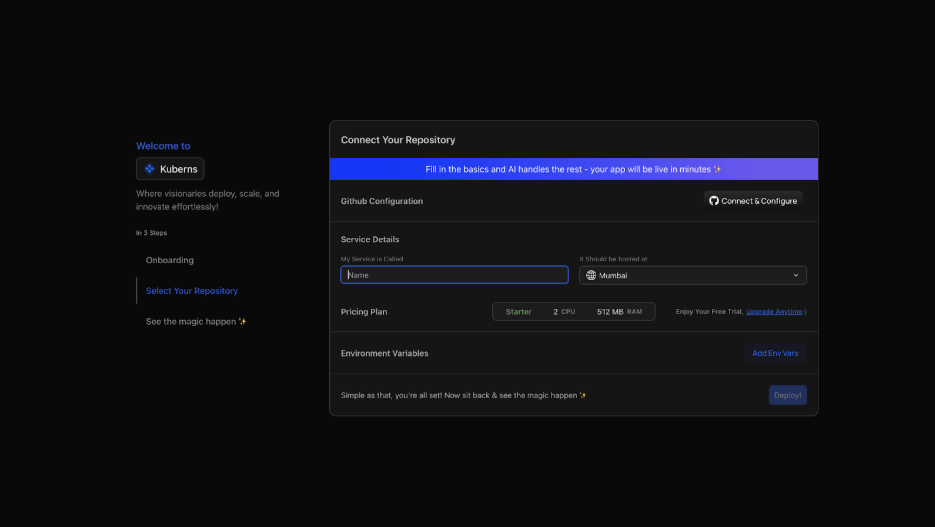
* Click "Connect & Configure" and authorise Kuberns access to your repositories
* Select your MERN repository. Choose the branch you want to deploy (usually main)
* Kuberns reads requirements.txt, detects your framework, and configures the start command automatically
### Step 3: Set Environment Variables
Navigate to the Environment section before deploying:

* Click "Add Env Vars" and input key-value pairs manually, or
* Click "Upload .env file" to import all variables at once
Upload your .env file directly or add key-value pairs manually. Kuberns encrypts all values at rest; they never appear in build logs.

### Step 4: Deploy- The AI Takes Over
Click Deploy. From here, you watch rather than configure. The agentic AI:

* Installs all packages from requirements.txt using pip install
* Detects Flask/Django, starts with Gunicorn (gunicorn app\:app --bind 0.0.0.0:$PORT)
* Detects FastAPI, starts with Uvicorn (uvicorn main\:app --host 0.0.0.0 --port $PORT)
* Runs Django migrations automatically if detected
* Provisions AWS compute, issues SSL, and enables CI/CD on every GitHub push
* Activates AI-driven autoscaling based on real traffic

Your Python app is live at a public HTTPS URL in minutes.
## What Kuberns Handles vs What You'd Do on VPS and Other PaaS Platforms
| Production requirement | Manual VPS | Kuberns |
| --------------------------------------- | --------------------------------- | ----------------------------------- |
| Python version + virtual environment | Install manually | Auto-detected from requirements.txt |
| Gunicorn / Uvicorn production server | Install + configure start command | Auto-detected from framework |
| 0.0.0.0 binding | Manual in start command | Automatic |
| Nginx as a reverse proxy | Install + configure | Not needed |
| SSL certificate | Certbot + renewal cron | Automatic |
| systemd service to keep the app running | Write service file | Built-in process management |
| Django migrate + collectstatic | Manual after each deploy | AI automatic |
| CI/CD on push | GitHub Actions setup | Built-in |
[Deploy your Python app on Kuberns now using agentic AI in one click](https://kuberns.com/services/laravel)
> 💡 Building an async FastAPI service as part of a larger architecture? See our [FastAPI deployment](https://kuberns.com/blogs/fastapi-deployment-guide/) guide for the complete setup, including ASGI vs WSGI, uvicorn\[standard] vs bare uvicorn, and the Gunicorn+UvicornWorker production pattern.
## Deploy Python Data Apps Without Managing Infrastructure
The challenge with Python data apps is that they often have heavier dependencies than web apps, such as numpy, pandas, scikit-learn, and torch, which means longer install times, larger memory footprints, and more sensitive Python version requirements. The deployment platform needs to handle this without you configuring custom Docker layers or memory limits.
Kuberns handles heavy Python dependency stacks automatically. The AI reads your requirements.txt, allocates appropriate compute based on your app's actual memory usage, and scales when traffic arrives. If your data app is a Flask or FastAPI endpoint wrapping an ML model, a Dash dashboard, or a Streamlit-style data application, the same four-step deployment process applies.
For data apps specifically:
* Keep your model loading outside the request handler, load at startup, not on each request, or slow first-response times compound
* Add a /health endpoint that returns 200 without loading model weights, platforms use this for health checks
* Pin your Python version explicitly; ML libraries are sensitive to Python version mismatches. Add .python-version with 3.12 or 3.11 to your repository root
* Heavy models should be loaded from environment-injected paths or cloud storage (S3, GCS), not committed to the repository
## Is Your Python App Ready? Deploy It Now With AI
Your requirements.txt is complete. Your app reads environment variables correctly. Your production server (Gunicorn or Uvicorn) is in your dependencies. That's the full checklist for a Python deployment that actually works.
On Kuberns, everything between your code and a live HTTPS URL, server configuration, process management, SSL, autoscaling, CI/CD is handled by the platform. You write Python. The AI handles infrastructure.
Push to GitHub and ship it.
**[Deploy your Python app on Kuberns Now](https://dashboard.kuberns.com/login)**
## Frequently Asked Questions
### Can I deploy any Python app on Kuberns?
Yes. Kuberns supports all major Python frameworks, including [Flask](https://kuberns.com/blogs/how-to-deploy-flask-app/), [Django](https://kuberns.com/blogs/how-to-deploy-django-app-in-one-click-with-ai/), and FastAPI. The platform auto-detects your app type and configures the runtime automatically, no need for Dockerfiles or custom scripts.
### Do I need DevOps or Docker knowledge to deploy on Kuberns?
No. That’s exactly what Kuberns eliminates. You don’t need Docker, Kubernetes, or NGINX setup experience. The AI engine takes care of all infrastructure, scaling, and SSL configuration automatically.
### How long does it take to deploy a Python app on Kuberns?
Usually under five minutes. Once you connect your GitHub repository, Kuberns builds, deploys, and configures your app automatically, including SSL and monitoring.
irements.txt. Push to GitHub. Connect on Kuberns, the AI runs migrate, collectstatic, and starts Gunicorn automatically. For the complete Django setup, see our [Django deployment guide](https://kuberns.com/blogs/how-to-deploy-django-app-in-one-click-with-ai/)
### What is the difference between Gunicorn and Uvicorn for Python deployment?
Gunicorn is a WSGI server, designed for synchronous Python frameworks like Flask and Django. Uvicorn is an ASGI server, designed for async frameworks like FastAPI. Using Gunicorn for FastAPI loses all async performance benefits. Using Uvicorn for Flask or Django works but misses Gunicorn's mature process management. For FastAPI at scale, the production best practice is Gunicorn with Uvicorn workers: gunicorn -w 2 -k uvicorn.workers.UvicornWorker. On Kuberns, the AI selects the correct server automatically based on your framework.
### Why does Python deployment say "success" but the app is unreachable?
The build step (installing packages) succeeded, but the runtime process crashed immediately after starting. Check runtime logs in your platform's dashboard. Common causes: a missing environment variable causing a KeyError at startup, a missing package causing ModuleNotFoundError, or the app binding to 127.0.0.1 instead of 0.0.0.0. On Kuberns, real-time logs show exactly what happened at startup, no SSH session needed.
---
- [More Deployment Guides articles](https://kuberns.com/blogs/category/deployment-guides/1/)
- [All articles](https://kuberns.com/blogs/)
