# What Is an Automated Software Deployment Tool?
> An automated software deployment tool takes your code from GitHub to live production automatically. Compare one-click deployment (Kuberns) vs traditional tools.
- **Author**: manav-dobariya
- **Published**: 2025-08-04
- **Modified**: 2026-04-05
- **Category**: Deployment Guides
- **URL**: https://kuberns.com/blogs/how-to-implement-one-click-automated-software-deployment/
---
Automated software deployment is meant to simplify releases, but for many teams, it's still a high-stress, error-prone process. From environment mismatches to last-minute script failures, pushing code to production can feel more like defusing a bomb than delivering value.
There are two kinds of automated software deployment tools, and most guides treat them as the same thing.
The first kind automates deployment tasks you define. You write the pipeline in YAML, configure the build steps, specify your environments, manage your secrets, and handle scaling separately. Tools like GitHub Actions, Jenkins, Octopus Deploy, and Argo CD fall here. Powerful, flexible, and still requiring a significant setup investment before the first deployment runs.
The second kind automates deployment itself. You connect a repository. The tool reads your code, detects your framework and runtime, generates the pipeline, provisions infrastructure, issues SSL, activates CI/CD, and manages autoscaling without configuration from you. Kuberns falls here.
The distinction matters because searchers asking "what is an automated software deployment tool" often have very different jobs-to-be-done depending on which category they need.
This guide covers both, helps you understand which type fits your situation, and walks step by step through enabling one-click deployment automation for teams who want the second kind.
## What Is an Automated Software Deployment Tool?
An automated software deployment tool is a platform or system that removes manual steps from the process of delivering application code from a version control repository into a running production environment.
According to the[ DORA State of DevOps research programme](https://dora.dev/capabilities/deployment-automation/), deployment automation is "the process of deploying software to testing and production environments from information stored in version control." High-performing engineering teams use deployment automation to deploy multiple times per day; the automation is what makes that frequency sustainable without introducing human error.
In practice, automated deployment tools handle some combination of:
* Triggering a build when code is pushed to a repository
* Installing dependencies and compiling code
* Running automated tests as deployment gates
* Configuring environment variables and secrets securely
* Provisioning or updating infrastructure
* Issuing and renewing SSL certificates
* Routing traffic to the new version
* Monitoring post-deployment health and triggering rollback if needed
* Activating CI/CD for future deployments
The degree to which each of these steps is automated and how much configuration they require, varies significantly between tool categories.
> **💡 For a comprehensive comparison of specific automated deployment tools with pricing and use cases, see our [Best Auto Deployment Tools](https://kuberns.com/blogs/best-auto-deployment-tools/) guide.**
## The Three Types of Automated Software Deployment Tools
Not all automated deployment tools are the same. Understanding the three main categories helps you choose the right one for your situation and explains why the steps to "enable one-click deployment automation" look completely different depending on which category you're in.
### Type 1: CI/CD Pipeline Tools
**Examples:** [GitHub Actions](https://github.com/features/actions), [Jenkins](https://www.jenkins.io/), [GitLab CI/CD](https://docs.gitlab.com/ci/), [CircleCI](https://circleci.com/), [Bitbucket Pipelines](https://bitbucket.org/product/features/pipelines/integrations)
These tools automate the build-test-deploy pipeline. You define what the pipeline does in configuration files (typically YAML), and the tool executes those steps automatically when triggered, usually by a commit or pull request.
**What you configure:** every step of the pipeline, when to trigger, what commands to run, which environments to deploy to, how to handle secrets, and what to do on failure.
**What they give you:** maximum flexibility. Any language, any framework, any deployment target. But that flexibility comes with a configuration investment proportional to what you want to automate.
**Who this serves:** engineering teams with DevOps expertise who want fine-grained control over every step of their delivery pipeline. Also strong for enterprises with compliance requirements around approval gates.
The realistic first-deploy timeline: 2–8 hours to configure a working pipeline from scratch, longer for complex multi-service applications.
> **💡 For a detailed comparison of CI/CD tools, including pricing and feature breakdowns, see [CI/CD Tools Comparison](https://kuberns.com/blogs/how-to-eliminate-manual-steps-in-ci-cd-workflow/).**
### Type 2: One-Click and PaaS Deployment Platforms
**Examples:** [Kuberns](https://kuberns.com/), [Vercel](https://vercel.com/), [Render](https://render.com/), [Railway](https://railway.com/), [Netlify](https://www.netlify.com/), [Fly.io](https://fly.io/)
These platforms automate the deployment workflow itself, not just the tasks within it. Instead of defining pipeline steps, you connect a repository and the platform handles the rest: framework detection, build configuration, infrastructure provisioning, SSL, CI/CD activation, and autoscaling.
**What you configure:** environment variables and secrets. Everything else is handled automatically.
**What they give you:** immediate time-to-first-deploy (under 5 minutes for most frameworks) without YAML, Dockerfiles, or infrastructure expertise.
**Who this serves:** developers and small engineering teams who want production-grade deployment without a dedicated DevOps engineer. Especially valuable for teams using AI coding tools (Cursor, Bolt, Lovable, Claude Code) where development speed is high and deployment friction is the bottleneck.
The realistic first-deploy timeline: under 5 minutes for most common frameworks.
### Type 3: Enterprise Configuration Management and Release Orchestration
**Examples:** Octopus Deploy, Ansible, AWS CodeDeploy, Puppet, Chef, Azure DevOps
These tools manage deployment across large, complex, or regulated environments. They handle multi-environment promotion (dev → staging → production), approval gates, compliance audit trails, and deployment to heterogeneous infrastructure, including on-premise servers.
**What you configure:** deployment targets, release lifecycles, approval workflows, environment-specific variables, and runbooks.
**Who this serves:** enterprise engineering and IT operations teams with regulated environments, multi-environment release orchestration requirements, or existing on-premise infrastructure.
The realistic first-deploy timeline: days to weeks for initial setup, depending on environment complexity.
## What Does One-Click Deployment Actually Do?
One of the most common questions from developers evaluating [one-click deployment platform](https://kuberns.com/)s is: "Does it actually handle everything, or do I still need to set up the database, configure SSL, etc.?" The honest, specific answer matters.
**Here is what Kuberns's one-click automated deployment does automatically:**
**Framework detection:** reads your repository root (package.json, requirements.txt, go.mod, pom.xml, composer.json) and identifies your framework and runtime version without you specifying anything. React, Next.js, Node.js, Python/Flask/Django/FastAPI, Go, Java, PHP/Laravel, Ruby, Astro, detected automatically.
**Build pipeline generation:** determines the correct build command for your detected framework. npm run build for Next.js, pip install -r requirements.txt and gunicorn for Flask, and go build for Go services. No Procfile, no Dockerfile, no YAML.
**Infrastructure provisioning:** spins up AWS-backed compute in your selected region with appropriate resource allocation. No AWS account required. No IAM policies to configure.
**SSL certificate issuance:** issues an HTTPS certificate automatically. Your application is accessible via HTTPS from the first request, including renewals handled without manual intervention.
**CI/CD activation:** Every subsequent push to your connected branch triggers an automatic rebuild and redeploy. You never manually trigger a deployment again after the first one.
**Environment variable management:** you add secrets (API keys, database connection strings, etc.) in the dashboard before deployment. They are encrypted at rest and injected at runtime, never exposed in build logs.
**Autoscaling:** AI-driven traffic pattern analysis scales compute proactively. When your application gets traffic, it scales up before performance degrades.
**Post-deployment monitoring:** Application health is monitored from the first request. Anomaly detection surfaces issues automatically.
**The one-click deployment checklist, what stays on you:** add environment variables before deploying (database URLs, API keys, any secrets your app needs). Everything else is handled.
> **💡 For a deeper look at how AI-powered deployment automation works across the full pipeline, see How to Use [AI in DevOps](https://kuberns.com/blogs/how-to-use-ai-in-devops-and-developer-workflow-to-automate-deployments/) to Automate Deployments, step-by-step from triggering to monitoring.**
## How to Enable One-Click Deployment Automation with Kuberns Agentic AI
The following steps set up a fully automated deployment; every future push to your main branch redeploys automatically. No additional configuration needed after Step 4.
### Step 1: Create your Kuberns account
Go to[ kuberns](https://kuberns.com/) and sign up. Free tier to start, $7 gets $14 in compute credits (2× value), no credit card required for the free tier.
### Step 2: Connect your GitHub repository
Click "Create Project" and connect your GitHub account. Select the repository containing your application. Kuberns scans the repository immediately, and you will see the detected framework, build command, and output directory confirmed on screen.
Select the branch you want to deploy (typically main or production). Every future push to this branch triggers an automatic redeploy.
### Step 3: Add environment variables
On the same screen, add your application's secrets and configuration:
* Database connection string (DATABASE\_URL, MONGO\_URI, etc.)
* API keys (OPENAI\_API\_KEY, STRIPE\_SECRET\_KEY, etc.)
* Any framework-specific configuration (NEXTAUTH\_SECRET, DEBUG=False, SECRET\_KEY, etc.)
You can paste key-value pairs individually or upload a .env file directly. All values are encrypted at rest. This step takes 2–3 minutes and prevents the most common first-deploy failures.
### Step 4: Click Deploy
The AI agent takes over:
* Installs dependencies
* Runs the build command
* Configures the production server (Gunicorn for Flask/Django, Uvicorn for FastAPI, the Next.js production server for Next.js)
* Provisions AWS compute
* Issues SSL
* Starts the application
* Activates CI/CD on your connected branch
**Time to live HTTPS URL:** 3–7 minutes for most frameworks.
Your application is live. No manual steps. No YAML to update when your framework changes. No deployment commands to run.
#### **Watch: One-Click Deployment in Action**
Want to see what one-click automated software deployment looks like in the real world?
In this short demo, we show how a real app is deployed using Kuberns from GitHub to live production in just seconds. No scripts. No YAML. No DevOps overhead.
## Traditional Automated Deployment Tools vs One-Click Deployment
For teams evaluating whether to use a pipeline-based tool (GitHub Actions, Jenkins) or a one-click platform (Kuberns), the comparison is most useful when it's concrete:
|
| **GitHub Actions** | **Jenkins** | **Kuberns** |
| -------------------------------- | --------------------------- | ------------------------ | ------------------------------ |
| **Configuration required** | YAML workflow files | Jenkinsfile + plugins | None |
| **Infrastructure managed by** | You | You | Platform |
| **Time to first working deploy** | 2–4 hours | 4–8 hours | Under 5 minutes |
| **SSL management** | Manual or Action | Manual | Automatic |
| **Autoscaling** | Manual configuration | Manual | AI-driven |
| **CI/CD on every push** | After YAML setup | After Jenkinsfile | Automatic |
| **Database provisioning** | External | External | External (connect via env var) |
| **Rollback** | Manual or scripted | Manual | One-click |
| **Pricing** | Per-minute runners | Self-hosted cost | Compute-only |
| **Best for** | Teams with DevOps expertise | Enterprise, full control | Developers shipping fast |
The honest summary: GitHub Actions and Jenkins give you more control over every deployment step. Kuberns removes the need to exercise that control. If your team has a DevOps specialist who wants to own every pipeline decision, GitHub Actions or Jenkins is the right choice. If your team wants deployment to work without thinking about it, Kuberns is.
> **💡 For the distinction between deployment automation tools at the application layer vs infrastructure layer, see [What Is a DevOps AI Agent](https://kuberns.com/blogs/understanding-devops-ai-agent-the-future-of-ai-in-devops/)?, how intelligent automation handles each layer of the software delivery lifecycle.**
## Benefits of Automated Software Deployment (What the Data Shows)
The business case for automating software deployment is well-established across independent research.
The[ DORA 2025 State of DevOps Report](https://services.google.com/fh/files/misc/2024_final_dora_report.pdf) found that deployment automation is one of the highest-leverage capabilities differentiating elite engineering teams: high-performing teams deploy on-demand, multiple times per day, with change failure rates under 5%. Deployment automation is what makes that frequency achievable without burning out engineers.
The[ Perforce 2026 State of DevOps Report](https://www.hpcwire.com/bigdatawire/this-just-in/perforce-2026-state-of-devops-report-indicates-mature-devops-practices-lead-to-ai-success/), surveying 820 technology professionals found that 74% of organisations report AI meets or exceeds expectations for deployment automation, with 48% measuring value through faster feature delivery. High-maturity organisations embed automated deployment across 72% of their delivery lifecycle versus 18% for low-maturity teams.
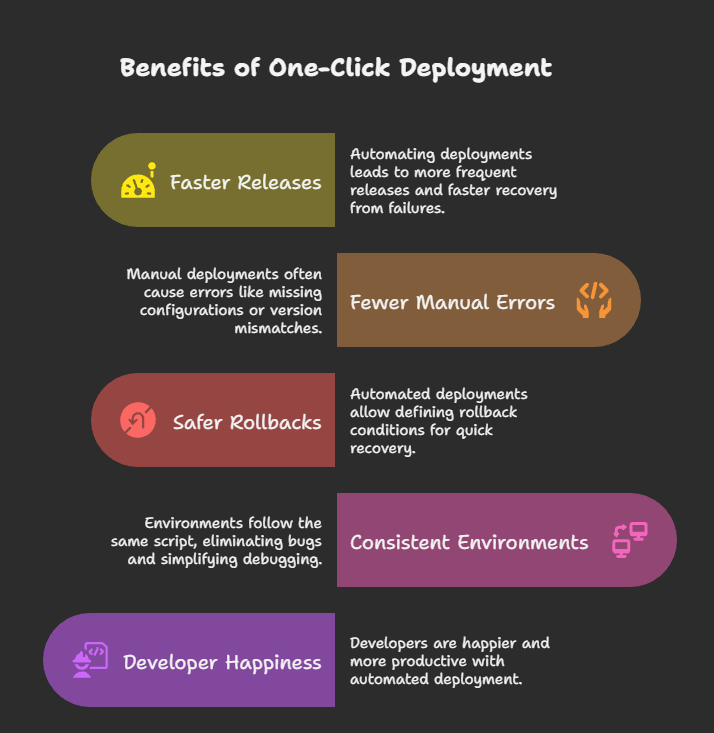
Specific benefits engineering teams consistently report after implementing automated deployment:
**Faster release cycles:** eliminating manual deployment steps removes the bottleneck between "code is done" and "users have it." Teams deploying manually once a week can move to deploying multiple times per day without proportionally increasing deployment effort.
**Fewer deployment-caused incidents:** human error in manual deployment steps (wrong environment, missed dependency, forgotten configuration) is a consistent source of production incidents. Automation eliminates the entire class of manual-step errors.
**Lower cognitive overhead:** engineers working on complex applications already carry a significant mental load. Removing the mental cost of tracking deployment steps, managing release windows, and coordinating deployments frees cognitive capacity for problem-solving.
**Consistent environments:** automated deployment applies the same process identically every time. Staging and production configurations stay in sync. The "works on my machine" and "worked in staging" classes of issues decrease significantly.
> **💡 For how automated deployment fits into the broader AI-in-DevOps picture, see[ AI in DevOps and Developer Workflow](https://kuberns.com/blogs/ai-in-devops-and-developer-workflow/), covering how automation applies across the full software delivery lifecycle, not just deployment.**
## Conclusion: Choose the Right Automated Deployment Tool
The right automated software deployment tool depends on what your team wants to control and what you want to hand off.
One-click deployment by Kuberns gives you the outcome without the configuration, appropriate for development teams that want to ship code and have deployment work automatically, at the speed of modern AI-assisted development.
The clearest signal you need is one-click deployment automation: you are spending time on deployment infrastructure that you could be spending on a product. Manual deploy commands, YAML maintenance, environment synchronisation, SSL renewal, scaling decisions, if these are consuming engineering time, automating them through a platform like Kuberns has immediate and compounding returns.
[Enable automated deployment for your project](https://dashboard.kuberns.com/)
## Frequently Asked Questions
### What is an automated software deployment tool?
An automated software deployment tool is a platform or system that removes manual steps from delivering application code from a version control repository into a running production environment. It handles tasks like building code, installing dependencies, configuring environments, issuing SSL certificates, provisioning infrastructure, and activating CI/CD. The degree of automation varies by tool type: pipeline tools (GitHub Actions, Jenkins) automate steps you define in configuration files; one-click platforms (Kuberns) automate the entire deployment workflow without configuration.
### What does one-click deployment actually do? Does it also set up the database and everything for me?
One-click deployment (Kuberns) handles: framework detection, build pipeline generation, infrastructure provisioning, SSL certificate issuance, CI/CD activation on every future push, autoscaling, and post-deployment monitoring. What it does not provision automatically: databases (you connect an existing database via a DATABASE\_URL environment variable; Supabase, PlanetScale, MongoDB Atlas, and Railway databases all work this way). Database migrations can be run as a pre-deploy command. Everything else, framework configuration, server setup, SSL, and scaling, is fully automated.
### How do I enable one-click deployment automation?
Four steps: (1) Create a Kuberns account at kuberns.com. (2) Connect your GitHub repository, Kuberns detects your framework automatically. (3) Add environment variables (database URLs, API keys, any secrets). (4) Click Deploy. From that point, every push to your connected branch triggers an automatic redeploy. The entire setup takes under 5 minutes for most frameworks.
### What is the difference between automated deployment and CI/CD?
CI/CD (Continuous Integration / Continuous Deployment) is the broader practice and pipeline framework. Automated deployment is the deployment-specific stage within that pipeline. CI handles code integration, testing, and build. CD handles delivering the built artefact to a running environment. Tools like GitHub Actions cover both CI and CD, but require you to configure each stage. One-click deployment platforms like Kuberns implement the full CI/CD pipeline automatically; you don't configure stages separately; the platform handles both.
### What is one-click deployment automation? What are the best tools for it?
One-click deployment automation means a platform that deploys your application from a repository connection without manual configuration steps. The best tools in 2026: Kuberns for full-stack applications (any framework, compute-only pricing, AI-driven autoscaling), Vercel for Next.js and frontend-first applications, Render for full-stack with managed databases, and Railway for MVPs and side projects. For enterprise deployments requiring multi-environment promotion and compliance workflows, Octopus Deploy and GitHub Actions are better fits than one-click platforms.
### How does automated software deployment reduce errors?
Manual deployment steps introduce human error at multiple points: wrong environment targeted, missed dependency installation, forgotten environment variable, incorrect configuration for production vs staging. Automated deployment eliminates the entire class of manual-step errors by executing the same process identically every time. According to DORA research, teams with high deployment automation also have significantly lower change failure rates; the automation enforces consistency that humans cannot maintain under time pressure.
### What is automating software deployment? What are the first steps?
Automating software deployment means replacing manual deployment commands and procedures with tooling that executes them automatically when triggered (typically by a code push). First steps: (1) identify where manual deployment currently happens in your workflow; (2) choose the tool category that fits your team's expertise and requirements; (3) for one-click automation, connect your repository to Kuberns and add environment variables, deployment is automated from that point; (4) for pipeline-based automation, define your deployment steps in a YAML workflow file in GitHub Actions or equivalent.
### What is an automated deployment system?
An automated deployment system is the complete infrastructure and tooling that handles moving code from development to production without manual intervention. It typically includes: a trigger (code push to a branch), a build system (installs dependencies, compiles, runs tests), an artefact store (packages the built application), a deployment mechanism (delivers the artefact to the target environment), and a monitoring system (verifies the deployment is healthy and triggers rollback if needed). Modern one-click platforms like Kuberns implement this entire system as a managed service; connecting a repository is equivalent to provisioning the full automated deployment system.
### Does automated software deployment work for small teams and solo developers?
Yes, small teams and solo developers benefit most from automated deployment because they have the least capacity to absorb deployment overhead. A solo developer spending 2 hours per week on manual deployments gets 8 hours per month back by automating. Kuberns is specifically designed for teams without dedicated DevOps engineers: zero configuration, compute-only pricing (no per-seat fees that compound for teams), and a free tier that deploys real production applications.
---
- [More Deployment Guides articles](https://kuberns.com/blogs/category/deployment-guides/1/)
- [All articles](https://kuberns.com/blogs/)
