# Render vs DigitalOcean: Which Platform to Use in 2026?
> Choosing Render or DigitalOcean? Compare managed deployment, App Platform, Droplets, pricing, databases, scaling, Docker, and operational responsibility.
- **Author**: suyash-tiwari
- **Published**: 2026-04-25
- **Modified**: 2026-08-27
- **Category**: Alternatives
- **URL**: https://kuberns.com/blogs/render-vs-digitalocean/
---
Render wins on ease of setup, while DigitalOcean wins on infrastructure control. That trade-off is the deciding factor between the two platforms for most teams in 2026.
Render is a managed PaaS that handles a lot of the infrastructure work for you. DigitalOcean is more infrastructure-first, giving you raw compute power but requiring you to manage more of the setup yourself. Both platforms still require significant manual configuration, so the right choice depends on how much of that setup your team wants to own.
For teams that want to remove more of the manual deployment work, [Kuberns](https://kuberns.com/) provides another approach. Its agentic AI prepares deployment configuration from a connected GitHub repository so developers can focus on the application rather than the infrastructure workflow.
In this guide, we compare Render and DigitalOcean across deployment workflow, pricing, scaling, and long-term operational effort. We also show why teams in 2026 are increasingly moving beyond both.
## TL;DR: Render vs DigitalOcean in 2026
- **Render**: Managed PaaS with simple repo-based deployment. Still requires service configuration, instance sizing, and environment setup. Costs grow as your app scales.
- **DigitalOcean**: Infrastructure-first. Cheap entry price on Droplets, but you manage servers, security, CI/CD, and scaling yourself. App Platform helps but still involves manual config.
- **[Kuberns](https://kuberns.com/)**: Best for full-stack and complex backend projects that need a simpler workflow with agentic AI for deployment. Connect a GitHub repository and Kuberns analyzes the application and prepares its deployment configuration.
> If you want to stop managing deployment infrastructure and focus on building your product, [Kuberns is the clear step forward](https://kuberns.com/).
## What Makes This Comparison Worth Reading in 2026
Render is a managed PaaS best suited to developers who want Git-based deployment without managing servers. DigitalOcean provides raw VPS control through Droplets as well as a managed App Platform option. The practical decision is how much infrastructure control your team needs and how much deployment configuration it wants to own.
The Render vs DigitalOcean debate has been going for a few years. Most comparisons focus on pricing tiers and feature checklists. But what actually matters for most teams is the **total deployment effort**, not just the monthly bill.
How long does it take to get an app live? How much ongoing maintenance does it create? What happens when traffic spikes? What do you pay when the app grows?
These are the real questions. And in 2026, a new deployment model changes how you should answer them. Let's walk through both platforms honestly first.
## How Deployment Actually Works on Render
 [Render](https://kuberns.com/blogs/render-pricing/) is a modern PaaS that lets you deploy web services, background workers, cron jobs, static sites, and databases from your GitHub or GitLab repo. If you want a step-by-step walkthrough, see our [guide to deploying on Render](https://kuberns.com/blogs/how-to-deploy-on-render/).
The experience is much cleaner than older PaaS platforms. You connect your repository, define a service type, set build and start commands, add environment variables, and pick an instance size. Render handles the rest: builds, containers, TLS, and CDN for static sites.
For most developers, the initial experience feels fast. But deployment on Render is not zero-configuration:
- You choose your instance type (free, starter, standard, pro) and pay accordingly
- You configure build commands and environment variables manually
- You select an instance type and configure scaling when the application needs more capacity
- Databases are separate managed services with their own billing
- Free web services spin down after 15 minutes without inbound traffic, according to [Render's Free instance documentation](https://render.com/docs/free).
Render is genuinely good for developers who want something simpler than raw cloud infrastructure. But it is not fully automated. Configuration decisions fall back on you. As your app grows, the operational overhead grows too.
> For a full breakdown of Render's pricing tiers, see our [Render Pricing Explained 2026](https://kuberns.com/blogs/render-pricing/) guide.
## How Deployment Actually Works on DigitalOcean
[Render](https://kuberns.com/blogs/render-pricing/) is a modern PaaS that lets you deploy web services, background workers, cron jobs, static sites, and databases from your GitHub or GitLab repo. If you want a step-by-step walkthrough, see our [guide to deploying on Render](https://kuberns.com/blogs/how-to-deploy-on-render/).
The experience is much cleaner than older PaaS platforms. You connect your repository, define a service type, set build and start commands, add environment variables, and pick an instance size. Render handles the rest: builds, containers, TLS, and CDN for static sites.
For most developers, the initial experience feels fast. But deployment on Render is not zero-configuration:
- You choose your instance type (free, starter, standard, pro) and pay accordingly
- You configure build commands and environment variables manually
- You select an instance type and configure scaling when the application needs more capacity
- Databases are separate managed services with their own billing
- Free web services spin down after 15 minutes without inbound traffic, according to [Render's Free instance documentation](https://render.com/docs/free).
Render is genuinely good for developers who want something simpler than raw cloud infrastructure. But it is not fully automated. Configuration decisions fall back on you. As your app grows, the operational overhead grows too.
> For a full breakdown of Render's pricing tiers, see our [Render Pricing Explained 2026](https://kuberns.com/blogs/render-pricing/) guide.
## How Deployment Actually Works on DigitalOcean
 DigitalOcean offers two main ways to deploy: **Droplets** (VPS) and **App Platform** (managed PaaS). The experience is very different depending on which path you choose.
### DigitalOcean Droplets: Full VPS Control
Droplets are virtual machines. You pick a plan, choose your OS, and you have a server. From there, you are responsible for everything:
- Installing your runtime (Node.js, Python, Go, etc.)
- Configuring your web server (Nginx, Apache, Caddy)
- Setting up firewalls, SSH keys, and security hardening
- Installing SSL certificates
- Setting up CI/CD pipelines (GitHub Actions, etc.)
- Configuring monitoring and alerts
- Handling server updates and patches
[DigitalOcean Droplets start at $4 per month](https://www.digitalocean.com/pricing/droplets) for the smallest Basic instance. The total operating cost also includes the engineering time required to configure, secure, monitor, update, and troubleshoot the server.
### DigitalOcean App Platform: A Managed PaaS
DigitalOcean's App Platform is its managed PaaS offering and is closer to Render. You connect a repository or container image, configure the application components and resources, and deploy. App Platform manages the underlying infrastructure, application runtimes, automatic OS patching, metrics, log forwarding, and supported scaling options.
DigitalOcean offers two main ways to deploy: **Droplets** (VPS) and **App Platform** (managed PaaS). The experience is very different depending on which path you choose.
### DigitalOcean Droplets: Full VPS Control
Droplets are virtual machines. You pick a plan, choose your OS, and you have a server. From there, you are responsible for everything:
- Installing your runtime (Node.js, Python, Go, etc.)
- Configuring your web server (Nginx, Apache, Caddy)
- Setting up firewalls, SSH keys, and security hardening
- Installing SSL certificates
- Setting up CI/CD pipelines (GitHub Actions, etc.)
- Configuring monitoring and alerts
- Handling server updates and patches
[DigitalOcean Droplets start at $4 per month](https://www.digitalocean.com/pricing/droplets) for the smallest Basic instance. The total operating cost also includes the engineering time required to configure, secure, monitor, update, and troubleshoot the server.
### DigitalOcean App Platform: A Managed PaaS
DigitalOcean's App Platform is its managed PaaS offering and is closer to Render. You connect a repository or container image, configure the application components and resources, and deploy. App Platform manages the underlying infrastructure, application runtimes, automatic OS patching, metrics, log forwarding, and supported scaling options.
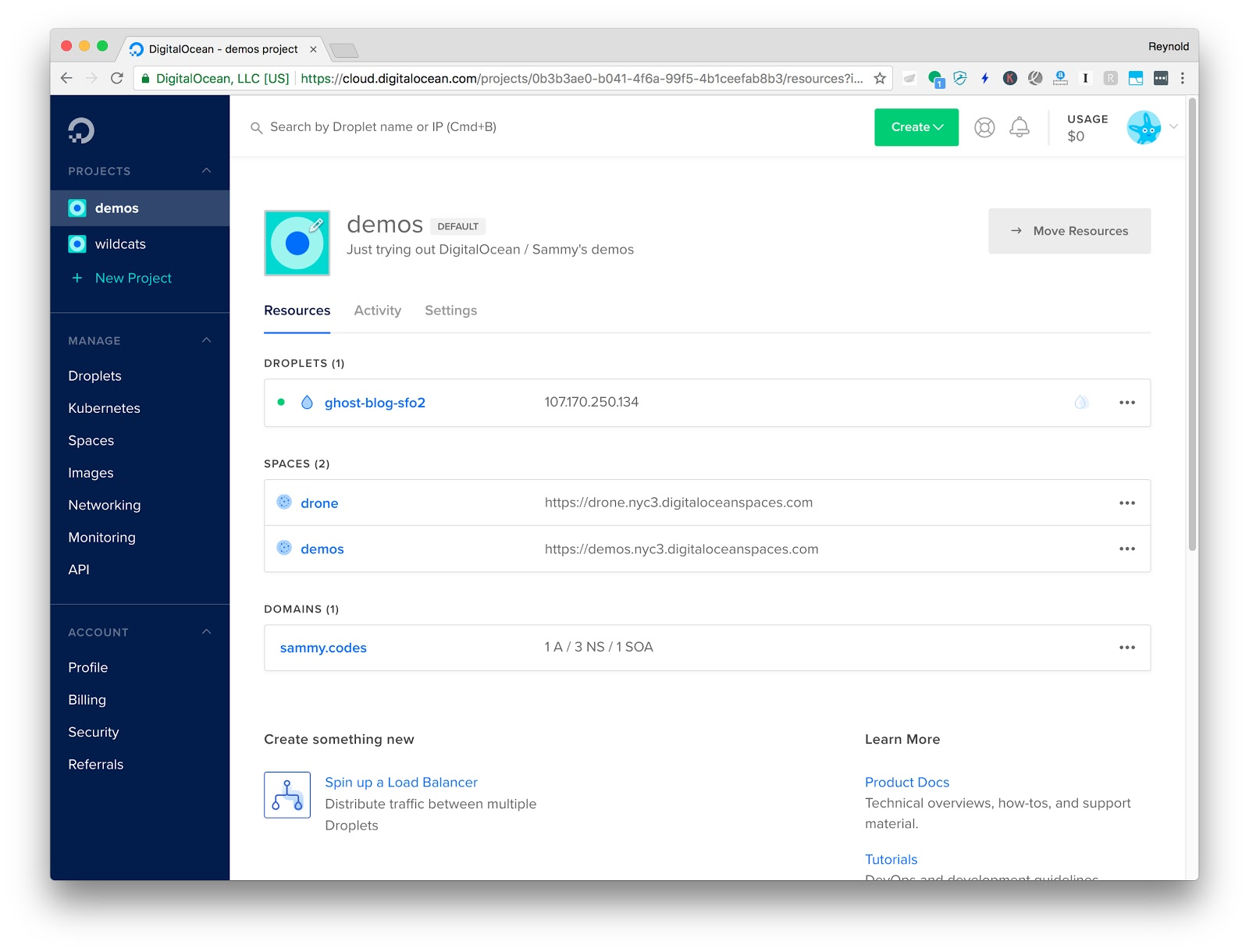 App Platform starts at a higher compute price than the smallest Droplet because it includes a managed application layer. Teams still select container resources, configure environment variables, and decide how each application component should scale. [DigitalOcean's App Platform pricing](https://www.digitalocean.com/pricing/app-platform) explains the current container plans, transfer allowances, databases, and scaling availability.
> Render simplifies infrastructure compared to managing raw servers, and DigitalOcean's App Platform brings it closer to a managed experience. But neither platform removes the operational effort involved in getting your application live and keeping it stable. That is exactly where Agentic AI deployment becomes important.
> If you're considering DigitalOcean as an alternative to something else, check our [DigitalOcean alternatives](https://kuberns.com/blogs/digitalocean-alternatives/) breakdown for a wider view of the market.
## Render vs DigitalOcean: Head-to-Head Comparison
Now let's put the two platforms side by side across the areas that matter most.
| Category | Render | DigitalOcean |
|---|---|---|
| Deployment model | Managed PaaS, repo-based | IaaS (Droplets) or App Platform PaaS |
| Setup effort | Medium. Configure services and environment. | High (Droplets) or Medium (App Platform) |
| Infrastructure management | Abstracted, but still requires configuration | Full control, full responsibility |
| Free tier | Yes (with cold starts) | Yes, includes 3 static sites |
| Scaling | Manual scaling and autoscaling options, depending on plan | Manual on Droplets; vertical, horizontal, and eligible CPU-based autoscaling on App Platform |
| Databases | Managed Postgres, Redis | Managed Postgres, MySQL, Redis, MongoDB, and Kafka, separate billing |
| CI/CD | Built-in repository-based deploys | Manual setup on Droplets; built-in Git-based deployment on App Platform |
| Pricing model | Service-based, grows with instances | Droplet-based or resource-based (App Platform) |
| Docker support | Yes | Yes (both Droplets and App Platform) |
| Best for | Devs who want managed PaaS without raw servers | Teams who want infrastructure control or a cheap VPS |
## Pricing: What You Actually Pay
This is where both platforms get more complicated than their marketing pages suggest.
### Render Pricing
Render's Free instances are useful for testing, hobby projects, and previewing the platform, but Render advises against using them for production applications. Production costs depend on the compute selected for each web service, worker, database, and Key Value instance. Review [Render's current pricing](https://render.com/pricing) before calculating a production budget.
Databases and Key Value instances are billed as separate resources. A full-stack application with a web service, database, cache, and background worker therefore needs a combined cost estimate rather than a single web-service price.
Render spins down a Free web service after 15 minutes without inbound traffic. Render states that spinning it back up takes about one minute, which is one reason its documentation positions Free instances for testing and hobby projects rather than production applications.
### DigitalOcean Pricing
Droplets start at $4 per month for 512 MiB RAM. A Basic Droplet with 2 vCPUs and 4 GiB RAM is currently listed at $24 per month. Managed databases, load balancers, backups, storage, and transfer beyond included allowances can add separate charges. For a broader cost breakdown, see our [DigitalOcean pricing guide](https://kuberns.com/blogs/digitalocean-pricing/).
App Platform container pricing starts at $5 per month, with larger shared and dedicated options priced by their allocated resources. Development databases, dedicated egress IPs, and transfer beyond the included allowance are separate charges.
The hidden cost on DigitalOcean is engineer time. Managing Droplets, configuring Nginx, debugging deployment failures, and patching servers are all real hours that do not appear on the invoice.
## Where Render and DigitalOcean Fall Short
Neither Render nor DigitalOcean is the complete answer in 2026.
**Render's limitations:**
- Free web services spin down after 15 minutes without inbound traffic
- No truly zero-config deployment. You still define build commands and services manually.
- Costs grow fast for apps with multiple services
- Scaling and higher-capacity instances increase the number of plan and resource decisions
**DigitalOcean's limitations:**
- Droplets require full server management and are not suitable for teams without DevOps expertise
- App Platform removes server administration but still requires component, resource, and scaling choices
- App Platform charges for outbound transfer beyond the allowance included with its container instances
- CI/CD is not built-in on Droplets. You have to wire it yourself.
Both platforms ask you to make infrastructure decisions before your app can run. That is the core problem they share, and it is exactly what a newer deployment model solves.
## How Kuberns Removes Manual Work on Render and DigitalOcean
App Platform starts at a higher compute price than the smallest Droplet because it includes a managed application layer. Teams still select container resources, configure environment variables, and decide how each application component should scale. [DigitalOcean's App Platform pricing](https://www.digitalocean.com/pricing/app-platform) explains the current container plans, transfer allowances, databases, and scaling availability.
> Render simplifies infrastructure compared to managing raw servers, and DigitalOcean's App Platform brings it closer to a managed experience. But neither platform removes the operational effort involved in getting your application live and keeping it stable. That is exactly where Agentic AI deployment becomes important.
> If you're considering DigitalOcean as an alternative to something else, check our [DigitalOcean alternatives](https://kuberns.com/blogs/digitalocean-alternatives/) breakdown for a wider view of the market.
## Render vs DigitalOcean: Head-to-Head Comparison
Now let's put the two platforms side by side across the areas that matter most.
| Category | Render | DigitalOcean |
|---|---|---|
| Deployment model | Managed PaaS, repo-based | IaaS (Droplets) or App Platform PaaS |
| Setup effort | Medium. Configure services and environment. | High (Droplets) or Medium (App Platform) |
| Infrastructure management | Abstracted, but still requires configuration | Full control, full responsibility |
| Free tier | Yes (with cold starts) | Yes, includes 3 static sites |
| Scaling | Manual scaling and autoscaling options, depending on plan | Manual on Droplets; vertical, horizontal, and eligible CPU-based autoscaling on App Platform |
| Databases | Managed Postgres, Redis | Managed Postgres, MySQL, Redis, MongoDB, and Kafka, separate billing |
| CI/CD | Built-in repository-based deploys | Manual setup on Droplets; built-in Git-based deployment on App Platform |
| Pricing model | Service-based, grows with instances | Droplet-based or resource-based (App Platform) |
| Docker support | Yes | Yes (both Droplets and App Platform) |
| Best for | Devs who want managed PaaS without raw servers | Teams who want infrastructure control or a cheap VPS |
## Pricing: What You Actually Pay
This is where both platforms get more complicated than their marketing pages suggest.
### Render Pricing
Render's Free instances are useful for testing, hobby projects, and previewing the platform, but Render advises against using them for production applications. Production costs depend on the compute selected for each web service, worker, database, and Key Value instance. Review [Render's current pricing](https://render.com/pricing) before calculating a production budget.
Databases and Key Value instances are billed as separate resources. A full-stack application with a web service, database, cache, and background worker therefore needs a combined cost estimate rather than a single web-service price.
Render spins down a Free web service after 15 minutes without inbound traffic. Render states that spinning it back up takes about one minute, which is one reason its documentation positions Free instances for testing and hobby projects rather than production applications.
### DigitalOcean Pricing
Droplets start at $4 per month for 512 MiB RAM. A Basic Droplet with 2 vCPUs and 4 GiB RAM is currently listed at $24 per month. Managed databases, load balancers, backups, storage, and transfer beyond included allowances can add separate charges. For a broader cost breakdown, see our [DigitalOcean pricing guide](https://kuberns.com/blogs/digitalocean-pricing/).
App Platform container pricing starts at $5 per month, with larger shared and dedicated options priced by their allocated resources. Development databases, dedicated egress IPs, and transfer beyond the included allowance are separate charges.
The hidden cost on DigitalOcean is engineer time. Managing Droplets, configuring Nginx, debugging deployment failures, and patching servers are all real hours that do not appear on the invoice.
## Where Render and DigitalOcean Fall Short
Neither Render nor DigitalOcean is the complete answer in 2026.
**Render's limitations:**
- Free web services spin down after 15 minutes without inbound traffic
- No truly zero-config deployment. You still define build commands and services manually.
- Costs grow fast for apps with multiple services
- Scaling and higher-capacity instances increase the number of plan and resource decisions
**DigitalOcean's limitations:**
- Droplets require full server management and are not suitable for teams without DevOps expertise
- App Platform removes server administration but still requires component, resource, and scaling choices
- App Platform charges for outbound transfer beyond the allowance included with its container instances
- CI/CD is not built-in on Droplets. You have to wire it yourself.
Both platforms ask you to make infrastructure decisions before your app can run. That is the core problem they share, and it is exactly what a newer deployment model solves.
## How Kuberns Removes Manual Work on Render and DigitalOcean
 [Kuberns](https://kuberns.com/) is an agentic AI platform for deployment. It is designed for full-stack and complex backend projects where developers want to reduce the manual work involved in preparing deployment configuration.
Connect a GitHub repository and Kuberns analyzes the application, identifies its stack and services, and prepares the deployment workflow. This gives developers a managed path from repository to deployment without building a Docker, Kubernetes, or cloud configuration workflow themselves.
### What Changes with Kuberns
- **Less manual configuration**: Agentic AI analyzes the repository and prepares the application configuration needed for deployment.
- **No manual Docker work required**: Developers can deploy supported applications without first creating and maintaining a Docker-based workflow.
- **Managed deployment workflow**: The application, deployments, logs, and operational information remain accessible through one platform.
- **Simpler starting point**: Plans start at $7, bundle packs provide additional savings, and a Trial Option is available.
[Kuberns](https://kuberns.com/) is an agentic AI platform for deployment. It is designed for full-stack and complex backend projects where developers want to reduce the manual work involved in preparing deployment configuration.
Connect a GitHub repository and Kuberns analyzes the application, identifies its stack and services, and prepares the deployment workflow. This gives developers a managed path from repository to deployment without building a Docker, Kubernetes, or cloud configuration workflow themselves.
### What Changes with Kuberns
- **Less manual configuration**: Agentic AI analyzes the repository and prepares the application configuration needed for deployment.
- **No manual Docker work required**: Developers can deploy supported applications without first creating and maintaining a Docker-based workflow.
- **Managed deployment workflow**: The application, deployments, logs, and operational information remain accessible through one platform.
- **Simpler starting point**: Plans start at $7, bundle packs provide additional savings, and a Trial Option is available.
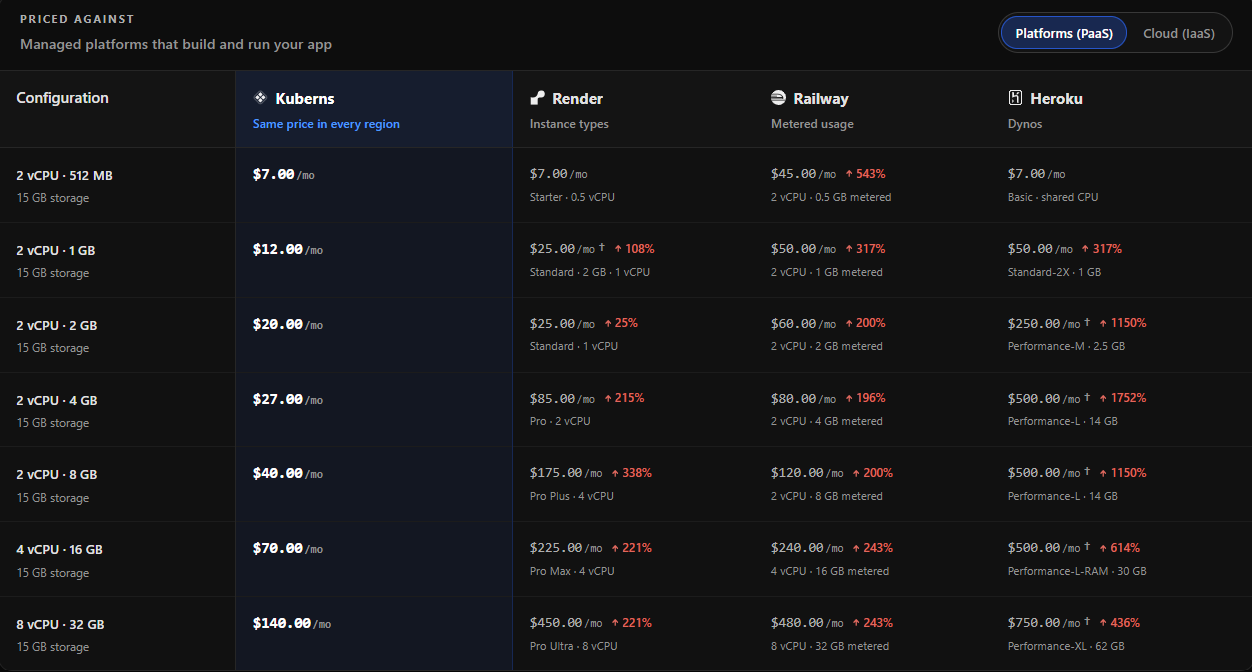 Kuberns gives teams a clearer starting point for deployment costs without requiring them to assemble a separate server-management toolchain before the application can run.
> Kuberns uses agentic AI for deployment to reduce the configuration work between connecting a repository and running the application.
## Render vs DigitalOcean vs Kuberns: Full Comparison
| Category | **[Kuberns (Agentic AI)](https://kuberns.com/)** | Render | DigitalOcean |
|---|---|---|---|
| Deployment model | Repository analysis with agentic AI for deployment | Managed PaaS, repository-based | IaaS through Droplets or managed PaaS through App Platform |
| Configuration approach | Deployment configuration prepared from the connected repository | Developer configures services, commands, variables, and resources | Team configures the server on Droplets or application components on App Platform |
| Infrastructure responsibility | Managed platform workflow | Render manages servers; the developer manages application services and resources | Team-managed on Droplets; managed infrastructure on App Platform |
| Docker workflow | No manual Docker work required for supported applications | Dockerfile or prebuilt image supported | Container images supported on App Platform; Docker can be managed on Droplets |
| Scaling | Managed through the platform | Manual scaling and eligible autoscaling options | Manual on Droplets; configured scaling and eligible autoscaling on App Platform |
| Deployment automation | Integrated deployment workflow | Built-in repository deploys | Team-configured on Droplets; built-in Git deployment on App Platform |
| Monitoring | Application logs and operational information in the platform | Log streams and platform observability features | Team-configured on Droplets; metrics and log forwarding on App Platform |
| Pricing model | Plans start at $7; bundle packs offer additional savings | Separate workspace, compute, and data-service costs | Droplet or App Platform resources plus supporting services |
| Trial or free option | Trial Option available | Free instances available with limitations | Three static-site apps in the App Platform Free Tier |
| Best for | Full-stack and complex backend projects that need less manual deployment configuration | Developers who want a managed PaaS | Teams choosing between managed App Platform and direct VM control |
## Why Teams Choose Kuberns for a Simpler Deployment Workflow
Render can be a practical starting point for a managed PaaS, but a production architecture may include multiple separately configured services, databases, workers, and higher-capacity instances.
DigitalOcean Droplets give teams direct infrastructure control, but that control also makes the team responsible for server configuration, security updates, monitoring, deployment automation, and scaling.
In both cases, the underlying problem is the same: deployment still requires ongoing manual work.
Kuberns reduces this setup burden by using agentic AI to analyze the repository and prepare the deployment workflow. Developers can focus on application work instead of first assembling and maintaining a separate infrastructure toolchain.
**Here is how Kuberns goes beyond Render and DigitalOcean:**
- Agentic AI for deployment across supported frontend, backend, and full-stack projects
- Repository analysis that prepares deployment configuration
- No manual Docker work required for supported applications
- A managed workflow for deployments and application logs
- Plans starting at $7, with bundle packs for additional savings
- Trial Option available
[Connect your GitHub repository and start deploying with Kuberns](https://dashboard.kuberns.com/).
## Conclusion: Switch to Kuberns for Simpler Full-Stack Deployment
Render and DigitalOcean are both legitimate deployment options, and both have strong use cases. Render wins when you want a managed PaaS without raw server management. DigitalOcean wins when you need infrastructure control and have the team to manage it.
But in 2026, the better question is: why are you still making infrastructure decisions at all?
Kuberns offers a more direct workflow for teams that want to reduce deployment configuration. Its agentic AI analyzes a connected GitHub repository and prepares the application for deployment, removing the need to build a separate Docker, Kubernetes, or server-management workflow first.
If your priority is shipping a full-stack or complex backend project without owning the manual deployment setup, switch to Kuberns and keep the development workflow focused on the application.
[Deploy with Agentic AI on Kuberns](https://dashboard.kuberns.com/)
Kuberns gives teams a clearer starting point for deployment costs without requiring them to assemble a separate server-management toolchain before the application can run.
> Kuberns uses agentic AI for deployment to reduce the configuration work between connecting a repository and running the application.
## Render vs DigitalOcean vs Kuberns: Full Comparison
| Category | **[Kuberns (Agentic AI)](https://kuberns.com/)** | Render | DigitalOcean |
|---|---|---|---|
| Deployment model | Repository analysis with agentic AI for deployment | Managed PaaS, repository-based | IaaS through Droplets or managed PaaS through App Platform |
| Configuration approach | Deployment configuration prepared from the connected repository | Developer configures services, commands, variables, and resources | Team configures the server on Droplets or application components on App Platform |
| Infrastructure responsibility | Managed platform workflow | Render manages servers; the developer manages application services and resources | Team-managed on Droplets; managed infrastructure on App Platform |
| Docker workflow | No manual Docker work required for supported applications | Dockerfile or prebuilt image supported | Container images supported on App Platform; Docker can be managed on Droplets |
| Scaling | Managed through the platform | Manual scaling and eligible autoscaling options | Manual on Droplets; configured scaling and eligible autoscaling on App Platform |
| Deployment automation | Integrated deployment workflow | Built-in repository deploys | Team-configured on Droplets; built-in Git deployment on App Platform |
| Monitoring | Application logs and operational information in the platform | Log streams and platform observability features | Team-configured on Droplets; metrics and log forwarding on App Platform |
| Pricing model | Plans start at $7; bundle packs offer additional savings | Separate workspace, compute, and data-service costs | Droplet or App Platform resources plus supporting services |
| Trial or free option | Trial Option available | Free instances available with limitations | Three static-site apps in the App Platform Free Tier |
| Best for | Full-stack and complex backend projects that need less manual deployment configuration | Developers who want a managed PaaS | Teams choosing between managed App Platform and direct VM control |
## Why Teams Choose Kuberns for a Simpler Deployment Workflow
Render can be a practical starting point for a managed PaaS, but a production architecture may include multiple separately configured services, databases, workers, and higher-capacity instances.
DigitalOcean Droplets give teams direct infrastructure control, but that control also makes the team responsible for server configuration, security updates, monitoring, deployment automation, and scaling.
In both cases, the underlying problem is the same: deployment still requires ongoing manual work.
Kuberns reduces this setup burden by using agentic AI to analyze the repository and prepare the deployment workflow. Developers can focus on application work instead of first assembling and maintaining a separate infrastructure toolchain.
**Here is how Kuberns goes beyond Render and DigitalOcean:**
- Agentic AI for deployment across supported frontend, backend, and full-stack projects
- Repository analysis that prepares deployment configuration
- No manual Docker work required for supported applications
- A managed workflow for deployments and application logs
- Plans starting at $7, with bundle packs for additional savings
- Trial Option available
[Connect your GitHub repository and start deploying with Kuberns](https://dashboard.kuberns.com/).
## Conclusion: Switch to Kuberns for Simpler Full-Stack Deployment
Render and DigitalOcean are both legitimate deployment options, and both have strong use cases. Render wins when you want a managed PaaS without raw server management. DigitalOcean wins when you need infrastructure control and have the team to manage it.
But in 2026, the better question is: why are you still making infrastructure decisions at all?
Kuberns offers a more direct workflow for teams that want to reduce deployment configuration. Its agentic AI analyzes a connected GitHub repository and prepares the application for deployment, removing the need to build a separate Docker, Kubernetes, or server-management workflow first.
If your priority is shipping a full-stack or complex backend project without owning the manual deployment setup, switch to Kuberns and keep the development workflow focused on the application.
[Deploy with Agentic AI on Kuberns](https://dashboard.kuberns.com/)
 ## FAQs About Render vs DigitalOcean
### What is the main difference between Render and DigitalOcean?
Render is a managed application platform focused on repository-based deployment. DigitalOcean offers both App Platform, a managed PaaS, and Droplets, which are virtual machines that give teams greater infrastructure control and responsibility.
### How is DigitalOcean App Platform different from Droplets?
DigitalOcean App Platform builds and runs applications on managed infrastructure, while Droplets are virtual machines that teams configure, secure, patch, monitor, and scale themselves.
### Is DigitalOcean cheaper than Render?
A DigitalOcean Droplet can have a lower starting compute price, but the comparison changes when server administration, databases, load balancing, backups, and engineering time are included. Render and DigitalOcean App Platform charge separately for the application resources and supporting services a project uses.
### Do Render and DigitalOcean support Docker?
Yes. Render can build from a Dockerfile or deploy a prebuilt image. DigitalOcean supports container images through App Platform, and teams can install and manage Docker directly on Droplets.
### Is Render a PaaS?
Yes. Render is a managed Platform as a Service for deploying web services, static sites, background workers, cron jobs, databases, and Docker-based applications from a Git repository or container image.
### Is DigitalOcean a good IaaS platform for DevOps teams?
DigitalOcean is a good IaaS option for DevOps teams that want virtual machines, networking control, Kubernetes, managed databases, and predictable VPS-style infrastructure. It is less ideal for teams that want deployment configuration handled automatically.
### Does DigitalOcean App Platform have a free tier?
DigitalOcean App Platform includes a Free Tier for static sites. Dynamic applications, workers, databases, higher resource limits, and production workloads require paid resources.
### Does Render's free tier spin down after inactivity?
Yes. Render spins down a Free web service after 15 minutes without inbound traffic. Render states that starting the service again takes about one minute. Paid service instances do not have this Free-instance limitation.
### When should a team choose Kuberns instead?
Choose Kuberns when a full-stack or complex backend project needs a managed deployment workflow without manually preparing infrastructure and deployment configuration. Kuberns is an agentic AI platform for deployment that analyzes a connected GitHub repository and prepares the application for deployment.
---
- [More Alternatives articles](https://kuberns.com/blogs/category/alternatives/1/)
- [All articles](https://kuberns.com/blogs/)
## FAQs About Render vs DigitalOcean
### What is the main difference between Render and DigitalOcean?
Render is a managed application platform focused on repository-based deployment. DigitalOcean offers both App Platform, a managed PaaS, and Droplets, which are virtual machines that give teams greater infrastructure control and responsibility.
### How is DigitalOcean App Platform different from Droplets?
DigitalOcean App Platform builds and runs applications on managed infrastructure, while Droplets are virtual machines that teams configure, secure, patch, monitor, and scale themselves.
### Is DigitalOcean cheaper than Render?
A DigitalOcean Droplet can have a lower starting compute price, but the comparison changes when server administration, databases, load balancing, backups, and engineering time are included. Render and DigitalOcean App Platform charge separately for the application resources and supporting services a project uses.
### Do Render and DigitalOcean support Docker?
Yes. Render can build from a Dockerfile or deploy a prebuilt image. DigitalOcean supports container images through App Platform, and teams can install and manage Docker directly on Droplets.
### Is Render a PaaS?
Yes. Render is a managed Platform as a Service for deploying web services, static sites, background workers, cron jobs, databases, and Docker-based applications from a Git repository or container image.
### Is DigitalOcean a good IaaS platform for DevOps teams?
DigitalOcean is a good IaaS option for DevOps teams that want virtual machines, networking control, Kubernetes, managed databases, and predictable VPS-style infrastructure. It is less ideal for teams that want deployment configuration handled automatically.
### Does DigitalOcean App Platform have a free tier?
DigitalOcean App Platform includes a Free Tier for static sites. Dynamic applications, workers, databases, higher resource limits, and production workloads require paid resources.
### Does Render's free tier spin down after inactivity?
Yes. Render spins down a Free web service after 15 minutes without inbound traffic. Render states that starting the service again takes about one minute. Paid service instances do not have this Free-instance limitation.
### When should a team choose Kuberns instead?
Choose Kuberns when a full-stack or complex backend project needs a managed deployment workflow without manually preparing infrastructure and deployment configuration. Kuberns is an agentic AI platform for deployment that analyzes a connected GitHub repository and prepares the application for deployment.
---
- [More Alternatives articles](https://kuberns.com/blogs/category/alternatives/1/)
- [All articles](https://kuberns.com/blogs/)