# What Is Vibe Deployment? The AI Way to Ship Any App Without DevOps
> Vibe coding builds apps with AI. Vibe deployment ships them. Deploy any app to production in minutes without Dockerfiles, servers, or DevOps knowledge.
- **Author**: james-whitfield
- **Published**: 2026-05-06
- **Modified**: 2026-05-06
- **Category**: AI & DevOps
- **URL**: https://kuberns.com/blogs/what-is-vibe-deployment/
---
In 2025, Andrej Karpathy introduced the world to vibe coding: the idea that you could build software by describing what you want in plain language and letting AI handle the code. Cursor, Claude Code, Bolt, and Windsurf turned that idea into everyday practice.
But nobody coined the term for what comes next.
Once your app exists, it still has to run somewhere. And until now, that meant writing Dockerfiles, configuring servers, setting up SSL, and wiring CI/CD pipelines. AI made building fast. Deployment stayed manual.
At Kuberns, we call the solution to that **vibe deployment**: using AI to ship any application to production, the same way vibe coding uses AI to build it. No config. No DevOps. No infrastructure knowledge required.
## What Is Vibe Deployment?
Vibe deployment means using AI to deploy any application to production, without writing server configuration, managing infrastructure, or needing DevOps skills.
The parallel to vibe coding is intentional and exact:
- **Vibe coding:** You describe what you want to build. AI writes the code.
- **Vibe deployment:** You push your code to GitHub. AI deploys it to production.
The key word is *any*. Vibe deployment is not limited to apps built with AI coding tools. Whether you wrote the code yourself, generated it with Cursor, or had Claude Code scaffold the entire backend, the deployment experience is the same: connect your repo, and an AI platform handles everything from stack detection to SSL certificates to live URL assignment.
This is what [Kuberns](https://kuberns.com) is built to do. It is an AI-agentic deployment platform. Push your code, and the AI agent reads your repository, detects your stack, provisions compute, issues SSL, and gives you a live HTTPS URL in under 5 minutes. No Dockerfile. No YAML. No terminal.
## Why Vibe Deployment Matters
Vibe coding removed the barrier to building software. But it exposed a new one: shipping it.
You spend 30 minutes building an app with Cursor or Claude Code. Then you spend 3 hours trying to deploy it. You are not a worse developer than before. You are just facing infrastructure work that AI coding tools do not solve.
Vibe deployment closes that gap for every kind of developer:
- **AI-assisted developers** who built with Cursor, Claude Code, Bolt, or Windsurf and need to get their app live without a DevOps detour
- **Traditional developers** who write their own code but want deployment to be as fast and friction-free as possible
- **Non-technical builders** who used a no-code AI tool and want to move off the platform's hosting to something they control
- **Teams** who want every Git push to go live automatically without maintaining a CI/CD pipeline
For all of them, the workflow becomes the same:
**Write or generate code → Push to GitHub → Vibe deploy → Live in minutes**
For a step-by-step walkthrough of going from a finished local app to a live URL, see the [guide on what to do after vibe coding](https://kuberns.com/blogs/after-vibe-coding-deploy-your-app/).
## Vibe Coding vs Vibe Deployment: The Complete Picture
These two ideas cover the full software lifecycle when you want AI doing the heavy lifting at every stage.
| Aspect | Vibe Coding | Vibe Deployment |
|---|---|---|
| What it replaces | Writing code manually | Configuring servers, Docker, and CI/CD manually |
| Tools used | Cursor, Claude Code, Bolt, Windsurf, Lovable | Kuberns, agentic deployment platforms |
| Who can use it | Anyone who can describe what they want | Anyone with a GitHub repo |
| Output | A working app on localhost | A live app on a public HTTPS URL |
| Time to complete | 20 minutes to a few hours | Under 5 minutes |
| What the AI handles | Code generation, debugging, refactoring | Stack detection, provisioning, SSL, CI/CD |
| Required for | Building the app | Shipping the app |
Importantly, you do not need to use both. A developer who writes their own code manually can still use vibe deployment. A developer who vibe codes can still deploy manually. But using both together is what makes the full stack truly frictionless.
## How Vibe Deployment Works in Practice
The mechanics are straightforward. Here is what happens when you deploy an AI-built app on [Kuberns](https://kuberns.com):
### Step 1: Push Your AI-Built App to GitHub
Push your codebase to a GitHub repository. No changes to the code are required. Kuberns works with apps generated by any AI tool.

### Step 2: Connect Your Repository
Sign up at [kuberns.com](https://kuberns.com) and connect your GitHub account. Select the repository that contains your AI-built app.
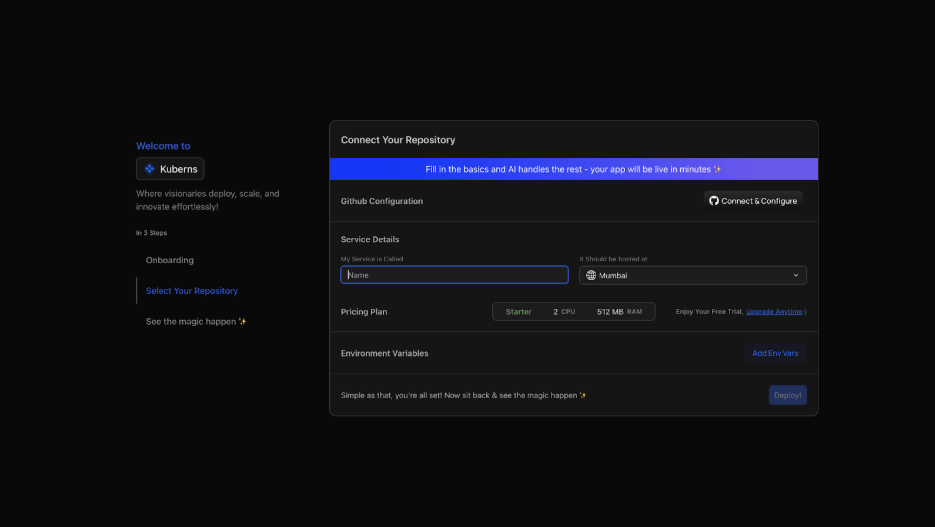
Kuberns AI scans your repository and automatically detects the runtime, framework, start command, and port. You do not fill in any of this manually.
### Step 3: Add Environment Variables
Before deploying, navigate to the Environment tab in the Kuberns dashboard and manually add any secrets your app needs: API keys, database URLs, and authentication secrets.

Kuberns stores these values securely and injects them into your app at runtime. You add them once in the dashboard. Nothing sensitive is stored in your repository.
### Step 4: Click Deploy
The Kuberns AI agent takes over from here.

It clones your repository, installs dependencies, starts your application process, provisions compute, issues an SSL certificate, and assigns a live HTTPS URL. All of this happens without you touching a terminal or writing a single line of config.

Your app is live. Every subsequent push to your connected GitHub branch triggers an automatic redeploy. No CI/CD pipeline to configure. No manual steps.
 ## What You Can Deploy with Vibe Deployment
Because vibe deployment works at the GitHub repo level, it does not care how the code was written or what tool generated it. Any app in any framework on any stack is fair game.
**Built with an AI coding tool:**
| AI Coding Tool | Works with Kuberns |
|---|---|
| Cursor | Yes |
| Claude Code | Yes |
| Bolt | Yes |
| Windsurf | Yes |
| Lovable | Yes (export to GitHub) |
| Replit | Yes (export to GitHub) |
| GitHub Copilot | Yes |
| Gemini Code Assist | Yes |
**Frameworks and runtimes supported:**
Next.js, React, Vue, Svelte, Astro, Node.js, Express, NestJS, FastAPI, Django, Flask, Ruby on Rails, Laravel, Go, Rust, Java Spring Boot, .NET, and most other frameworks. Kuberns reads the repository and figures out the stack without you specifying it.
**Types of apps that deploy cleanly:**
- Full-stack web applications
- REST APIs and GraphQL APIs
- AI agents and LangChain apps
- MCP servers
- Discord bots and Telegram bots
- Background workers and cron jobs
- Backends with databases
If it runs as a process and listens on a port, Kuberns can deploy it. If you built with Cursor specifically, see the guide on [deploying a Cursor website on Kuberns](https://kuberns.com/blogs/deploy-cursor-website-on-kuberns/) for a walkthrough.
## What Vibe Deployment Handles That You Would Otherwise Do Manually
This comparison shows exactly what gets removed from your workflow when you use vibe deployment instead of setting up a server yourself.
## What You Can Deploy with Vibe Deployment
Because vibe deployment works at the GitHub repo level, it does not care how the code was written or what tool generated it. Any app in any framework on any stack is fair game.
**Built with an AI coding tool:**
| AI Coding Tool | Works with Kuberns |
|---|---|
| Cursor | Yes |
| Claude Code | Yes |
| Bolt | Yes |
| Windsurf | Yes |
| Lovable | Yes (export to GitHub) |
| Replit | Yes (export to GitHub) |
| GitHub Copilot | Yes |
| Gemini Code Assist | Yes |
**Frameworks and runtimes supported:**
Next.js, React, Vue, Svelte, Astro, Node.js, Express, NestJS, FastAPI, Django, Flask, Ruby on Rails, Laravel, Go, Rust, Java Spring Boot, .NET, and most other frameworks. Kuberns reads the repository and figures out the stack without you specifying it.
**Types of apps that deploy cleanly:**
- Full-stack web applications
- REST APIs and GraphQL APIs
- AI agents and LangChain apps
- MCP servers
- Discord bots and Telegram bots
- Background workers and cron jobs
- Backends with databases
If it runs as a process and listens on a port, Kuberns can deploy it. If you built with Cursor specifically, see the guide on [deploying a Cursor website on Kuberns](https://kuberns.com/blogs/deploy-cursor-website-on-kuberns/) for a walkthrough.
## What Vibe Deployment Handles That You Would Otherwise Do Manually
This comparison shows exactly what gets removed from your workflow when you use vibe deployment instead of setting up a server yourself.
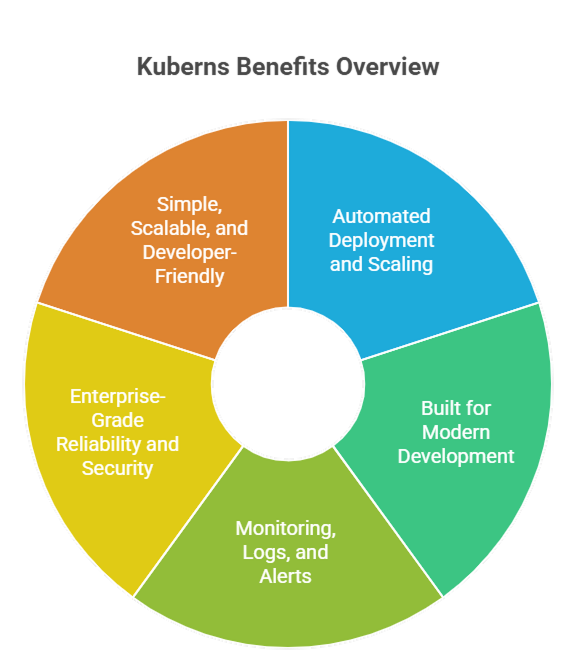 | Task | Manual deployment | Vibe deployment on Kuberns |
|---|---|---|
| Stack detection | You specify runtime, version, build command | Automatic |
| Server provisioning | You rent a VPS, configure it | Automatic on Kuberns cloud |
| SSL certificate | Certbot setup and renewal | Automatic |
| Environment variables | Stored in server .env files | Added once in the Kuberns dashboard, encrypted at rest |
| Process management | PM2 or systemd config | Automatic |
| CI/CD on Git push | GitHub Actions YAML | Built-in |
| Custom domain and HTTPS | DNS records and Certbot | One-click |
| Auto-scaling | Manual rules and load balancer config | AI-driven |
| Crash recovery | PM2 watch config | Automatic |
| Logs and monitoring | External observability stack | Built-in dashboard |
A developer deploying manually to a VPS typically spends 2 to 4 hours on initial setup before their app is live. With vibe deployment on Kuberns, the same app is live in under 5 minutes.
## The Full Vibe Stack in 2026
**Build:** Cursor, Claude Code, or Bolt generates your app from a description.
**Store:** GitHub holds the codebase and tracks every change.
**Ship:** Kuberns deploys it to production on every push.
**Scale:** Kuberns handles traffic, uptime, and auto-scaling.
None of these tools require you to understand how they work under the hood. That is the point. For the full picture, the [AI development stack guide for 2026](https://kuberns.com/blogs/ai-tools-stack-for-developers/) covers the end-to-end workflow in detail.
## Common Mistakes When Shipping AI-Built Apps
Even with vibe deployment, a few avoidable issues come up when moving AI-generated code from localhost to production.
**Hardcoded localhost URLs:** AI tools often generate code with `http://localhost:3000` hardcoded in API calls or config files. Replace these with environment variables before deploying. Kuberns injects `PORT` automatically, but your app still needs to read from it.
**Missing start command:** Some AI-generated projects lack a proper `start` script in `package.json` or a `Procfile`. Add one before pushing. Kuberns will detect it and use it.
**Secrets committed to the repository:** AI tools sometimes generate code with API keys written directly in the source. Move all secrets to environment variables in the Kuberns dashboard and remove them from the codebase before pushing.
**No production database:** An app that works on localhost with SQLite will not work in production without a real database. Use a managed database or connect one in your environment variables before deploying.
**Binding to 127.0.0.1:** AI-generated servers occasionally bind to `127.0.0.1` instead of `0.0.0.0`. Change this in your server code, as binding to localhost blocks all external traffic in production.
These are all quick fixes. Being aware of them before you deploy saves a round trip of debugging.
## Why Developers Are Adopting Vibe Deployment
For most developers, infrastructure was never the point. The product is the point. Managing servers, certificates, and deployment pipelines is overhead between the developer and the thing they actually care about building.
Vibe deployment removes that overhead entirely. Not reduces it. Removes it. You do not choose between Nginx and Caddy, or PM2 and systemd, or write GitHub Actions YAML. The platform handles all of it.
Developers who adopt vibe deployment ship faster, iterate more, and spend their time on the work that matters. If deployment is still the slow part of your workflow, [Kuberns](https://kuberns.com) is free to start.
[Ship your AI-built app on Kuberns](https://dashboard.kuberns.com/)
| Task | Manual deployment | Vibe deployment on Kuberns |
|---|---|---|
| Stack detection | You specify runtime, version, build command | Automatic |
| Server provisioning | You rent a VPS, configure it | Automatic on Kuberns cloud |
| SSL certificate | Certbot setup and renewal | Automatic |
| Environment variables | Stored in server .env files | Added once in the Kuberns dashboard, encrypted at rest |
| Process management | PM2 or systemd config | Automatic |
| CI/CD on Git push | GitHub Actions YAML | Built-in |
| Custom domain and HTTPS | DNS records and Certbot | One-click |
| Auto-scaling | Manual rules and load balancer config | AI-driven |
| Crash recovery | PM2 watch config | Automatic |
| Logs and monitoring | External observability stack | Built-in dashboard |
A developer deploying manually to a VPS typically spends 2 to 4 hours on initial setup before their app is live. With vibe deployment on Kuberns, the same app is live in under 5 minutes.
## The Full Vibe Stack in 2026
**Build:** Cursor, Claude Code, or Bolt generates your app from a description.
**Store:** GitHub holds the codebase and tracks every change.
**Ship:** Kuberns deploys it to production on every push.
**Scale:** Kuberns handles traffic, uptime, and auto-scaling.
None of these tools require you to understand how they work under the hood. That is the point. For the full picture, the [AI development stack guide for 2026](https://kuberns.com/blogs/ai-tools-stack-for-developers/) covers the end-to-end workflow in detail.
## Common Mistakes When Shipping AI-Built Apps
Even with vibe deployment, a few avoidable issues come up when moving AI-generated code from localhost to production.
**Hardcoded localhost URLs:** AI tools often generate code with `http://localhost:3000` hardcoded in API calls or config files. Replace these with environment variables before deploying. Kuberns injects `PORT` automatically, but your app still needs to read from it.
**Missing start command:** Some AI-generated projects lack a proper `start` script in `package.json` or a `Procfile`. Add one before pushing. Kuberns will detect it and use it.
**Secrets committed to the repository:** AI tools sometimes generate code with API keys written directly in the source. Move all secrets to environment variables in the Kuberns dashboard and remove them from the codebase before pushing.
**No production database:** An app that works on localhost with SQLite will not work in production without a real database. Use a managed database or connect one in your environment variables before deploying.
**Binding to 127.0.0.1:** AI-generated servers occasionally bind to `127.0.0.1` instead of `0.0.0.0`. Change this in your server code, as binding to localhost blocks all external traffic in production.
These are all quick fixes. Being aware of them before you deploy saves a round trip of debugging.
## Why Developers Are Adopting Vibe Deployment
For most developers, infrastructure was never the point. The product is the point. Managing servers, certificates, and deployment pipelines is overhead between the developer and the thing they actually care about building.
Vibe deployment removes that overhead entirely. Not reduces it. Removes it. You do not choose between Nginx and Caddy, or PM2 and systemd, or write GitHub Actions YAML. The platform handles all of it.
Developers who adopt vibe deployment ship faster, iterate more, and spend their time on the work that matters. If deployment is still the slow part of your workflow, [Kuberns](https://kuberns.com) is free to start.
[Ship your AI-built app on Kuberns](https://dashboard.kuberns.com/)
 ---
## Frequently Asked Questions
### Q: What is vibe deployment?
Vibe deployment is a term coined by Kuberns for the practice of using AI to deploy any application to production, the same way vibe coding uses AI to build it. You push your code to GitHub, connect your repository to [Kuberns](https://kuberns.com), and the AI agent handles stack detection, server provisioning, SSL, CI/CD, and gives you a live HTTPS URL in under 5 minutes. No Dockerfiles. No server config. No DevOps knowledge required.
### Q: What is the difference between vibe coding and vibe deployment?
Vibe coding uses AI to write code. Vibe deployment uses AI to ship it. Vibe coding requires an AI coding tool like Cursor or Claude Code. Vibe deployment requires an agentic deployment platform like Kuberns. You can use either independently or both together for a fully AI-driven workflow from first line of code to live production URL.
### Q: Can I deploy an app without knowing DevOps?
Yes. Kuberns detects your stack automatically and handles server provisioning, SSL, and CI/CD. You add your environment variables manually in the Kuberns dashboard before deploying. No DevOps knowledge is required beyond connecting your GitHub repo and entering your secrets.
### Q: Which AI coding tools work with vibe deployment on Kuberns?
Kuberns deploys any app pushed to GitHub, so it works with Cursor, Claude Code, Bolt, Windsurf, Lovable, Replit, GitHub Copilot, and any other AI coding tool. The tool that built the code does not matter.
### Q: Do I need a Dockerfile to deploy on Kuberns?
No. Kuberns reads your repository and detects the framework and runtime automatically. It builds and deploys your app without requiring a Dockerfile, YAML config, or any infrastructure file.
### Q: What kinds of apps can I deploy with vibe deployment?
Vibe deployment works for full-stack web apps, REST APIs, AI agents, backends with databases, and real-time applications. Kuberns supports Node.js, Python, Go, Ruby, PHP, Java, Rust, and most popular frameworks.
### Q: How long does vibe deployment take on Kuberns?
The first deployment takes under 5 minutes. Subsequent deployments triggered automatically by a Git push complete in around 60 to 90 seconds.
### Q: Is vibe deployment only for hobby projects?
No. Vibe deployment on Kuberns is production-grade. Kuberns supports auto-scaling, custom domains, persistent databases, environment encryption, and real-time monitoring. It is used by indie developers, startups, and agencies for live production applications.
---
- [More AI & DevOps articles](https://kuberns.com/blogs/category/ai-devops/1/)
- [All articles](https://kuberns.com/blogs/)
---
## Frequently Asked Questions
### Q: What is vibe deployment?
Vibe deployment is a term coined by Kuberns for the practice of using AI to deploy any application to production, the same way vibe coding uses AI to build it. You push your code to GitHub, connect your repository to [Kuberns](https://kuberns.com), and the AI agent handles stack detection, server provisioning, SSL, CI/CD, and gives you a live HTTPS URL in under 5 minutes. No Dockerfiles. No server config. No DevOps knowledge required.
### Q: What is the difference between vibe coding and vibe deployment?
Vibe coding uses AI to write code. Vibe deployment uses AI to ship it. Vibe coding requires an AI coding tool like Cursor or Claude Code. Vibe deployment requires an agentic deployment platform like Kuberns. You can use either independently or both together for a fully AI-driven workflow from first line of code to live production URL.
### Q: Can I deploy an app without knowing DevOps?
Yes. Kuberns detects your stack automatically and handles server provisioning, SSL, and CI/CD. You add your environment variables manually in the Kuberns dashboard before deploying. No DevOps knowledge is required beyond connecting your GitHub repo and entering your secrets.
### Q: Which AI coding tools work with vibe deployment on Kuberns?
Kuberns deploys any app pushed to GitHub, so it works with Cursor, Claude Code, Bolt, Windsurf, Lovable, Replit, GitHub Copilot, and any other AI coding tool. The tool that built the code does not matter.
### Q: Do I need a Dockerfile to deploy on Kuberns?
No. Kuberns reads your repository and detects the framework and runtime automatically. It builds and deploys your app without requiring a Dockerfile, YAML config, or any infrastructure file.
### Q: What kinds of apps can I deploy with vibe deployment?
Vibe deployment works for full-stack web apps, REST APIs, AI agents, backends with databases, and real-time applications. Kuberns supports Node.js, Python, Go, Ruby, PHP, Java, Rust, and most popular frameworks.
### Q: How long does vibe deployment take on Kuberns?
The first deployment takes under 5 minutes. Subsequent deployments triggered automatically by a Git push complete in around 60 to 90 seconds.
### Q: Is vibe deployment only for hobby projects?
No. Vibe deployment on Kuberns is production-grade. Kuberns supports auto-scaling, custom domains, persistent databases, environment encryption, and real-time monitoring. It is used by indie developers, startups, and agencies for live production applications.
---
- [More AI & DevOps articles](https://kuberns.com/blogs/category/ai-devops/1/)
- [All articles](https://kuberns.com/blogs/)