Published
- 11 min read
How to Deploy a Full Stack App With AI: Complete Step-by-Step Guide
TL;DR
Deploying a full-stack app is much easier in 2025. You no longer need servers, nginx files, or Docker unless you choose to.
The cleanest workflow is:
- Organise your project with a clear frontend and backend structure.
- Add environment variables for API URLs, database URIs, and secrets.
- Use a managed database like MongoDB Atlas or Postgres and keep your connection string in an env var.
- Connect your GitHub repo to a modern deployment platform: kuberns.
- Deploy frontend and backend together so routing, SSL, scaling, and logs stay unified.
- Add your custom domain and let the platform handle SSL automatically.
- Run a quick production checklist to verify builds, CORS, database connectivity, and auth.
- Monitor logs and enable scaling so your app stays stable under real traffic.
If you want the simplest path to deploy a full-stack app, Kuberns lets you connect your repo, add environment variables, and deploy everything in one go without touching any servers.
Introduction
Deploying a full-stack app is one of those milestones that feels exciting at first but quickly becomes confusing once you move from your local machine to the cloud. On your laptop, everything feels predictable.
The frontend loads instantly, your API responds without delay, and your database connects with a single environment variable. None of those parts stays that simple once you deploy.
In production, you have to think about build commands, environment variables, routing, SSL, database connectivity, background tasks, and how all of these pieces behave together under real user traffic.
Even a small misconfiguration can break your API or make your frontend unreachable. This is why most developers still struggle with deployment, even if their application is well written.
The good news is that deployment in 2025 does not need to rely on servers, manual nginx files, or complicated CI pipelines.
More teams prefer a workflow where they connect a GitHub repo, add the required environment variables, and let the platform handle the full stack build and deployment. It creates a predictable process without the usual DevOps overhead. This guide will show you how to deploy a full-stack application in a clean, stable, and production-friendly way. We will go through project structure, build preparation, database setup, deployment flows, and the key checks you should complete before going live.
You will also see how unified platforms like Kuberns simplify the entire process by handling routing, SSL, scaling, and service detection behind the scenes, allowing you to ship apps faster without writing infrastructure code.
Preparing Your App for Deployment
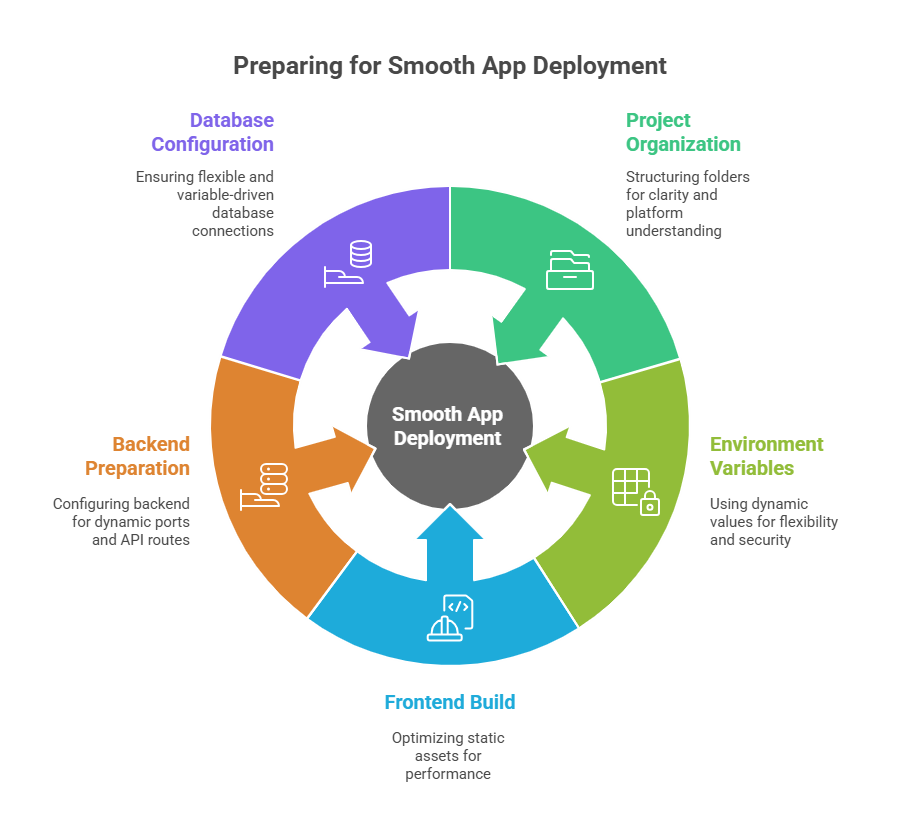 A smooth deployment starts long before you click any deploy button. Most full-stack apps fail in production, not because the platform is complicated, but because small parts of the project were not prepared correctly during development. Fixing these issues early makes the entire deployment process predictable and much easier to manage.
Organise your project clearly
Your folder structure should be easy for both you and your deployment platform to understand.
A common layout looks like this:
/client (React, Next.js, Vue, Angular) /server (Node, Django, FastAPI, Laravel, Go)
If everything lives in one repo, deployment systems can automatically detect the frontend and backend, run the right build commands, and assign the correct runtime for each part.
Use environment variables everywhere
No value that changes between development and production should be hardcoded. This includes:
- API URLs
- Database connection URLs
- Secrets and tokens
- Application ports
Create a .env file locally, but never commit it. In production, these values will be added through your hosting platform.
Prepare your frontend build
For frameworks like React, Vue, Angular, and SvelteKit, always generate a production build. This ensures that your frontend is packaged into optimised static assets that load quickly and work reliably. Most issues that appear after deployment come from a missing or broken build step.
Prepare your backend for production
Your backend should read environment variables correctly, listen on a dynamic port, and avoid assuming that your frontend is running on localhost. If both run together, the backend should be ready to serve the frontend build or handle API routes cleanly without conflict.
Check your database configuration
Make sure your database connection logic is flexible and uses environment variables. Whether you use MongoDB, PostgreSQL, MySQL, or any other database, the connection string must come from a variable rather than being hardcoded into your code.
Taking time to prepare your project in these four areas removes almost all of the friction developers face during deployment. Once your structure, variables, build steps, and database logic are in place, the rest of the process becomes straightforward.
Deployment Approaches in 2025
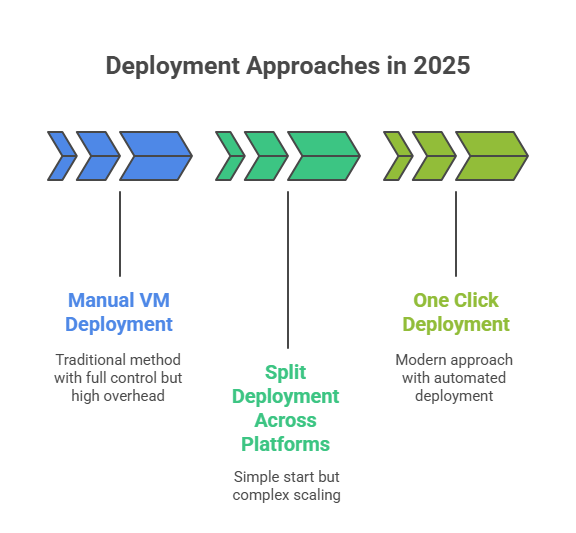 There are several ways to deploy a full-stack application, but not all of them make sense for modern development. Some give you full control but require heavy maintenance. Others are quick to start but become difficult to scale.
Understanding these approaches helps you choose the workflow that fits your project and your team.
Manual VM Deployment
This is the traditional method.
You rent a virtual machine, install everything manually, and configure the entire system yourself. You set up Node or Python, install your database, configure nginx as a reverse proxy, manage SSL certificates, and use tools like PM2 or Supervisor to keep your backend running.
This setup gives you complete control, but it also creates the most overhead. You are responsible for server updates, security patches, scaling, load balancing, firewall rules, and anything else that happens at the infrastructure level. For learning, it is valuable. For production, it becomes difficult to maintain as your app grows.
Split Deployment Across Multiple Platforms
Many full-stack apps start here.
A typical setup might look like this:
- Frontend hosted on a static site platform
- Backend running on another hosting provider
- Database hosted on Atlas or a managed SQL service
This feels simple at the beginning because each part has a dedicated host. But as soon as your app becomes more serious, the complexity increases. You now manage multiple dashboards, logs are split, and each platform has its own environment variable system. Updating the API URL requires you to rebuild the frontend, and CORS becomes an ongoing headache because your frontend and backend live on different domains.
It works for small apps, but it does not scale smoothly.
One Click Deployment
This is the most modern and stable approach in 2025.
Instead of managing servers or juggling multiple platforms, you connect your GitHub, select a repository and let the deployment system detect your frontend, backend, and build steps automatically.
The flow is simple:
- Connect GitHub
- Select your repository
- Add environment variables
- Click deploy
The platform takes care of framework detection, build order, routing, SSL, scaling, and logs. Your frontend and backend deploy together, use the same environment, and work predictably.
This reduces almost all the maintenance that usually appears in full-stack deployments.
Kuberns is the only platform that follows this workflow and allows developers to ship complete applications without writing any infrastructure code.
Preparing Your Full Stack App for Production
A full-stack application becomes reliable in production when four things work together without surprises. Your database needs to connect cleanly, your frontend and backend builds must run correctly, your domain should point to the right place, and your runtime should stay stable under real traffic.
This section walks through the essentials you should have in place before going live.
Database Setup
Start with a managed database service like MongoDB Atlas, PostgreSQL, or MySQL. Create your cluster, add a database user, and copy the connection string. Store this value in an environment variable inside your deployment platform. This keeps your credentials secure and makes deployments consistent.
Most database issues in production come from small oversights. IP whitelisting can block your backend from connecting, missing indexes can cause slow queries, and leftover test data can affect your analytics. Kuberns reduces these problems by providing stable outbound networking and accepting your database URI directly, so you do not have to worry about changing server IPs or constant manual whitelisting.
Deploying the Frontend and Backend
You can deploy these parts separately, but that creates more work. You build the frontend and upload it, deploy the backend somewhere else, update the API URL inside the frontend, and rebuild again. Logs and errors live in different dashboards, which makes debugging slower and less predictable.
Deploying both parts together keeps things simple. You choose your repository, the platform auto-detects your frameworks, and the correct build commands run automatically. Whether your app uses React, Next.js, Angular, Node, Django, Laravel, or something else, the entire build and deployment flow happens in one place. Routing, SSL, ports, logs, and deploy history stay unified, and updates ship without downtime.
Domain and SSL Setup
If you configure everything manually, you need to set up nginx, install Certbot, handle redirects, and maintain certificate renewals. It works but requires ongoing attention.
Kuberns streamline this. You add your domain, SSL is issued automatically, and renewals happen in the background. Routing is applied without writing configuration files, which keeps things clean and fast.
Production-Ready Checklist
Before going live, check three areas: your frontend, your backend, and your database.
Frontend
- The build loads correctly with no missing assets.
- SPA routing works for deep links.
- API calls reach the backend without errors.
Backend
- All environment variables load correctly.
- The database connection stays stable under load.
- CORS rules allow your frontend’s domain.
- Authentication flows work without breaking.
- Logs show clean, readable output.
Database
- Important fields have proper indexes.
- Backups are enabled.
- Development data is removed.
- Basic performance checks are complete.
Troubleshooting Essentials
If something breaks, start with the common issues:
- CORS errors from mismatched domains
- API 404 after deployment
- Incorrect or missing environment variables
- Backend is listening on the wrong port
- Failed frontend or backend build scripts
- Database connection refused
- Missing static assets
- SPA deep linking is failing without rewrite rules
These are the problems most teams run into when deploying full-stack applications.
Scaling, Logs, and Monitoring
As your app grows, scaling becomes important. You may increase memory and CPU (vertical scaling) or increase the number of running instances (horizontal scaling). Auto scaling helps handle traffic spikes without manual intervention.
Keep an eye on your logs too. API errors, slow queries, and build logs reveal more than you think. And set up monitoring, so you receive alerts for downtime, error spikes, or health check failures. A few small steps here can prevent hours of debugging later.
Final Thoughts
Deploying a full-stack application does not need to be complicated. Once your project structure is clean, your environment variables are in place, and your database is configured correctly, the rest of the process should feel straightforward. Most of the challenges developers face in production come from small details that were never prepared during development, not from the deployment platform itself.
In 2025, the easiest way to deploy a full-stack app is to avoid managing servers and skip the long list of manual setup tasks. A simple workflow where you connect your GitHub repository, add your environment variables, and deploy both the frontend and backend together keeps everything predictable. It also gives you one place to manage logs, routing, SSL, and scaling, which removes most of the friction that usually comes with full-stack deployments.
If you want to follow this kind of workflow, you can explore how Kuberns handles full-stack apps. The platform automatically detects your services, builds them in the right order, and takes care of everything from routing to SSL.
Deploying your next project to see how clean the process feels

Frequently Asked Questions
How do I deploy a full-stack app without setting up servers?
You can use Kuberns, which builds and runs your frontend and backend automatically. Connect your GitHub repo, add your environment variables, and let the platform handle the build, routing, SSL, and scaling.
Do I need Docker to deploy a full-stack application?
No. Docker is only required if you are deploying manually or need a custom runtime. Kuberns generate containers for you behind the scenes, so you do not have to write Dockerfiles.
Should I deploy my frontend and backend separately?
You can, but it creates more work. You have to manage two dashboards, handle CORS, and rebuild the frontend every time the API URL changes. Deploying both together in one workflow is cleaner and more predictable.
Can I deploy a monorepo full-stack app?
Yes. As long as your project has a clear structure, platforms can detect your frontend and backend folders and run the correct build steps automatically.
How do I add environment variables in production?
Instead of using a .env file, add your variables in your deployment dashboard. This is more secure and ensures your build picks up the correct values.
What is the most common cause of production errors?
Missing or incorrect environment variables. After that, CORS issues and database connection problems are the next most common.
How do I properly connect my app to MongoDB or Postgres?
Copy the connection string from your database provider and store it as an environment variable. Make sure your backend reads it dynamically and that your database allows connections from your hosting environment.
Do I need to configure SSL manually?
Not with Kuberns. You add your domain, and SSL is issued automatically, along with renewals and routing.
How do I fix CORS issues during deployment?
Update your backend to allow your frontend’s production domain. CORS failures usually come from mismatched domain names or missing allowed origins.