Published
- 12 min read
Windsurf Deploy: How to Push Your Code From IDE to Production in One Click

If you have tried AI-powered IDEs like Windsurf or Cursor, you already know how fast they make you. You write code, preview changes, fix bugs and refactor almost instantly. These tools help you ship ideas at a speed that traditional editors never allowed.
But one thing becomes obvious very quickly. You can code fast, but taking that code live still slows you down.
Most developers who search for “windsurf deploy” are not looking for another IDE feature. They are looking for a simple way to move their Windsurf project from the editor to a live, production-ready environment. And that is where the real problem shows up.
Recent reports highlight this gap clearly. The Harness Developer Experience Report shows that 97% of developers struggle because their tools are scattered and create too much context switching.
The CD Foundation found that even though most developers use Git based workflows, deployment performance drops when teams rely on multiple tools and manual configurations.
AI IDEs help you write code fast, but deployment still depends on configs, pipelines, YAML files, environment variables and cloud infrastructure. That is why even the fastest coding experience slows down the moment you try to take your app live.
This article focuses on that gap and shows the simplest and most reliable way to deploy anything you build in Windsurf, Cursor or any IDE.
Why is coding fast, but deployment is still slow?
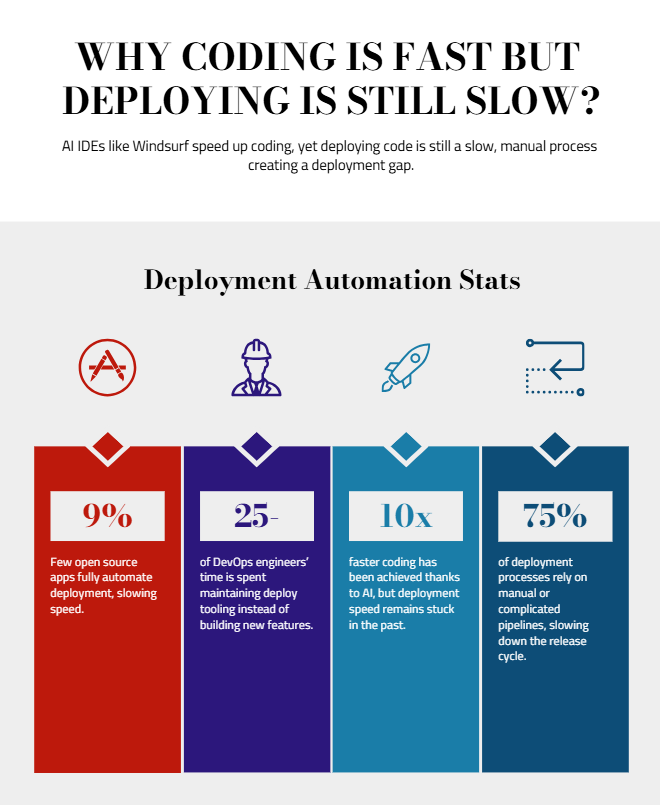 AI IDEs like Windsurf and Cursor have made writing code unbelievably fast. You type, the AI understands what you want, and you get working components, layouts or API logic in seconds. The coding experience has never been smoother.
But the moment you try to deploy that code, the speed disappears.
This is the “deployment gap”, the slow part between finishing your code and getting it live.
And it is not just you. Research shows this is a universal problem:
- A study on CI and deployment automation showed that only about 9% of open source apps actually automate deployment fully. The rest rely on manual configurations or complicated pipelines.
- And DevOps engineers themselves report that 25 to 100% of their time is spent maintaining deploy tooling instead of building features.
All of this means one simple thing: Coding has become 10 times faster, but deployment has not.
Common Problems Developers Face When Deploying Code From AI IDEs
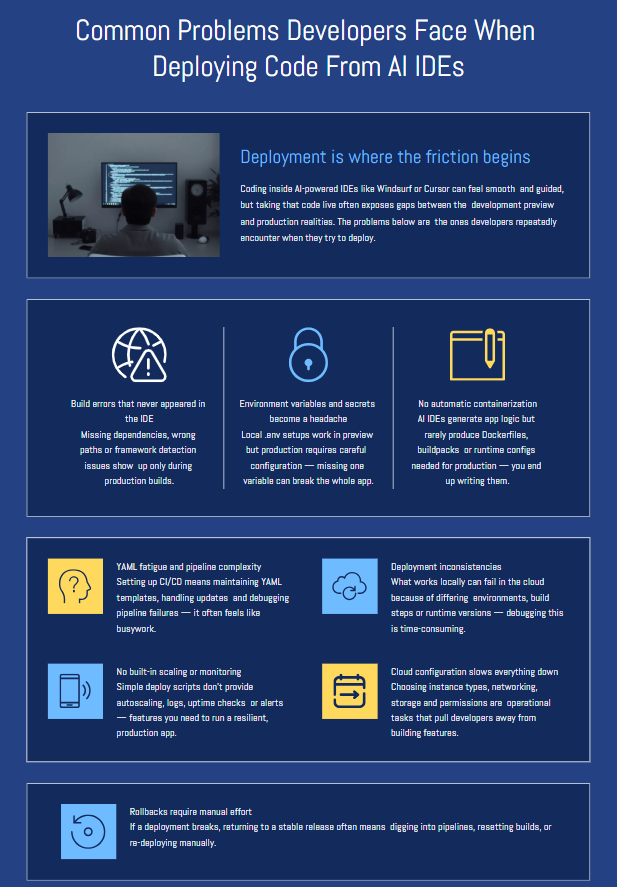 Coding inside Windsurf or Cursor feels smooth because everything is guided, fast and predictable. But deployment is the opposite. It is where developers spend the most time debugging things that have nothing to do with writing code.
Here are the issues that show up most often once you try to take your project live:
1. Build errors that never appeared in the IDE
Windsurf can run previews, but production builds often behave differently. You suddenly see missing dependencies, incorrect paths or framework detection issues.
2. Environment variables and secrets become a headache
Local .env files work fine during development, but configuring them for production needs extra steps. Many developers forget one variable, and the whole app breaks after deployment.
3. No automatic containerization
AI IDEs generate the application logic, but they do not handle Dockerfiles, buildpacks or runtime settings needed for production. You end up writing configs manually, even though the app is ready.
4. YAML fatigue and pipeline complexity
Setting up CI or CD pipelines means maintaining YAML templates, dealing with version updates and fixing pipeline failures. It feels like busywork that slows the project down.
5. Deployment inconsistencies
What works locally sometimes fails on cloud because the environment, build process, or Node/Python versions do not match. Debugging this takes hours.
6. No built in scaling or monitoring
Deploying from an IDE or a simple script does not give you autoscaling, logs, uptime checks or alerts. You eventually need all of these to run a real app.
7. Cloud configuration slows everything down
Choosing instance types, setting up networking, configuring storage and handling permissions are operational tasks that pull developers out of their flow.
8. Rollbacks require manual effort
If something breaks after deployment, rolling back to a stable version should be easy. But most workflows require going back into pipelines, resetting builds or re-deploying manually.
These problems are not caused by Windsurf or Cursor. They are caused by how deployment traditionally works.
AI helps you write code faster. But deployment still depends on tools and configs that were designed years before AI IDEs existed.
This is why developers need a deployment solution that matches the speed of modern coding tools. And that brings us to the most important part of this article.
What’s the Best Way to Deploy Apps Built Inside Windsurf?
When you build something in Windsurf, the coding part is fast. The preview feels instant. The entire flow keeps your momentum going. But when it is time to deploy, you do not want that flow to break.
The best and most reliable way to deploy anything you build inside Windsurf is very simple:
Write in Windsurf → Push to GitHub → Deploy on Kuberns
This workflow gives you the speed of AI coding and the stability of a fully managed deployment platform. And most importantly, it removes all the painful parts that slow you down after writing code.
Let’s break down why this workflow works so well.
Windsurf handles the coding. GitHub handles the structure.
You write code inside Windsurf the same way you normally do. Once you are ready, you commit and push it to GitHub.
GitHub becomes the clean handoff point. You get:
- clean version control
- a safe activity history
- a place for teammates to collaborate
- predictable structure for deployment
- zero guesswork for build systems
Windsurf focuses on speed and code quality. GitHub takes care of organisation and traceability.
Kuberns handles everything after the code leaves the IDE
 This is where your workflow finally becomes as fast as the IDE.
Once you connect your GitHub repo to Kuberns, the platform takes over:
Automatic build detection: Kuberns identifies whether your project is Next.js, Python, Node.js, Go or something else. No build config needed. No build scripts to write.
Automatic containerization: You do not need Dockerfiles or custom images. Kuberns handles the packaging required to run your app in production.
Automatic environment variables and secrets: You can add all your variables inside the Kuberns dashboard. No more missing .env values or manual cloud secrets setup.
Automatic deployment: Your app goes live instantly. No pipelines. No CI. No YAML templates.
Automatic scaling: Traffic goes up, Kuberns scales. Traffic goes down, Kuberns scales back. You do not touch any config.
Automatic monitoring and logs: You get real-time logs and metrics by default. Debugging production issues becomes easy.
Automatic rollbacks: If something breaks, one click takes you back to the previous stable version.
Automatic cost optimisation: Since Kuberns runs on optimised AWS infrastructure, users can save up to 40% compared to deploying directly.
Everything after coding becomes automated.
This workflow completely removes the deployment gap
If you look back at all the problems in the previous section: configurations, YAML, Docker, infra setup, pipelines, scaling, the Windsurf → GitHub → Kuberns workflow solves every one of them.
It gives you the speed you love inside Windsurf, and the reliability you need in production.
- No DevOps knowledge needed.
- No cloud setup needed.
- No manual deployment steps.
Just write code fast, push, and go live.
This is the cleanest and most modern way to deploy Windsurf projects. And it finally matches the speed of today’s AI-powered development tools.
Check out the quick guide to deploy your projects on Kuberns
Conclusion
Windsurf makes writing code feel effortless. You move fast, you stay focused, and you build things in minutes that used to take hours. But the moment it is time to take your project live, that speed drops. Deployment still feels slow, manual and full of steps that interrupt your flow.
You do not need to fight with pipelines, YAML files, Docker or cloud setup just to ship the code you already finished inside Windsurf.
The cleanest way to deploy is simple. You push your code to GitHub. Kuberns does everything else.
Kuberns removes the entire “deployment gap”. It builds your app, packages it, deploys it, scales it and keeps it running without you touching any infrastructure. You get the same feeling of speed that Windsurf gives you, just on the production side.
If you want a workflow where both coding and deployment feel equally fast and effortless, this is the easiest path.
Deploy your Windsurf project on Kuberns today and take your app live without slowing down.

FAQs
Q1: Can I deploy directly from Windsurf to production?
Not for real production workloads. Windsurf is built for fast coding and previews, not for handling infrastructure, scaling, logs, environments or rollbacks. The easiest way to deploy is on Kuberns.
Q2: What is the best way to deploy a project built in Windsurf?
The best way is the simple workflow: Windsurf → GitHub → Kuberns. You write code in Windsurf, push it to GitHub and let Kuberns handle everything else, including builds, containerization, scaling and deployment.
Q3: Do I need Docker or Kubernetes knowledge to deploy with Kuberns?
No. Kuberns takes care of containerization, environments, and the underlying Kubernetes infrastructure for you. You never touch YAML, Dockerfiles or cluster configs.
Q4: Does Kuberns support private GitHub repositories?
Yes. You can connect private repositories securely and deploy them with the same one-click workflow.
Q5: How fast can I deploy a Windsurf project using Kuberns?
Once the GitHub repo is connected, deployment is almost instant. Kuberns automatically detects the framework, builds the app and makes it live without any manual configuration.
Q6: Can I use Kuberns for any type of project I build in Windsurf?
Yes. Whether it is Next.js, Flask, Node.js, Go or a full-stack app, Kuberns handles the build and deployment automatically. You do not need to set up language-specific pipelines.
Q7: Is Kuberns cheaper than deploying directly on AWS?
Yes. Since Kuberns runs on optimised AWS infrastructure, users can save up to 40% on cloud costs compared to building everything manually on AWS.
Q8: What makes Kuberns better than IDE-based deploy features?
IDE deploys are great for quick previews, but not for real production traffic. They lack scaling, logs, uptime guarantees and rollback capabilities. Kuberns gives you a stable, automated production environment with none of the manual setup.