Published
- 14 min read
How to Deploy a Golang App Without Docker (Complete Guide with AI)
Go Is Built for Speed, but Deploying It Should Be Too
Golang has become one of the most efficient languages for modern web applications, APIs, and backend services. It’s lightweight, fast, and made for concurrency, a dream for developers who care about performance and simplicity.
But when it comes to deployment, that simplicity often disappears.
Most Go developers still end up wrestling with Dockerfiles, YAML pipelines, reverse proxies, or manual cloud setups just to get their app online.
What should be a five-minute task turns into hours of DevOps overhead, and for many, it’s a barrier between a finished product and a live one.
Traditional platforms like Render, Railway, and Fly.io have made Golang hosting easier, but they still depend on configuration files and manual scaling.
Dockerizing your app, building containers, linking them to cloud services, and managing SSL can quickly drain productivity.
That’s why more developers in 2025 are moving to platforms that completely remove deployment complexity.
In this guide, you’ll learn:
- What deploying a Golang app really involves (and why it’s tricky)
- How today’s popular deployment platforms compare
- Which is the easiest and fastest way to ship Go projects
- And how to deploy your Golang app to the cloud without touching Docker or CLI tools
What Does Deploying a Golang App Really Involve?
When you build a Go application, it usually compiles into a single, fast, and lightweight binary, one of the biggest advantages of the language.
But getting that binary online and production-ready still requires a surprising amount of DevOps work.
Let’s break down what traditional Go app deployment looks like and why it often becomes more complex than it should be.
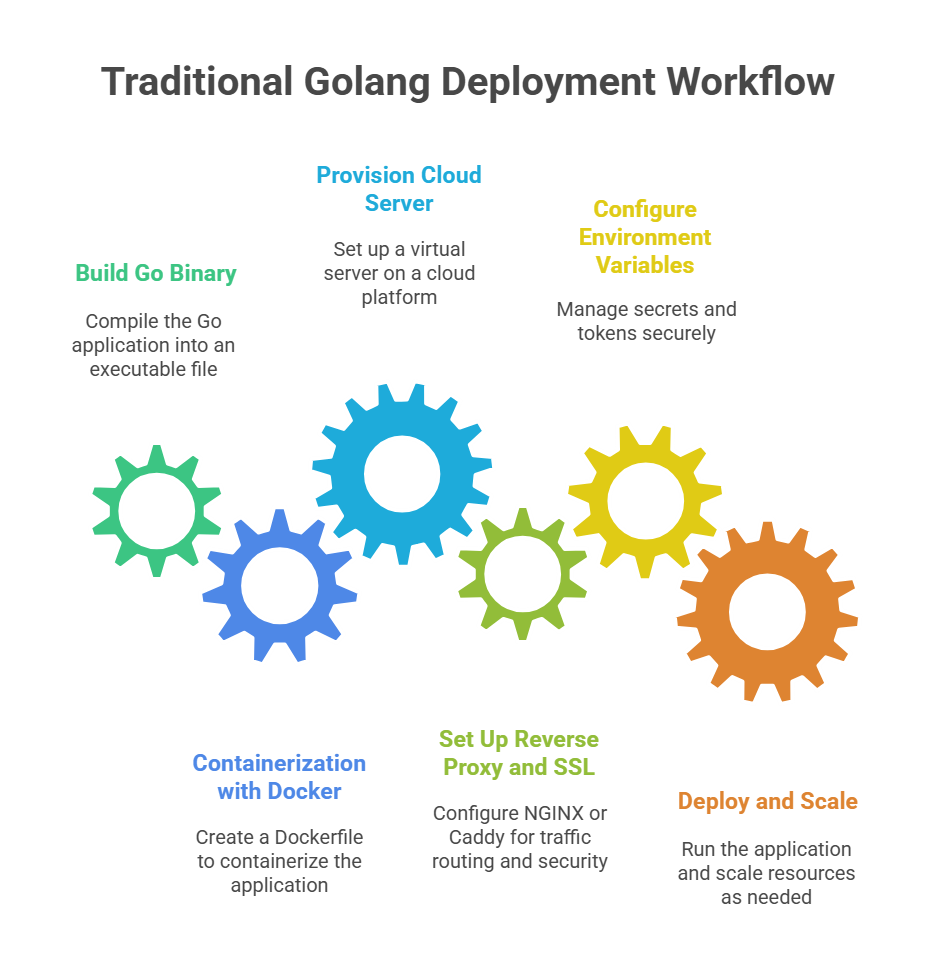
The Traditional Golang Deployment Workflow
- Build the Go Binary.
You start by running go build to create your executable file. Straightforward enough. - Containerization with Docker
Most tutorials then ask you to create a Dockerfile to containerise your app. You define the Go runtime, expose ports, and configure environment variables manually. - Provision a Cloud Server
You either rent a VPS or use a cloud provider like AWS EC2, DigitalOcean Droplets, or Google Cloud. Then comes network configuration, firewall rules, and server hardening. - Set Up Reverse Proxy and SSL
Add NGINX or Caddy to route traffic, handle HTTPS, and manage certificates. Missing a single config line here can lead to hours of debugging. - Configure Environment Variables
Secrets, tokens, and database URLs need to be securely managed, usually through .env files or external secret managers. - Deploy and Scale
Finally, you run the app and monitor CPU usage manually. If traffic increases, you scale by adding servers or editing Docker Compose and Kubernetes manifests.
Even though Go is simple to develop with, deployment often turns into a manual, error-prone process.
Common Problems Developers Face
- Too much DevOps overhead: You need to learn Docker, NGINX, SSL, and CI/CD before your first deploy.
- Limited visibility: You don’t get built-in monitoring or logs unless you integrate external tools.
- Hard scaling: Adding instances or containers means editing multiple configuration files.
- Cost inefficiency: Over-provisioning servers or using static instances leads to wasted money.
For many Go developers, deployment feels like it belongs in another job description.
Comparing The Best Golang Deployment Platforms in 2025
If you’ve tried hosting a Golang app before, you’ve probably noticed one thing. Every platform makes you do just a little too much. Some ask for Dockerfiles, some need Procfiles, and others expect you to manage servers or scaling rules manually.
In 2025, developers have several ways to deploy Go apps, but not all are built for simplicity.
Let’s look at how the top platforms compare, and where Kuberns stands out.
| Platform | Configuration Required | Setup Time | Scaling | Cost Efficiency | Monitoring | Best For |
|---|---|---|---|---|---|---|
| Kuberns | Zero configuration | less than 5 min | AI-powered auto scaling | Up to 40% AWS savings | Full dashboard logs & metrics | Developers & teams without DevOps |
| Heroku | Procfile & buildpacks | 10–15 min | Basic | Expensive | Basic metrics | Small apps, prototypes |
| Render | Docker / YAML | 15–20 min | Good | Moderate | Logs only | Small teams |
| Railway | Minimal setup | 10–12 min | Auto | Affordable | Limited | Indie developers |
| Fly.io | Docker + CLI setup | 20–25 min | Advanced | Medium | CLI-based | Microservices, power users |
| DigitalOcean App Platform | Manual runtime setup | 20+ min | Good | High for low traffic | Built-in | Developers wanting control |
Heroku
Heroku remains a friendly option for small apps or proofs of concept, but its free tier has vanished, and pricing has increased for production workloads. It also requires a Procfile and buildpack setup, making it less appealing for developers who prefer quick, no-fuss deploys.
(Check out The Ultimate Guide to Heroku Alternatives in 2025)
Render
Render supports Dockerized Go deployments and integrates easily with GitHub. It’s a decent option for moderate workloads, but you’ll still need configuration files like render.yaml or Docker instructions. Scaling can also get expensive beyond small apps.
(We have added the Render vs Kuberns Comparison to help you make a better decision)
Railway
Railway offers a clean developer experience and minimal setup. However, it’s optimised for Node.js and Python more than Go, and its limited monitoring and runtime control make it less ideal for scaling Go-based APIs.
(Check out the Best Railway Alternatives for Solo Developers and Startups)
Fly.io
Fly.io is powerful for global microservice deployments, but it assumes you’re comfortable with Docker, CLI workflows, and multi-region scaling configuration.
It’s flexible, but not effortless.
(We have a curated list of top Fly.io Alternatives for Developers)
DigitalOcean App Platform
DigitalOcean’s App Platform offers solid reliability but needs manual runtime configuration for Go. It’s not as intuitive for first-time users, and scaling options are fixed-tiered rather than dynamic.
(Here are the Best DigitalOcean Alternatives for Startups)
Kuberns
And then there’s Kuberns, the platform designed to eliminate configuration entirely.
Kuberns automatically identifies your Go module, builds and deploys it from GitHub, and manages infrastructure behind the scenes.
No Dockerfiles, no CLI, no YAML. It comes with AI-based scaling, real-time logs, and transparent AWS-backed pricing that helps you save up to 40% compared to Render or Heroku.
In short, Kuberns gives you the speed of Go with the simplicity of one-click deployment, something other platforms still can’t match.
Why Developers Choose Kuberns for Golang App Deployment
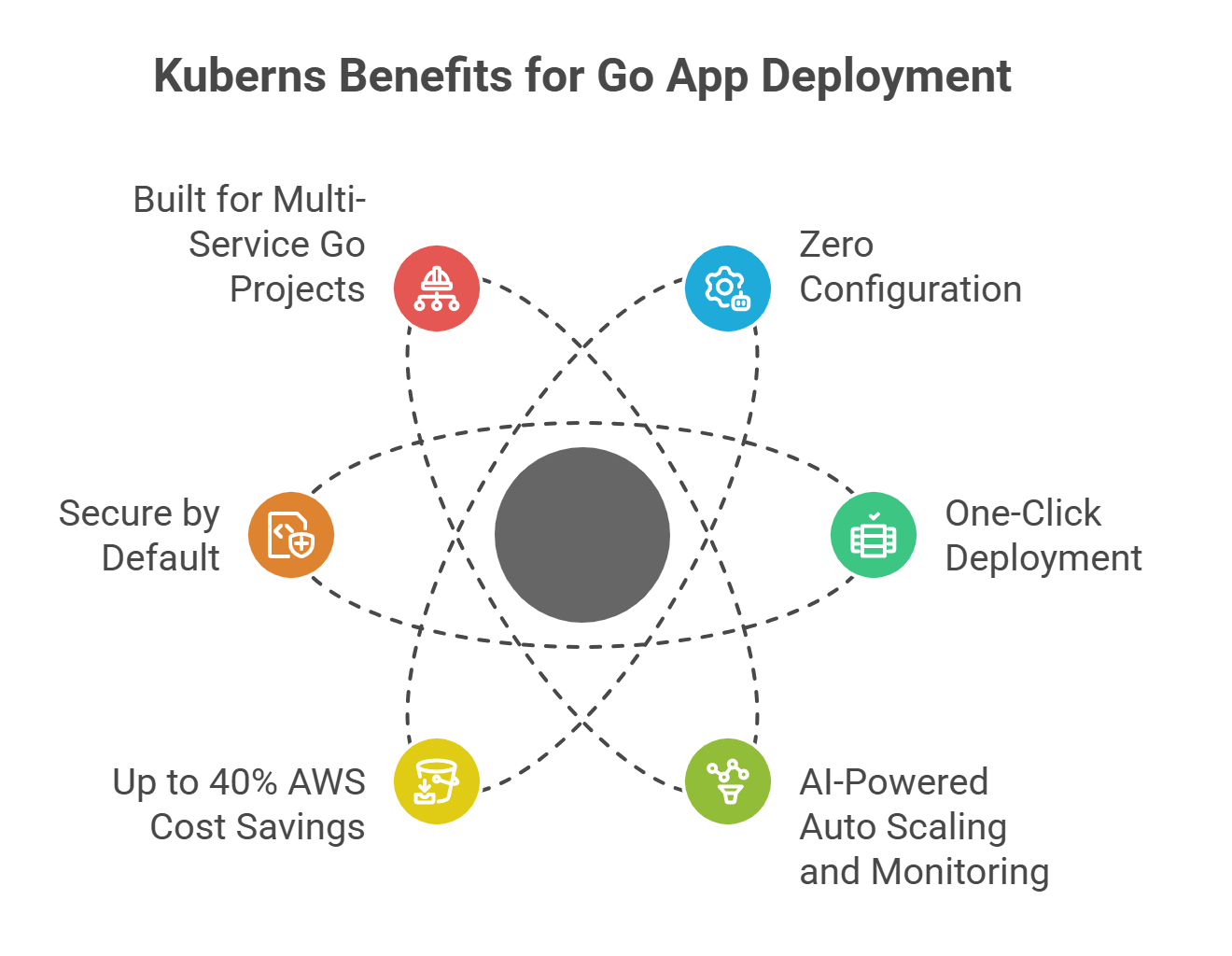 Developers using Kuberns aren’t just getting another hosting platform; they’re getting a deployment experience that matches the speed and efficiency of Go itself.
Here’s why more teams are choosing Kuberns to deploy and scale their Golang apps in 2025.
Zero Configuration
No Dockerfiles. No YAML. No runtime definitions.
Kuberns automatically detects your Go project structure and builds it using its AI-based build engine.
You don’t have to define ports, write container instructions, or configure servers. The platform handles the entire pipeline, from build to live environment, automatically.
You literally just connect your Git repository, click deploy, and your app is live in minutes.
One-Click Git Deployment
Traditional CI/CD tools require pipelines, secrets management, and build commands. Kuberns skips all that. Once your GitHub repository is connected, every push can trigger a deployment automatically.
- Build: Kuberns detects your Go module and compiles the binary.
- Deploy: It creates a secure container on AWS infrastructure.
- Scale: AI adjusts resources dynamically.
- Monitor: Logs and metrics appear instantly in your dashboard.
You never have to open a terminal again.
AI-Powered Auto Scaling and Monitoring
Instead of guessing how much compute your Go service will need, Kuberns watches traffic in real time and scales automatically. When your API usage spikes, new containers are spun up automatically. When demand drops, resources scale back to save costs.
You can also view live logs, CPU/memory usage, and performance charts, all from a clean dashboard. No Prometheus setup. No Grafana dashboards. It’s built right in.
Up to 40% AWS Cost Savings
Kuberns hosts your Go app directly on AWS infrastructure, the same reliable foundation used by global enterprises.
But instead of reselling AWS at a markup, Kuberns optimises the resource allocation.
This results in up to 40% lower infrastructure cost while maintaining the same reliability, security, and performance as a direct AWS deployment.
Secure by Default
Every Go app deployed on Kuberns runs inside an isolated container with end-to-end encryption. SSL certificates are automatically provisioned and renewed.
Environment variables are encrypted, and network-level isolation ensures your app is secure by design, without needing manual configuration.
Built for Multi-Service Go Projects
If you’re deploying multiple Go microservices (e.g., API, worker, scheduler), Kuberns automatically identifies and runs them as individual services, all within the same deployment. This makes it ideal for complex architectures that would otherwise require Kubernetes setup or multi-container management.
In short, Kuberns gives Go developers the power of AWS, the speed of AI automation, and the simplicity of one click, no DevOps, no Docker, no YAML.
Time, Cost, and Complexity Comparison
For developers, choosing how to deploy a Go app often comes down to three questions: how long will it take, how much will it cost, and how complicated is it to manage afterwards.
Most platforms claim simplicity, but when you factor in setup time, hidden costs, and scaling complexity, the real story looks different.
Here’s a side-by-side breakdown of what you can expect when deploying your Golang app manually versus with Kuberns.
| Metric | Traditional Setup (Docker / PaaS) | Kuberns |
|---|---|---|
| Setup Time | 1–2 hours (Docker + runtime + SSL setup) | Under 5 minutes (one click) |
| Configuration Files | 3–5 (Dockerfile, YAML, NGINX, Procfile) | None required |
| Required Skills | Docker, CI/CD, NGINX, Linux server management | None (zero DevOps) |
| Scaling | Manual or tier-based | AI Auto-scaling in real time |
| Monitoring | Requires tools like Prometheus, Grafana, or Datadog | Built-in logs and dashboard |
| Cloud Cost | $30–$50/month for small Go apps | $15–$20/month (up to 40% AWS savings) |
| SSL and Domain Setup | Manual with certbot or cloud DNS setup | Automatic SSL + one-click domain |
How to Deploy or Migrate your Golang App to Kuberns?
 If you already have a Go application running on Render, Fly.io, Heroku, or a manual Docker setup, migrating to Kuberns is the easiest upgrade you can make this year.
You’ll immediately save time, reduce costs, and eliminate the repetitive configuration work that slows down your releases.
Whether you’re running a small API or multiple Go microservices, Kuberns makes migration smooth, automated, and risk-free.
- Connect Your GitHub Repository
Log in to the Kuberns dashboard and connect your GitHub account. Select the repository where your existing Go project is hosted. - Add Environment Variables (Optional)
Copy your environment variables from your current host and paste them into Kuberns’ secure dashboard. They’ll be encrypted automatically. - Click Deploy
Kuberns compiles your Go app using its AI-based build engine, packages it, and deploys it to AWS — all in one click. - Add Your Custom Domain
If you already have a domain, link it from the dashboard. SSL certificates are issued and renewed automatically. - Monitor and Scale Automatically
Once your app is live, Kuberns’ AI engine keeps it optimised, scaling resources as needed and sending alerts if performance changes.
That’s it. No manual redeploys, no downtime, no hidden configurations.
Deploy Smarter, Scale Faster
Golang was built for simplicity, performance, and speed, but until now, deployment didn’t match that philosophy. Between Docker setups, YAML pipelines, and server provisioning, deploying a Go app often felt more complex than building it.
Kuberns changes that.
It lets you deploy, scale, and monitor your Go applications with the same minimalism that makes Go powerful. No Docker, no YAML, no DevOps expertise, just one click from GitHub to production.
Whether you’re:
- A solo developer deploying a side project,
- A startup launching an MVP, or
- A tech team managing production workloads,
Kuberns gives you everything you need to deploy smarter and scale faster, with zero hassle.
So, if you’ve ever wondered, “How can I deploy my Golang app without Docker or DevOps pain?”
The answer is simple: Kuberns.
Deploy your Go app from GitHub in one click and experience true zero-configuration deployment

Frequently Asked Questions
Q1. Can I deploy any Golang app on Kuberns?
Yes. Kuberns supports all types of Go projects, from REST APIs built with net/http to full web apps using popular Go frameworks. The platform automatically detects your Go module and builds it with no extra setup or configuration files.
Q2. Do I need Docker to deploy a Go app on Kuberns?
No. Kuberns eliminates Docker entirely. It automatically creates and manages containers for your Go apps behind the scenes, so you don’t have to write or maintain a Dockerfile.
Q3. How long does it take to deploy a Go app on Kuberns?
Usually under five minutes. Once you connect your GitHub repository, Kuberns auto-builds your Go binary, provisions infrastructure, and makes your app live with SSL and monitoring ready to go. Watch Deploy Your App on Kuberns in One Click
Q4. Can I migrate my existing Go app from Render, Fly.io, or DigitalOcean to Kuberns?
Absolutely. Just connect your existing GitHub repo to Kuberns, copy your environment variables, and click deploy. No changes to your code, Docker setup, or folder structure are needed.
Q5. How does Kuberns handle scaling for Go applications?
Kuberns uses AI-powered auto-scaling that adjusts resources dynamically based on your app’s traffic. You never have to define instance sizes or manually manage load balancers. The system scales up during spikes and back down when idle to save costs.
Q7. How secure is deployment on Kuberns?
Every app deployed on Kuberns runs inside an isolated container with built-in network security, encrypted environment variables, and automatic SSL certificates.