Published
- 16 min read
How to Deploy a Next.js App in 2025: A Complete and Practical Guide

Introduction
Next.js has become a go-to framework for building modern web applications because it combines multiple rendering strategies in one system. You can use server side rendering, static generation, edge rendering, and built-in API routes without needing separate services. This makes Next.js suitable for everything from landing pages to SaaS dashboards and data-driven internal tools.
The challenge usually appears at deployment time. Unlike a purely static React app, a Next.js project often includes backend logic, dynamic pages, middleware, and server-rendered components. This means your hosting environment must be able to run Node.js, handle builds efficiently, manage environment variables securely, and scale when traffic changes.
In this guide, we will walk through:
- How Next.js behaves in a production environment
- What types of platforms are capable of hosting it effectively
- A practical comparison of common deployment options
- A simple step-by-step workflow to deploy on Kuberns
- Best practices to keep your app fast and stable in production
If you are new to the platform, you can read what Kuberns is and how it simplifies deployment to understand the core idea.
How to Deploy a Next.js App on Kuberns (Simple and Practical Guide)
Deploying a Next.js app on Kuberns is straightforward. You just connect your GitHub repo, confirm the build settings, and click deploy. Kuberns handles the environment setup, SSL, scaling, and hosting in the background so you don’t need to configure servers manually.
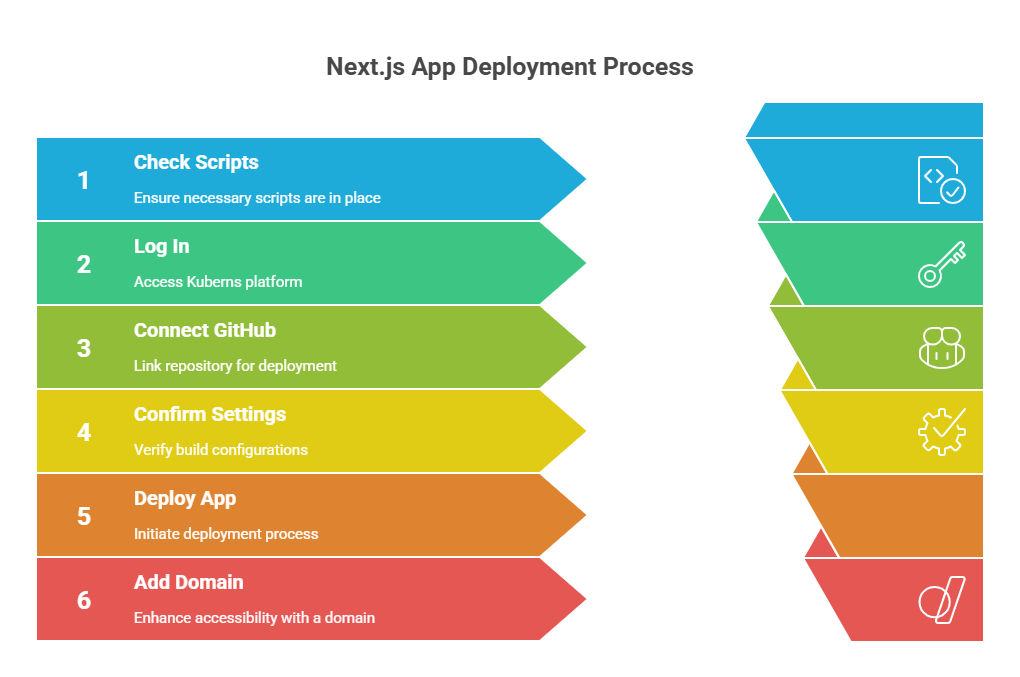 Here is the easiest way to do it:
1. Make Sure Your Project Has the Right Scripts
Open your package.json and ensure these scripts are present This tells Kuberns how to build and run your Next.js app.
2. Log In to Kuberns
Go to the dashboard and sign in:
https://dashboard.kuberns.com/login
If you’re new to the platform, you can also check What is Kuberns to understand the platform quickly.
3. Connect Your GitHub Repository
- Click Create New App
- Choose Connect GitHub
- Select the repository that contains your Next.js project
- Choose the branch you want to deploy (usually main)
There is no need to set up Docker or configuration files. Kuberns detects Next.js automatically.
4. Confirm Build Settings
Kuberns will suggest build commands by default, but here’s the standard setup:
| Field | Value |
|---|---|
| Build Command | npm install && npm run build |
| Start Command | npm start |
You can also add environment variables securely in the dashboard instead of using .env files in code.
5. Click Deploy
Once you click Deploy, Kuberns will:
- Fetch your code from GitHub
- Install dependencies
- Build your Next.js app
- Create the runtime environment automatically
- Give you a live production URL
This usually takes less than a minute.
You can see build logs in real time if you want to follow the deployment process.
6. Add Your Domain (Optional but Recommended)
If you want to use a custom domain:
- Open the app in your Kuberns dashboard
- Go to Domains
- Enter your domain name
- Update DNS (Kuberns shows exactly what to paste)
- Enable SSL
SSL is issued automatically, so you do not need Certbot or manual certificates.
That’s It. Your Next.js App Is Live.
No server setup. No reverse proxy configuration. No manual scaling.
You write the code, push to GitHub, and click deploy.
If later you want to automate ongoing deployments, you can see how simple workflows work here: How to eliminate manual steps in your CI/CD workflow
Quick Deployment Checklist
| Task | Required? | Why |
|---|---|---|
| next build and next start scripts | Yes | Allows production build and server run |
| Push code to GitHub | Yes | Kuberns pulls code directly |
| Add environment variables in dashboard | If your app uses them | Keeps secrets secure |
| Custom domain setup | Optional | Gives your app a professional URL |
Understanding How Next.js Runs in Production
A Next.js application is not shipped to the browser as a single static bundle. Instead, it is a hybrid framework that decides at build time and request time how each page should be rendered. This means your deployment environment needs to support both static asset delivery and server execution.
The Core Components of a Production Next.js App
| Component | Where It Runs | Purpose | Example Use Cases |
|---|---|---|---|
| Static Pages (SSG) | CDN / Browser | Pre-rendered at build time for maximum speed | Landing pages, blogs, marketing pages |
| Server Rendered Pages (SSR) | Node.js Server | Generated on each request to show fresh data | Dashboards, user profiles, authenticated pages |
| API Routes | Node.js Server | Backend endpoints inside your Next.js app | Form submissions, auth, database queries |
| Incremental Static Regeneration (ISR) | Node.js + CDN | Rebuilds pages in the background based on revalidation intervals | Content sites that update often |
| Middleware / Edge Functions | CDN Edge Layer | Logic that runs before routing | Authentication checks, redirects, feature flags |
| Client Side Components | Browser | Interactive UI logic and event handling | Toggles, inputs, forms, UI state |
Because the framework distributes work across the server, browser, and CDN, the hosting environment must support all three layers.
What Your Hosting Environment Needs to Support
A Next.js deployment platform must be able to:
- Run Node.js Reliably To handle SSR, API routes, ISR updates, and middleware.
- Execute the Build Step (next build) This generates both static assets and server-side code bundles.
- Serve the Application Usingnext start This is what actually runs your app in production.
- Store and Inject Environment Variables Securely For API keys, database credentials, and runtime configs.
- Scale Up and Down Based on Traffic Since SSR pages and APIs consume CPU and memory under load.
- Provide Monitoring and Logging Debugging SSR failures without logs is nearly impossible.
- Handle SSL Certificates and Domains To ensure the app is secure by default.
Many platforms specialize in only part of this process.
For example:
| Deployment Type | Works Well For | Limitations |
|---|---|---|
| Static Hosting (Netlify, GitHub Pages) | Pure SSG sites | Cannot run SSR or API routes |
| Serverless Platforms | Light API usage, intermittent requests | Can experience cold starts and slower response times |
| VPS / Bare Metal | Full control and tuning | Requires deep DevOps experience to configure and maintain |
| Kuberns | SSR apps, API heavy apps, SaaS platforms | Designed to automate the entire workflow |
This is why deployment is often the key deciding factor when picking between Vercel, VPS hosting, or a managed platform like Kuberns.
Why This Matters for Real Projects
A typical product dashboard or commercial application uses:
- Authentication
- Personalized content
- Database connected API routes
- Dynamic SSR pages
These require a deployment environment that behaves more like a backend app server rather than a static host.
If the hosting environment does not support full Next.js runtime capabilities, you may run into:
- Slow response times on dynamic pages
- Failing API routes
- Memory leaks or crashes at scale
- Complex server and NGINX configuration work
This is where automated platforms simplify the experience by handling the runtime, scaling, networking, and process management for you.
Popular Ways to Deploy a Next.js Application (Comprehensive Comparison)
There are several approaches to deploying a Next.js application. The right choice depends on how dynamic your application is, how you handle APIs, and how much infrastructure responsibility your team wants to take on.
Below is a practical comparison, starting with Kuberns since it is designed for full stack applications where both frontend and backend logic live inside the same Next.js project.
1. Kuberns (Managed PaaS on AWS)
 Kuberns provides a fully managed environment built specifically for modern full stack applications. You connect your GitHub repository, configure build commands, and deploy in one click. The platform automatically handles containerization, environment variables, SSL certificates, scaling, monitoring, and rollbacks.
Your Code → GitHub → Kuberns (Build + Deploy + Scale) → Live Production URL
If you are new to the platform, the guide on what Kuberns is and how it simplifies deployments explains the underlying approach.
Pros
- Simple deploy-from-GitHub workflow without writing Dockerfiles
- Designed for Next.js SSR, API routes, workers, cron jobs, and databases
- Runs on AWS infrastructure with consistent performance
- Predictable pricing for production workloads
- Low maintenance, no DevOps expertise required
Cons
- Less suitable for applications that require deep networking customization
Best suited for: SaaS products, dashboards, internal apps, data-backed applications, and teams that want to avoid complex DevOps overhead.
To understand why this model is becoming standard as applications grow, see the guide on automated software deployment.
2. Vercel
 Vercel integrates closely with Next.js and provides fast deployment workflows, especially when the application relies heavily on static content.
See a full breakdown in Best Vercel Alternatives in 2025.
Pros
- Very smooth developer experience
- Automatic preview builds
- Good for static-heavy pages and UI prototypes
Cons
- Pricing increases rapidly for SSR and API routes under real production load
- Cold starts can affect dynamic pages and dashboards
- Backend functionality is limited without additional services
Best suited for: Marketing sites, UI prototypes, and early MVPs.
3. Netlify
 Netlify is primarily a static hosting and CDN delivery platform, with optional serverless functions.
See Best Netlify Alternatives in 2025 for detailed evaluation.
Pros
- Easy deployments and global CDN distribution
- Good for static content
Cons
- Not optimized for Next.js SSR or complex backend logic
- Serverless function integration can become difficult to manage
Best suited for: Static sites and projects built mainly with Static Site Generation.
4. Railway
 Railway simplifies deploying applications by abstracting infrastructure and using container-like environments.
See Best Railway Alternatives for Solo Developers and Startups.
Pros
- Quick to deploy small applications
- Easy environment variable management
- No server setup required
Cons
- Usage-based pricing can grow unpredictably
- Not as efficient for heavy SSR workloads
Best suited for: Early-stage projects, personal tools, small full stack apps.
5. Render
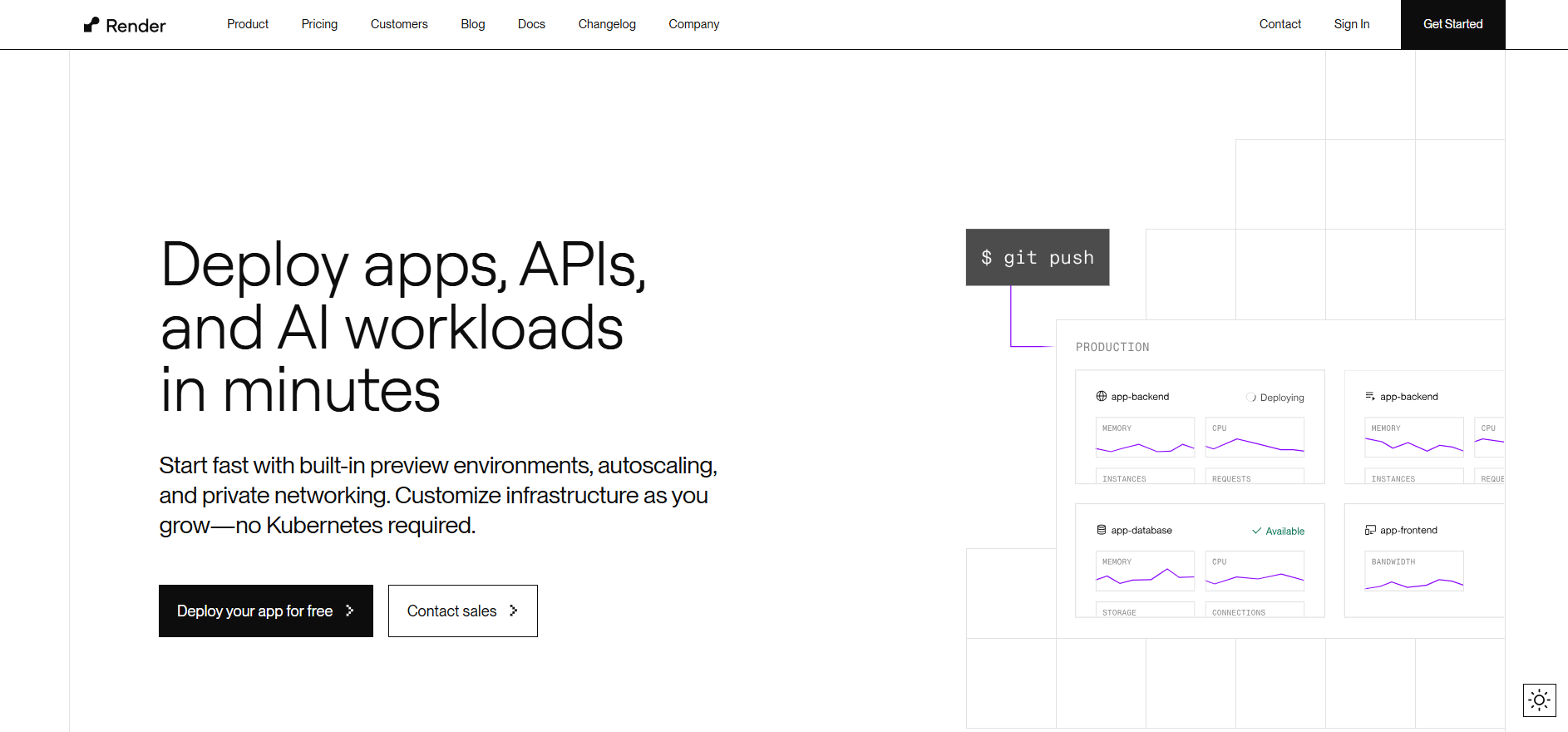 Render provides autoscaling app services and databases without requiring manual VPS management.
See Best Render Alternatives in 2025.
Pros
- Supports persistent services
- Can run application servers, workers, and queues
- Easy integration with databases
Cons
- Slower build and deployment times on large applications
- Performance may vary across workloads
Best suited for: Full stack apps that need backend services without managing a VPS.
6. Fly.io
 Fly.io runs applications close to end users by deploying containers across global edge locations.
Pros
- Interesting model for latency-sensitive apps
- Can run full containers with control over regions
Cons
- Configuration and scaling complexity increases quickly
- Requires container knowledge and tuning for optimal results
Best suited for: Applications where geographic latency is the primary concern and the team is comfortable with container orchestration.
7. Self-Hosted VPS (AWS EC2, DigitalOcean, Hetzner)
 This approach gives you full control but also full operational burden. You manage Node.js, PM2, NGINX, SSL, firewalls, scaling, logs, and recovery.
For platform-level comparison, see Best DigitalOcean Alternatives
Pros
- Maximum configurability
- Can be cost-efficient at small scale
Cons
- Requires DevOps expertise
- Debugging and scaling complexity increases as traffic grows
- Security, uptime, and failover become your responsibility
Best suited for: Teams with DevOps resources or custom network-level needs.
Summary Comparison
| Platform | Supports SSR & API Routes Well | Ease of Deployment | Scalability | Maintenance Effort | Best For |
|---|---|---|---|---|---|
| Kuberns | Yes | Easy (GitHub to deploy) | Automatic | Low | SaaS and production apps |
| Vercel | Yes, but costly at scale | Very easy | Automatic with usage limits | Low | Prototypes and UI-focused apps |
| Netlify | Limited SSR support | Easy | Limited | Low | Static-heavy sites |
| Railway | Moderate | Easy | Usage-based scaling | Moderate | Early-stage projects |
| Render | Yes | Moderate | Moderate | Moderate | General full stack apps |
| Fly.io | Yes | Moderate | Global containers | High | Latency-sensitive apps |
| Self-Hosted VPS | Yes with manual setup | Hard | Manual | High | Teams with DevOps resources |
Why Many Teams Choose Kuberns for Next.js Deployment
Kuberns is designed for developers who want to deploy quickly and scale confidently, without managing cloud complexity.
What you get:
This gives you the power of AWS, but with the simplicity of a launch button.
If you want to understand why developers are shifting from manual deployments to automated platforms, read: https://kuberns.com/blogs/post/automated-software-deployment
Best Practices for Next.js Deployment
Once your Next.js app is running on Kuberns, a few small adjustments can help you get better performance, faster load speed, and smoother scaling in production.
1. Use Environment Variables Safely
During development, it is common to store values in a .env.local file. In production, move those into the Kuberns dashboard under Environment Variables.
This keeps API keys, authentication secrets, and tokens encrypted and out of your codebase.
Example variables you may store: NEXT_PUBLIC_API_URL=https://api.yourapp.com DATABASE_URL=postgres://… JWT_SECRET=your-secret
2. Optimize Where Your Assets Come From
Next.js supports large image optimization, but serving heavy images directly from the server can slow responses.
For best results:
- Store images on Cloudinary, S3, or a similar CDN
- Use the built-in <Image /> component to optimize sizes automatically
This reduces server workload and improves page speed.
3. Monitor Resource Usage
Kuberns provides built-in usage charts and logs. Check these occasionally to understand how your app behaves under load.
Why this matters:
- SSR pages use CPU
- API routes use memory
- Spikes in either may indicate a slow query or unnecessary data fetching
Turning on alerts helps you identify issues before end users notice them.
4. Reduce Server Rendering When Possible
Not every page needs to be server-rendered. Consider using:
- Static Site Generation (SSG) for public pages
- Incremental Static Regeneration (ISR) for content that updates occasionally
This improves both performance and cost efficiency, since fewer requests need real time computation.
5. Cache Data to Reduce Load
If your app fetches external data often (API calls, database queries, etc.), add caching wherever possible:
- Next.js revalidate option for ISR
- Browser-side caching for public responses
- CDN caching headers for images or assets
This improves speed and reduces compute needs.
6. Keep Deployment Workflow Simple
Avoid over-complicating deployment pipelines. Kuberns already handles containerization, build steps, scaling, and hosting.
If you want a clean CI/CD setup, the guide on software deployment strategies and workflow simplification explains how teams remove unnecessary deployment steps.
Conclusion
Deploying a Next.js application should not require managing servers, configuring reverse proxies, or worrying about scaling. A good deployment workflow is one that is simple to set up, stable in production, and easy to maintain as your application grows.
Kuberns is designed to offer exactly that experience. You connect your GitHub repository, confirm your build settings, and deploy. The platform takes care of the environment, security, updates, and scaling on its own.
If you want to focus more on building your application and less on deployment infrastructure, you can get started in a few minutes:
Start deploying your Next.js app

Frequentyly Asked Questions (FAQ’s)
Does Kuberns support server side rendering and API routes in Next.js?
Yes. Kuberns runs Next.js in a Node.js environment, so server side rendering, API routes, middleware, incremental static regeneration, and edge logic all work without extra configuration. You do not need to set up your own proxy server or backend service unless your application requires a separate architecture.
Do I need Docker to deploy a Next.js app on Kuberns?
No. You do not need to write or manage Dockerfiles. Kuberns automatically handles containerization during deployment. You only confirm your build and start commands, and the platform generates and manages the runtime environment for you.
Can I use a database with my Next.js application on Kuberns?
Yes. You can connect to PostgreSQL, MySQL, MongoDB, Supabase, Neon, Firebase, or any cloud-managed database. Store your database connection credentials as environment variables in the Kuberns dashboard, and connect using your usual ORM or query library.
How should I manage environment variables when deploying?
During local development, you may use a .env.local file. In production, add these variables securely in the Environment Variables section of the Kuberns dashboard. Kuberns encrypts them and injects them during deployment, keeping your credentials safe.
Can I run background jobs or workers alongside my Next.js app?
Yes. Kuberns supports multi-service deployments, including workers and scheduled tasks. This is useful if your application processes queue messages, sends emails, or performs automated workflows.
Can I use my own domain name and SSL with Kuberns?
Yes. You can add any custom domain directly from the dashboard. Once DNS is configured, Kuberns automatically provides and renews SSL certificates. You do not need Certbot or manual certificate maintenance.
How does scaling work on Kuberns?
Kuberns monitors resource usage and adjusts the runtime automatically based on application load. There is no need to configure load balancers or autoscaling groups manually. Your application scales up and down as needed.
What happens if a deployment fails?
If a deployment fails, Kuberns keeps the previous stable version online. You can also roll back to a previous deployment version at any time. This helps avoid downtime and allows safe, continuous iteration.