Published on · Updated on: · By Manav Dobariya
- 9 min read
The Fastest Way to Deploy Django in 2026
If you’re searching for the easiest way to deploy a Django app with an included database and autoscaling, you’re in the right place.
Here’s the honest answer most guides won’t give you upfront: deploying Django manually is one of the most time-consuming deployments in the Python ecosystem. You need a WSGI server (Gunicorn), a reverse proxy (Nginx), a PostgreSQL database, SSL certificates, a process manager, static file handling (collectstatic), and database migrations (manage.py migrate), all configured and maintained in the right order.
As one production Django guide puts it: “Deploying Django to production is more than just running python manage.py runserver on a server. The development server is single-threaded, not secure, and will fall over under any real traffic.”
The alternative in 2026: Kuberns is an agentic AI cloud platform that handles every layer of that stack automatically. Connect your GitHub repository, add your environment variables including your PostgreSQL connection string, click Deploy and the AI runs your migrations, collects your static files, configures Gunicorn, provisions AWS compute, issues SSL, and enables AI-driven autoscaling based on real traffic. No Gunicorn config. No Nginx. No systemd service file.
This guide covers exactly how to get there: the mandatory settings.py production changes with code, the requirements.txt your Django app needs, the step-by-step Kuberns deployment, including how PostgreSQL and autoscaling work, and a platform comparison table built around what Django specifically needs.
Prerequisites (What You Need Before Deploying on Kuberns)
1. requirements.txt with the production stack
Kuberns reads this to install your dependencies. These four packages are the minimum for a production Django deployment:
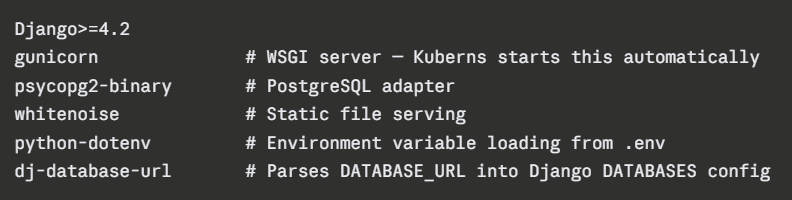 Generate from your virtual environment:
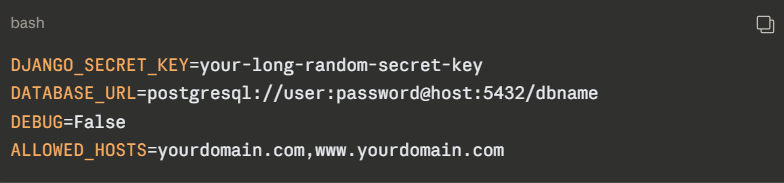
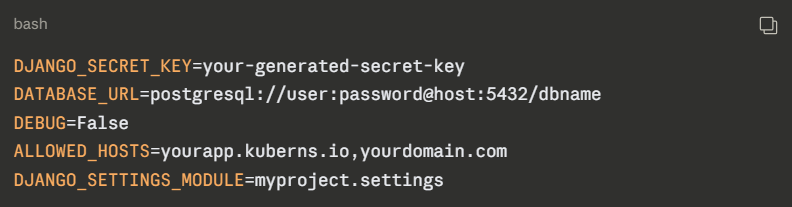
2. Your environment variables ready
Collect these before deploying. You’ll paste them into the Kuberns dashboard:
On other platforms, you’d also install and configure Nginx as a reverse proxy, write a Gunicorn systemd service file, set up Certbot for SSL certificates and configure a cron for renewal, create a PostgreSQL user and database, configure pg_hba.conf, and manually run manage.py migrate and manage.py collectstatic after every deploy. It’s a 45-step complex process. On Kuberns, none of those steps exists.
How to Deploy Your App on Kuberns?
Before walking through the steps, this is what the deployment looks like in real time. The agentic AI detecting your Django project, running migrations, and producing a live HTTPS URL in under five minutes. Worth watching before you start:
Django project → GitHub → Kuberns AI → migrations run → static files collected → live HTTPS URL. No Gunicorn config. No Nginx. No server.
Steps to deploy your Django app in the fastest way with AI
Kuberns is an agentic AI cloud platform built on AWS infrastructure. For Django apps, the AI detects your stack to find your project configuration, sets the build command and correct output directory automatically, configures SPA routing, issues SSL, and deploys with CI/CD with zero configuration files from your side.
Step 1: Create Your Account and Project
Go to kuberns and click “Deploy with AI”. Create your account and add basic details of your account.
 Kuberns has a free tier to start. After that, $7 gets you $14 in compute credits, 2X value to apply toward your deployment. See what each tier includes
Step 2: Connect GitHub
On the “Creating a Service” page, just connect your GitHub account, add the project name and region.
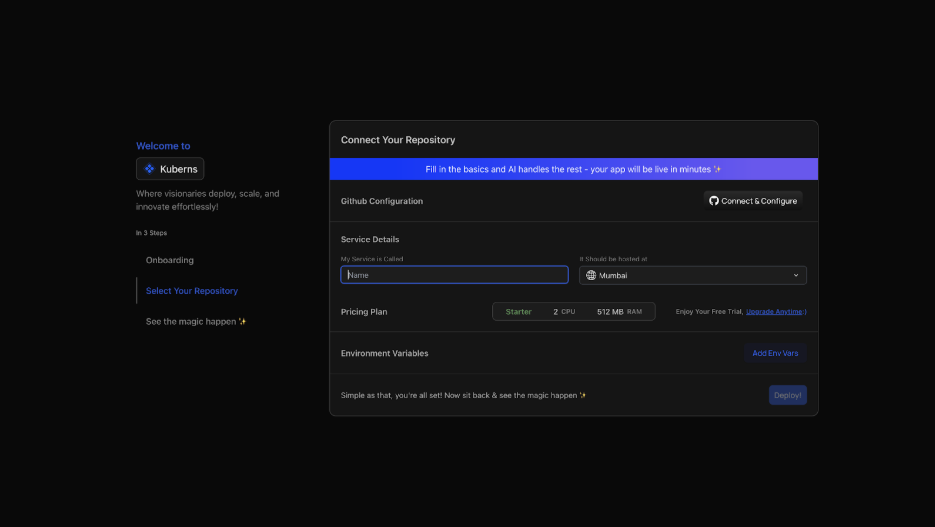
- Click “Connect & Configure” and authorise Kuberns access to your repositories
- Select your React repository and the branch you’re deploying from (main)
- The AI scans your project, identifies Vite or Create React App, and configures the build command and output directory, you confirm, not configure
Step 3: Set Environment Variables
Navigate to the Environment section before deploying:
- Click “Add Env Vars” and input key-value pairs manually, or
- Click “Upload .env file” to import all variables at once
 Upload your .env file directly or add key-value pairs manually. Kuberns encrypts all values at rest, they never appear in build logs.
Step 4: Deploy and The AI Takes Over
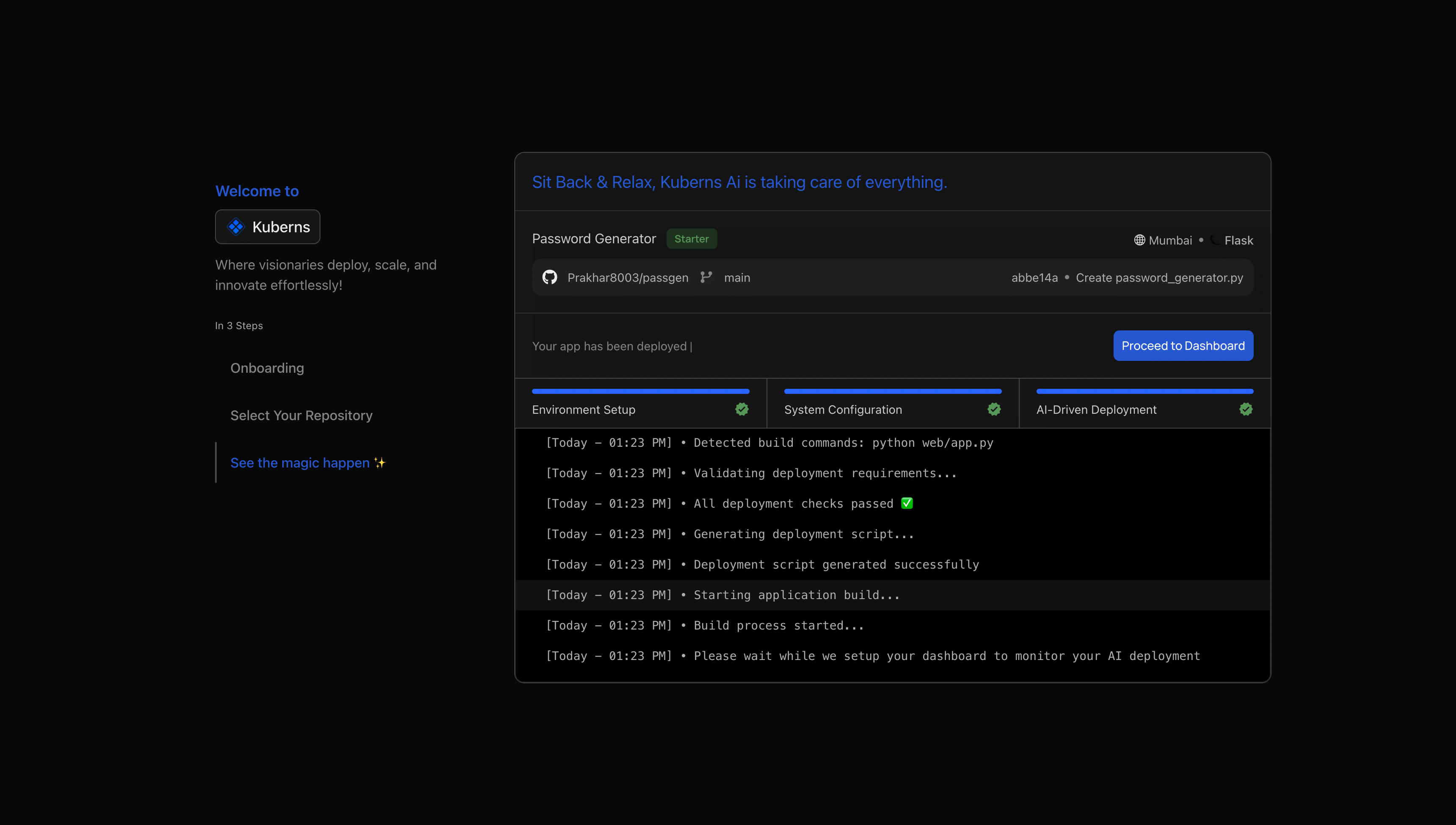 Click Deploy. From here, you watch rather than configure. The agentic AI:
- Installs all packages from requirements.txt
- Detects Django and starts the app with Gunicorn (gunicorn myproject.wsgi:application)
- Runs python manage.py migrate automatically: Your database tables are created
- Runs python manage.py collectstatic automatically: Static files are ready
- Provisions AWS compute in your chosen region
- Issues an SSL certificate: Your URL is HTTPS from the first request
- Enables CI/CD: Every GitHub push triggers an automatic redeploy
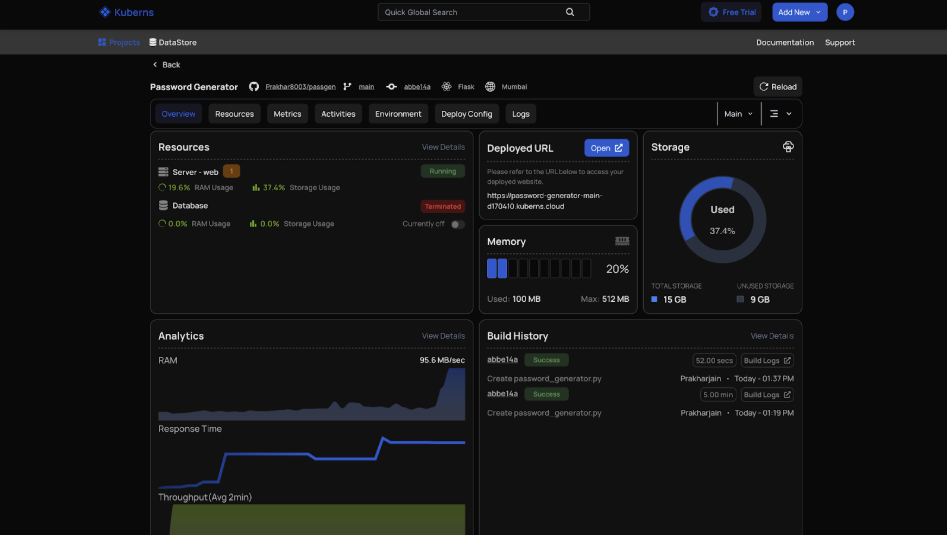 Your Django app is live within minutes. Try the Agentic AI-powered deployment now.
What Kuberns Handles That You’d Otherwise Do Manually
| Django production requirement | Manual VPS | Render / Railway | Kuberns |
|---|---|---|---|
| Gunicorn WSGI server config | Write config file | Procfile required | AI automatic |
| manage.py migrate | Run manually after each deploy | Manual or pre-deploy script | AI automatic |
| manage.py collectstatic | Run manually | Manual or pre-deploy script | AI automatic |
| WhiteNoise / static file serving | Configure Nginx | Manual config | AI automatic |
| PostgreSQL connection | Manual DB setup | Separate service | Environment variable |
| SSL certificate | Certbot + cron | Automatic | Automatic |
| Autoscaling | Manual rules + load balancer | Rules-based | AI-driven, traffic-based |
| Monitoring + logs | Prometheus / Datadog | Basic | Built-in, zero setup |
| Zero-downtime deploys | Manual blue/green setup | Varies | Automatic |
💡 Running a Django backend with a React or Next.js frontend? See our React deployment guide and Next.js deployment guide. Kuberns handles both as separate services from the same project with unified CI/CD.
Django Deployment Platform Comparison (2026)
| Platform | Auto Setup (Build + Run) | Static Files Handling | Server Setup (Gunicorn) | Database (PostgreSQL) | Auto Scaling | Free Tier | Best For |
|---|---|---|---|---|---|---|---|
| Kuberns | Yes, AI handles everything (one-click deploy) | Automatic (collectstatic handled) | Automatic (no config needed) | External via env vars (flexible) | Yes, AI-driven | Yes, includes credits | Full-stack Django apps, zero-ops teams |
| Render | Partial, requires manual commands | Manual build configuration | Requires Procfile | Managed Postgres (paid) | Rules-based | Free tier with limitations | Django apps migrating from Heroku |
| Railway | Partial, requires start/build commands | Manual setup | Manual start command | Plugin-based | Limited | $5 trial credit | Prototypes and early-stage projects |
| Heroku | Partial, requires Procfile + build setup | Buildpack-based | Procfile required | Add-on (paid) | Dyno-based | No free tier | Legacy apps and simple deployments |
| AWS Elastic Beanstalk | Partial, config-heavy setup | Requires EB configuration | Managed via EB | RDS integration | Yes | Limited free tier | AWS-native enterprise deployments |
| VPS (Manual) | No, fully manual setup | Manual configuration | Manual setup | Manual setup | Manual | No | Full control, DevOps-heavy teams |
Kuberns is the only platform in this table where migrate, collectstatic, and Gunicorn configuration happen automatically without writing a Procfile, render.yaml, start command, or .ebextensions/ config. For every other managed platform, you write at least one configuration layer. For VPS, you write everything.
Compare Kuberns plans and pricing
Conclusion
Django is a production-grade framework. Your deployment platform should match. Manual VPS deployments give you control but demand full responsibility; every migration, every collectstatic, every Gunicorn config, every SSL renewal is yours to manage.
Heroku simplified this, but the pricing has made it less competitive for production apps. Render and Railway are solid choices with trade-offs in manual configuration steps and billing predictability.
Kuberns removes the entire configuration layer. The agentic AI handles Gunicorn, migrations, static files, PostgreSQL connections, SSL, CI/CD, and autoscaling, automatically, on AWS infrastructure, every time you deploy. You write Django. The platform handles everything between your code and your users.
If your Django app is on GitHub and you have a PostgreSQL connection string ready, you can be live with autoscaling in under ten minutes.
Deploy your Django app on Kuberns

Frequently Asked Questions
What’s the easiest way to deploy a Django app with an included database and autoscaling?
Kuberns is the easiest option. Connect your GitHub repository, and click Deploy. The agentic AI runs manage.py migrate, runs manage.py collectstatic, starts the app with Gunicorn, issues HTTPS, and enables AI-driven autoscaling, automatically, without any configuration files. From signup to a live, autoscaling Django app with a connected database takes under 10 minutes. Deploy on Kuberns
How do I deploy a Django application with automatic scaling?
On Kuberns, autoscaling is enabled by default on every deployment. The AI observes real request volume and response times and scales the number of running instances up and down accordingly. On AWS Elastic Beanstalk, you configure Auto Scaling Groups with Target Tracking policies. On Render, you set autoscaling thresholds manually on paid plans. On Railway, scaling is limited. On VPS, you build your own scaling infrastructure.
How do I deploy a Django app to the cloud?
Three steps on Kuberns: (1) push your Django project to GitHub, (2) connect your GitHub repo to Kuberns, (3) click Deploy. The platform handles migrations, static files, WSGI server configuration, SSL, and CI/CD automatically. Your Django app is live in the cloud in under five minutes.
How do I deploy a Django app on a VPS?
Deploying Django on a VPS requires installing Nginx, PostgreSQL, Python, and Gunicorn; configuring Nginx as a reverse proxy; writing a Gunicorn systemd service file; setting up Certbot for SSL and a cron for renewal; creating a PostgreSQL database and user; and running collectstatic and migrate after every deploy. For teams without dedicated DevOps resources, this path creates significant ongoing maintenance overhead. Kuberns provides the same reliability on AWS infrastructure without manual configuration.
What is the best way to host a Django app in 2026?
For full-stack Django apps with PostgreSQL and real production traffic, Kuberns is the best option in 2026, with AI-driven autoscaling, automatic migrations, automatic static file handling, no per-seat pricing, and up to 40% lower cost than standard AWS. For teams migrating from Heroku, Render’s managed PostgreSQL and Heroku-compatible workflow is a clean transition. See Kuberns Django hosting in one click
How do I deploy a Django project on AWS Elastic Beanstalk?
AWS Elastic Beanstalk requires the EB CLI, an .ebextensions/ configuration directory, a requirements.txt, and a Procfile or Corefile. This path adds configuration complexity that most product teams find disproportionate to the benefit. Kuberns provides the same AWS infrastructure reliability with zero configuration overhead.
How do I deploy a Django app on a VPS with automatic scaling and zero downtime?
On a raw VPS, zero-downtime deploys require a blue/green deployment strategy or a rolling update mechanism, typically via a load balancer, multiple VPS instances, and a CI/CD pipeline that routes traffic between versions. Autoscaling requires a separate Auto Scaling Group above the VPS layer. This is a valid architecture for large teams with DevOps resources, but adds significant infrastructure complexity. Kuberns provides both zero-downtime deploys and AI-driven autoscaling out of the box on AWS infrastructure, without any of the underlying configuration.
Can I deploy a Django app without using Docker?
Yes. With Kuberns, you don’t need Docker or YAML configurations. The platform automatically detects your project’s structure, packages it into containers, and deploys it securely to production. This makes the process faster and beginner-friendly.
Can I connect my custom domain when deploying with Kuberns?
Yes. Kuberns allows you to connect a custom domain directly through the dashboard. It automatically provisions an SSL certificate and keeps it renewed, ensuring your Django app runs securely with HTTPS enabled by default.
What makes Kuberns different from Render or Railway?
Render and Railway make deployment easier, but still require configuration files and manual scaling adjustments. Kuberns uses AI to handle configuration, environment detection, scaling, and optimisation automatically, offering one-click deployment with AWS-backed reliability and lower running costs.
How do I migrate my existing Django app to Kuberns?
You can migrate your Django project by connecting your existing GitHub repository to Kuberns. The platform automatically detects your app, provisions resources, and sets up your environment. Most apps can be deployed in minutes with zero manual setup.